
What is Meta AI Muse Spark? A complete 2026 guide to Meta’s flagship AI model — features, pricing, glasses integration, and how it compares.
If you’ve noticed Meta AI suddenly feeling faster, more conversational, and oddly good at understanding what your camera is pointed at, there’s a specific reason: Meta AI Muse Spark. It’s the model quietly running behind the scenes of the Meta AI app, and increasingly, behind WhatsApp, Instagram, Facebook, Messenger, Threads, and even Meta’s smart glasses.
Muse Spark isn’t just an incremental update it’s Meta’s first model built by its newly formed Superintelligence Labs, and it represents the company’s most direct attempt yet to compete with the likes of ChatGPT, Claude, and Gemini. If you’ve been hearing the name without quite understanding what it actually does, this guide covers everything: what Muse Spark is, how it differs from its predecessor Muse Spark 1.1, where you can actually use it, what it costs developers, and how it stacks up against the competition.
What Is Meta AI Muse Spark?
Featured snippet answer: Meta AI Muse Spark is Meta’s flagship multimodal AI model, built by Meta Superintelligence Labs, that powers the Meta AI app, website, and — increasingly WhatsApp, Instagram, Facebook, Messenger, Threads, and Meta’s AI glasses, with capabilities spanning conversation, image generation, live camera understanding, and agentic task completion.
In plainer terms, Muse Spark is the “brain” behind Meta AI. When you chat with the Meta AI assistant, ask it a question through your Ray-Ban Meta glasses, or use the shopping features inside the Meta AI app, Muse Spark is the model doing the actual thinking. It was introduced in April 2026 as Meta’s most powerful model at the time, and it was quickly followed by a more advanced version, Muse Spark 1.1, in July 2026.
The Story Behind Muse Spark: Meta Superintelligence Labs
To understand why Muse Spark exists, it helps to know where it came from.
Meta spent 2025 undergoing a significant internal reorganization of its AI efforts, built around a costly, high-profile hiring push. The company brought in Alexandr Wang, previously CEO of Scale AI, as its first-ever Chief AI Officer, following a roughly $14.3 billion investment for a large stake in Scale AI. Wang was tasked with building a new division Meta Superintelligence Labs — specifically to close the gap between Meta and rivals like OpenAI, Anthropic, and Google in frontier AI development.
Muse Spark, unveiled in April 2026, was the first model to come out of that new team. It marked a notable shift for Meta, whose AI strategy had previously centered heavily on open-weight models in the Llama family. Muse Spark, by contrast, is closed-weight and proprietary you can use it, but you can’t download it or fine-tune it locally the way you could with Llama.
Muse Spark vs. Muse Spark 1.1: What Changed
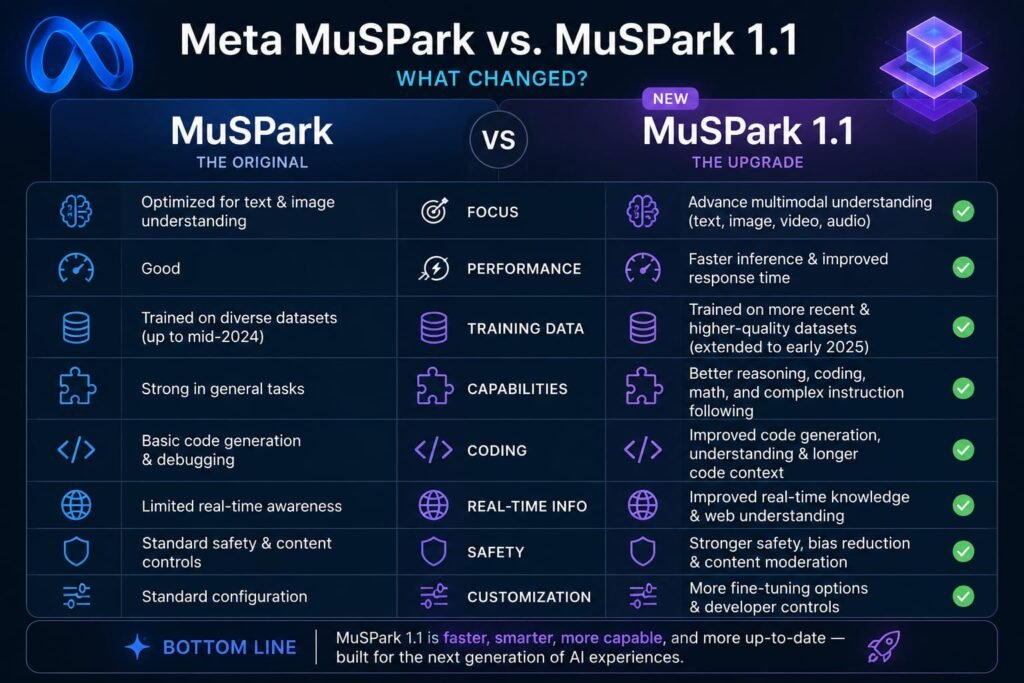
Just three months after the original release, Meta shipped Muse Spark 1.1 in July 2026, and the upgrade was substantial enough that it’s worth understanding the difference between the two versions.
The Original Muse Spark
The first version of Muse Spark was designed primarily to make Meta AI itself smarter and faster better conversational responses, quicker voice replies, and stronger multimodal perception for tasks like recognizing what’s in front of a camera. It rolled out first to the Meta AI app and website before expanding to Meta’s other platforms.
Muse Spark 1.1: The Agentic Leap
Muse Spark 1.1 shifted the model’s focus toward agentic capability meaning it doesn’t just answer questions, it plans, uses external tools, and follows through on multi-step tasks with less hand-holding. According to Meta’s own description, the update was trained to orchestrate multi-agent systems, where a main agent gathers context, builds a plan, and delegates parts of the task to parallel subagents that report back.
Alexandr Wang described Muse Spark 1.1 as the company’s strongest model yet for agentic and coding work. It also introduced a notably large context window — around 1 million tokens letting it hold far more information in a single conversation or task than the original version could.
Key Features and Capabilities of Muse Spark
Whether you’re a casual user or a developer evaluating the model, these are the standout capabilities worth knowing.
Agentic Task Completion
Muse Spark 1.1 can move beyond simple Q&A into actual task execution connecting to your email and calendar, creating slide decks, running research across multiple sources, and following a task through from start to finish rather than just describing how you’d do it yourself.
Multi-Agent Orchestration
One of the more technically interesting features is what Meta calls a “Contemplating Mode,” which allows the model to reason across multiple parallel subagent processes at once. In practice, this means a complex task like researching several competitors and summarizing the differences gets broken into pieces the model can work through simultaneously rather than one step at a time.
Multimodal and Visual Understanding
Muse Spark shows particular strength in visual perception recognizing objects, reading text in images, and answering visual STEM-style questions. This is the capability underpinning its integration into Meta’s smart glasses, where the model needs to understand what a camera is actually looking at in real time.
Voice Conversations
Meta AI’s voice mode, powered by Muse Spark, supports natural back-and-forth conversation you can interrupt, switch topics mid-sentence, or change languages without restarting the conversation. It can also generate images on the fly during a spoken exchange and surface relevant content, like Reels or map results, as the conversation continues.
Tool and MCP Compatibility
Muse Spark 1.1 is built to generalize to new tools without needing task-specific retraining, including compatibility with MCP (Model Context Protocol) servers and custom skills a feature aimed squarely at developers building more complex, tool-using applications on top of the model.
Where You Can Actually Use Muse Spark
Muse Spark isn’t confined to one app it’s being rolled out fairly aggressively across Meta’s entire product lineup.
Meta AI App and Website
The most direct way to use Muse Spark is through the Meta AI app or meta.ai website, where it’s available in a “Thinking” mode for more complex reasoning tasks.
WhatsApp, Instagram, Facebook, Messenger, and Threads
Muse Spark-powered Meta AI is expanding into search bars, group chats, and posts across Meta’s core apps. A notable feature here is the ability to tap the Meta AI icon inside a group chat to get a quick, private answer grounded in what that specific conversation is discussing without leaving the chat or exposing your question to the group.
Threads Mentions
Meta AI is also being integrated directly into Threads through @meta.ai mentions in posts and replies, letting the assistant participate contextually within public conversations.
Ray-Ban Meta and Oakley Meta Glasses
This is arguably the most distinctive use case. Muse Spark powers the AI running on Meta’s smart glasses, giving the assistant the ability to “see” through the wearer’s camera and respond to what’s in front of them identifying landmarks, translating text, answering questions about an object, or pulling up relevant shopping results based on what you’re looking at. The rollout started in the US and Canada, with Ray-Ban Meta Display glasses following later.
Shopping Mode
A dedicated shopping experience lets you search Facebook Marketplace listings alongside results from across the web in a single place, complete with map-based browsing and filters for price, style, and distance. You can also tag a specific brand or creator to browse their public content directly in a scrollable grid.
Muse Spark for Developers: The Meta Model API and Pricing
For most of Meta’s AI history, access to its models has been free through the open-weight Llama releases. Muse Spark changed that.
Featured snippet answer: Meta charges for Muse Spark 1.1 API access through the Meta Model API, with new developer accounts receiving $20 in free credits, followed by usage-based pricing of $1.25 per million input tokens and $4.25 per million output tokens.
This marked the first time Meta has charged businesses for access to one of its AI models a significant shift for a company that built much of its AI reputation on open-source releases. Alexandr Wang has publicly framed the pricing as deliberately aggressive, positioning it as one of the more affordable options among frontier-model providers, with the stated goal of scaling well for high-volume usage rather than optimizing for casual, low-volume developers.
At launch, full API access was offered as a private preview to select partners, with a broader public rollout following the announcement. If you’re a developer wanting to build with Muse Spark, the Meta Model API is the entry point, separate from the free consumer access available through the Meta AI app.
How Muse Spark Compares to GPT, Claude, and Gemini
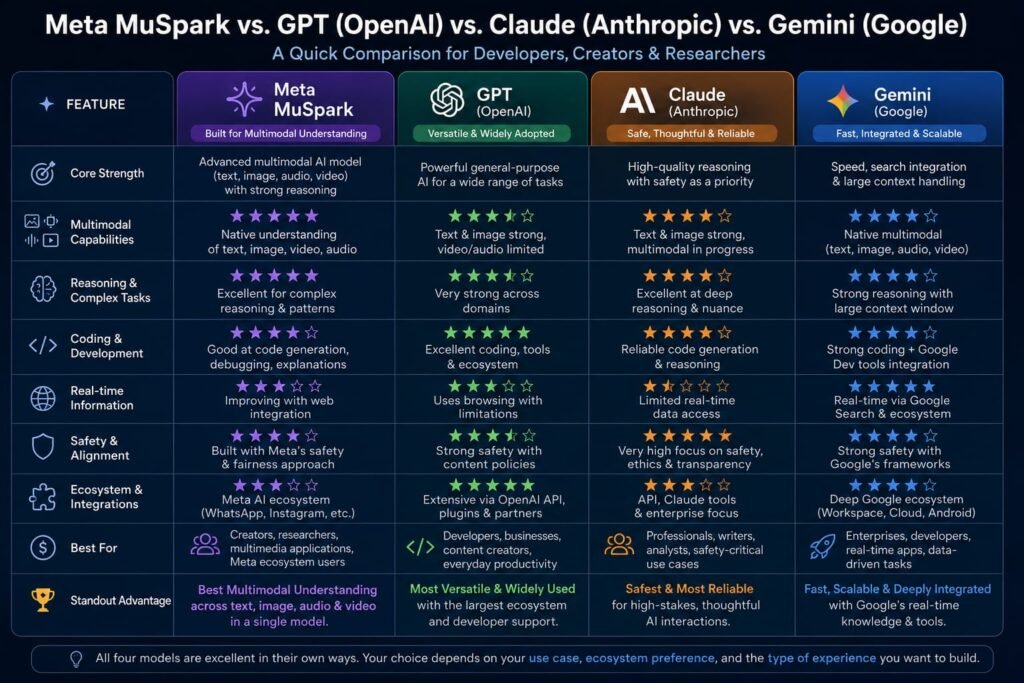
Meta has positioned Muse Spark 1.1 as a direct competitor to the top tier of models from OpenAI, Anthropic, and Google specifically citing comparisons to models like GPT-5.5, Claude Opus 4.8, and Gemini 3.1 Pro in its own framing of the release.
According to Meta’s own benchmark claims, Muse Spark 1.1 outperforms Google’s most recent Gemini release on certain coding and reasoning benchmarks, and beats older versions of OpenAI’s and Anthropic’s models on select tasks. It’s worth noting, though, that Meta’s comparisons notably didn’t include benchmarks against the very latest releases from those competitors at the time — a detail worth keeping in mind when weighing the claims.
Independent analysis has also pointed out that while Muse Spark performs strongly on multimodal and visual reasoning tasks, its results on certain agentic benchmarks — such as GDPval-AA and TerminalBench Hard suggest there’s still room to close the gap with some competing models on pure agentic task performance.
The realistic takeaway: Muse Spark is a genuinely capable, fast-moving addition to the frontier model landscape, but it’s still earlier in its development trajectory than the more established flagship models from Meta’s biggest rivals.
Real-World Use Cases for Muse Spark
Beyond the feature list, here’s what Muse Spark actually looks like in day-to-day use:
Daily briefings — Meta AI can pull together a morning summary of what matters to you, drawing on connected calendar and email context rather than requiring you to ask for each piece separately.
Research deep dives — instead of a single search-style answer, Muse Spark 1.1 can research a topic across multiple sources and compile the findings into a structured summary.
Visual shopping and inspiration — pointing your glasses’ camera at a room or an outfit and asking Meta AI for style or decor suggestions, powered by the same visual understanding used in Shopping Mode.
Group chat assistance — settling a factual debate in a WhatsApp group chat without leaving the conversation, using the private side-chat feature.
Developer-built agentic tools — companies building customer-facing assistants or internal automation tools on top of the Meta Model API, taking advantage of Muse Spark 1.1’s subagent orchestration for more complex, multi-step workflows.
Limitations and What to Watch For
No model launch is without caveats, and Muse Spark has a few worth flagging before you build your expectations too high.
It’s a closed model, which means you don’t get the flexibility of self-hosting or fine-tuning that Meta’s open-weight Llama models offer a real shift for a company that built its AI reputation on openness. Its agentic benchmark performance, while improving quickly, still trails some competitors on certain specialized tests. And because Meta’s own comparisons to rival models skipped the most recent competing releases, it’s worth treating any “beats the competition” claims with a healthy amount of independent verification before relying on them for a serious technical decision.
Rollout has also been gradual and staggered — availability on specific glasses hardware, in specific countries, and inside specific apps has expanded in phases rather than all at once, so what’s available to you may depend on your device, region, and which Meta app you’re using.
Getting Started With Muse Spark
If you want to try Muse Spark yourself, here’s the fastest path depending on what you’re after:
- Casual users: Open the Meta AI app or visit meta.ai and start a conversation select Thinking mode for more complex requests that benefit from deeper reasoning.
- Smart glasses owners: Check whether Muse Spark has rolled out to your specific Ray-Ban Meta or Oakley Meta model and region, since availability has expanded gradually rather than launching everywhere simultaneously.
- Developers: Sign up for Meta Model API access to receive your starting free credits, then review the token-based pricing before scaling up any production usage.
Frequently Asked Questions
What is Meta AI Muse Spark used for?
Muse Spark powers Meta AI’s core functions conversation, voice interaction, image generation, visual recognition through smart glasses, shopping assistance, and increasingly, autonomous multi-step task completion like research and planning.
Is Muse Spark free to use?
Yes, for consumers. Muse Spark powers the free Meta AI app, website, and integrations across WhatsApp, Instagram, Facebook, and Messenger. Developers accessing it through the Meta Model API, however, pay for usage beyond an initial free credit allowance.
What’s the difference between Muse Spark and Muse Spark 1.1?
The original Muse Spark focused on making Meta AI faster and smarter for everyday conversation and visual tasks. Muse Spark 1.1, released three months later, added strong agentic capabilities planning, tool use, and multi-agent orchestration along with a much larger context window.
Can I download or fine-tune Muse Spark like Meta’s Llama models?
No. Unlike Meta’s open-weight Llama family, Muse Spark is a closed, proprietary model. It’s accessible through Meta’s apps and API, but you can’t download or self-host it.
How much does the Muse Spark API cost developers?
New developer accounts start with $20 in free credits. After that, Meta charges $1.25 per million input tokens and $4.25 per million output tokens for Muse Spark 1.1 access.
Does Muse Spark work with Meta’s smart glasses?
Yes. Muse Spark powers the AI assistant on Ray-Ban Meta and Oakley Meta glasses, enabling real-time camera-based understanding, translation, and contextual assistance, with a staggered rollout across the US, Canada, and additional markets over time.
Is Muse Spark better than GPT, Claude, or Gemini?
Meta claims Muse Spark 1.1 outperforms some prior versions of competing models on select benchmarks, though its comparisons notably excluded the most recent releases from rivals, and independent evaluations suggest it still trails on certain agentic-specific benchmarks.
Can Muse Spark actually complete tasks on its own, or does it just answer questions?
With Muse Spark 1.1, Meta AI can go beyond answering questions — it can plan, connect to apps like email and calendar, and follow a task through to completion, functioning more like an agent than a simple chatbot.
Where is Muse Spark available right now?
It’s live in the Meta AI app and meta.ai, and has expanded to WhatsApp, Instagram, Facebook, Messenger, and Threads, along with a phased rollout to Ray-Ban Meta and Oakley Meta glasses in select regions.
My Final Thoughts For Meta Spark Muse Ai
Meta AI Muse Spark represents one of the clearest signals yet that Meta is serious about competing at the frontier of AI, not just as a feature bolted onto its social apps, but as a genuine platform play spanning chat, voice, smart glasses, and a paid developer API. Whether it fully closes the gap with OpenAI, Anthropic, and Google remains an open question — but the pace of change between the original Muse Spark and Muse Spark 1.1 in just three months suggests Meta isn’t planning to slow down.
If you want to see what all this looks like in practice, the easiest way in is simply opening the Meta AI app and trying a real task — ask it to research something, plan out a project, or just have a voice conversation and see how it handles a topic switch mid-sentence. That hands-on test will tell you more about where Muse Spark actually stands than any benchmark chart.
Related Reads:
What Is Lovable AI? The Complete Guide to the AI App Builder Everyone’s Talking About
Is Lovable AI Free? Here’s What You Actually Get
Claude Pro vs ChatGPT Plus: The Real Difference Between These $20 AI Plans
How to Fix AI Image Generator Deformities in Fingers, Toes, and Other Anomalies