
Bolt AI app builder explained: how it works, pricing, key features, and honest limitations. Everything you need before building your first app.
Most app builders make you wait for a server to spin up, a preview to load, a deployment to finish. The Bolt AI app builder was built to remove that wait almost entirely, running your entire development environment directly inside your browser tab. Describe an app, and you’ll watch it get built in real time, with no local setup and nothing to install.
That speed has made Bolt one of the most talked-about names in AI-powered app creation, but speed alone doesn’t tell you whether it’s the right tool for your project. This guide covers exactly what the Bolt AI app builder is, how its browser-based technology actually works, what it costs at every tier, what it’s genuinely good at, where it falls short, and how it stacks up against competitors like Lovable and v0 — so you can decide whether it belongs in your toolkit.
What Is the Bolt AI App Builder?
Featured snippet answer: Bolt (Bolt.new) is an AI-powered app builder from StackBlitz that generates full-stack web applications directly in your browser from a text prompt, using WebContainers technology to run a complete Node.js development environment client-side, without any local installation or backend server.
In plainer terms: you type a description of the app you want, and Bolt writes real React and Node.js code, shows you a live preview as it builds, and lets you keep refining the app through further prompts — all inside a single browser tab. It was created by StackBlitz, the company behind a well-established browser-based code editor, which gave Bolt a head start on the underlying technology most competitors had to build from scratch.
How the Bolt AI App Builder Actually Works
Understanding what sets Bolt apart starts with the technology running underneath it.
WebContainers: A Full Dev Environment in Your Tab
Bolt’s core innovation is WebContainers a technology that runs an entire Node.js environment inside your browser, rather than sending your code off to a remote server to execute. That’s a meaningfully different approach from most competing app builders, which typically run your generated app in the cloud and stream a preview back to you. Because everything happens client-side, Bolt can generate code and update your live preview essentially instantly, without the round-trip delay of a cloud server.
The Token-Based System
Rather than charging per message or per project, Bolt uses a token-based consumption model. Every prompt you send, every AI response, and every code edit draws from your monthly token allowance, and the amount consumed scales with the complexity of your request — a small styling tweak uses relatively few tokens, while a complex new feature can use significantly more. This is a different model from tools that charge per interaction regardless of size, and it means your actual monthly cost depends heavily on how you use the tool, not just which plan you’re on.
Bolt Cloud: Closing the Backend Gap
Earlier versions of Bolt left a noticeable “deployment gap” the app it generated still needed you to wire up hosting, a database, and authentication separately. Bolt’s more recent version addressed this directly with Bolt Cloud, adding built-in databases, authentication, file storage, edge functions, analytics, and hosting, so a generated app can go from prompt to genuinely deployed product without leaving the platform.
Key Features of the Bolt AI App Builder
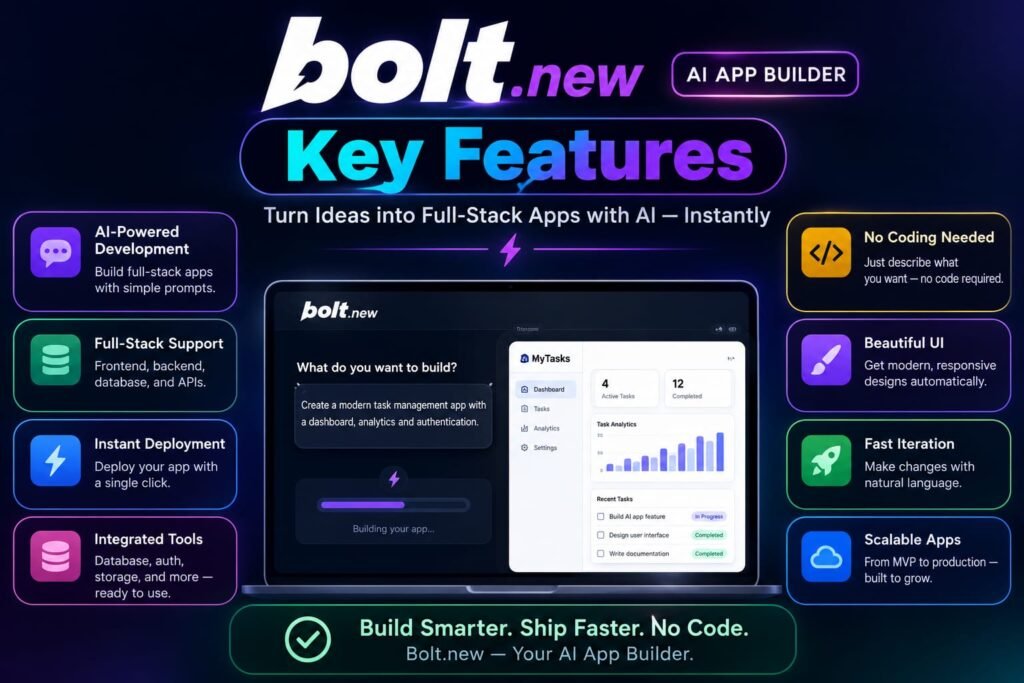
Beyond its core architecture, a handful of specific features are worth knowing about if you’re evaluating Bolt for a real project.
Figma Import
Bolt supports dropping Figma designs directly into the chat interface, letting the AI build against a real visual reference rather than working purely from a text description useful if you or a designer already have a polished mockup you want translated into working code.
AI Image Editing
Bolt includes built-in AI image editing inside the chat interface, letting you edit specific parts of an image directly as part of your building workflow, rather than switching to a separate design tool.
Model Flexibility
Bolt lets you choose between lighter or deeper AI reasoning depending on your task, balancing speed, cost, and output quality useful for keeping token usage down on simple requests while reserving deeper reasoning for genuinely complex features. Claude models power code generation by default.
Team Templates
For teams building multiple similar projects, Bolt lets you turn an existing project into a reusable starter template, which helps standardize structure and speeds up future builds rather than starting from a blank prompt every time.
Editable Netlify URLs
Once deployed, you can change your published site’s URL without needing to redeploy or rebuild the entire app a small but genuinely convenient feature for anyone iterating on a live project.
Bolt AI App Builder Pricing: What It Actually Costs
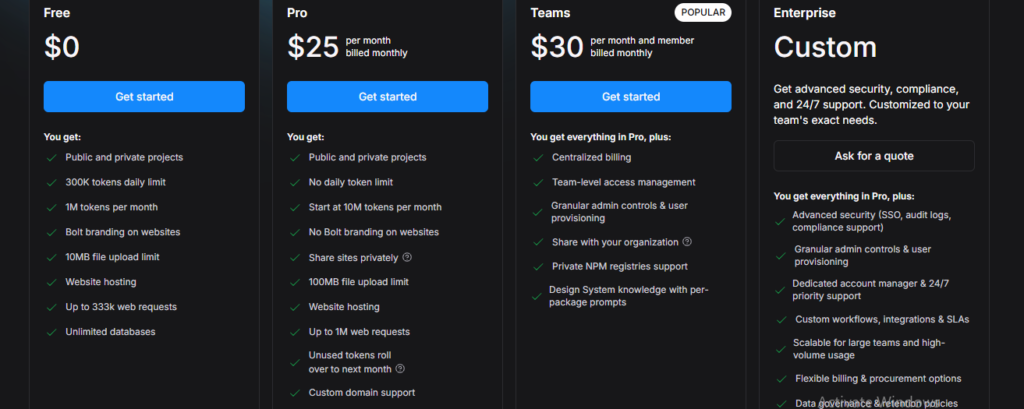
Featured snippet answer: Bolt’s free plan includes 1 million tokens per month with a 300,000 daily cap. The Pro plan costs $25/month for 10 million tokens, the Teams plan costs $30 per member per month, and Enterprise pricing is available on request with a 10% discount for annual billing on any paid tier.
Free Plan
Bolt’s free tier is genuinely usable, not just a limited demo — you get access to the core AI builder, hosting, and databases, along with private projects, at zero cost and no credit card required. The catch is a 300,000-token daily cap layered on top of the 1-million monthly allowance, which means even though your monthly total sounds generous, you can hit a wall mid-session on anything beyond a simple page.
Pro Plan ($25/month)
Moving to Pro removes the daily token cap entirely and bumps your monthly allowance up to 10 million tokens. It also adds custom domains and removes Bolt’s branding from your published app both meaningful upgrades if you’re building something you intend to actually launch rather than just prototype.
Teams Plan ($30/member/month)
The Teams tier is built for small groups collaborating on the same builds, adding shared workspace features on top of the same token-based foundation as Pro.
Enterprise
For larger organizations with specific security or compliance requirements, Bolt offers custom Enterprise pricing through direct sales contact.
Token Rollover
Unused tokens on paid plans roll over for up to two months, as long as your subscription stays active a helpful cushion for months where your usage is lighter than usual.
What Can You Actually Build With the Bolt AI App Builder?
Bolt is squarely a web application builder, and it’s particularly strong in a few specific scenarios:
- Rapid prototypes — going from an idea to a clickable, working demo in minutes, ideal for testing concepts before committing to a full build
- Landing pages and marketing sites — simple, fast builds where speed matters more than deep backend complexity
- Full-stack web apps — with Bolt Cloud handling the database, authentication, and hosting layer, genuinely complete SaaS-style applications are achievable
- Design-to-code builds — using the Figma import feature to turn an existing design into working code quickly
Example: A freelance designer with a client’s Figma mockup could import it directly into Bolt, prompt the AI to wire up the corresponding pages and navigation, and have a clickable, deployable version of the design live within a single afternoon without writing the underlying code by hand.
Bolt AI App Builder Limitations to Know Before You Start
No tool is perfect, and being upfront about where Bolt struggles will save you real frustration.
Context loss in long conversations. As your chat history grows within a single project, the AI can lose track of earlier decisions and occasionally reintroduce bugs you’d already fixed. Starting a fresh conversation periodically helps, though you’ll lose some accumulated project context in the process.
No native mobile output. Bolt builds responsive web apps and progressive web apps, but not native iOS or Android apps. If an actual App Store or Google Play listing is your goal, you’ll need a mobile-specific tool instead.
Token consumption can feel unpredictable. Because token usage scales with project complexity rather than a flat per-message cost, some users have reported feeling surprised by how quickly tokens disappear on larger, more iterative projects. Keeping an eye on the in-dashboard token meter is worth the habit.
Best for early-stage building, not final polish. Bolt is at its strongest when speed matters more than precision for genuinely production-grade refinement, many builders treat Bolt as the fast first draft and move the resulting code into a more traditional development environment for the final pass.
Bolt vs. Lovable vs. v0: How Does Bolt Compare?
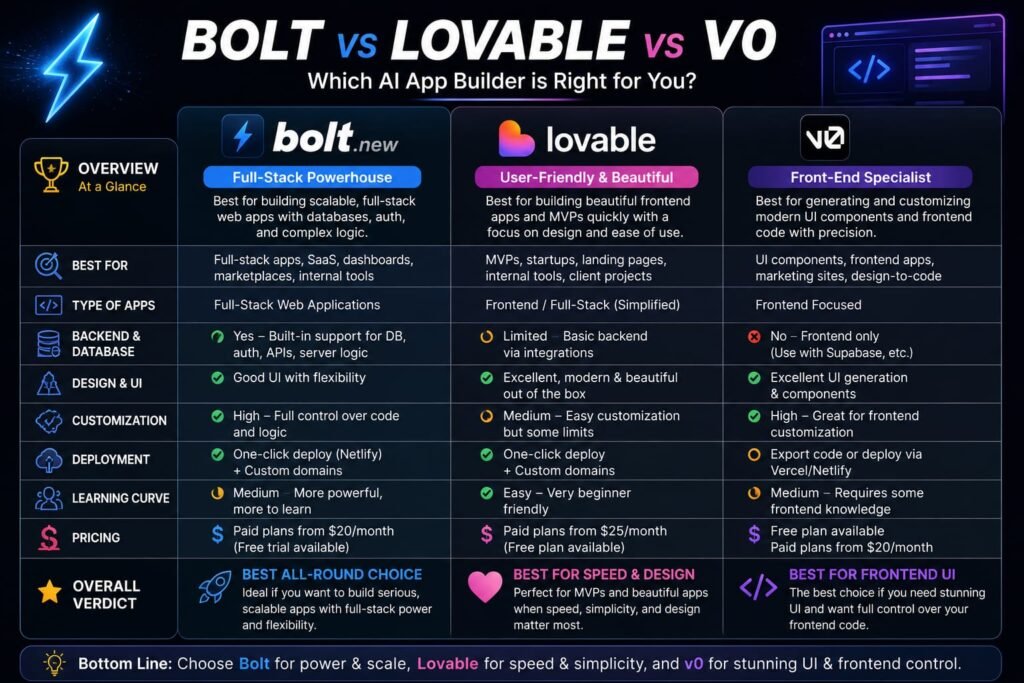
Bolt sits in a crowded field, and knowing where it stands next to its closest competitors clarifies what it’s genuinely best at.
Bolt vs. Lovable: Both generate full-stack web apps with a real backend, but they take different technical approaches Bolt runs client-side through WebContainers for speed, while Lovable leans on a two-stage plan-then-build workflow aimed at catching misunderstandings before code gets written. Free-tier value tends to favor Bolt, while Lovable’s team pricing is often more cost-effective for shared projects than Bolt’s per-member Teams plan.
Bolt vs. v0: v0 is component-first, focused specifically on generating polished, well-designed UI pieces rather than complete application logic. Bolt, by contrast, aims to generate and deploy a full working application. If design quality of individual components is your top priority, v0 often produces cleaner output; if you need the whole app — backend included Bolt covers more ground on its own.
Bolt vs. Base44: Base44 automates even more of the setup decisions than Bolt, aiming squarely at absolute beginners, and is slightly cheaper at the entry level. Bolt offers a larger token allowance for the same price tier, making it a better fit once you’re doing more sustained, iterative building.
Tips to Get the Most Out of the Bolt AI App Builder
A few habits noticeably improve both your results and your token efficiency:
- Plan before you prompt. Write a complete description of your app and break it into three to five major features, then prompt for each feature in a single detailed message rather than sending twenty small, incremental requests.
- Watch the token meter. Keeping an eye on your dashboard’s token usage as you work helps you avoid unpleasant surprises near the end of your billing cycle.
- Restart conversations periodically. If the AI starts making inconsistent decisions or reintroducing old bugs, starting a fresh chat — while briefly re-establishing key context — often resolves it faster than continuing to prompt through the confusion.
- Use Figma import when you already have a design. Building against an actual visual reference produces more consistent results than describing layout purely in text.
- Treat Bolt as your fast first draft. For anything going to production with real users or payments, plan on a review pass — either your own or a developer’s — before you fully rely on the generated code.
Who Should Use the Bolt AI App Builder?
Bolt tends to be the right choice if you:
- Want to see a working prototype appear in real time, with no waiting on cloud build steps
- Are building a web app, landing page, or SaaS MVP rather than a native mobile app
- Value seeing the actual code alongside the visual output, rather than a fully black-boxed experience
- Are comfortable managing a token-based budget and staying disciplined about how you prompt
It’s a weaker fit if you specifically need native mobile apps, if you’re not willing to review and refine AI-generated code before shipping something significant, or if unpredictable token costs make you uneasy about budgeting.
Frequently Asked Questions
What is the Bolt AI app builder used for?
Bolt is used to generate, preview, and deploy full-stack web applications from a text prompt everything from quick prototypes and landing pages to more complete SaaS-style apps with a working backend.
Is the Bolt AI app builder free to use?
Yes. Bolt offers a genuinely functional free plan with 1 million tokens per month and a 300,000 daily cap, including access to hosting and databases, with no credit card required to start.
How much does Bolt cost after the free plan?
The Pro plan costs $25/month for 10 million tokens, the Teams plan costs $30 per member per month, and Enterprise pricing is available by contacting sales. Annual billing on any paid tier includes a 10% discount.
Can Bolt build native mobile apps?
No. Bolt is a web application builder it produces responsive web apps and progressive web apps, but not native iOS or Android apps for the App Store or Google Play.
What makes Bolt different from other AI app builders?
Bolt’s core differentiator is WebContainers, a technology that runs a full Node.js development environment inside your browser rather than on a remote server, making it one of the fastest AI app builders for real-time generation and preview.
Do I need coding experience to use the Bolt AI app builder?
No, though having some technical comfort helps when you need to review, debug, or extend the generated code for anything beyond a simple prototype.
Does Bolt include a database and authentication?
Yes. Bolt Cloud adds built-in databases, authentication, file storage, edge functions, and hosting, closing the gap that earlier versions left between a generated app and a genuinely deployable one.
The Bottom Line: Is the Bolt AI App Builder Right for You?
The Bolt AI app builder earns its reputation in the first fifteen minutes of use describe an app, and watch it appear in real time, with no setup and no waiting. That speed, combined with Bolt Cloud’s built-in backend and genuinely usable free tier, makes it one of the strongest options available for fast web app prototyping and SaaS MVPs in 2026.
Where it asks more of you is discipline: managing your token budget, planning your prompts, and treating the AI’s output as a strong first draft rather than a finished product. If that tradeoff sounds like a fair one for the speed you’re getting, the best next step is simply to try it Bolt’s free plan requires no credit card, so you can describe your actual app idea and see exactly how it handles your specific project before deciding whether to upgrade.
Related Reads:
What Is Lovable AI? The Complete Guide to the AI App Builder Everyone’s Talking About
Is Lovable AI Free? Here’s What You Actually Get
Claude Pro vs ChatGPT Plus: The Real Difference Between These $20 AI Plans
How to Fix AI Image Generator Deformities in Fingers, Toes, and Other Anomalies
What Is Meta AI Muse Spark? The Complete 2026 Guide to Meta’s Flagship AI Model
Kimi K3 Explained: Inside Moonshot AI’s Record-Breaking Open Mode
Best AI App Builder in 2026: 10 Top Tools to Build an App Without Coding