
Looking for the best AI app builder? Compare 10 top no-code app creation tools by use case, pricing, and features to find your perfect fit.
Not long ago, turning an app idea into something real meant hiring a developer, learning to code yourself, or watching your budget disappear into a six-figure development quote. That’s no longer the only path. Today, the best AI app builder can take a plain-English description and turn it into a working web or mobile app in a matter of hours, not months.
But “best” isn’t a single answer it depends entirely on what you’re building. The best ai app builder for a mobile fitness app looks nothing like the best app creation software for an internal business dashboard. This guide breaks down the top app builders on the market right now, organized by exactly what they’re best at, so you can find the app creator no code tool that actually fits your project instead of picking whichever name has the loudest marketing.
By the end, you’ll know how to build application without coding for your specific use case — whether that’s a startup MVP, a mobile app for the App Store, or a simple internal tool your team actually uses.
What Makes an AI App Builder “Best”? Key Evaluation Criteria
Before comparing specific tools, it helps to know what actually separates a genuinely useful app builder from one that looks impressive in a demo and falls apart the moment you need to make a real change.
Code Ownership and Portability
Some app builders generate real, exportable code you can hand to a developer later. Others lock your app inside their platform permanently. If there’s any chance you’ll want to move off the platform eventually, code ownership matters more than almost anything else on this list.
Backend and Database Support
A genuinely useful app needs somewhere to store data, handle user accounts, and manage logins. The strongest AI app builders come with a real backend built in — not just a pretty front end with nowhere to save information.
Web vs. Native Mobile Output
This is one of the biggest, most overlooked differences between app builders. Many tools that call themselves “app builders” actually produce web apps, not real, installable mobile apps. If your goal is a listing in the App Store or Google Play, you need a tool specifically built for native mobile output.
Ease of Iteration
The real test of any app builder isn’t the first version it generates it’s the tenth. Can you add a new feature, fix a bug, or change your data model in week three without the whole app breaking? This is where a lot of flashy tools quietly fall apart.
Pricing Transparency
Credit-based pricing, where different requests cost different amounts, can make it hard to predict your actual monthly cost. Understanding how a platform bills you before you commit saves a lot of budget surprises later.
Best AI App Builders at a Glance
| Tool | Best For | Output | Starting Price |
|---|---|---|---|
| Lovable | Full-stack web apps and SaaS MVPs | Web (React + Supabase) | Free, Pro ~$25/mo |
| Bolt.new | Fast, browser-based prototypes | Web | Free, paid tiers vary |
| Rork | Native mobile apps (iOS/Android) | React Native + Expo, or Swift | Free, Junior $20-25/mo |
| Base44 | Absolute beginners, fastest setup | Web, fully managed | Free, paid tiers vary |
| v0 | UI components and design-first builds | Web (React/Next.js components) | Free, paid tiers vary |
| Bubble | Complex, database-heavy web apps | Web | Free, paid tiers vary |
| FlutterFlow | Native mobile with visual control | Flutter (iOS/Android) | Free, paid tiers vary |
| Replit | Developers wanting AI-assisted coding | Web/backend, full IDE | Free, paid tiers vary |
| Adalo | Simple mobile MVPs and directories | Native-feeling mobile | Free, paid from $36/mo |
| Jotform AI App Builder | Business apps, forms, approvals | Web | Free, paid tiers vary |
Lovable: Best AI App Builder for Full-Stack Web Apps
Lovable has become one of the most talked-about names in this category, and for good reason it generates a complete web application, front end and back end included, from a written prompt. Behind the scenes, it produces real React and TypeScript code, syncs to GitHub, and connects to Supabase for your database and user authentication.
Best for: Non-technical founders validating a SaaS idea, freelancers building a client’s first working version, and anyone who wants a real, portable codebase rather than a locked-in black box.
Where it falls short: Highly custom business logic — complex permission systems, unusual multi-role workflows often takes several rounds of prompting to get right, and Lovable is web-only, with no native mobile output.
Bolt.new: Best for Fast, Browser-Based Prototypes
Bolt.new runs entirely in the browser and is built around speed you can go from a blank prompt to a clickable prototype in minutes. It supports React, Node.js, and PostgreSQL out of the box, with one-click deployment, and its newer version added chat-based image editing and Figma import for design-to-code workflows.
Best for: Quick, simple prototypes and single-page apps where you want to see an idea come to life immediately, without configuring a heavier backend.
Where it falls short: As projects grow more complex, Bolt tends to handle less depth than Lovable or Bubble, particularly once you need a more sophisticated backend.
Rork: Best for Native Mobile Apps
If your goal is a real app in the App Store or Google Play — not a web app dressed up to look like one Rork is one of the few tools built specifically for that job. You describe your app in plain English, and Rork generates a fully functional cross-platform app using React Native and Expo, the same production framework behind apps like Discord and Coinbase. You can preview it instantly on your own phone and publish directly to the App Store from the dashboard.
Rork also offers a more advanced tier called Rork Max, which builds fully native Swift apps for Apple platforms specifically, unlocking deeper native features like widgets, Live Activities, Apple Watch support, HealthKit, and Vision Pro compatibility capabilities that cross-platform frameworks typically can’t reach.
Best for: Founders and product managers who specifically need a native mobile app rather than a web app, especially anyone planning to publish to app stores without hiring a mobile developer.
Where it falls short: Rork is mobile-specific, so if you also need a web version of your product, you’ll likely need a second tool alongside it. Pricing is credit-based, and more complex apps with AI features, integrations, or Rork Max’s native capabilities can burn through credits faster than expected.
Base44: Best for Absolute Beginners
Base44 takes automation a step further than most competitors by handling database, authentication, and hosting entirely on its own, removing even the configuration decisions that tools like Lovable still leave to you. That makes it one of the most approachable entry points into AI app building if you’ve never touched a no-code tool before.
Best for: First-time builders who want the fastest possible path from idea to working app, with the fewest decisions to make along the way.
Where it falls short: That same simplicity means less granular control once your project’s needs get more specific or technical.
v0: Best for UI Components and Design-First Builds
v0 takes a different approach from full-stack generators it’s component-first, meaning it excels specifically at producing polished, well-designed UI pieces rather than complete application logic. If design quality is your top priority and you’re comfortable wiring up the backend logic separately, v0 produces some of the cleanest front-end output in this category.
Best for: Designers and developers who want beautifully designed React or Next.js components without a full app-generation platform underneath.
Where it falls short: v0 doesn’t natively handle full-stack app logic, so it’s better paired with another tool than used as your only app builder.
Bubble: Best for Complex, Database-Heavy Web Applications
Bubble has been a mainstay in the no-code world for years, and it remains one of the most powerful platforms for genuinely complex web applications — the kind with deep data relationships, custom workflows, and heavy business logic. Its visual, drag-and-drop workflow editor gives you granular control that prompt-based tools often can’t match.
Best for: Startups and businesses building a complex SaaS product, marketplace, or internal system that needs more structural depth than a quick AI-generated app can offer.
Where it falls short: Bubble has a steeper learning curve than most prompt-to-app tools, and very large, high-traffic applications may eventually need more advanced backend infrastructure than the platform natively provides.
FlutterFlow: Best for Native Mobile With Visual Control
FlutterFlow blends AI generation with a visual, drag-and-drop editor built on Google’s Flutter framework. You describe the app or screen you want, and FlutterFlow AI generates screens, widget trees, and database schemas which then become fully editable components in the visual builder rather than a locked black box.
Best for: Teams that want native mobile output but also want to visually fine-tune the result rather than relying purely on prompts.
Where it falls short: The learning curve is higher than pure prompt-to-app tools like Rork or Base44, since you’re working with a genuine visual development environment underneath the AI layer.
Replit: Best for Developers Who Want AI Assistance
Replit sits closer to the “vibe coding” end of the spectrum a full browser-based development environment with AI baked in, rather than a pure no-code tool. It’s particularly strong for people with some technical comfort who want AI to accelerate their workflow without giving up the ability to dig into the actual code.
Best for: Developers, technical founders, and anyone comfortable reading and editing code who wants AI to handle the repetitive parts of building.
Where it falls short: It’s a less approachable entry point for genuinely non-technical users compared to prompt-only tools like Base44 or Lovable.
Adalo, Glide, and Softr: Best for Simple Business Apps and Directories
This trio of tools serves a slightly different need than the AI-first generators above — visual, drag-and-drop app building aimed at simpler use cases. Adalo focuses on mobile directories, booking apps, and community apps with a beginner-friendly canvas. Glide and Softr both specialize in turning existing spreadsheet or database data into usable internal apps quickly, which makes them a strong fit for operations-heavy teams that already have structured data sitting in a spreadsheet.
Best for: Simple, well-defined use cases — an internal directory, a booking system, a spreadsheet-driven employee portal where you don’t need the flexibility of a full custom-generated app.
Where it falls short: None of these are built for complex, highly custom SaaS products; they’re purpose-built for simpler, more templated app patterns.
How to Choose the Best AI App Builder for Your Project
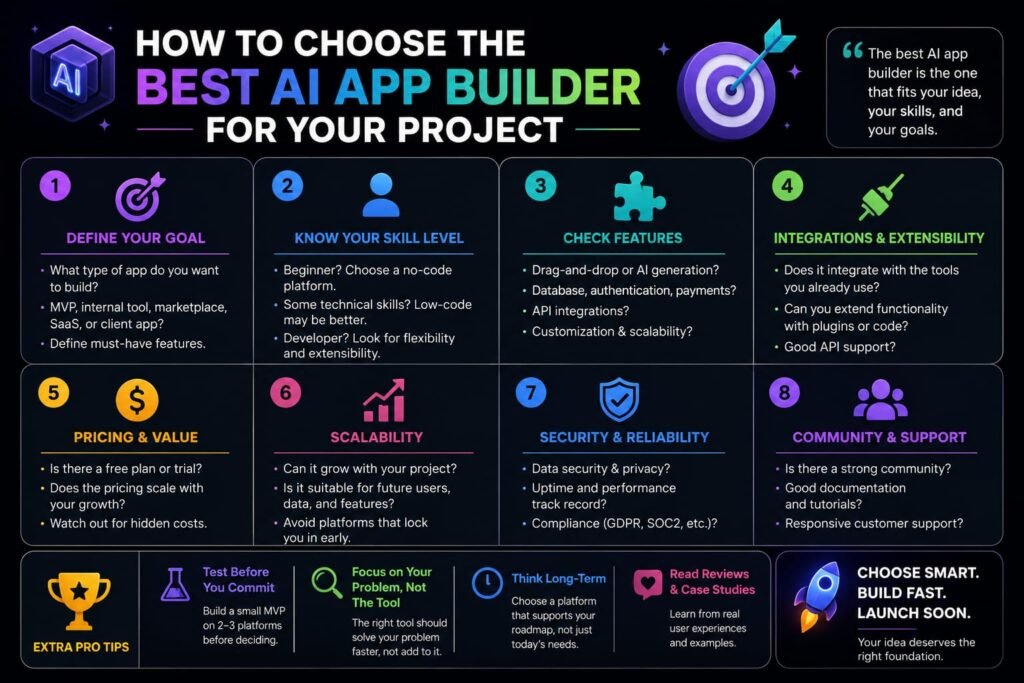
With this many solid options, the decision usually comes down to answering a few honest questions about your project:
Are You Building for Web or Mobile?
This is the single biggest fork in the road. If you need a real app store listing, tools built specifically for native mobile Rork, FlutterFlow, or Adalo — are the right category. If you’re building a web app, dashboard, or SaaS product, Lovable, Bolt, Bubble, or Base44 are better fits.
How Technical Are You, Really?
If you’re completely non-technical and want the fewest decisions possible, Base44 or Adalo will feel the most approachable. If you’re comfortable reading code and want AI to speed up your own development process, Replit or v0 paired with a code editor will serve you better.
Do You Need to Own the Code?
If there’s any chance you’ll hand this project to a developer down the line, or you simply want the security of not being locked into one platform, prioritize tools like Lovable, Bolt, or FlutterFlow, which produce real, exportable code.
How Complex Is Your Data Model?
Simple apps with a handful of screens and straightforward data work well in almost any of these tools. Apps with complex relationships between data — multi-role permissions, nested records, custom workflows are better served by Bubble or a full-stack generator like Lovable rather than a lighter, more templated builder.
What’s Your Actual Budget?
Credit-based pricing across most of these tools means your real monthly cost depends heavily on how much iteration your project needs. A simple landing page might cost nothing beyond a free tier; a complex app with authentication, payments, and several rounds of revision can burn through a $25-50/month plan surprisingly fast. Budget conservatively rather than assuming the advertised starting price is your ceiling.
Common Mistakes When Building an App Without Coding
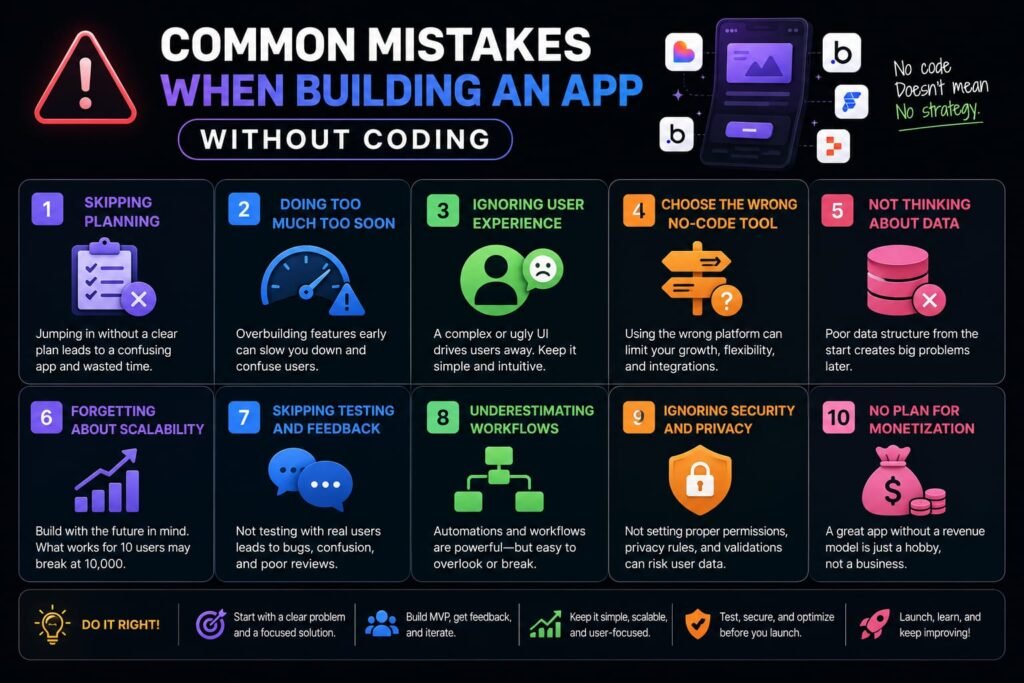
Even with a genuinely capable tool, a few habits tend to separate a smooth build from a frustrating one.
Skipping the planning stage. Jumping straight into building without describing your app’s structure first screens, data, user flowleads to more rework than starting with a clear plan, even in tools that support prompting alone.
Underestimating backend complexity. Authentication, payments, and permission systems are consistently the features that consume the most credits and cause the most confusion. Budget extra time and credits specifically for these.
Assuming “no-code” means “no review needed.” AI-generated code is often described as being somewhere around 60-70% production-ready. For anything handling real user data or payments, a human review pass your own or a developer’s is still worth the time before launch.
Choosing based on hype instead of use case. The most talked-about tool isn’t always the right one for your specific project. A mobile-first idea built in a web-only tool, or vice versa, creates problems no amount of prompting can fully fix later.
Ignoring security defaults. Some platforms default new projects to public visibility. If your project involves anything sensitive, check your privacy settings before you start adding real data.
Frequently Asked Questions
What is the best AI app builder overall?
There’s no single best option it depends on your use case. Lovable is generally considered the strongest all-around choice for full-stack web apps, Rork leads for native mobile apps, and Bubble remains the top choice for complex, database-heavy applications.
Can I really build an app without any coding knowledge?
Yes. Tools like Base44, Lovable, Rork, and Adalo are specifically designed for people with zero coding background you describe your app in plain English and the platform handles the technical implementation.
What’s the difference between a no-code app builder and an AI app builder?
Traditional no-code builders rely on drag-and-drop visual editors, while AI app builders generate an app directly from a written description. Many modern platforms, like FlutterFlow and Lovable, now combine both approaches.
Are AI-built apps good enough for a real business, or just prototypes?
Many AI app builders produce genuinely production-ready MVPs and internal tools. For apps with significant scale or highly custom logic, most builders eventually pair their AI-generated foundation with a developer for the more complex parts.
Which AI app builder is best for building a mobile app for the App Store?
Rork and FlutterFlow are built specifically for native mobile output, unlike web-focused tools such as Lovable or Bolt, which don’t produce installable App Store or Google Play apps.
How much does it cost to build an app without coding?
Most tools offer a free tier for exploration, with paid plans typically ranging from $20 to $100 a month depending on usage. Actual cost depends heavily on your app’s complexity, since credit-based pricing means features like authentication and payments consume more of your allowance than simple screens.
Do AI app builders let me keep the code if I stop paying?
This varies by platform. Tools like Lovable, Bolt, and Rork sync to GitHub or allow code export, meaning you retain a real, usable codebase. Some fully managed platforms, like Base44, keep more of the process in-house, so it’s worth checking a platform’s export policy before committing to a long-term project.
Is Bubble still relevant next to newer AI app builders?
Yes. While newer prompt-based tools are faster for simple projects, Bubble’s visual workflow editor still offers more structural depth for genuinely complex applications than most AI-first generators currently match.
Can I switch between AI app builders mid-project?
It’s possible but not always smooth, particularly with platforms that don’t offer code export. This is another reason code ownership matters — switching is far easier when you’re working with portable, exportable code from the start.
My Final Thoughts: Finding Your Best AI App Builder in 2026
There’s genuinely no single best ai app builder that wins across every category the right choice depends entirely on whether you’re building for web or mobile, how technical you are, and how complex your data and logic actually need to be. Lovable and Bolt lead for web-based full-stack apps, Rork and FlutterFlow lead for native mobile, and Bubble still holds its ground for the most complex, database-heavy builds.
The fastest way to find your fit isn’t more research it’s a real test. Pick the two tools from this list that best match your use case, describe the same simple version of your app idea in both, and see which one actually feels right for how you think and build. Most of these platforms offer a free tier, so that comparison won’t cost you anything but an afternoon and it’ll tell you more than any single “best of” list ever could.
Related Reads:
What Is Lovable AI? The Complete Guide to the AI App Builder Everyone’s Talking About
Is Lovable AI Free? Here’s What You Actually Get
Claude Pro vs ChatGPT Plus: The Real Difference Between These $20 AI Plans
How to Fix AI Image Generator Deformities in Fingers, Toes, and Other Anomalies
What Is Meta AI Muse Spark? The Complete 2026 Guide to Meta’s Flagship AI Model
Kimi K3 Explained: Inside Moonshot AI’s Record-Breaking Open Mode