

Base 44 pricing explained: Free, Starter, Builder, Pro, and Elite plans compared, plus how the credit system actually works in 2026.
You’ve found Base44, you like the idea of building a real app by just describing it, and now you’re staring at a pricing page with plan names, two different kinds of credits, and no obvious answer to the question you actually came here for: what does this thing really cost once you’re building for real?
Base44 pricing looks simple on the surface — five tiers, from free up to $160 a month but the number that matters most isn’t the plan price. It’s the credit system underneath it, which decides how far that plan actually stretches once you’re deep into building an app rather than just testing the waters. Get the credit math wrong, and you can burn through a plan meant to last a month in a single weekend.
This guide breaks down every Base44 pricing tier, exactly how the credit system works, what specifically drains your credits fastest, how Base44 compares to competitors like Lovable and Bolt, and which plan actually fits your project — so you can budget accurately instead of guessing.
What Is Base44 and How Does Its Pricing Work?
Base44 is an AI app builder that lets you create a full-stack web application front end, backend, and database included by describing it in plain English rather than writing code. It’s built specifically to remove even more of the setup burden than some competitors, automating hosting, authentication, and database configuration so non-technical users have fewer decisions to make.
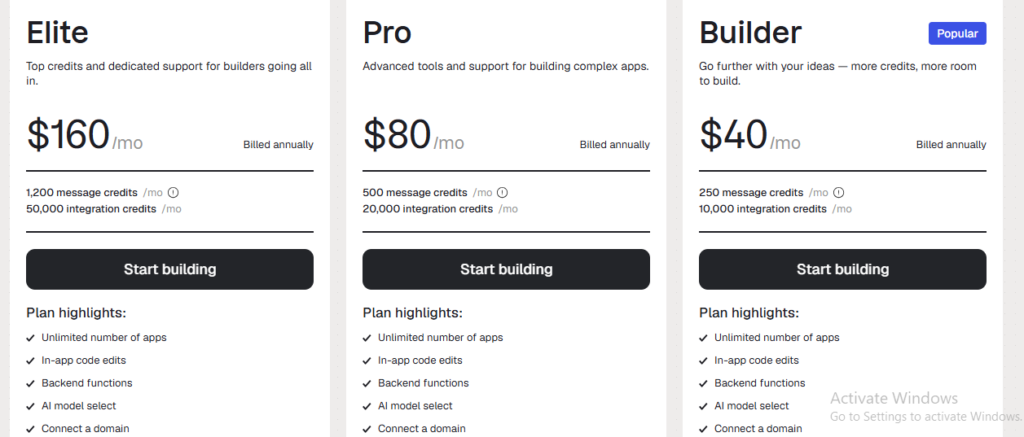
Base44 pricing follows a freemium, credit-based model with five tiers Free, Starter, Builder, Pro, and Elite ranging from $0 to $160 per month on annual billing. Each paid plan includes a fixed monthly allowance of two credit types: message credits, used while you build, and integration credits, used when your live app calls built-in services.
That two-credit structure is the part most new users don’t expect, and it’s the key to understanding what you’re actually paying for at each tier.
Base44 Pricing Plans at a Glance
| Plan | Monthly Price (Annual Billing) | Monthly Price (Month-to-Month) | Message Credits | Integration Credits |
|---|---|---|---|---|
| Free | $0 | $0 | 25/month (5/day cap) | 100/month |
| Starter | $16 | ~$20-25 | ~100/month | ~2,000/month |
| Builder | $40 | ~$50 | Higher | Higher |
| Pro | $80 | ~$100 | Higher still | Higher still |
| Elite | $160 | ~$200 | Highest | Highest |
Annual billing brings a discount of roughly 20% compared to paying month-to-month across every paid tier a meaningful saving if you’re confident you’ll be using the platform for more than a couple of months.
Base44 Free Plan: What You Actually Get
Base44’s free plan is a genuine, no-cost option rather than a short trial window, though it’s clearly designed for testing and exploration rather than sustained app building. It includes 25 message credits per month, capped at 5 per day, plus 100 integration credits per month.
Base44’s free plan is not designed for production use its daily 5-credit cap on message credits means you can only make a handful of building requests each day, enough to explore the platform and build a very simple project, but not enough for sustained, active development.
That daily cap is the real limiter. Even though 25 monthly message credits sounds workable on paper, the 5-per-day ceiling means you can’t front-load a full weekend of building into the free tier — you’re forced into small, spaced-out sessions instead.
Base44 Starter Plan: The Entry-Level Paid Tier ($16/month)
The Starter plan is Base44’s most affordable paid option, priced at $16/month on annual billing (rising to somewhere in the $20-25 range if you pay monthly instead). It’s aimed at personal projects and early-stage MVPs, with roughly 100 message credits and around 2,000 integration credits per month.
Best for: Individuals building a personal project or validating a simple app idea, where daily building limits aren’t a major constraint but you still don’t need heavy integration usage.
Where it falls short: Starter doesn’t include some of the more professional features like a custom domain that show up starting at the Builder tier, and its credit pool is still modest if your app leans heavily on backend automations or AI-powered features.
Base44 Builder Plan: The Sweet Spot for Most Projects ($40/month)
The Builder plan roughly doubles the Starter tier’s price to about $40/month annually, but it’s widely considered the best value in Base44’s lineup for most solo builders and small teams. This is the entry point for a custom domain, backend functions, and GitHub integration the specific combination most people actually need to take a project from prototype to something they’d comfortably show a client or launch publicly.
Best for: Freelancers building client work, non-technical founders launching a real MVP, and anyone who’s outgrown the Starter tier’s credit ceiling.
Example: A freelancer building a booking app for a small business client would likely need Builder rather than Starter specifically for the custom domain and GitHub integration — features that matter the moment a project moves from “my own experiment” to “something a paying client expects to look professional.”
Base44 Pro Plan: For Scaling Startups ($80/month)
The Pro plan doubles again from Builder, landing at roughly $80/month annually. It’s positioned for startups and more advanced app development, offering a substantially larger credit pool for both message and integration usage — the tier Base44 recommends once your app is live and actively used by real users generating ongoing integration activity.
Best for: Startups with a live, actively-used product where integration credits (LLM calls, emails, automations) are consumed regularly by real user activity rather than just your own building sessions.
Base44 Elite Plan: The Top Tier ($160/month)
Elite is Base44’s highest publicly listed tier, priced at roughly $160/month annually again, double the Pro plan. It’s built for users who need to scale their apps significantly and require a large volume of credits each month, typically because they’re running an app with meaningful user traffic and correspondingly heavy integration usage.
Best for: Teams or businesses running a production app with real scale, where credit consumption from live usage not just building has become the primary cost driver.
Understanding Base44’s Credit System: Message Credits vs. Integration Credits
This is the part of Base44 pricing that trips up the most users, so it’s worth slowing down on.
Featured snippet answer: Base44 uses two separate credit types message credits, which are consumed while you’re actively building or editing your app through prompts, and integration credits, which are consumed after your app is live, whenever it calls a built-in service like sending an email, generating an image, or making an AI model call.
Message Credits
Every prompt you send while building asking the AI to add a feature, fix a bug, or restyle a page draws from your message credit pool. Importantly, Base44 doesn’t charge a flat rate per prompt: the cost scales with how much work the request actually requires. A simple text or visual tweak might cost around 0.5 credits, while a big, app-wide structural change can cost 3 to 4 credits or more.
Integration Credits
Once your app is live, integration credits cover the ongoing services your app calls during real use. A basic action like sending an email might cost around 1 credit, while calls to AI language models cost more and heavier, more capable AI models cost more still. This distinction matters enormously if you’re building an AI-powered feature into your app, like a chatbot: every question a live user asks it triggers another LLM call, which means an AI-heavy app can burn through integration credits far faster than a simpler, static app ever would.
No Rollover, No Top-Ups
Both credit types reset monthly on your original subscription date rather than the calendar month, and unused credits from either pool don’t roll over — anything you don’t use simply expires. Unlike some competitors that let you purchase one-off top-up packs, Base44 doesn’t currently offer a way to buy extra credits without upgrading your entire plan tier.
What Actually Drives Up Your Base44 Credit Usage
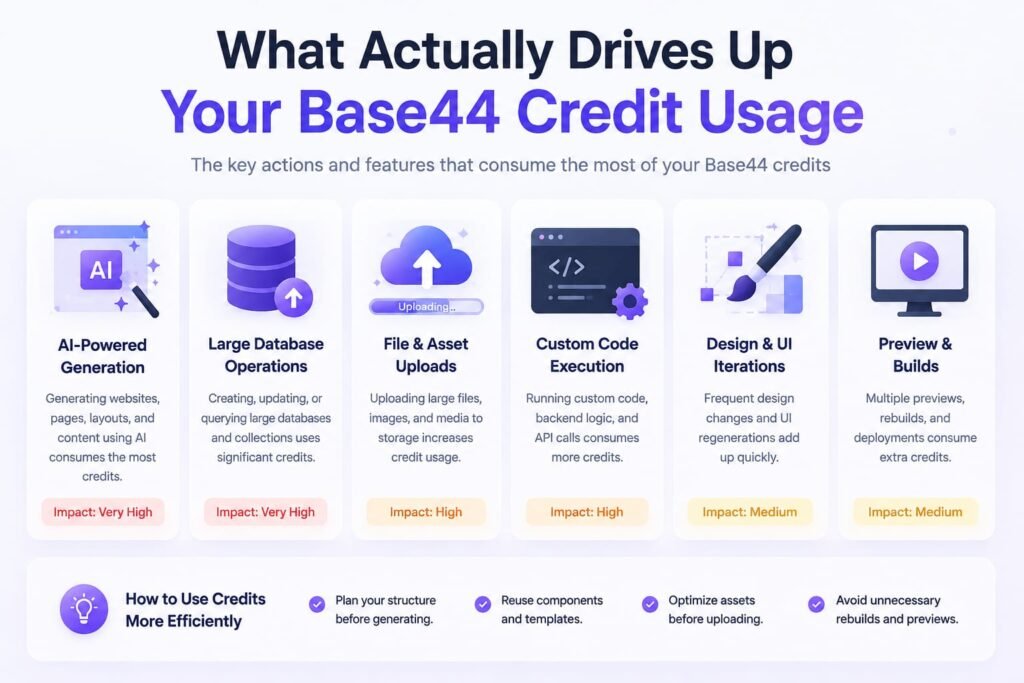
A few specific patterns are responsible for most of the “why did my credits disappear so fast” moments Base44 users run into:
Large, sweeping prompts. Asking for a big, app-wide restructuring in a single message costs meaningfully more message credits than breaking the same change into smaller, targeted requests — though breaking things down too much can also add up, so there’s a balance to strike.
AI-powered features in a live app. Chatbots, AI-generated content, and any feature relying on repeated LLM calls consume integration credits continuously as real users interact with your app this is the single biggest hidden cost for AI-heavy projects specifically.
Frequent iteration during building. Constant small back-and-forth tweaks during active development add up faster than a more planned, batched approach to prompting.
Heavier AI models for integrations. Not all AI model calls cost the same opting for a more capable, heavier model for an integration task costs more credits than a lighter model suited to a simpler task.
Base44 Pricing vs. Competitors: How Does It Compare?
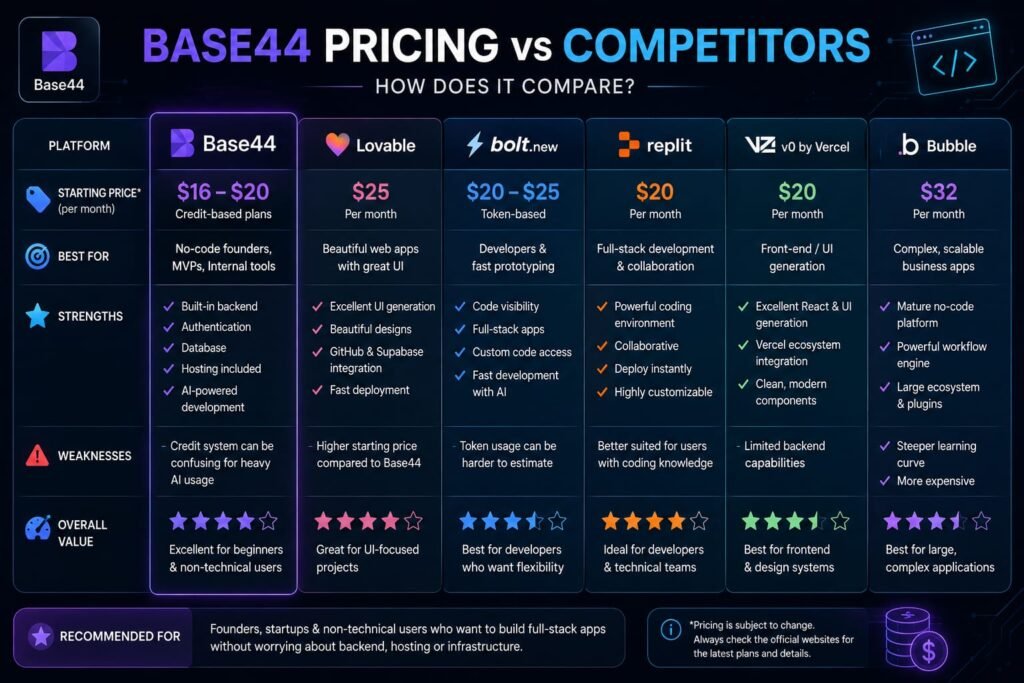
Base44’s pricing sits in an interesting spot relative to other AI app builders cheap to get started, but pricier than average once you scale up.
Base44 vs. Lovable: Base44’s entry-level Starter plan, at roughly $16/month, undercuts Lovable’s comparable tier (around $21/month). Once you move beyond the entry tier, though, Base44 tends to become more expensive than Lovable at equivalent usage levels.
Base44 vs. Bolt.new: A similar pattern holds against Bolt, whose entry-level paid plan runs around $18/month Base44’s Starter tier is cheaper at the bottom, but the gap narrows or reverses at higher tiers.
Base44 vs. Replit: Replit’s entry-level paid plan has been reported around $20/month, again putting Base44’s Starter plan slightly ahead on pure entry-level price, though Replit offers a more complete, code-first development environment that Base44 doesn’t aim to replicate.
The overall pattern: Base44 is genuinely one of the more affordable entry points in the AI app builder category, which makes it an easy first step for testing an idea. But if your project scales up in complexity or usage, it’s worth comparing your actual projected credit consumption against competitors before assuming Base44 remains the cheaper option long-term.
Monthly vs. Annual Billing: How Much You Actually Save
Across every paid Base44 tier, choosing annual billing brings the effective monthly cost down by roughly 20% compared to paying month-to-month. On the Builder plan specifically, that’s the difference between paying around $50/month billed monthly versus $40/month billed annually — working out to $480 for the year instead of $600. If you’re confident you’ll be using Base44 for more than a few months, annual billing is almost always the better financial choice, provided you’re comfortable committing the full year’s payment up front.
Student and Educator Discounts
Verified students and teachers can reportedly access up to 50% off the Starter plan worth checking if you fall into either category, since it isn’t always prominently advertised on the main pricing page.
Tips to Save Money on Base44 Pricing
A handful of habits make a real difference in how far your Base44 plan actually stretches:
- Batch your building prompts. Group related changes into a single, well-described request rather than sending many small, incremental prompts, since each one draws from your message credit pool individually.
- Watch AI-heavy features closely. If your app includes a chatbot or other LLM-powered feature, monitor your integration credit usage regularly once it’s live — this is where costs escalate fastest and most unpredictably.
- Choose lighter AI models for simple integration tasks. Reserve your heaviest, most capable AI model calls for tasks that genuinely need them, and use lighter options for simpler automations.
- Commit to annual billing once you’re confident in the platform. The roughly 20% discount adds up quickly across a full year, and it’s a straightforward way to lower your effective monthly cost without changing how you use the platform at all.
- Right-size your plan based on projected live usage, not just building. If you’re about to launch to real users, remember that ongoing integration credit consumption from live traffic can outpace what you used during development — plan your tier around expected usage, not just your build-phase habits.
Which Base44 Plan Should You Choose?
Use this as a quick decision guide based on where your project actually stands:
Choose Free if you’re just testing whether Base44’s approach to app building fits how you think, with no urgency to build anything substantial yet.
Choose Starter if you’re building a personal project or an early MVP, and you don’t yet need a custom domain or heavy backend integrations.
Choose Builder if you’re building for a client, launching a real product, or need a custom domain, backend functions, and GitHub integration — this is the tier most solo builders and freelancers should land on.
Choose Pro if your app is live with real users and integration credit consumption from actual usage has become a meaningful, ongoing cost.
Choose Elite if you’re operating at real scale, with high enough traffic and integration demand that even Pro’s allowance isn’t enough to comfortably cover a month.
Frequently Asked Questions
How much does Base44 cost per month?
Base44’s paid plans range from $16/month (Starter) to $160/month (Elite) on annual billing, with month-to-month pricing running roughly 20% higher across every tier. A free plan is also available for testing.
Is Base44 completely free to use?
Not for sustained use. Base44 offers a genuine free plan with 25 message credits per month (capped at 5 per day) and 100 integration credits, but it’s designed for testing and light exploration rather than ongoing app development.
What’s the difference between Base44’s message credits and integration credits?
Message credits are consumed while you’re actively building your app through AI prompts. Integration credits are consumed after your app is live, whenever it calls a built-in service like sending an email, generating content, or making an AI model call.
Do unused Base44 credits roll over to the next month?
No. Both message and integration credits reset monthly on your subscription’s original billing date, and any credits you don’t use during that cycle expire rather than carrying forward.
Can I buy extra credits if I run out on Base44?
Not currently as a standalone purchase. Unlike some competitors that offer one-off credit top-ups, Base44 generally requires upgrading to a higher plan tier if you’re consistently running short on credits.
Which Base44 plan is best for most people?
The Builder plan, at roughly $40/month on annual billing, is generally considered the best fit for most solo builders and freelancers, since it’s the most affordable tier that includes a custom domain, backend functions, and GitHub integration.
Is Base44 cheaper than Lovable or Bolt.new?
At the entry level, yes Base44’s Starter plan undercuts comparable entry tiers from Lovable, Bolt.new, and Replit. At higher tiers, Base44 tends to become more expensive than these competitors for equivalent usage.
Does Base44 offer discounts for students or teachers?
Yes, reportedly up to 50% off the Starter plan for verified students and educators, though this isn’t always prominently featured on the main pricing page, so it’s worth checking directly.
Why do my Base44 credits run out faster than expected?
The most common causes are large, sweeping building prompts, AI-powered features (like chatbots) making frequent LLM calls once your app is live, and defaulting to heavier AI models for integration tasks that don’t require them.
My Final Thoughts: Is Base44 Pricing Worth It in 2026?
Base 44 pricing rewards a bit of upfront planning. The entry-level Starter tier is genuinely one of the more affordable ways to start building a real app without code, but the credit system underneath split between message credits for building and integration credits for live usage — is where your actual monthly cost gets decided. Get familiar with how those two credit types work before you commit to a plan, and you’ll avoid the most common surprise Base44 users run into: a reasonable-sounding plan price that doesn’t match how far the credits inside it actually go.
If you’re still deciding, the lowest-risk next step is simple: start on the free plan, build a small version of your actual app idea, and pay close attention to how quickly your daily message credits disappear. That hands-on test will tell you more about which paid tier you actually need than any pricing table including this one. And since Base44’s plans and credit allocations can shift, it’s always worth a final check on base44.com/pricing before you subscribe.
Related Reads:
What Is Lovable AI? The Complete Guide to the AI App Builder Everyone’s Talking About
Is Lovable AI Free? Here’s What You Actually Get
Claude Pro vs ChatGPT Plus: The Real Difference Between These $20 AI Plans
How to Fix AI Image Generator Deformities in Fingers, Toes, and Other Anomalies
What Is Meta AI Muse Spark? The Complete 2026 Guide to Meta’s Flagship AI Model
Kimi K3 Explained: Inside Moonshot AI’s Record-Breaking Open Mode
Best AI App Builder in 2026: 10 Top Tools to Build an App Without Coding
Bolt AI App Builder: The Complete Guide to Building Apps in Your Web Browser
Higgsfield AI Pricing in 2026: Every Plan, Credit Cost, and What You Actually Get