
Higgsfield AI pricing explained: from $9 Starter to $129 Ultra. Compare credits, hidden costs, free tier limits, and whether it beats Runway in 2026
If you have ever signed up for an AI video tool, burned through your credits in ten minutes, and stared at a paywall wondering where your money went, you already understand the frustration that drives people to search for higgsfield ai pricing. Higgsfield markets itself as an all-in-one creative suite with cinematic camera control, character consistency, and access to over 15 AI video models. But the gap between the marketing and the actual cost-per-clip is where most users get surprised.
We have spent weeks testing Higgsfield across every plan—from the free tier through Ultra—tracking credit consumption on real projects, comparing per-clip costs against Runway and Kling, and mapping out the “365-day unlimited” claims that sound better than they are. This guide gives you the honest numbers: what each plan actually costs, how credits translate into finished videos, where the hidden fees live, and whether Higgsfield is the right investment for your specific workflow.
By the end, you will know exactly which tier fits your output, how to avoid the most common pricing trap, and when a competitor like Runway or Kling is the smarter financial choice.
What Is Higgsfield AI?
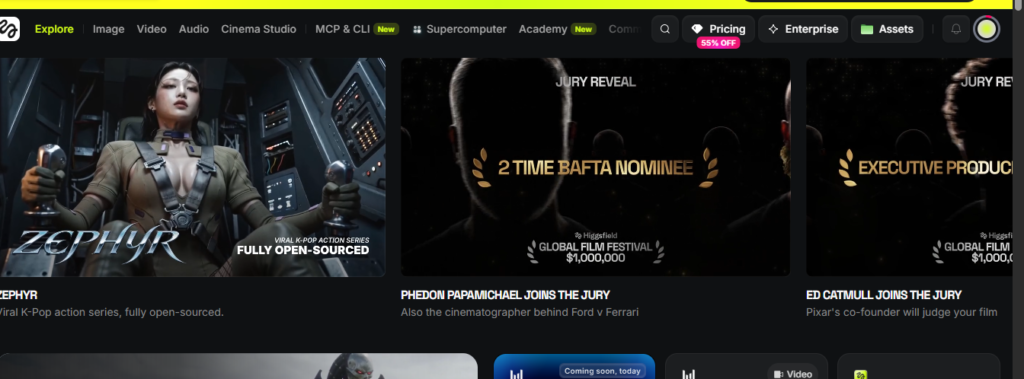
Higgsfield AI is a San Francisco-based creative platform founded in 2023 by Alex Mashrabov, former head of generative AI at Snap, and AI researcher Yerzat Dulat. The company is backed by Accel, Menlo Ventures, GFT Ventures, and AI Capital Partners at a valuation exceeding $1.3 billion.
The platform serves 25 million users who have generated 850 million assets, including 300 million videos. Creators produce 6 million generations per day, with 2 million of those being videos.
What makes Higgsfield different from pure video generators like Pika or Kling is its production layer. Instead of just generating clips, Higgsfield bundles character consistency (Soul ID), camera control (Cinema Studio), ad production (Marketing Studio), spoken video (LipSync Studio), and color control (Soul HEX) into one credit-based workspace. You can switch between models—Seedance 2.0, Kling 3.0, Veo 3.1, Sora 2, WAN 2.6—without leaving the platform.
Higgsfield AI Pricing at a Glance (2026)
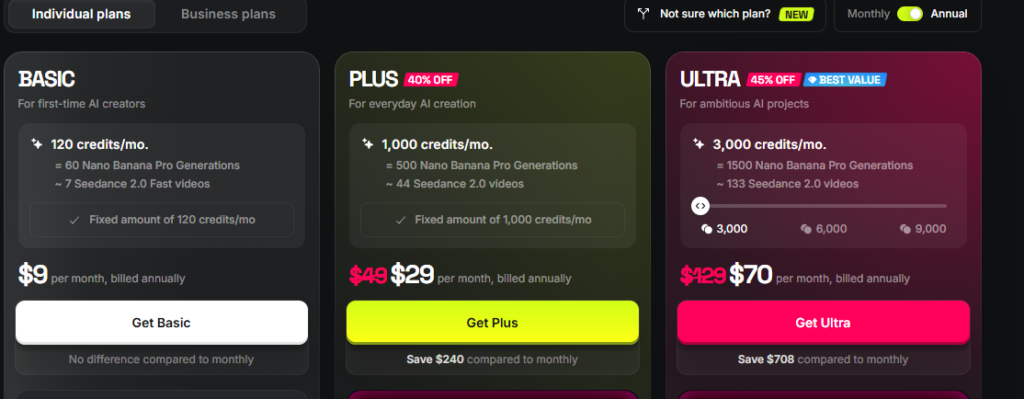
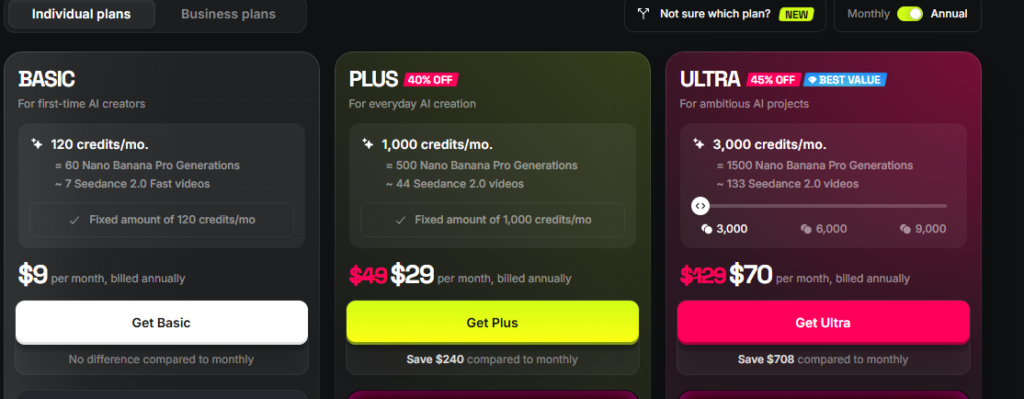
Higgsfield has restructured its pricing multiple times since its 2025 launch, and the numbers vary depending on whether you pay monthly or annually. Here is the current structure as of mid-2026:
| Plan | Monthly Price | Annual Price (per month) | Monthly Credits | Parallel Generations |
|---|---|---|---|---|
| Free | $0 | $0 | Limited daily credits | 1 video, 1 image |
| Basic | $5 | $5 | ~70 | 2 videos, 2 images |
| Starter | ~$19 | $15 | ~200–270 | 2 videos, 2 images |
| Plus | ~$49 | $39 | ~1,000 | 6 videos, 8 images |
| Ultra | $129 | $99 | ~3,000 (scalable to 9,000) | 8 videos, 8 images |
| Business | ~$71/seat | $62/seat | 1,500 per seat (3,000 min) | 16 videos, 16 images |
Prices verified from multiple sources as of July 2026. Higgsfield has changed its plan names and credit allocations more than once, so always confirm the live pricing page before subscribing.
Featured snippet answer: How much does Higgsfield AI cost? Higgsfield AI pricing starts at $5 per month for Basic (70 credits), $15 per month for Starter (~200 credits), $39 per month for Plus (~1,000 credits), and $99 per month for Ultra (~3,000 credits) when billed annually. Monthly billing is roughly 15–30% more expensive.
How the Higgsfield Credit System Actually Works
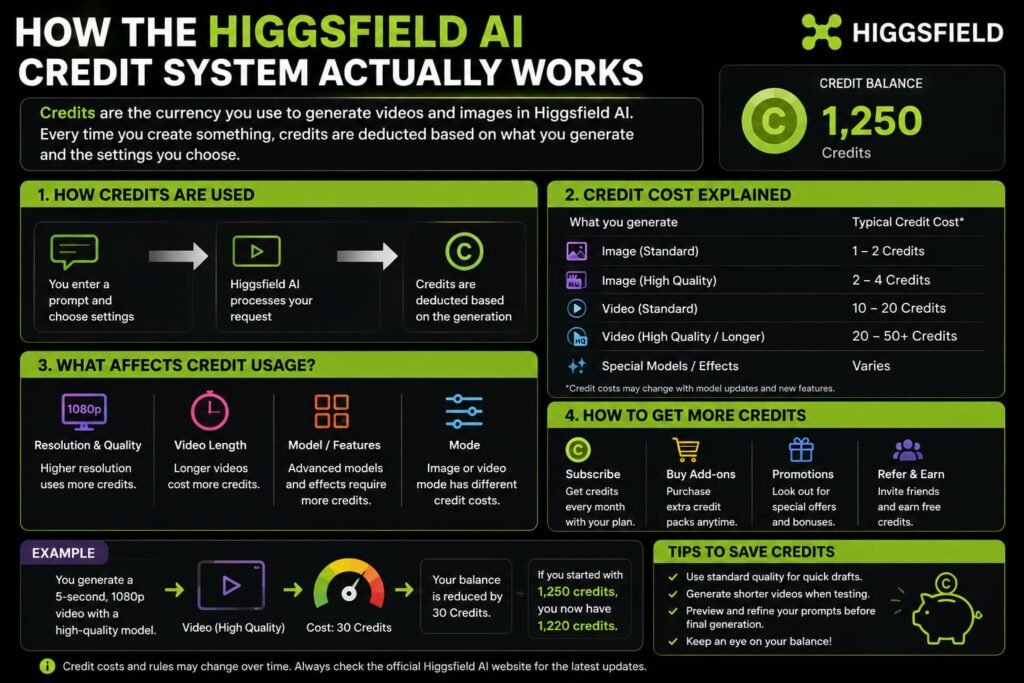
The headline price is only half the story. Higgsfield runs on a credit-based system where different models consume different amounts per generation. Understanding this is the difference between budgeting accurately and hitting a wall mid-project.
Credit Consumption by Model
| Model | Type | Approximate Credits per Clip | Cost on Ultra Plan |
|---|---|---|---|
| Kling 3.0 | Video (5s, 720p) | ~7–25 credits | ~$0.25–$0.85 |
| Seedance 2.0 Standard | Video (10s, 720p) | ~36 credits | ~$1.20 |
| Seedance 2.0 Fast | Video (10s, 720p) | ~28 credits | ~$0.95 |
| WAN 2.6 | Video (10s, 720p) | ~30 credits | ~$1.00 |
| Veo 3.1 | Video (8s) | ~58 credits | ~$1.90 |
| Sora 2 | Video | ~40–70 credits | ~$1.30–$2.30 |
| Nano Banana Pro | Image | ~0.5–2 credits | Fractions of a cent |
| Soul V2 & Cinema | Video (low quality) | Included free on paid plans | $0 |
The Real Cost-Per-Video Math
On the Plus plan at $39 per month for roughly 1,000 credits, a short Kling 3.0 clip at 25 credits works out to about $1 per clip. A Veo 3.1 clip at 58 credits costs roughly $2.25. If you generate 20 Veo clips in a month, you have burned through nearly half your Plus allocation.
On Ultra at $99 for 3,000 credits, the per-clip rate drops by roughly 50–55% compared to lower tiers. That same Veo clip costs closer to $1.65. For heavy daily producers, Ultra is where the math starts to make sense.
Critical detail: Monthly credits do not roll over. If you pay for 1,000 credits and only use 400, the remaining 600 disappear at the end of the billing cycle. Top-up credit packs are available at approximately $5 per 100 credits, but they expire after 90 days.
The “365-Day Unlimited” Claim: What It Actually Includes
One of Higgsfield’s most prominent marketing points is “365-Day Unlimited and Free Gens” on paid plans. This sounds like unlimited video generation for a year. The reality is more nuanced—and for video creators, significantly less generous than it appears.
Here is what is actually unlimited, broken down by model type:
| Model | Type | Starter | Plus | Ultra |
|---|---|---|---|---|
| Soul V2 & Cinema | Video (low quality) | 300 free | 5,000 free | 10,000 free |
| Seedream 5.0 Lite | Image | Unlimited | Unlimited | Unlimited |
| Flux.2 Pro | Image | Unlimited | Unlimited | Unlimited |
| Seedream 4.5 | Image | Not included | Unlimited | 4K Unlimited |
| Nano Banana | Image | Not included | Unlimited | Unlimited |
| Kling O1 Image | Image | Not included | Unlimited | Unlimited |
| GPT Image | Image | Not included | Unlimited | Unlimited |
| Kling 3.0 | Video (top quality) | Not included | Not included | 100 free only |
Six out of eight “unlimited” models are image generators, not video. The only video model with unlimited access is Soul V2 & Cinema, which is Higgsfield’s oldest and lowest-quality video model. Premium video models like Kling 3.0, Sora 2, and Veo 3.1 still cost credits on every generation.
Featured snippet answer: Is Higgsfield AI really unlimited? No. The “365-day unlimited” claim on paid plans applies primarily to image generation models. Video generation on premium models like Kling 3.0, Sora 2, and Veo 3.1 still consumes credits on every generation. Only the lower-quality Soul V2 & Cinema video model has free generations.
What Higgsfield Ai Each Plan Is Actually Worth?
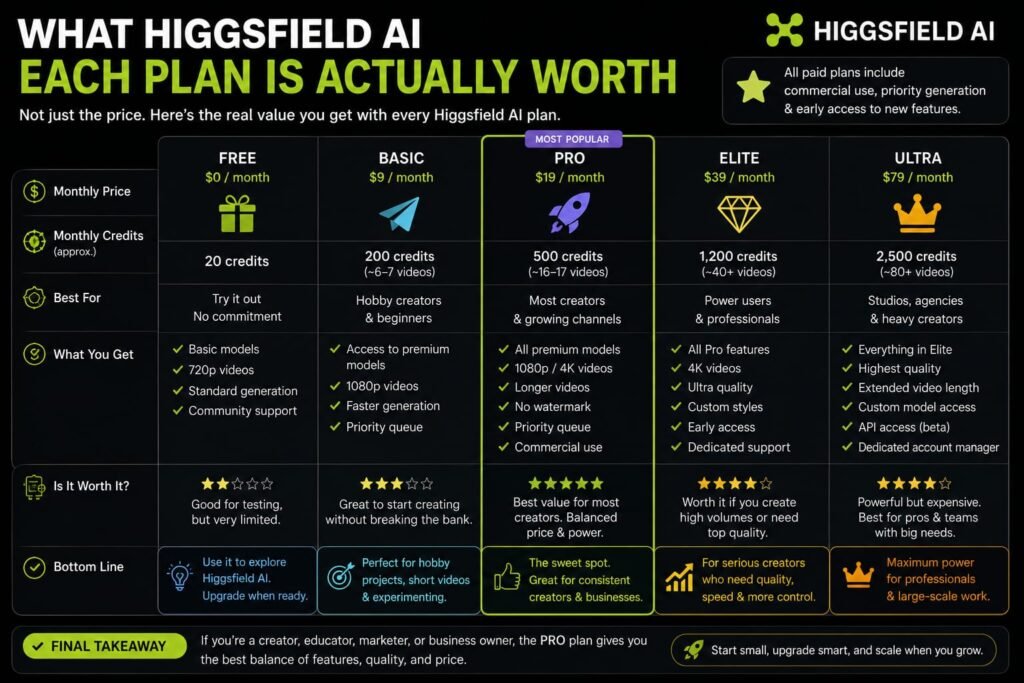
Free Tier: A Preview, Not a Production Tool
Higgsfield’s free tier gives you limited daily credits, access to selected basic models, watermarked outputs, and the ability to run one video and one image generation at a time. It is genuinely useful for testing the interface and output quality before committing financially. It is not viable for any real production work.
Basic ($5/month): For First-Time Experimenters
At 70 credits per month, the Basic plan translates to roughly 35 Nano Banana Pro images or about 8 Kling 3.0 videos. Access is limited to selected models only. This tier works if you are curious about AI video and want to experiment without a significant commitment, but it is too restrictive for regular creators.
Starter ($15/month annual): The Testing Tier
With approximately 200 credits, Starter gives you enough runway to test multiple models and see which ones fit your style. It is best treated as an extended trial rather than a working plan. Most creators who produce content regularly will outgrow Starter within the first month.
Plus ($39/month annual): The Sweet Spot for Most Creators
Plus unlocks all models, provides roughly 1,000 credits, and allows up to 6 parallel video generations. For regular social media creators, small brands, and indie filmmakers with a steady output, this is where Higgsfield starts to deliver real value. The 365-day unlimited image models become genuinely useful here, and the credit pool is large enough for weekly content production without constant anxiety.
Ultra ($99/month annual): For Heavy Daily Production
Ultra is Higgsfield’s most popular tier for serious creators. At 3,000 base credits (scalable to 9,000), parallel generation for 8 videos and 8 images, and 50–55% lower per-credit costs than lower tiers, it is designed for studios and daily producers. The plan includes 100 free Kling 3.0 generations, 10,000 Soul V2 & Cinema generations, and unlimited Kling 3.0 access on annual plans.
Business ($62/seat/month annual): For Teams and Agencies
The Business plan requires a minimum of 2 seats, with 1,500 credits per seat and a shared credit pool. It adds collaborative features: shared workspace, integrated chat, usage analytics, shareable Soul IDs, and custom SSO. Parallel processing scales to 16 videos and 16 images across the team. For agencies producing volume for multiple clients, the shared pool and admin controls justify the per-seat cost.
Higgsfield’s Key Features: That Justify the Price
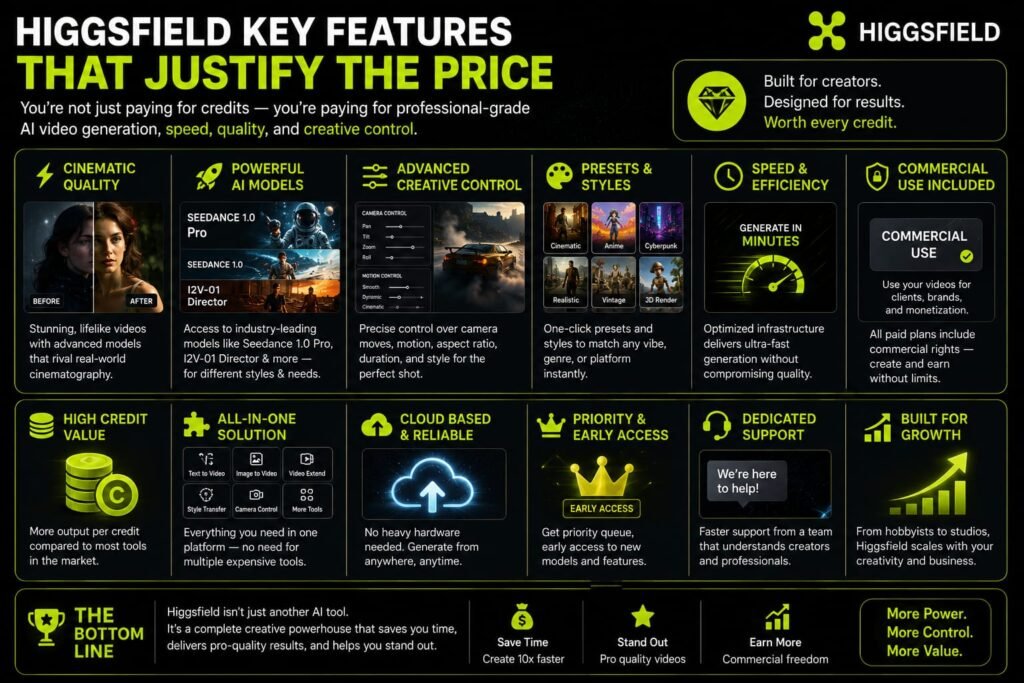
Whether Higgsfield’s pricing is worth it depends heavily on whether you use the features that separate it from cheaper alternatives.
Soul ID: Persistent Character Consistency
Soul ID trains a persistent identity from reference photos and carries the same face across every generation and every model automatically. For storytelling, branded content, and campaigns where a character must look identical across multiple clips, this is a genuine differentiator. Runway has no equivalent system.
Cinema Studio: Real Camera Control
Cinema Studio simulates real optical physics, letting you choose a virtual camera body, lens type, focal length, and movement before generating. It includes 1,296 camera lenses and cinematic parameters. For filmmakers who care about how a shot feels, this level of control is unmatched by tools that only offer a text box.
Marketing Studio: URL-to-Ad Production
Marketing Studio builds ad variants from a product URL, using Seedance 2.0 as the engine and Soul ID for spokesperson consistency. For e-commerce brands and performance marketers, this automates a workflow that otherwise requires a designer, copywriter, and video editor.
LipSync Studio: Spoken Video in 8+ Languages
LipSync Studio handles spoken video with native lip synchronization across multiple languages. This is not an afterthought add-on—it is integrated into the generation pipeline, meaning audio and visual motion are created together rather than stitched in post-production.
Multi-Model Access in One Workspace
Higgsfield aggregates 15+ models including Seedance 2.0, Kling 3.0, Veo 3.1, WAN 2.6, Hailuo 2.3, and Gemini Omni Flash. Instead of subscribing to four separate platforms, you access them from one credit pool. For creators who experiment across models to find the best fit for each shot, this consolidation saves both money and cognitive overhead.
Higgsfield vs Runway: A Pricing and Value Comparison
Runway is Higgsfield’s closest competitor, and the choice between them often comes down to what you value more: production tools or editing depth.
| Dimension | Higgsfield | Runway |
|---|---|---|
| Entry price | $9/month (Basic/Starter) | $15/month (Standard) |
| Top individual plan | $129/month (Ultra) | $95/month (Max) |
| Credit math on shared models | Lower per-clip cost | Higher per-clip cost |
| Character consistency | Soul ID (persistent across sessions) | Director Mode (session-only) |
| Editing layer | Limited | Mature timeline, Motion Brush |
| Exclusive models | None | Gen-4.5, Gen-4 Turbo |
| Ad production tools | Marketing Studio, URL-to-ad | None |
| Mobile app | Strong | Limited |
On shared models, Higgsfield consistently undercuts Runway. A Seedance 2.0 clip costs approximately $3.00 on Higgsfield versus $3.60 on Runway. Kling 3.0 runs about $1.00 on Higgsfield versus $1.30 on Runway. For a creator generating 30 Kling clips per month, that $9 difference alone covers part of the subscription gap.
However, Runway’s Gen-4.5 is widely considered the strongest single cinematic AI video model available in mid-2026, and it is exclusive to Runway. If Gen-4.5 is your primary model, Runway is the only option regardless of price.
Is Higgsfield cheaper than Runway? Yes, on shared models like Seedance 2.0 and Kling 3.0, Higgsfield’s per-clip cost is lower. However, Runway offers exclusive access to Gen-4.5 and Gen-4 Turbo, plus a more mature editing layer with Motion Brush and timeline compositing.
Higgsfield Ai Hidden Costs and Pricing Traps to Avoid
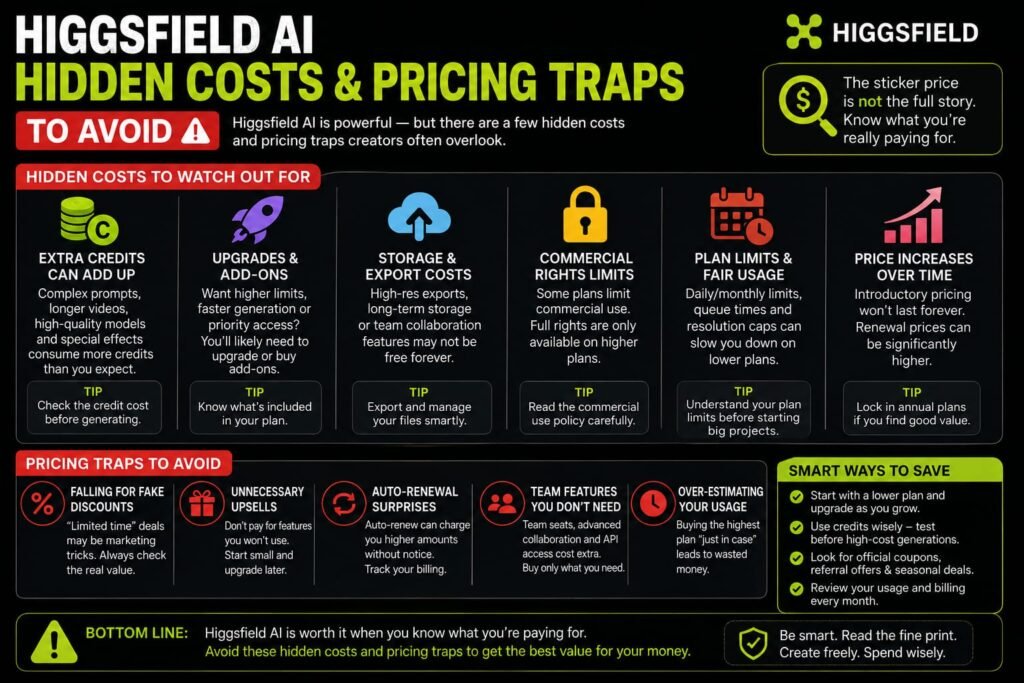
The “Unlimited” Misunderstanding
The most common pricing trap is assuming that paid plans include unlimited video generation. As detailed above, only image models and the low-quality Soul V2 video model are unlimited. Premium video models burn credits on every generation. If your workflow depends on Kling 3.0 or Veo 3.1, budget for credit consumption, not unlimited access.
Non-Rolling Credits
Unused credits expire at the end of each billing cycle. If your production volume fluctuates—heavy one week, light the next—you will waste money on months where you do not hit your cap. There is no way to bank credits for future high-volume periods.
Top-Up Pack Expiration
Credit top-ups cost approximately $5 per 100 credits but expire after 90 days. Buying them in bulk to “save for later” is a losing strategy. Only purchase top-ups when you have an immediate, specific need.
Annual Billing Risk
Annual plans are cheaper per month but charged upfront as a lump sum. Higgsfield has changed pricing multiple times since launch. Locking into an annual plan carries the risk that a better tier structure or competitor pricing emerges mid-year. If you are new to the platform, test monthly for one cycle before committing annually.
Who Should Pay for Higgsfield Ai?
Higgsfield is worth the price if:
- You need the same character to appear consistently across multiple clips, models, or sessions
- Your production includes native audio, spoken video, or multilingual content
- You want ad production tools, camera control, and character consistency in one subscription
- You generate enough volume that Ultra’s 50–55% lower per-credit rate saves money versus lower tiers
- You prefer testing multiple models (Seedance, Kling, Veo) from one workspace rather than subscribing to separate platforms
Higgsfield is not worth the price if:
- You only need plain text-to-video without character consistency or camera control
- Your budget is tight and your output is sporadic (Kling’s official app at ~$26/month may be cheaper)
- You need mature post-production editing, compositing, and timeline work (Runway wins here)
- You require very long-form, broadcast-grade footage (neither Higgsfield nor Runway fully replaces traditional production yet)
- Your primary model is Runway Gen-4.5 (exclusive to Runway, so the comparison is moot)
The Free Trial to Higgsfield Ai: How to Test Before You Pay
Higgsfield offers a 1-day unlimited trial for new users. Activation requires adding a card, but the charge is $0. During the 24-hour window, you get unlimited generation across 20+ models with one important caveat: only one concurrent generation at a time. You cannot queue multiple jobs simultaneously.
Critical tip: Before generating, toggle the “Unlimited” switch inside the model menu. If you skip this, the generation pulls from regular credits instead of the unlimited trial pool. This toggle is easy to miss and defeats the purpose of the trial if overlooked.
After the trial, if you do not cancel, it converts to a paid Plus subscription. You can cancel anytime before the renewal date from Manage Account → Subscription.
Frequently Asked Questions
Is Higgsfield AI free?
Higgsfield offers a limited free tier with daily credits, watermarked outputs, and access to selected basic models. It is useful for testing but not viable for production work. There is also a 1-day unlimited trial for new users that requires a card but charges $0.
How much does Higgsfield AI cost per month?
Paid plans range from $5 per month (Basic, 70 credits) to $129 per month (Ultra, 3,000 credits). Annual billing reduces the effective monthly cost by roughly 15–30%. The Business plan starts at $62 per seat per month when billed annually.
Do Higgsfield credits roll over?
No. Monthly plan credits do not roll over to the next billing cycle. Unused credits expire at the end of each month. Top-up credit packs expire after 90 days.
How many videos can I make on Higgsfield per month?
It depends entirely on the model and plan. On Plus (~1,000 credits), you can generate approximately 114 Kling 3.0 videos or 17 Veo 3.1 clips. On Ultra (~3,000 credits), that scales to roughly 342 Kling videos or 51 Veo clips. Premium models like Sora 2 and Veo 3.1 consume significantly more credits than Kling 3.0.
Is Higgsfield cheaper than Runway?
On shared models like Seedance 2.0 and Kling 3.0, yes. Higgsfield’s per-clip cost is lower. However, Runway offers exclusive Gen-4.5 and Gen-4 Turbo models plus a more mature editing layer. The cheaper option depends on which models you actually use.
What does “365-day unlimited” actually mean on Higgsfield?
It means unlimited access to specific image generation models (Seedream, Flux, Nano Banana, GPT Image) and the lower-quality Soul V2 & Cinema video model. Premium video models like Kling 3.0, Sora 2, and Veo 3.1 still cost credits on every generation. Six of the eight “unlimited” models are image generators.
Can I use Higgsfield for commercial work?
Yes. All paid plans include commercial use rights. Watermark-free exports are available across all paid tiers. The Business plan adds team collaboration features and shared workspaces for agency workflows.
Does Higgsfield have a mobile app?
Yes. Higgsfield publishes apps for iOS via the Apple App Store, with Android access available as well. You can prompt, generate, and export directly from a phone.
What is the best Higgsfield plan for beginners?
Most beginners should start with the free tier or the 1-day unlimited trial to test quality. If you decide to pay, Plus at $39 per month (annual) is the sweet spot for regular creators. It unlocks all models, provides enough credits for steady output, and includes the 365-day unlimited image models. Starter is too restrictive for anyone producing content weekly.
How do I avoid running out of credits?
Use lower-cost models like Kling 3.0 for drafting and iteration. Save premium models like Veo 3.1 and Sora 2 for final renders. Take advantage of the unlimited image models for still assets. If you consistently hit your cap, upgrade to Ultra rather than buying top-up packs, since Ultra’s per-credit rate is 50–55% lower.
My Final Conclusion: Is Higgsfield AI Pricing Worth It?
Higgsfield ai pricing is fair value for a specific type of creator: someone who needs character consistency, cinematic camera control, and multi-model access under one roof. The platform is not the cheapest option for plain text-to-video—Kling’s official app at roughly $26 per month undercuts Higgsfield on raw per-clip cost for Kling 3.0 alone. But Higgsfield’s value is in the stack: Soul ID, Cinema Studio, Marketing Studio, and LipSync Studio are tools you would otherwise need multiple subscriptions to replicate.
The honest caveat is that the “unlimited” marketing is misleading for video creators. If your workflow depends on premium video models, you are paying per clip regardless of plan. Budget accordingly.
My recommendation: Start with the 1-day unlimited trial. Generate real content that matches your actual workflow—not demo prompts. Track which models you gravitate toward and how many credits a typical project consumes. If Kling 3.0 covers 80% of your needs, compare Higgsfield’s cost against Kling’s official app. If you need Soul ID consistency, Marketing Studio, or the ability to switch between Seedance and Veo without switching platforms, Higgsfield’s consolidation justifies the premium.
Looking for a way to reduce the cost of your Higgsfield AI subscription? Before purchasing a plan, check our Higgsfield AI promo code guide for the latest discounts, referral offers, and promotional deals that may help you save on your subscription.
Related Reads-
What Is Lovable AI? The Complete Guide to the AI App Builder Everyone’s Talking About
Is Lovable AI Free? Here’s What You Actually Get
Claude Pro vs ChatGPT Plus: The Real Difference Between These $20 AI Plans
How to Fix AI Image Generator Deformities in Fingers, Toes, and Other Anomalies
What Is Meta AI Muse Spark? The Complete 2026 Guide to Meta’s Flagship AI Model
Kimi K3 Explained: Inside Moonshot AI’s Record-Breaking Open Mode
Best AI App Builder in 2026: 10 Top Tools to Build an App Without Coding
Bolt AI App Builder: The Complete Guide to Building Apps in Your Web Browser
Higgsfield AI Pricing in 2026: Every Plan, Credit Cost, and What You Actually Get
Higgsfield AI Promo Code: The Honest Guide to Real Discounts (and Fake Ones to Avoid)