

Higgsfield AI credits explained: how they work, what each model costs, how to earn free credits, and how to make your balance last longer.
You sign up for Higgsfield, generate a few clips you’re genuinely excited about, and then without much warning you’re staring at a “no credits remaining” message wondering exactly where they went. If that’s happened to you, you’re not alone. Higgsfield AI credits are the currency behind every image and video the platform generates, and they don’t spend the same way across every model, every resolution, or every second of footage.
Understanding how Higgsfield AI credits actually work is the difference between a subscription that comfortably covers your monthly output and one that leaves you buying top-ups every other week. This guide breaks down exactly how the credit system functions, what determines how many credits a single generation costs, how the different plans compare, legitimate ways to earn extra credits, and the specific habits that stretch your balance the furthest.
What Are Higgsfield AI Credits?
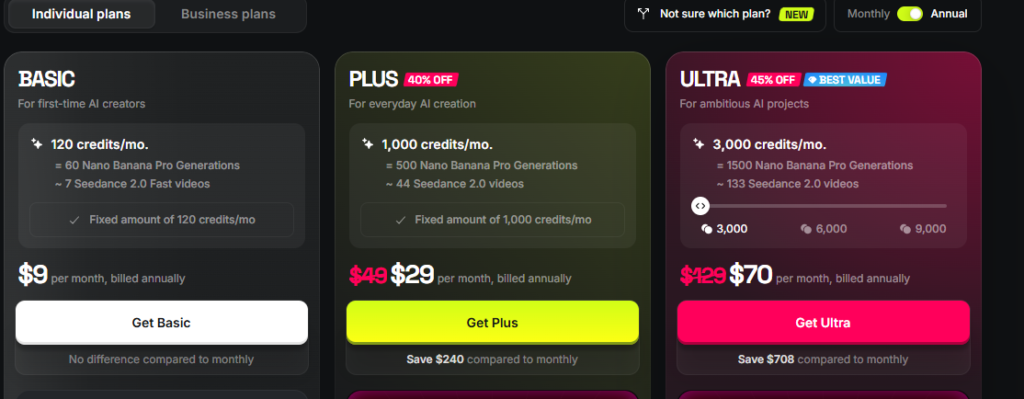
Higgsfield AI credits are the platform’s internal usage currency, deducted from your monthly allowance every time you generate an image or video. The number of credits a generation costs depends on which AI model you use, the resolution and duration you select, and whether you enable extras like native audio.
Rather than charging a flat rate per generation, Higgsfield aggregates access to 15 or more different AI video and image models including Sora 2, Veo 3.1, Kling 3.0, WAN 2.6, Seedance 2.0, and Hailuo 02 under a single credit pool. Each model has its own strengths, price point, and output quality, and each one draws down your credits at a different rate. That flexibility is a big part of Higgsfield’s appeal, but it also means your credit balance can behave unpredictably if you’re not paying attention to which model you’re generating with.
How Higgsfield AI Credits Are Actually Consumed
Every action on the platform that involves AI generation pulls from your credit balance, but not evenly. A quick, low-resolution image might cost a small fraction of a credit, while a longer, high-resolution video using a premium model can consume dozens of credits in a single generation.
Credits Are Tied to Compute, Not Just Clicks
It helps to think of credits as a stand-in for the actual computing power behind each generation, rather than a flat “per click” fee. Video generation, in particular, requires far more processing than a still image, which is why video models consume credits so much faster than image tools do.
Different Actions, Different Costs
Beyond straightforward video and image generation, Higgsfield’s broader app library tools like Face Swap, Headshot Generator, and Lipsync Studio each carry their own credit costs, generally lower than full video generation but still variable depending on the specific tool and settings you choose.
How Many Higgsfield AI Credits Does Each Plan Include?
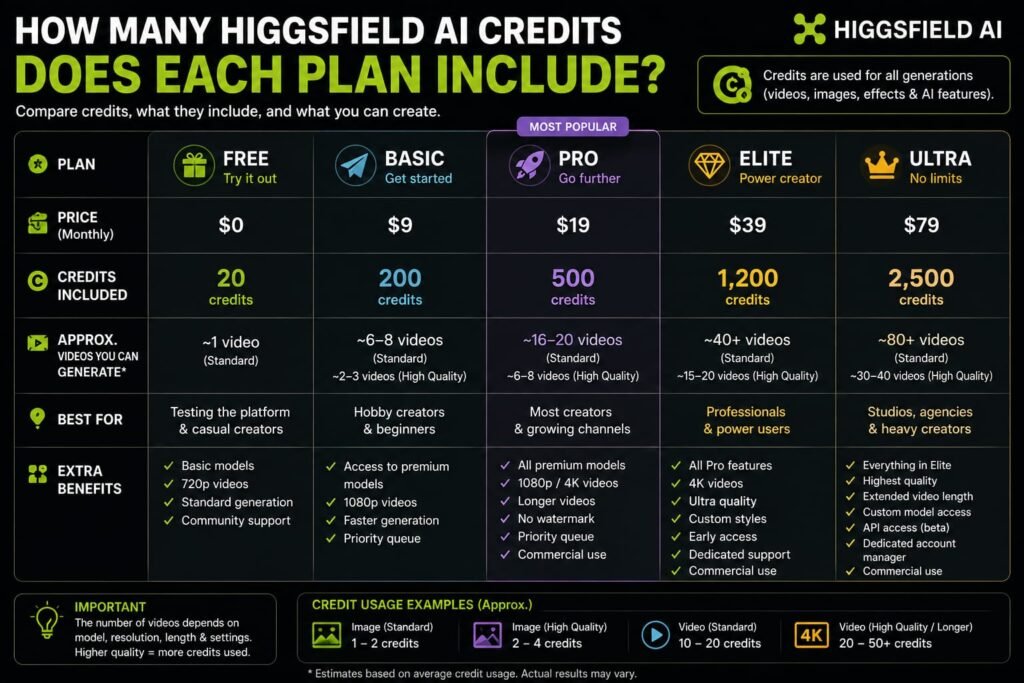
Higgsfield’s plans allocate a fixed monthly pool of credits, though it’s worth flagging upfront that the platform has restructured its plan names and exact credit allotments more than once, so treat the following as a general reference rather than the final word always confirm current numbers on Higgsfield’s official pricing page before subscribing.
| Plan Tier | Approximate Monthly Credits |
|---|---|
| Free | Small daily allowance |
| Entry-level (Starter/Basic) | 120–200 |
| Mid-tier (Plus/Pro) | 600–1,000 |
| Top-tier (Ultra/Max) | 1,800–3,000+ |
| Team | Several thousand, shared across seats |
The wide ranges here reflect genuinely conflicting figures reported across different points in 2026 a sign of how frequently Higgsfield has adjusted its packaging. What stays consistent across every version of the pricing structure is the core principle: higher tiers get proportionally larger credit pools, and the real question isn’t the raw number, but how far that number stretches based on which models you actually use.
What Determines How Many Credits a Generation Actually Costs
The number of Higgsfield AI credits a single generation costs depends on four main factors: which AI model you select, the output resolution, the length of the video, and whether optional features like native audio are enabled.
Model Choice
This is the single biggest factor. Premium, higher-fidelity models consume noticeably more credits per generation than lighter, faster models. Choosing the right model for the task rather than defaulting to the flashiest option is the most impactful lever you have over your monthly credit burn.
Resolution
Higher output resolutions, such as 4K, consume more credits than standard-quality settings. If a project doesn’t specifically require top-tier resolution, dropping down a notch can meaningfully extend your credit balance.
Video Duration
Video credit costs typically scale with the length of the clip, since longer footage requires more compute time to generate. This is also where costs escalate fastest, since most video models charge in short time increments rather than a flat per-video rate more on that below.
Optional Features
Extras like native audio generation or specific camera-control features can add to the credit cost of a generation, so toggling off features you don’t need for a specific clip is an easy way to trim usage.
Video Length and Higgsfield AI Credits: How Per-Second Billing Works
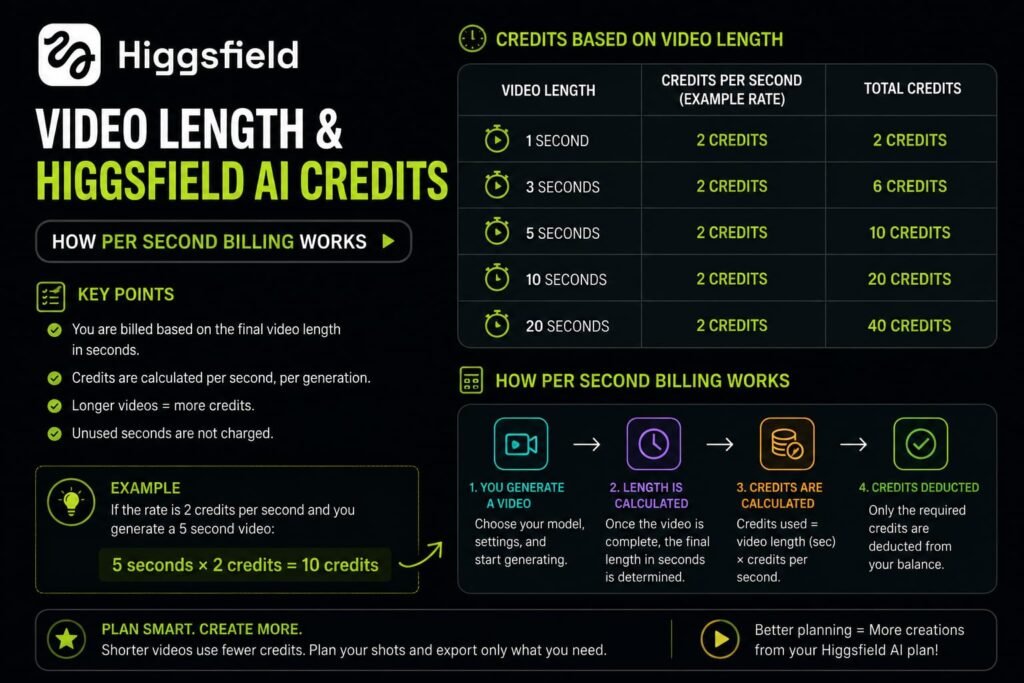
One of the more important, and often misunderstood, details about Higgsfield AI credits is that video generation is typically billed in short time segments rather than per finished clip.
Higgsfield generally charges video credits per short time segment rather than per completed video — models like DOP Lite, Turbo, and Standard bill in roughly 3-second blocks, while models like Sora 2 bill in roughly 4-second blocks, meaning longer videos cost proportionally more credits rather than a flat per-clip price.
This explains why the platform’s advertised “video duration limits” aren’t really hard caps they’re a function of how many credits you have left, not a rule the software enforces. A longer video is simply many short renders stitched together, and each of those segments draws down your balance individually. That’s also why adding camera movement, lighting changes, or switching to a more cinematic model can cause your credit usage to spike faster than you’d expect: those features increase the compute cost of each segment, not just the overall clip.
Practical example: A creator testing out a moody, slow camera pan across a 12-second clip using a premium model will burn through significantly more credits than someone generating the same 12 seconds with a lighter model and no camera movement even though both end up with a video the same length.
Do Higgsfield AI Credits Roll Over Between Billing Cycles?
Generally, no. Monthly plan credits typically reset at the start of each new billing cycle rather than accumulating, which means any credits you don’t use within the month are usually lost rather than carried forward. This is worth factoring into how you plan your usage there’s little financial benefit to under-using your plan in one month hoping to “bank” credits for a bigger project later, since they likely won’t be there when you need them.
How to Get Free Higgsfield AI Credits
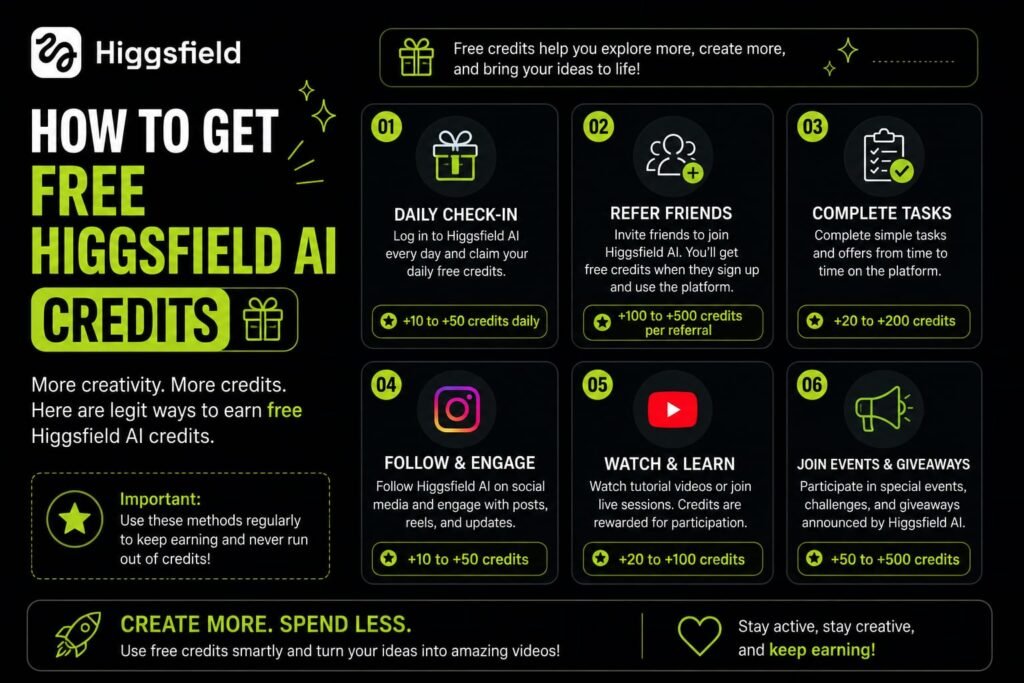
If you want to stretch your usage without immediately upgrading your plan, there are a few legitimate ways Higgsfield distributes extra credits.
The Free Sign-Up Tier
New accounts typically start with a small allotment of free credits or a limited daily allowance, enough to test the platform’s interface and output quality before committing to a paid plan.
Higgsfield Earn (Creator Program)
Higgsfield runs an official creator program called Higgsfield Earn, where you connect and verify a social media account, post AI-generated content through the program’s tracked links, and earn rewards based on the performance and views your content receives. This is one of the more sustainable ways to offset your credit costs if you’re already posting AI video content regularly, since it ties rewards to genuine audience engagement rather than a one-time bonus.
Official Referral Programs
Higgsfield periodically runs referral promotions where inviting a friend who subscribes can earn you bonus access sometimes framed as free days of unlimited access to a specific model provided the referred user completes specific steps, like subscribing and generating content, within a set time window. These programs and their exact terms change fairly often, so check your account dashboard for the current referral offer rather than relying on outdated details.
Official Promotions and Campaigns
Higgsfield occasionally runs limited-time promotional campaigns, including social media giveaways and grant-style programs for aspiring AI filmmakers. These are typically announced through Higgsfield’s own official channels, so following their official social accounts directly is the safest way to catch a legitimate offer rather than relying on third-party links claiming to offer free credits.
A word of caution: Be wary of unofficial “free credits” links, browser tricks, or region-spoofing tactics circulating on social platforms promising large credit bundles. These aren’t officially sanctioned, can violate Higgsfield’s terms of service, and in some cases carry real security risk. Stick to Higgsfield’s own site, app, and verified social accounts for any credit-related offer.
Buying Additional Higgsfield AI Credits (Top-Ups)
If your monthly allocation runs out before your billing cycle resets, Higgsfield offers top-up credit packs you can purchase on top of your existing plan, generally priced in small increments per 100 credits. It’s worth knowing that top-up credits typically come with an expiration window — commonly reported around 90 days from purchase — so buying a large pack expecting to use it gradually over many months carries a real use-it-or-lose-it risk. Only buy as many top-up credits as you’re confident you’ll use within that window.
Tips to Make Your Higgsfield AI Credits Last Longer
A handful of practical habits make a real difference in how far your monthly credits actually stretch:
Match the Model to the Task
Not every project needs your most expensive model. Save premium, high-fidelity options for hero content that genuinely benefits from the extra quality, and use lighter, more efficient models for higher-volume or lower-stakes clips.
Keep an Eye on Resolution Settings
Defaulting to 4K on every generation can quietly drain your balance far faster than necessary. Reserve top resolution for final, polished output rather than early drafts and tests.
Turn Off Features You Don’t Need
If a specific clip doesn’t need native audio or complex camera movement, disabling those options reduces the credit cost of that generation.
Plan Before You Generate
Since video credits are billed per time segment, generating a rough, low-cost draft first to confirm the framing, lighting, and motion before committing to a longer, higher-quality final render can save a meaningful number of credits over a project.
Use Your Monthly Allowance Rather Than Saving It
Because credits typically don’t roll over, spreading your usage evenly across the billing cycle gets more value out of your plan than leaving a large chunk unused and losing it at reset.
Track Usage Through the Dashboard
Higgsfield’s account dashboard shows your remaining credit balance in real time. Checking it periodically — especially before starting a longer or more experimental project — helps you avoid running out mid-session.
Common Higgsfield AI Credits Mistakes to Avoid
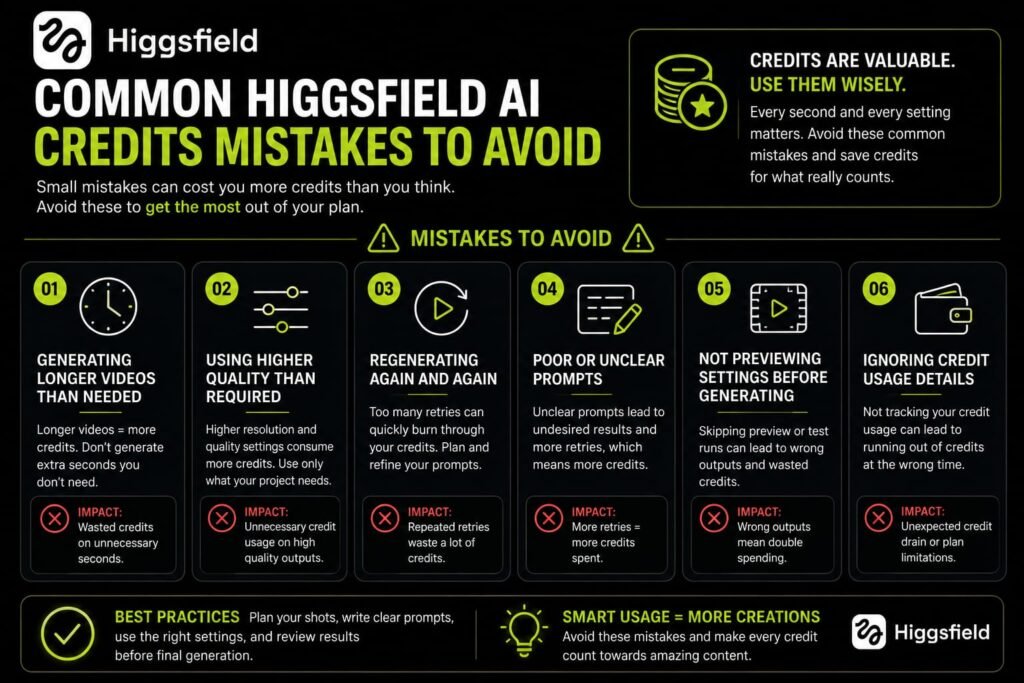
A few recurring mistakes tend to catch new users off guard:
Assuming all models cost the same. Jumping straight to a premium model out of habit, without checking its relative credit cost, is one of the fastest ways to burn through a monthly allowance.
Not checking the per-model cost breakdown before choosing a plan. The advertised credit number on a plan means little without knowing what it actually buys for the models you intend to use most check Higgsfield’s “Compare Plans” or model cost breakdown before subscribing.
Buying large top-up packs “just in case.” Given that top-up credits generally expire within a few months, over-buying ahead of actual need risks losing value rather than saving it.
Ignoring the daily cap on lower tiers. Some plans include daily as well as monthly limits, meaning even a generous-sounding monthly total can leave you blocked mid-session if you try to do all your work in one sitting.
Overlooking free legitimate credit sources. Skipping the official Higgsfield Earn program or referral offers, when you’re already creating and posting content regularly, leaves free value on the table that a lot of active creators end up missing.
Frequently Asked Questions
What are Higgsfield AI credits used for?
Higgsfield AI credits are consumed every time you generate an image or video, or use one of the platform’s specialized apps like Face Swap or Lipsync Studio. The amount deducted depends on the model, resolution, and duration you select.
How many credits does a Higgsfield video cost?
It varies significantly by model and length. Video generation is typically billed in short time segments — roughly every 3 to 4 seconds depending on the model so longer videos and premium models cost proportionally more credits than shorter clips on lighter models.
Do Higgsfield AI credits expire?
Monthly plan credits generally reset at the end of each billing cycle rather than rolling over, so unused credits are typically lost. Purchased top-up credits usually come with their own expiration window, commonly reported around 90 days.
Can I get free Higgsfield AI credits without paying?
Yes, through legitimate channels — new sign-ups typically receive a starter credit allotment, and Higgsfield’s official Earn creator program rewards verified social media content with credits or cash based on performance. Official referral and promotional campaigns also periodically offer bonus credits.
Why did my Higgsfield credits run out so fast?
The most common causes are using premium models by default, generating at high resolution when it isn’t necessary, enabling extras like native audio you didn’t need, or creating longer videos, since video credits are billed per time segment rather than as a flat rate.
Is it better to buy a top-up pack or upgrade my Higgsfield plan?
If you’re consistently running short every month, upgrading your plan tier usually offers better long-term value than repeatedly buying top-ups, since a higher plan tier typically includes a larger base allocation at a better credit-to-dollar ratio. Top-ups are better suited to occasional, one-off overages.
Do all Higgsfield AI models cost the same number of credits?
No. Credit costs vary significantly by model lighter, faster models cost meaningfully less per generation than premium, higher-fidelity options, which is one of the biggest factors in how far your monthly credits actually stretch.
Can I check exactly how many credits a specific model will cost before generating?
Higgsfield’s platform generally surfaces the credit cost for a given model and setting combination before you commit to generating, and the “Compare Plans” section on their pricing page also breaks down relative model costs reviewing this before a big project helps you budget your credits more accurately.
My Final Verdict: Making Higgsfield AI Credits Work for You
Higgsfield AI credits aren’t complicated once you understand the core mechanics: every model costs differently, video is billed by time segment rather than by clip, resolution and extras add to the total, and unused credits typically don’t carry over. The creators who get the most value out of their subscription aren’t necessarily the ones on the most expensive plan they’re the ones who match their model choice to the actual task, keep an eye on their dashboard, and take advantage of legitimate ways to earn extra credits along the way.
If your balance has been disappearing faster than expected, the best next step is a quick audit: check which models you’ve been defaulting to, review your resolution and duration settings on recent projects, and compare that against the per-model cost breakdown on Higgsfield’s official pricing page. A few small adjustments there usually make a bigger difference than upgrading your plan outright and if you’re already creating regularly, it’s worth taking a look at the official Higgsfield Earn program to start offsetting your credit usage instead of paying for all of it out of pocket.
Before choosing a Higgsfield AI plan, it’s worth checking the current subscription options and what each plan includes. Our detailed guide to Higgsfield AI pricing in 2026 breaks down the available plans, credits, features, and overall value so you can decide which option is right for you. Once you know which plan fits your needs, you can also check this page for the latest Higgsfield AI promo codes and available discounts to potentially save money on your subscription.
Related Reads:
What Is Lovable AI? The Complete Guide to the AI App Builder Everyone’s Talking About
Is Lovable AI Free? Here’s What You Actually Get
Claude Pro vs ChatGPT Plus: The Real Difference Between These $20 AI Plans
How to Fix AI Image Generator Deformities in Fingers, Toes, and Other Anomalies
What Is Meta AI Muse Spark? The Complete 2026 Guide to Meta’s Flagship AI Model
Kimi K3 Explained: Inside Moonshot AI’s Record-Breaking Open Mode
Best AI App Builder in 2026: 10 Top Tools to Build an App Without Coding
Bolt AI App Builder: The Complete Guide to Building Apps in Your Web Browser
Higgsfield AI Pricing in 2026: Every Plan, Credit Cost, and What You Actually Get