
Higgsfield AI pricing explained: Free, Starter, Plus, Ultra, and Business plans compared, plus what each credit actually buys in 2026.
If you’ve been comparing AI video tools and landed on Higgsfield, you’ve probably run into the same wall most people do: the pricing page looks simple at first glance, and then gets confusing fast. Three or four plan names, a credit number next to each one, and no clear answer to the question that actually matters — how many videos does that credit number actually buy you?
Higgsfield AI pricing is built around a credit system that aggregates more than a dozen leading AI video and image models — Sora, Veo, Kling, Seedance, and others under one subscription, and different models drain your credit balance at very different rates. That structure makes Higgsfield genuinely good value for the right user, and a confusing overspend for the wrong one.
This guide breaks down exactly how Higgsfield’s pricing works: what each plan costs, what a credit actually buys depending on which model you use, whether there’s a real free option, and how the whole system compares to alternatives like Runway and Kling. By the end, you’ll know exactly which plan fits your actual workload instead of guessing based on the sticker price alone.
A quick note before we start: Higgsfield has restructured its pricing more than once since its 2025 launch, and the numbers in this guide reflect the most consistently reported figures as of mid-2026. Given how often the platform adjusts its tiers, always confirm current pricing directly on higgsfield.ai/pricing before subscribing.
What Is Higgsfield AI?
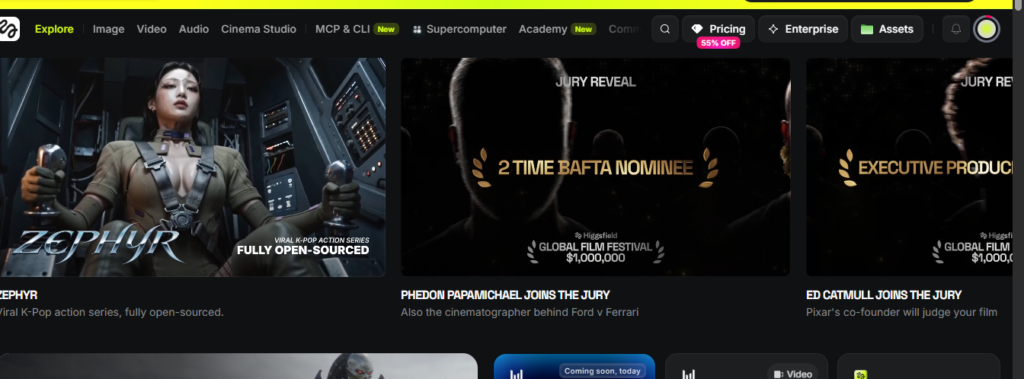
Before breaking down the cost, it helps to understand what you’re actually paying for. Higgsfield AI is a unified content-generation platform that gives you access to 15 or more leading AI video and image models including Sora 2, Veo 3.1, Kling 3.0, WAN 2.6, Seedance 2.0, and Hailuo 02 through a single subscription, rather than requiring separate accounts and separate bills for each one. On top of raw model access, it includes a library of more than 80 specialized apps for tasks like face swapping, headshot generation, and lip-syncing.
That “everything in one place” positioning is the core of Higgsfield’s value proposition, and it’s also why its pricing works differently from a single-model tool: you’re not just paying for one video generator, you’re paying for credit access across an entire model catalog.
How Higgsfield AI Pricing Actually Works: The Credit System Explained
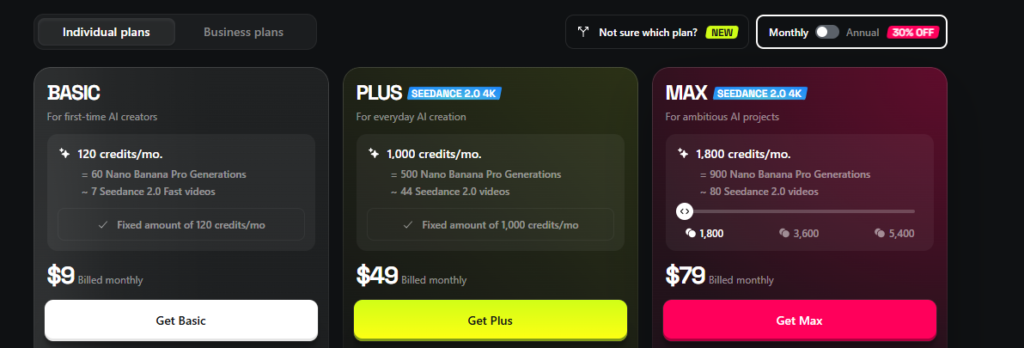
Higgsfield AI pricing is built on a credit-based subscription model, where each paid plan provides a fixed monthly credit allowance, and different AI models consume different amounts of credits per generation premium models like Veo 3 use significantly more credits than standard models like Kling.
Every plan gives you a set number of credits per billing cycle. When you generate a video, an image, or use one of the platform’s specialized apps, credits get deducted based on which model you used, the resolution you selected, and sometimes the length of the clip. Higher-end models and higher resolutions (like 4K output) cost more credits per generation than standard-quality options.
This means the plan price alone doesn’t tell you what you can actually produce. Two people on the exact same plan can end up with very different monthly output, simply because one of them is generating quick clips with a lightweight model while the other is rendering longer 4K videos with a premium one.
Credits Don’t Roll Over
An important detail that trips up a lot of subscribers: unused monthly credits on Higgsfield’s core plans typically don’t carry over into the next billing cycle. If you don’t use your full allocation within the month, it resets so there’s little benefit to under-using your plan in hopes of “saving up” credits for a bigger project later.
Is There a Higgsfield AI Free Plan?
Higgsfield AI offers a free tier with a limited daily credit allowance, giving new users enough access to test the interface, try select generation tools, and evaluate output quality before committing to a paid plan — but it isn’t built to support ongoing, regular content production.
The free option is real, but it’s designed as an evaluation tool rather than a working production plan. You can explore the platform, generate a small number of images or videos, and get a genuine feel for output quality — but if you’re creating content on any kind of regular schedule, you’ll run into the daily limit quickly. Think of the free tier as a test drive rather than a long-term option.
Higgsfield AI Pricing Plans Breakdown
Here’s how the paid tiers generally break down, based on the most consistently reported figures across current pricing sources:
| Plan | Monthly Price (Annual Billing) | Monthly Price (Month-to-Month) | Credits/Month |
|---|---|---|---|
| Free | $0 | $0 | Limited daily allowance |
| Starter | ~$15 | Higher when paid monthly | ~200 |
| Plus | ~$39 | ~$49 | ~1,000 |
| Ultra | ~$99 | ~$129 | ~3,000 (scalable higher) |
Starter Plan (~$15/month)
The Starter plan is aimed at individual creators just getting into regular AI content production. With roughly 200 monthly credits, it typically supports parallel processing for a couple of video generations and a handful of image generations at once enough for casual, consistent use without heavy daily output. As a rough guide, 200 credits translates to somewhere around 100 lightweight image generations or roughly 30+ videos using a lower-cost model like Kling.
Plus Plan (~$39/month annual, ~$49 monthly)
Plus is the tier most reviewers point to as the sweet spot for regular solo creators. It typically unlocks access to the full model library rather than restricting certain premium models to the higher tier, and its roughly 1,000 monthly credits translate to meaningfully more output potentially over 100 videos on a lower-cost model, or considerably fewer if you’re leaning on premium options like Veo.
Ultra Plan (~$99/month annual, ~$129 monthly)
Ultra is built for high-volume creators and small studios. Its base credit allowance of around 3,000 can scale significantly higher on larger custom packages, and it typically includes the fastest processing priority and the broadest access to premium models without hitting the throttling that can affect lower tiers during high-traffic periods.
Higgsfield Business and Enterprise Pricing
For teams and larger organizations, Higgsfield offers pricing beyond the individual-creator tiers:
Business plan: Generally priced somewhere in the range of $62-89 per seat per month (lower with annual billing), the Business tier adds team-oriented features on top of the same credit-based foundation, aimed at marketing teams or studios needing shared access across multiple users.
Enterprise: For organizations with larger-scale or custom requirements, Higgsfield offers negotiated Enterprise pricing rather than a fixed public rate, typically involving direct contact with the sales team to scope out volume and specific needs.
What Does a Higgsfield Credit Actually Buy?
This is the single most important thing to understand before choosing a plan, since the headline credit numbers mean very little without context.
A Higgsfield credit’s value depends entirely on which AI model you use lower-cost models like Kling 3.0 can produce a video for a fraction of the credits that premium models like Veo 3 require, meaning the same monthly credit allowance can generate dramatically different output volumes depending on your model choice.
To put real numbers on this: on the Ultra plan’s roughly 3,000 monthly credits, reports suggest you could generate somewhere around 428 videos using a lower-cost model like Kling 3.0, but only around 51 videos if you’re exclusively using a premium model like Veo 3. That’s nearly a ten-times difference in output from the exact same credit pool, purely based on which model you choose.
Practical example: A social media creator making quick, high-volume short-form clips will get dramatically more mileage out of their monthly credits sticking mostly to efficient models. A filmmaker or brand producing a small number of high-production-value hero videos will burn through credits much faster, even on a higher-tier plan, simply because premium models cost more per generation.
Before committing to a plan, it’s worth checking the “Compare Plans” or credit-cost breakdown on Higgsfield’s own pricing page for the specific models you intend to use most, since this detail changes how far your subscription actually stretches.
Higgsfield AI Top-Up Credits and Add-Ons
If you run out of your monthly allocation before your billing cycle resets, Higgsfield offers additional credit packs you can purchase on top of your plan — generally priced around $5 per 100 credits. It’s worth knowing that these top-up credits typically expire roughly 90 days after purchase, which creates a use-it-or-lose-it dynamic if you buy a large pack expecting to use it gradually over a longer stretch.
Monthly vs. Annual Billing: How Much You Actually Save
Across all of Higgsfield’s paid tiers, billing annually rather than month-to-month brings a meaningful discount — though the exact savings vary by plan rather than following one flat percentage. On the Plus plan, for instance, annual billing brings the effective monthly cost down from roughly $49 to around $39, while Ultra drops from about $129 to roughly $99. That’s a real enough gap that if you’re confident you’ll be using the platform for more than a few months, annual billing is usually the better financial choice just be aware you’re committing to that plan for the full year up front.
Does Higgsfield Throttle “Unlimited” Usage?
Plus and Ultra plans often advertise unlimited generation access for certain models, which sounds like a straightforward escape from the credit-counting math above — but there’s a caveat worth knowing. Higgsfield’s own pricing page reportedly discloses that unlimited usage may be subject to dynamic speed adjustments during high-traffic periods, meaning your generations can slow down when the platform is under heavy demand, even on a plan advertised as unlimited. It’s not a bug or a hidden catch exactly it’s disclosed policy but it’s worth factoring in if consistent, fast turnaround matters for your workflow.
Higgsfield AI Pricing vs. Competitors
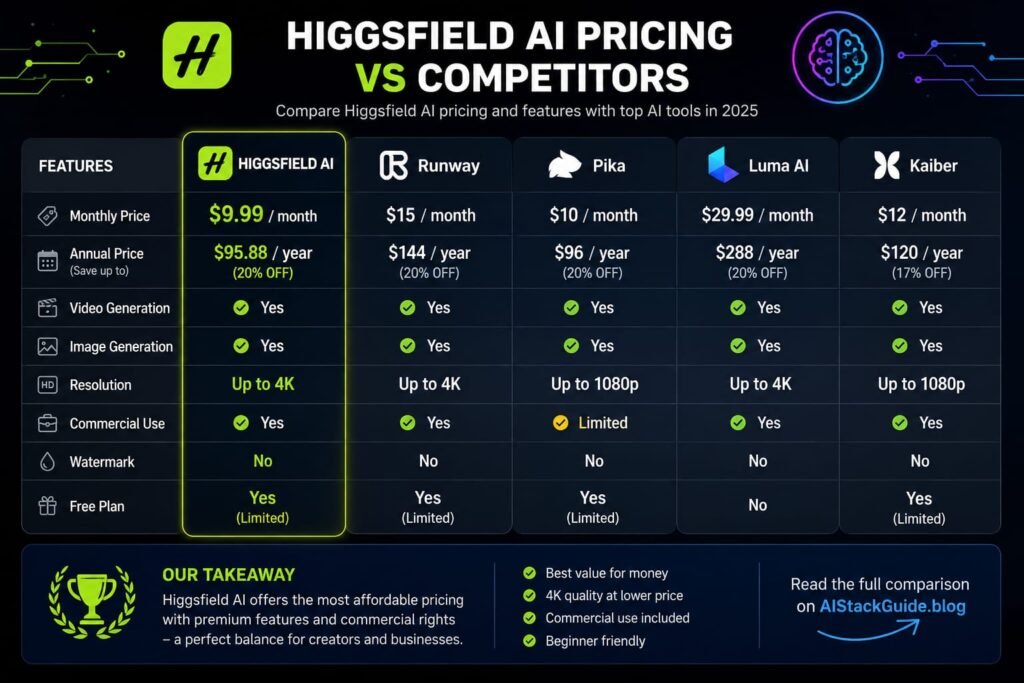
How does Higgsfield actually stack up against the alternatives you might also be considering?
Higgsfield vs. Runway or Kling Directly
Subscribing to a single model provider directly, like Kling, can sometimes work out cheaper per video if that’s the only model you use — but you lose the flexibility of switching between 15+ different models under one account, which is Higgsfield’s core appeal.
Higgsfield vs. VEO3 AI
For everyday Veo 3 Fast generation specifically, dedicated Veo-focused platforms have been reported as consistently cheaper per video than Higgsfield across most tiers. Higgsfield tends to become more cost-competitive specifically for large-scale annual usage on its Premium models, rather than for casual or occasional Veo generation.
Higgsfield vs. ImagineArt
ImagineArt has been noted as offering a lower entry price point and including features like AI Workflows and custom model training that Higgsfield doesn’t offer at any tier — worth a look if those specific capabilities matter more to you than Higgsfield’s broader model catalog.
The Bottom Line on Comparisons
Higgsfield’s real strength isn’t necessarily being the cheapest option for any single model it’s the convenience and flexibility of accessing a wide range of top-tier models under one subscription instead of juggling several separate accounts and bills. If you regularly switch between different models depending on the project, that convenience often outweighs a slightly higher per-video cost on any one model in isolation.
Which Higgsfield AI Plan Should You Choose?
Use this as a rough decision guide based on your actual usage pattern:
Choose the Free plan if you just want to test output quality and platform usability before spending anything.
Choose Starter if you’re a casual or occasional creator producing content a few times a month, primarily using lower-cost models.
Choose Plus if you’re a regular solo creator who wants access to the full model catalog and a credit pool that comfortably supports consistent weekly output.
Choose Ultra if you’re a high-volume creator or small studio that needs the largest credit pool, priority processing, and the least exposure to unlimited-tier throttling during busy periods.
Choose Business if you’re coordinating access across a team or studio and need shared, seat-based billing rather than individual accounts.
Tips to Get the Most Value From Your Higgsfield AI Plan
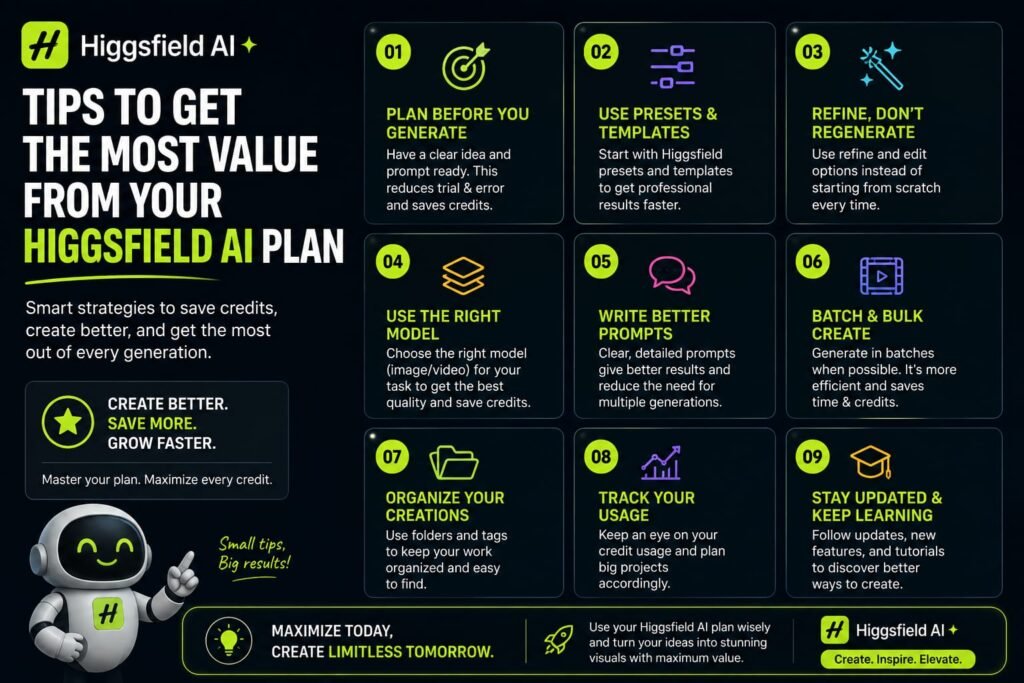
A few habits make a real difference in how far your credits actually stretch:
- Match your model to the task, not the hype. Save premium models like Veo 3 for hero content that genuinely needs the extra quality, and use efficient models like Kling for higher-volume, lower-stakes output.
- Check the credit-cost breakdown before committing to a plan. The “Compare Plans” section on Higgsfield’s own pricing page reveals per-model credit costs that the headline plan price doesn’t show you.
- Use your credits before they reset. Since unused monthly credits typically don’t roll over, spreading your usage evenly across the month gets more value than leaving a chunk unused.
- Be cautious with large top-up purchases. Since top-up credits generally expire around 90 days after purchase, buy only what you’re confident you’ll use within that window.
- Reconsider your resolution settings. Higher resolutions like 4K consume more credits per generation if a project doesn’t specifically need top-tier resolution, a standard setting stretches your credit pool further.
Frequently Asked Questions
How much does Higgsfield AI cost per month?
Paid plans generally range from around $15/month for Starter up to roughly $99–$129/month for Ultra, depending on whether you choose annual or monthly billing, with additional Business and Enterprise tiers for teams and larger organizations.
Is Higgsfield AI free to use?
Higgsfield offers a free tier with a limited daily credit allowance, suitable for testing the platform and evaluating output quality, but it isn’t designed to support regular, ongoing content production.
What is a Higgsfield credit, and how far does it go?
A credit is the unit consumed each time you generate a video or image on Higgsfield. Its real value varies significantly by model — lower-cost models like Kling can produce far more output per credit than premium models like Veo 3.
Do unused Higgsfield credits roll over to the next month?
Generally, no. Monthly plan credits typically reset at the start of each billing cycle rather than accumulating, so unused credits are usually lost rather than carried forward.
Does Higgsfield AI offer a discount for annual billing?
Yes. Annual billing brings a meaningful discount compared to paying month-to-month across all paid tiers, though the exact savings percentage varies by plan rather than being a flat rate.
Can I buy extra credits if I run out mid-month on Higgsfield?
Yes. Higgsfield offers top-up credit packs, generally priced around $5 per 100 credits, though these typically expire roughly 90 days after purchase.
Is Higgsfield cheaper than subscribing to Runway or Kling separately?
It depends on your usage. If you only use one model consistently, a dedicated single-model subscription can sometimes be cheaper per video. Higgsfield’s value comes from bundling access to 15+ models under one subscription rather than necessarily being the cheapest option for any single model.
Are “unlimited” generations on Higgsfield’s higher plans actually unlimited?
Mostly, but with a caveat Higgsfield’s own pricing disclosures note that unlimited usage on Plus and Ultra plans may be subject to dynamic speed adjustments during high-traffic periods, meaning generation can slow down under heavy platform demand even on an unlimited tier.
Has Higgsfield AI pricing changed recently?
Yes, multiple times since its 2025 launch. Because the platform has restructured its tiers and credit allocations more than once, it’s worth confirming current pricing directly on higgsfield.ai/pricing before subscribing, rather than relying solely on older published figures.
My Final Verdict: Is Higgsfield AI Pricing Worth It in 2026?
Higgsfield AI pricing rewards people who actually understand the credit system before they subscribe, and can catch casual users off guard if they don’t. The headline plan prices Starter around $15, Plus around $39, Ultra around $99 on annual billing only tell part of the story; the real cost-per-video depends heavily on which of Higgsfield’s 15+ models you actually use.
For creators who value having Sora, Veo, Kling, and a dozen other leading models under one subscription instead of juggling several separate accounts, that convenience is usually worth a slightly higher per-video cost on any single model. For creators who only ever need one specific model, a dedicated single-model platform might work out cheaper.
The smartest next step is simple: start with Higgsfield’s free tier, test the models you’d actually use for your real projects, and check the live credit-cost breakdown on their official pricing page before choosing a paid plan. That hands-on test will tell you far more about real value than any plan comparison table — including this one.
Understanding Higgsfield AI’s credit system is important before choosing a subscription plan. The number of credits you receive determines how much content you can generate, while different models, video lengths, and quality settings can consume credits at different rates. If you’re deciding which plan offers the best value, check our detailed Higgsfield AI Pricing in 2026 guide. And before you subscribe, don’t forget to check our Higgsfield AI Promo Code guide for available discounts and offers that could help reduce your cost.
Related Reads:
What Is Lovable AI? The Complete Guide to the AI App Builder Everyone’s Talking About
Is Lovable AI Free? Here’s What You Actually Get
Claude Pro vs ChatGPT Plus: The Real Difference Between These $20 AI Plans
How to Fix AI Image Generator Deformities in Fingers, Toes, and Other Anomalies
What Is Meta AI Muse Spark? The Complete 2026 Guide to Meta’s Flagship AI Model
Kimi K3 Explained: Inside Moonshot AI’s Record-Breaking Open Mode
Best AI App Builder in 2026: 10 Top Tools to Build an App Without Coding
Bolt AI App Builder: The Complete Guide to Building Apps in Your Web Browser