
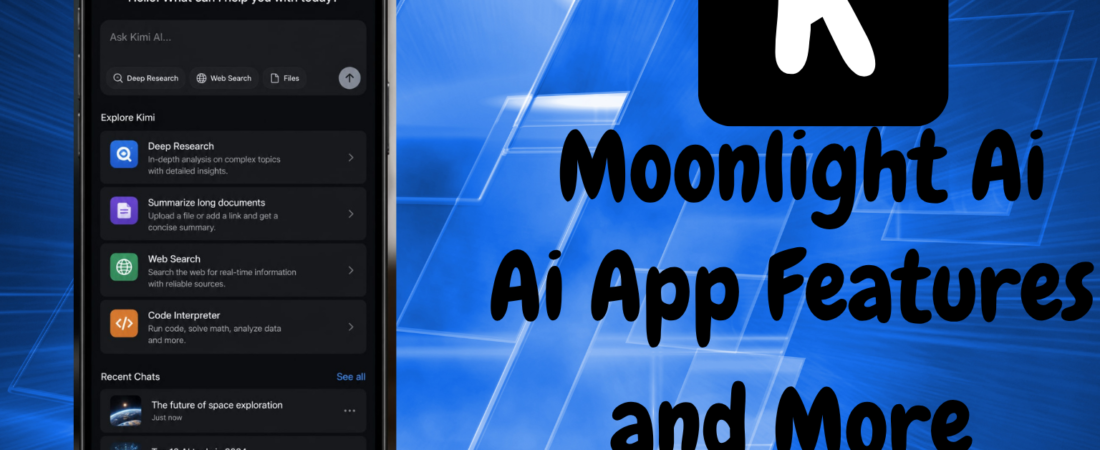
Kimi AI app guide: download links, English support, features, modes, and how it evolved from Kimi K1.5 to today’s Kimi K3 model.
A Chinese AI assistant climbing to the top of app store charts and coding leaderboards in the same month isn’t something that happens often but that’s exactly the run Kimi has had. Built by Beijing-based Moonshot AI, the Kimi AI app has grown from a research curiosity into a genuinely capable, English-friendly assistant that handles everything from quick chat questions to multi-step research and document generation.
If you’re trying to figure out what the Kimi AI app actually does, whether it works well in English, how to download it safely, and how it evolved from its early Kimi K1.5 model into the frontier-level Kimi K3 powering it today, this guide covers it all. By the end, you’ll know exactly what to expect before you install it.
What Is the Kimi AI App?
The Kimi AI app is a free mobile and web assistant developed by Moonshot AI, offering chat, deep reasoning, multi-step agent tasks, web search, and document generation available in English and more than a dozen other languages across iOS, Android, web, and desktop.
Kimi is built as an all-in-one assistant rather than a simple chatbot. Beyond back-and-forth conversation, it can browse the web for current information automatically, analyze uploaded files and images, write and debug code, and — through its more advanced agent modes complete multi-step tasks like generating a slide deck or compiling a research report with minimal step-by-step prompting from you.
From Kimi K1.5 to Kimi K3: The Model Behind the App
To understand what the Kimi AI app can do today, it helps to know the model history behind it, since “Kimi K1.5” is a name a lot of people still search for without realizing how much has changed since.
Kimi K1.5: Where It All Started
Kimi K1.5 was announced on January 20, 2025 — the same day DeepSeek published its own R1 reasoning paper. K1.5 was a multimodal reasoning model built on advanced reinforcement learning, and Moonshot claimed it matched the performance of OpenAI’s o1 model in math, coding, and multimodal reasoning at the time. It was offered in two variants a long chain-of-thought version for detailed reasoning and a short chain-of-thought version for faster answers — and was notable for being free to use with no usage limits when it launched.
Kimi K1.5 is no longer Moonshot AI’s active production model it was a research-stage reasoning system from January 2025, and current verification of Moonshot’s official model list shows no active kimi-k1.5 model ID available through the Kimi app or API today.
If you’re specifically looking to use “Kimi K1.5,” it’s worth knowing upfront that it’s now a historical model rather than something you can select in the current app. Its real legacy is technical rather than practical: the K1.5 research paper, published alongside DeepSeek’s R1 paper, helped establish a widely referenced approach for training reasoning models using reinforcement learning on verifiable rewards a technique that influenced much of the reasoning-model progress that followed across the industry.
The Path to Kimi K2 and K2.5
Following K1.5, Moonshot released Kimi K2 in July 2025 a full switch to an open-weight release strategy, with a 1-trillion-parameter Mixture-of-Experts architecture released under a modified MIT license. K2.5 followed in January 2026, expanding to native multimodal training across roughly 15 trillion mixed visual and text tokens, adding coordinated multi-agent task execution to the lineup.
Kimi K3: What Powers the App Today
The model actually running behind the Kimi AI app today is Kimi K3, released in July 2026. It’s a 2.8-trillion-parameter model reportedly the largest open-weight model released to date — built with two internally developed techniques, Kimi Delta Attention and Attention Residuals, that improve computing efficiency and reasoning quality. It supports a 1-million-token context window, processes both text and images natively, and is built specifically for long-horizon coding, research, and reasoning tasks. Independent benchmarking from Artificial Analysis placed K3 fourth among 189 tested models on its Intelligence Index behind Claude Fable 5 and two GPT-5.6 Sol configurations, but ahead of models like Claude Opus 4.8 and GPT-5.5.
Kimi App Download: How to Get Kimi on Every Platform
The Kimi AI app can be downloaded for free from the official Apple App Store and Google Play Store, used directly in a browser at kimi.com with no installation required, or installed as Kimi Work on supported Windows PCs and Apple-silicon Macs.
Downloading on iPhone (iOS)
Kimi is available as a free download on the Apple App Store, requiring iOS 15.0 or later. Search for “Kimi – Kimi K3 is Live” and confirm the developer listed is Moonshot AI before installing.
Downloading on Android
Kimi is available on Google Play as a free download. When downloading, confirm the developer is Moonshot AI and that the app’s package ID reads com.moonshot.kimichat — this is the safest way to verify you’re installing the official app rather than an impersonator.
Using Kimi on the Web
No installation is required if you’d rather use Kimi directly in a browser simply visit kimi.com to start chatting, researching, and generating content without downloading anything.
Installing Kimi on Desktop
For Windows PCs and Apple-silicon Macs, Moonshot offers Kimi Work, a dedicated desktop application built for deeper, sustained work sessions rather than quick mobile interactions.
A Word of Caution on Unofficial Downloads
Stick to the official App Store, Google Play, and kimi.com channels. Unofficial APK, EXE, or DMG files circulating outside these official channels can be outdated, modified, or designed to impersonate the real app a real risk given how quickly a popular AI app tends to attract copycats.
Kimi AI English: Is the App Fully Usable in English?
Yes. The Kimi AI app fully supports English as a primary interface and conversation language, alongside French, German, Indonesian, Italian, Japanese, Korean, Portuguese, Russian, Simplified and Traditional Chinese, Spanish, Thai, Turkish, and Vietnamese.
Despite being developed by a Beijing-based company, Kimi’s English support is genuinely robust rather than an afterthought — the interface, chat responses, document generation, and web search results all work natively in English, and user reviews consistently describe the English-language experience as fluent and natural rather than machine-translated or stilted. If English is your primary language, you shouldn’t run into friction using any part of the app.
Key Features of the Kimi AI App
Beyond basic chat, several features stand out as genuinely useful in daily use.
Web Search Built In
Kimi automatically decides when to search the web based on your question, without requiring you to manually toggle a search feature on or off. This means answers involving current events, recent figures, or regulatory changes stay grounded in up-to-date information rather than relying solely on the model’s training data.
Long Context and Multi-File Analysis
Kimi supports processing large volumes of uploaded material at once you can upload dozens of PDFs, Word documents, or slide decks in a single conversation and ask for a summary, comparison, or detailed outline, with the model tracking key points across all of them so follow-up questions stay grounded in the source material.
Office-Style Document Generation
Kimi works directly with Word, PowerPoint, Excel, and PDF files without losing formatting it can generate complex Excel formulas and charts, apply layout changes to a Word document or PDF, and add annotations, planning the steps and executing them within the same workspace.
Visual Agentic Slides
Upload a visual reference, and Kimi can customize a presentation to match that specific visual style, generating professionally formatted, personalized slides from a single prompt rather than requiring manual design work.
Vision and Screenshot Understanding
You can upload screenshots or design mockups and have Kimi generate structured outputs code, documents, tables — based directly on what’s in the image, which is particularly useful for mobile users who want to turn something they’ve seen on screen into a usable result quickly.
Kimi’s Modes Explained: Instant, Thinking, Agent, and Swarm
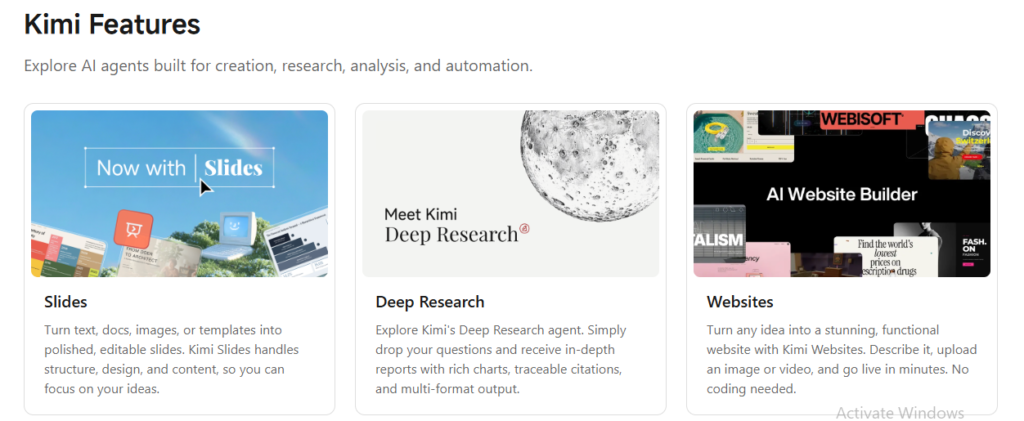
One of the more distinctive aspects of the Kimi AI app is that it doesn’t force you into a single interaction style it offers multiple modes depending on the complexity of what you’re asking.
Instant Mode
Built for fast, direct responses to straightforward questions, without deeper step-by-step reasoning.
Thinking Mode
For more complex problems — math, logic, algorithms Thinking Mode has Kimi work through intermediate reasoning steps visibly, which is particularly useful if you want to actually understand a solution rather than just receive a final answer.
Agent Mode
For multi-step tasks that go beyond a single response, Agent Mode lets Kimi use tools, take actions, and complete a task through to the end — generating a document, running a multi-part analysis, or completing a defined workflow with less manual prompting at each stage.
Agent Swarm
For genuinely large-scale tasks — massive literature reviews, wide-ranging research, or long industry report writing Kimi can dynamically deploy up to 300 sub-agents working in parallel to execute thousands of steps, compressing work that would traditionally take hours into a dramatically shorter timeframe.
What Can You Actually Do With the Kimi AI App?
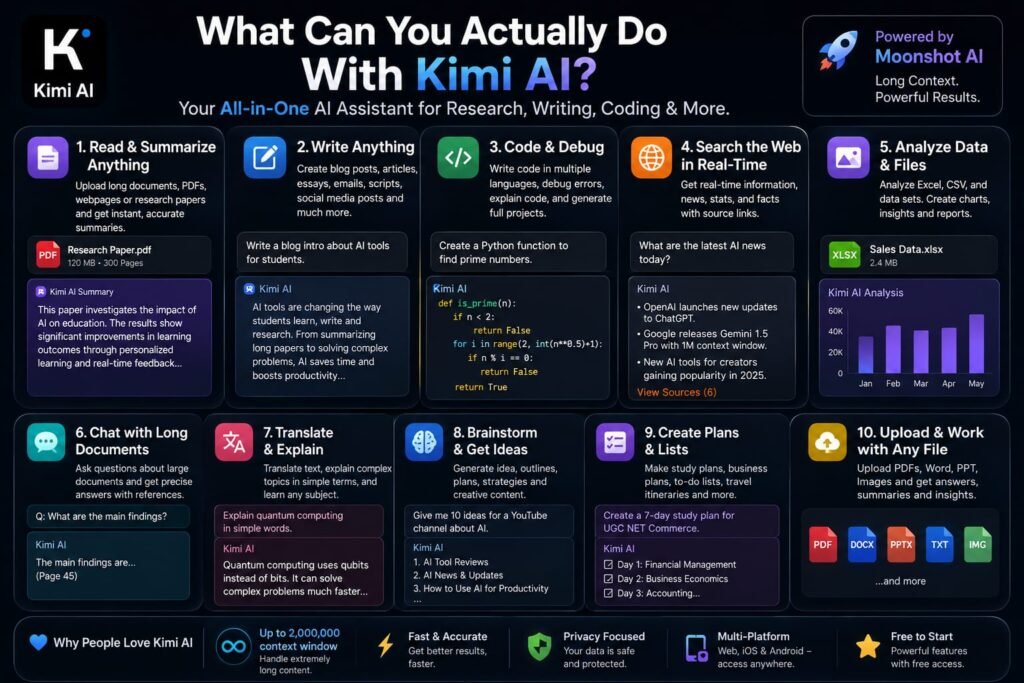
Bringing the features and modes together, here’s what day-to-day use of Kimi actually looks like:
- Research and studying — uploading multiple sources and asking for a synthesized summary, comparison, or set of potential exam questions based on the material
- Coding help — pasting code snippets for debugging, asking for rewrites in another language, or requesting short scripts with step-by-step explanations
- Document and presentation creation — generating polished slide decks, Excel models, or formatted reports directly from a prompt or an uploaded reference
- On-the-go research — using the mobile app’s screenshot and vision capabilities to turn something you’ve just seen into a structured output without switching to a laptop
Example: A student researching a complex topic could upload several PDF sources into one conversation, use Thinking Mode to work through a difficult concept step by step, and then switch to Agent Mode to have Kimi compile everything into a formatted summary document — all inside a single continuous chat thread.
Kimi AI App Pricing and Membership Tiers

The Kimi AI app is free to download with no upfront purchase required, and ordinary chat using Kimi’s standard model generally doesn’t consume any membership credits. That said, heavier usage certain models, Agent tasks, and more advanced desktop workflows can draw from a separate membership allowance. As of recent verification, Moonshot’s English Help Center listed four paid membership tiers: Moderato, Allegretto, Allegro, and Vivace, offering increasing levels of usage capacity for users who need more than the free allowance covers.
Exact limits, billing terms, and available purchase options can vary by account, region, and platform, so it’s worth checking the current pricing details directly in the app or on kimi.com before assuming a specific tier fits your needs.
Is the Kimi AI App Safe to Download?
This is a fair question for any AI app, and especially one developed outside the US. The safest approach is straightforward: download only through the official App Store, Google Play, or kimi.com listings, and verify the developer is listed as Moonshot AI before installing. As with any app requesting permissions, review what each permission is actually used for in the context of the specific feature you’re enabling, rather than granting broad access by default.
It’s also worth noting that Kimi’s developer disclosure indicates the app may use data to track users across apps and websites owned by other companies a standard disclosure category on app store listings, but worth reviewing in the app’s privacy policy if data tracking is a concern for you specifically.
Kimi AI App vs. ChatGPT, Claude, and Gemini: How Does It Compare?
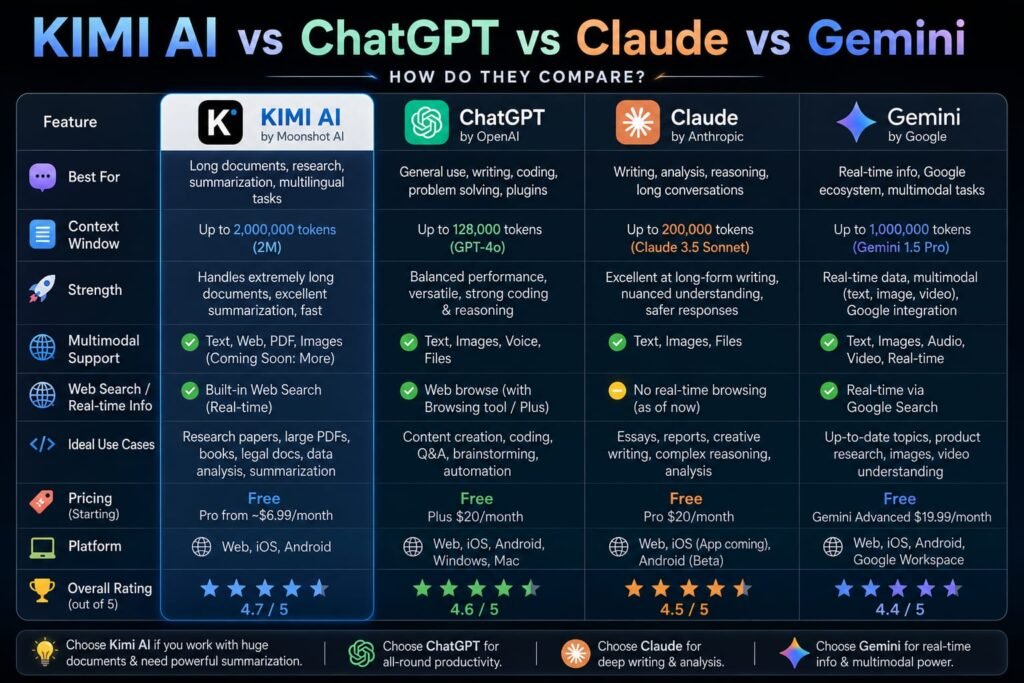
If you’re deciding whether to add Kimi alongside or instead of a more established assistant, here’s how it stacks up in practice.
Kimi vs. ChatGPT: Kimi’s free tier is notably generous, with ordinary chat use not consuming membership credits, and its Agent Swarm feature offers a distinct multi-agent research capability that ChatGPT’s standard tiers don’t directly replicate in the same form.
Kimi vs. Claude: Claude has traditionally been favored for careful, closely-instructed long-form writing, while Kimi’s strengths lean toward its agentic task execution and document-generation workflows, plus its transparent visible reasoning in Thinking Mode.
Kimi vs. Gemini: Both offer strong multimodal capabilities, but Kimi’s built-in office-file handling (Word, Excel, PowerPoint, PDF) without losing formatting is a specific, practical advantage for users whose work revolves around document creation and editing.
The overall takeaway: Kimi isn’t necessarily “better” across every category, but its combination of a genuinely free tier, strong English support, and agentic document workflows makes it a serious alternative worth testing alongside whichever assistant you’re currently using.
Tips for Getting the Best Results From the Kimi AI App
A few habits noticeably improve output quality:
- Be specific about deliverables and format. Instead of a vague request, structure your prompt around what you want, any constraints, and the format you need — for example, asking for a defined word count with specific sections rather than just “write about X.”
- Use Thinking Mode for anything you want to actually understand. If you’re studying a concept rather than just needing a quick answer, Thinking Mode’s visible reasoning steps are genuinely useful for learning, not just getting the final result.
- Batch your file uploads. Since Kimi tracks context across multiple uploaded files, uploading all your relevant sources at once produces more consistent, better-grounded follow-up answers than uploading them one at a time across separate messages.
- Reach for Agent Mode on multi-step tasks. If a task naturally breaks into several stages — research, draft, format — Agent Mode reduces how much manual prompting you need at each individual step.
Frequently Asked Questions
What is the Kimi AI app used for?
The Kimi AI app is used for chat-based Q&A, deep reasoning on complex problems, coding assistance, document and presentation generation, multi-file research analysis, and multi-step agent tasks all available on mobile, web, and desktop.
Is the Kimi AI app free to download?
Yes. Kimi is free to download on iOS and Android, and ordinary chat with the standard model generally doesn’t consume membership credits, though heavier usage of certain features draws from paid membership tiers.
Does the Kimi AI app work well in English?
Yes. English is fully supported across the interface, chat, and document features, alongside more than a dozen other languages, and user reviews consistently describe the English experience as natural rather than machine-translated.
What happened to Kimi K1.5?
Kimi K1.5 was Moonshot AI’s early reasoning model, announced in January 2025. It’s now a historical research model rather than an active product — the current Kimi app runs on Kimi K3, a far more advanced model released in July 2026.
How do I download the Kimi app safely?
Download only through the official Apple App Store, Google Play Store, or kimi.com, and confirm the developer is listed as Moonshot AI. Avoid unofficial APK, EXE, or DMG files from third-party sites, which can be outdated or modified.
What’s the difference between Kimi’s Instant, Thinking, and Agent modes?
Instant Mode gives fast, direct answers; Thinking Mode shows visible step-by-step reasoning for complex problems; and Agent Mode lets Kimi complete multi-step tasks like generating a document or running a multi-part analysis with less manual prompting at each stage.
Can Kimi search the web for current information?
Yes. Kimi automatically decides when a question needs current, real-time information and searches the web accordingly, without requiring you to manually enable a search toggle.
Is Kimi good for coding help?
Yes. You can paste code snippets for debugging, ask for rewrites in another programming language, or request example scripts with step-by-step explanations, and the underlying Kimi K3 model is specifically built with strong coding and long-horizon reasoning capabilities.
Does Kimi work with Word, Excel, and PowerPoint files?
Yes. Kimi can generate and edit content across Word, PowerPoint, Excel, and PDF files without losing formatting, including generating complex Excel formulas and applying layout changes directly within the same workspace.
The Final Verdict: Should You Download the Kimi AI App in 2026?
The Kimi AI app has come a long way from its Kimi K1.5 research origins what started as an experimental reasoning model in January 2025 now powers a genuinely capable, English-friendly assistant running on the frontier-level Kimi K3, with real strengths in document generation, multi-file research, and multi-step agent tasks that go well beyond simple chat.
If you’re deciding whether it’s worth adding to your toolkit, the fastest way to find out is a direct test: download the official app from the App Store or Google Play, upload a real document you’re working with, and try switching between Thinking and Agent modes on an actual task. That hands-on trial will tell you more about whether Kimi fits your workflow than any feature list and since it’s free to start, there’s genuinely no downside to trying it for yourself.
Related Reads:
What Is Lovable AI? The Complete Guide to the AI App Builder Everyone’s Talking About
Is Lovable AI Free? Here’s What You Actually Get
Claude Pro vs ChatGPT Plus: The Real Difference Between These $20 AI Plans
How to Fix AI Image Generator Deformities in Fingers, Toes, and Other Anomalies
What Is Meta AI Muse Spark? The Complete 2026 Guide to Meta’s Flagship AI Model
Kimi K3 Explained: Inside Moonshot AI’s Record-Breaking Open Mode
Best AI App Builder in 2026: 10 Top Tools to Build an App Without Coding
Bolt AI App Builder: The Complete Guide to Building Apps in Your Web Browser
Higgsfield AI Pricing in 2026: Every Plan, Credit Cost, and What You Actually Get
Base 44 Pricing in 2026: Every Plan, Credit Cost, and Hidden Fee Explained
Base44 Reviews 2026: What Real Users Actually Think Before You Build
FlutterFlow AI App Builder: The Complete 2026 Guide to Building Real Native Apps