
FlutterFlow AI app builder explained: features, AI Copilot, real pricing, hidden costs, and honest limitations before you build your app.
Most AI app builders promise you a working app in minutes, and most of them quietly mean a web app dressed up to look like one. The FlutterFlow AI app builder is built around a different promise entirely: real, production-grade native code for iOS, Android, web, and desktop, generated from a visual builder and natural-language prompts, that you can actually export and hand to a developer.
That combination genuine AI-assisted speed plus real code ownership has made FlutterFlow one of the most credible names in the no-code and AI app-building space, especially for anyone whose end goal is an actual App Store or Google Play listing rather than a browser tab. But it also comes with a steeper learning curve and a pricing structure that hides more costs than the headline number suggests.
This guide covers everything you need before committing: how FlutterFlow’s AI features actually work, what you get at each pricing tier, the hidden costs most reviews gloss over, how it compares to competitors like Adalo and Bolt, and who this tool is genuinely built for. By the end, you’ll know exactly whether the FlutterFlow AI app builder fits your project.
What Is the FlutterFlow AI App Builder?
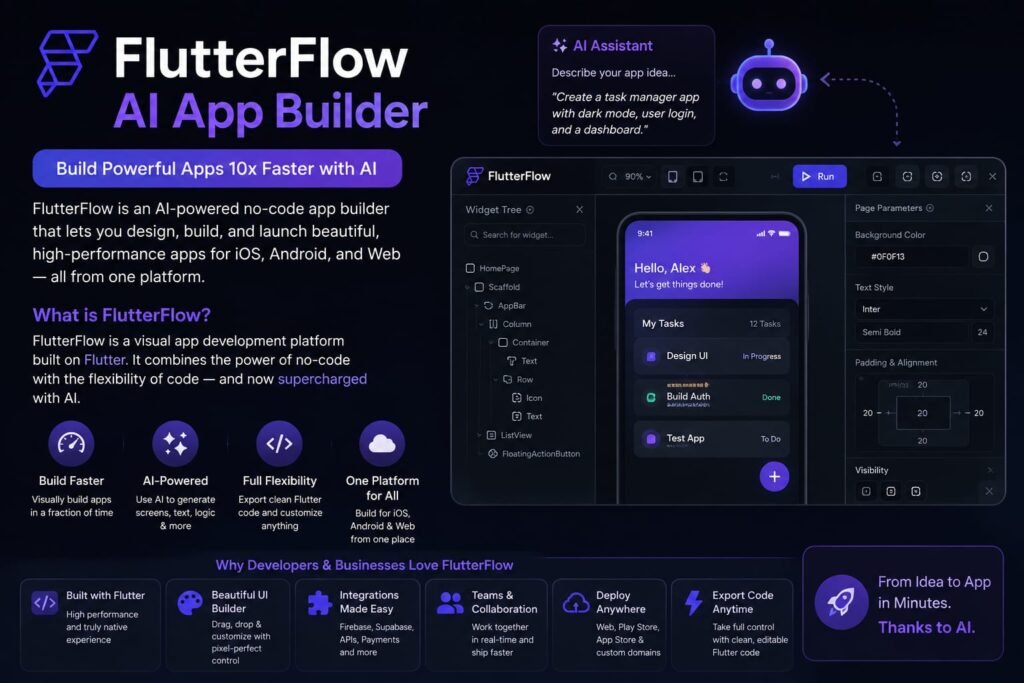
FlutterFlow is a visual, low-code app development platform built on Google’s Flutter framework, combining a drag-and-drop interface with AI-powered generation tools that let you build native iOS, Android, web, and desktop apps from a single codebase — and unlike many AI app builders, it lets you export clean, production-ready Flutter code rather than locking your app inside the platform.
At its core, FlutterFlow sits between a pure drag-and-drop no-code tool and a full custom-coding environment. You design your app visually — screens, components, data connections and the platform generates the corresponding Flutter code behind the scenes. Where AI comes in is through features like its AI Copilot, which lets you describe a screen or flow in plain language and have the platform generate the structure and basic logic automatically, speeding up the wireframing and prototyping stage significantly compared to building everything by hand in the visual editor.
Why FlutterFlow Is Different From Most AI App Builders
Before diving into pricing and features, it’s worth understanding what actually sets FlutterFlow apart in a crowded field of AI app-building tools.
Real Native Mobile Output
This is FlutterFlow’s single biggest differentiator. Many popular AI app builders Lovable, Bolt.new, Base44 generate web applications, not native mobile apps. FlutterFlow, by contrast, is built specifically on Flutter, Google’s cross-platform framework, meaning it compiles to genuine native code for iOS and Android, deployable directly to the App Store and Google Play.
Exportable, Production-Ready Code
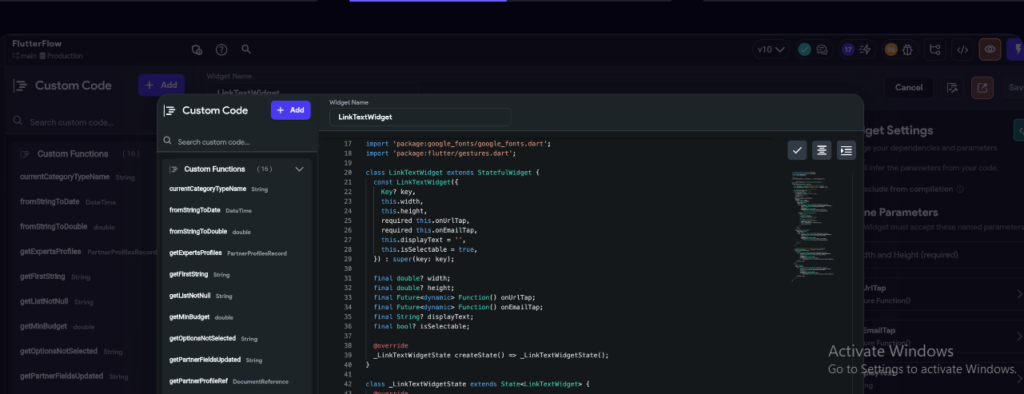
Unlike platforms that keep your app locked inside a proprietary system, FlutterFlow lets you export clean Flutter and Dart source code at any time (on paid plans), which you can maintain in your own Git repository and hand off to developers as your project matures. This code portability is a major reason FlutterFlow is trusted for more serious, long-term projects rather than just quick prototypes.
A Genuine Visual Builder, Not Just a Prompt Box
While AI generation is a growing part of FlutterFlow’s workflow, it isn’t a pure “type a prompt and hope” experience. What the AI generates becomes fully editable inside FlutterFlow’s visual, drag-and-drop canvas meaning you retain granular, hands-on control over layout, logic, and data connections rather than relying purely on re-prompting to fix something that came out wrong.
How FlutterFlow’s AI Features Actually Work
FlutterFlow’s AI capabilities are woven through several parts of the building process rather than existing as a single standalone feature.
AI Copilot: Prompt-to-Page Generation
Introduced in 2024, FlutterFlow’s AI Copilot lets you describe a screen or user flow in natural language, and the platform generates the corresponding page structure, layout, and basic data connections. Instead of manually dragging every component onto the canvas, you can describe a login screen with email and password fields, for example, and let the Copilot lay out the initial structure which you then refine visually.
AI-Assisted Database Setup
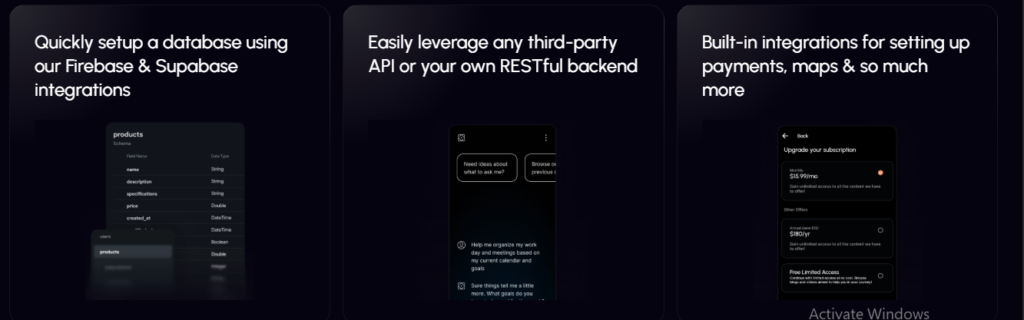
FlutterFlow’s AI tools extend into backend configuration as well, helping generate Firebase Firestore collections and data structures based on a description of what your app needs to store, rather than requiring you to manually define every field and data type by hand.
Native LLM Integrations
Beyond using AI to build your app, FlutterFlow also supports wiring AI capabilities directly into the app you’re building connecting to language models for features like chatbots, content generation, or intelligent form assistance within your finished product, not just during the build process.
FlutterFlow Pricing in 2026: Every Plan Explained
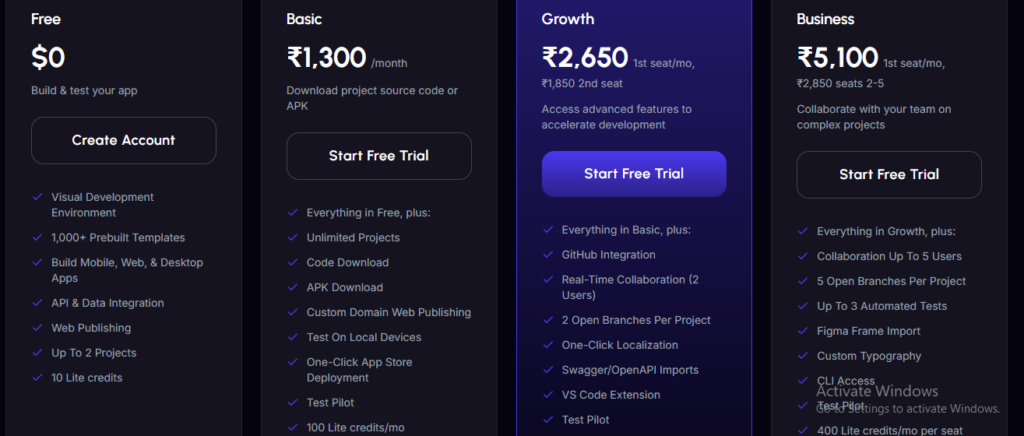
Featured snippet answer: FlutterFlow’s 2026 pricing includes four main tiers: Free ($0), Basic ($39/month), Growth ($80/month for the first seat, then $55 for additional seats), and Business ($150/month for the first seat) with FlutterFlow’s older Pro and Teams plans officially retired in late 2025.
Free Plan ($0/month)
The free tier gives you access to FlutterFlow’s visual builder, UI design tools, and basic API connectivity, along with a limited number of AI “Prompt-to-Page” generation requests. It’s intentionally scoped for learning and experimentation rather than production use you can build and test up to two active projects, but you can’t export code, deploy to app stores, or use a custom domain on this tier.
Basic Plan (~$39/month)
Basic is the entry point for anything you actually intend to ship. This is where code export and direct app store deployment unlock, along with access to FlutterFlow’s full template library and a monthly allowance of AI generation requests. For solo founders and freelancers building their first real project, this is generally considered the practical starting tier.
Growth Plan (~$80/month for the first seat, ~$55 for each additional seat)
Growth adds meaningfully expanded AI generation capacity often cited in the range of 500+ AI requests per month — along with improved collaboration tools, version control features, and more advanced testing and deployment options. This tier is aimed at small teams working together on the same app rather than solo builders.
Business Plan (~$150/month for the first seat)
FlutterFlow’s top tier adds the deepest collaboration, custom code, and advanced deployment capabilities, aimed at larger teams or businesses building and maintaining production apps with frequent updates and multiple contributors.
Annual Billing Savings
Across paid tiers, committing to annual billing typically saves roughly 25% compared to paying month-to-month a meaningful discount if you’re confident you’ll be building on the platform for more than a few months.
The Hidden Costs of FlutterFlow: What the Pricing Page Doesn’t Tell You
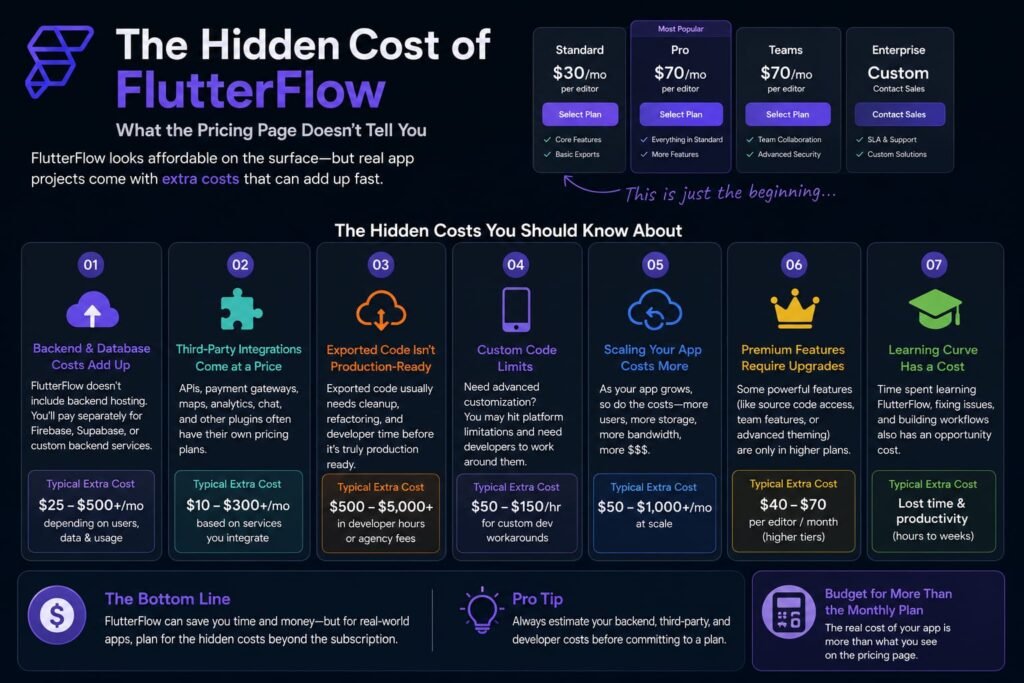
This is the section most reviews of the FlutterFlow AI app builder gloss over, and it’s genuinely important for budgeting realistically.
Featured snippet answer: FlutterFlow’s subscription price only covers builder access it does not include backend hosting, app store fees, or third-party API costs, which together can add anywhere from roughly $75 to $600+ per month for a production app depending on scale and complexity.
Backend Hosting Costs (Firebase or Supabase)
FlutterFlow doesn’t include a database in its subscription price you connect your own Firebase or Supabase backend, and that comes with its own separate, usage-based billing. Firebase remains a common choice for real-time apps and integrates deeply with FlutterFlow, but it carries a real risk of unexpected cost spikes if your database reads and writes aren’t optimized as your user base grows. Supabase, built on PostgreSQL, has become a popular alternative for SaaS and fintech-style apps specifically because its pricing tends to be more predictable.
App Store and Play Store Fees
Publishing your finished app costs money independent of FlutterFlow itself: Apple charges a $99 annual developer fee, while Google Play requires a one-time $25 registration fee. These are standard costs across virtually any native app development path, not unique to FlutterFlow, but they’re easy to forget when budgeting purely around the subscription price.
AI Usage Costs for In-App Features
If you’re building native AI features into your finished app a chatbot, content generator, or AI-assisted form — those LLM API calls typically carry their own usage-based cost, often estimated in the range of $10 to $50 or more per month depending on how heavily your app relies on them.
Domain and Additional Infrastructure
Custom domains, SSL certificates, and any additional hosting infrastructure beyond the basics can add further recurring costs, particularly as an app scales beyond a simple MVP.
Realistic Total Cost Estimate
Once you account for hosting, app store fees, and any AI feature usage, a genuinely production-grade app built with FlutterFlow can run somewhere in the range of $75 to $600+ per month in total “utility” costs on top of the subscription itself a detail worth planning around rather than discovering after launch.
Native Mobile Publishing: Getting Your App to the App Store and Google Play
One of FlutterFlow’s most practical advantages is how directly it handles the path to actual app store publication. From within the platform, you can deploy directly to the Google Play Store and Apple App Store, or export the underlying Flutter code to your own CI/CD pipeline if you want more control over the release process. GitHub integration allows for proper version control of the generated code — a feature that matters more as your project grows past a single solo builder working alone.
FlutterFlow’s Backend Integrations: Firebase and Supabase
FlutterFlow offers deep, purpose-built integration with Firebase Firestore, letting you visually set up collections, define data types, and have the platform auto-generate the corresponding read and write logic for your app’s screens — removing a significant amount of manual backend wiring that would otherwise require custom code.
Supabase support was added in 2025, giving builders a PostgreSQL-based alternative with generally more predictable pricing, which has made it an increasingly popular choice for SaaS and fintech-style applications specifically. A REST API connector is also available for developers who want to wire up a fully custom backend rather than using either managed option.
Who Should Use the FlutterFlow AI App Builder?
FlutterFlow’s combination of power and complexity means it fits certain builders far better than others.
Best for:
- Founders and product teams who specifically need a real, native mobile app for the App Store and Google Play, not a web app
- Builders who want the option to export clean code and bring on developers as the project matures
- Teams that need genuine collaboration features — version control, multi-seat access, branching for an app being actively maintained by more than one person
- Anyone comfortable with a moderate learning curve in exchange for significantly more building power than simpler tools offer
Less ideal for:
- Absolute beginners who want the lowest possible learning curve tools like Adalo or Base44 are generally considered more approachable for a first-ever no-code project
- Solo builders on a tight budget who don’t yet need collaboration features, code export, or app store deployment the free plan’s restrictions mean you’ll likely need to upgrade quickly to build anything real
- Anyone who wants a fully web-based app rather than native mobile output, since FlutterFlow’s core strength is specifically mobile-first
FlutterFlow vs. Other AI App Builders: How Does It Compare?
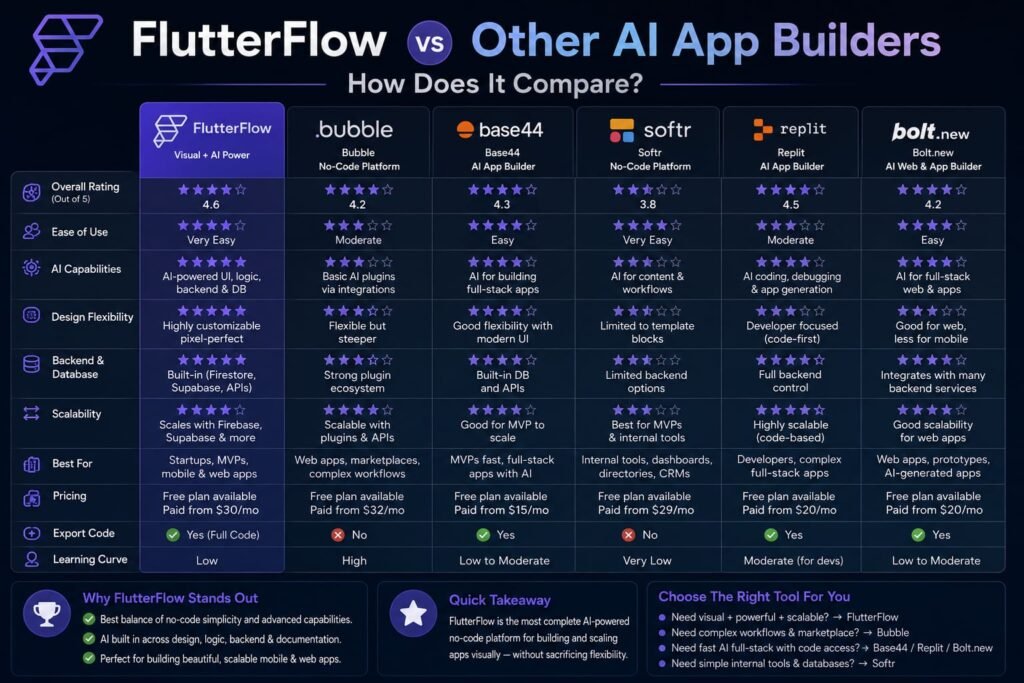
Understanding where FlutterFlow sits relative to its closest competitors clarifies exactly what you’re trading off by choosing it.
FlutterFlow vs. Adalo
Adalo markets itself as a genuinely no-code alternative with an even gentler learning curve, requiring no technical or programming experience at all — a real contrast to FlutterFlow’s blend of visual building and custom code, which caters more to technically comfortable users. Adalo also includes unlimited database storage on paid plans with no usage-based charges, directly addressing the “bill shock” risk that FlutterFlow’s Firebase-based hosting can create. What you trade for that simplicity is generally less depth and flexibility than FlutterFlow offers for more complex, custom applications.
FlutterFlow vs. Bolt.new or Lovable
Bolt and Lovable are web-first AI app builders, generating React-based web applications rather than native mobile apps. If your project’s end goal is a website or web app, either tool is a more natural fit and generally faster to iterate in. But neither produces an installable App Store or Google Play app, which remains FlutterFlow’s clearest advantage for mobile-specific projects.
FlutterFlow vs. Base44
Base44 automates even more of the setup decisions than FlutterFlow, aiming squarely at non-technical beginners building web apps with minimal configuration. FlutterFlow’s tradeoff for its added complexity is significantly more control and, critically, native mobile output that Base44 doesn’t offer at all.
The Overall Positioning
FlutterFlow occupies a distinct niche: it’s more powerful and more code-oriented than pure no-code tools like Adalo, but more approachable than hand-coding a Flutter app from scratch. If native mobile output and eventual code ownership both matter to your project, few competitors match that specific combination.
Common Challenges When Using FlutterFlow
Even strong reviews of the FlutterFlow AI app builder are honest about where it asks more of you than simpler tools.
A steeper learning curve. Compared to purely visual, no-code-only tools, FlutterFlow requires more comfort with concepts like data structures, state management, and API connections — even with AI Copilot handling much of the initial generation.
Underestimated backend costs. As covered above, many founders budget only for the FlutterFlow subscription itself and are caught off guard by Firebase or Supabase hosting bills once real users start generating meaningful database activity.
AI generation still needs human refinement. Like most AI-assisted builders, Copilot-generated screens and logic are a strong starting point rather than a finished product expect to spend real time in the visual editor refining what the AI produces, especially for anything beyond simple, common screen patterns.
Seat-based pricing adds up for larger teams. Because Growth and Business plans charge per seat, costs scale directly with team size, which is worth factoring in if you’re planning for a larger collaborative team rather than a solo or two-person build.
Tips for Getting the Most Out of the FlutterFlow AI App Builder
A few practical habits make a real difference in both cost and build quality:
- Start on the Basic plan, not Free. Since the free tier blocks code export and app store deployment entirely, most builders with a real project in mind should budget for Basic from the start rather than treating Free as a genuine production starting point.
- Choose your backend deliberately. If predictable costs matter more to you than Firebase’s deep real-time integration, seriously evaluate Supabase before committing, since backend hosting is likely to become your largest ongoing cost beyond the subscription itself.
- Use AI Copilot for structure, not final polish. Let the AI handle the first pass of a screen or flow, then plan for a manual refinement pass in the visual editor rather than expecting a perfect result straight from a prompt.
- Budget for app store and infrastructure costs upfront. Include Apple’s $99/year fee, Google’s $25 one-time fee, and a realistic estimate of backend hosting in your project budget from day one, rather than discovering them after launch.
- Only upgrade to Growth or Business when collaboration genuinely requires it. For solo builders, the added AI request allowance and collaboration tools in higher tiers often aren’t worth the price jump until you’re actually working with a team.
Frequently Asked Questions
What is the FlutterFlow AI app builder used for?
FlutterFlow is used to build real, native iOS and Android apps (along with web and desktop versions) from a single visual builder, using AI-assisted generation tools to speed up screen creation, database setup, and overall app structure.
Is FlutterFlow really free to use?
FlutterFlow offers a free plan for building and testing up to two projects, but it doesn’t include code export or app store deployment, making it suitable for learning and prototyping rather than launching a real app.
How much does FlutterFlow cost in 2026?
FlutterFlow’s paid plans range from about $39/month (Basic) to $80/month for the first seat (Growth) and $150/month for the first seat (Business), with roughly 25% savings available on annual billing. These prices cover the builder only — backend hosting and app store fees are separate.
Does FlutterFlow include database hosting in its price?
No. FlutterFlow connects to external backends like Firebase or Supabase, which bill separately based on your actual usage, meaning your total monthly cost extends beyond the FlutterFlow subscription itself.
Can I export the code FlutterFlow generates?
Yes, on paid plans. FlutterFlow lets you export clean, production-ready Flutter and Dart source code, which you can maintain in your own Git repository and hand off to developers as your app grows.
Is FlutterFlow good for complete beginners with no coding experience?
It’s usable by beginners, but it has a steeper learning curve than purely no-code tools like Adalo, since it involves concepts like data structures and API connections even with AI assistance. Absolute beginners prioritizing the simplest possible experience may prefer a more streamlined alternative.
How is FlutterFlow’s AI different from tools like Lovable or Bolt?
FlutterFlow’s AI Copilot generates native Flutter app structure and logic specifically for mobile (and web/desktop) output, while tools like Lovable and Bolt generate web applications only. FlutterFlow is also less of a pure prompt-to-app experience — AI-generated output remains fully editable in a visual, drag-and-drop canvas.
What happened to FlutterFlow’s old Pro and Teams plans?
FlutterFlow officially retired its legacy Pro and Teams plans in late 2025, replacing them with the current Free, Basic, Growth, and Business tiers as part of a broader pricing restructure centered around AI generation credits and collaboration features.
Does FlutterFlow charge extra for AI features inside my finished app?
If you build native AI capabilities into your app — like a chatbot or content generator — those language model API calls typically carry their own separate usage-based cost, often estimated in the $10-$50+ per month range depending on usage volume.
My Final Thoughts: Is the FlutterFlow AI App Builder Right for You?
The FlutterFlow AI app builder earns its reputation for one specific reason: it’s one of the only AI-assisted tools that produces genuinely native, exportable mobile apps rather than a web app dressed up to look like one. That combination of AI-accelerated building, visual control, and real code ownership makes it a serious option for founders and teams who need an actual App Store presence and want the flexibility to bring on developers later.
The tradeoff is real too a steeper learning curve than the simplest no-code tools, and a pricing structure where the subscription is genuinely just the starting point once you factor in backend hosting and app store fees. If native mobile output and long-term code ownership both matter to your project, that tradeoff is usually worth it. If you’re building a simple web app or want the absolute gentlest possible learning curve, a different tool may serve you better.
The clearest way to find out is a hands-on test: start with FlutterFlow’s free plan, describe a simple version of your actual app idea using AI Copilot, and see how the generated structure feels to work with in the visual editor. That firsthand experience not another pricing table will tell you whether FlutterFlow is the right foundation for what you’re building.
Related Reads:
What Is Lovable AI? The Complete Guide to the AI App Builder Everyone’s Talking About
Is Lovable AI Free? Here’s What You Actually Get
Claude Pro vs ChatGPT Plus: The Real Difference Between These $20 AI Plans
How to Fix AI Image Generator Deformities in Fingers, Toes, and Other Anomalies
What Is Meta AI Muse Spark? The Complete 2026 Guide to Meta’s Flagship AI Model
Kimi K3 Explained: Inside Moonshot AI’s Record-Breaking Open Mode
Best AI App Builder in 2026: 10 Top Tools to Build an App Without Coding
Bolt AI App Builder: The Complete Guide to Building Apps in Your Web Browser
Higgsfield AI Pricing in 2026: Every Plan, Credit Cost, and What You Actually Get
Base 44 Pricing in 2026: Every Plan, Credit Cost, and Hidden Fee Explained
Base44 Reviews 2026: What Real Users Actually Think Before You Build