
Kling 3.0 explained: native 4K at 60fps, AI Director storyboarding, and real pricing. Everything you need before generating your first video.
The gap between “impressive AI demo” and “footage you’d actually use in a real project” has mostly come down to one word: resolution. Most AI video models cap out at 1080p, then quietly upscale to something bigger, and the softness shows the moment you put it on a large screen. Kling 3.0 is the first major model to break that pattern — producing genuinely native 4K video at 60 frames per second, not an upscaled approximation of it.
Released by Kuaishou on February 4, 2026, Kling 3.0 didn’t just bump up resolution. It rebuilt the model around a unified framework that generates video, image, and synchronized audio together, added an “AI Director” system that plans camera shots automatically, and introduced character consistency tools strong enough that some reviewers have called it the best in the category. This guide covers everything worth knowing: what actually changed, how the new features work, what it really costs once you factor in iteration, and how it stacks up against Sora 2, Veo, and Seedance 2.
What Is Kling 3.0? A Quick Answer
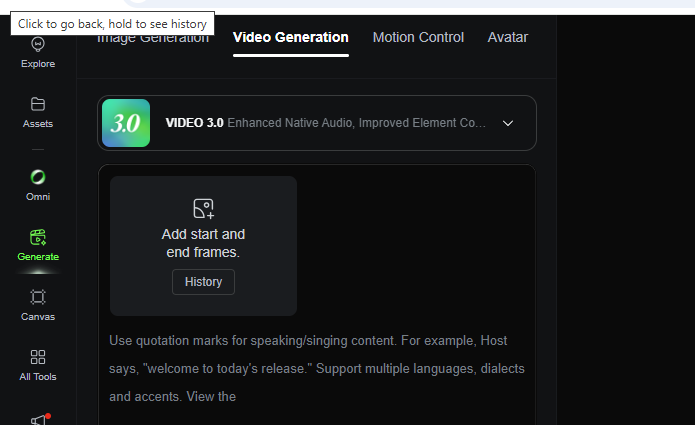
Kling 3.0 is Kuaishou’s third-generation AI video and image generation model family, released February 4, 2026, built on a unified Multi-modal Visual Language framework that generates native 4K video at up to 60fps, clips up to 15 seconds long, multi-shot sequences with automatic camera direction, and synchronized multilingual audio — all within a single, integrated system.
Kling comes from Kuaishou Technology, the Hong Kong and mainland China-listed company behind the short-video platform Kwai. Kling AI first launched in beta in June 2024, and has moved through a rapid succession of versions since — 1.6, 2.0, 2.1, 2.6, and the O1 series — before arriving at version 3.0. By the time of the 3.0 launch, Kuaishou reported that Kling had served more than 60 million creators worldwide and generated over 600 million videos across its full product history, with more than 30,000 enterprise clients using the platform.
Kling’s Evolution: From Beta to Kling 3.0
Understanding what makes Kling 3.0 significant means understanding the pace Kuaishou has kept. New major versions have arrived roughly every two to three months since the original beta — Kling 1.6 introduced multi-image input in December 2024, Kling 2.6 introduced audio-visual co-generation, and the O1 series brought a unified multimodal approach that laid the groundwork for what became Kling 3.0’s core architecture.
Kling 3.0 represents the biggest single jump in that sequence. Compared directly to Kling 2.6, the headline upgrades include duration extending from 10 to 15 seconds, resolution moving from 1080p to true native 4K, frame rate doubling from a lower baseline to 60fps, and the addition of new lip-sync languages for multilingual dialogue generation.
Key Features of Kling 3.0 Explained
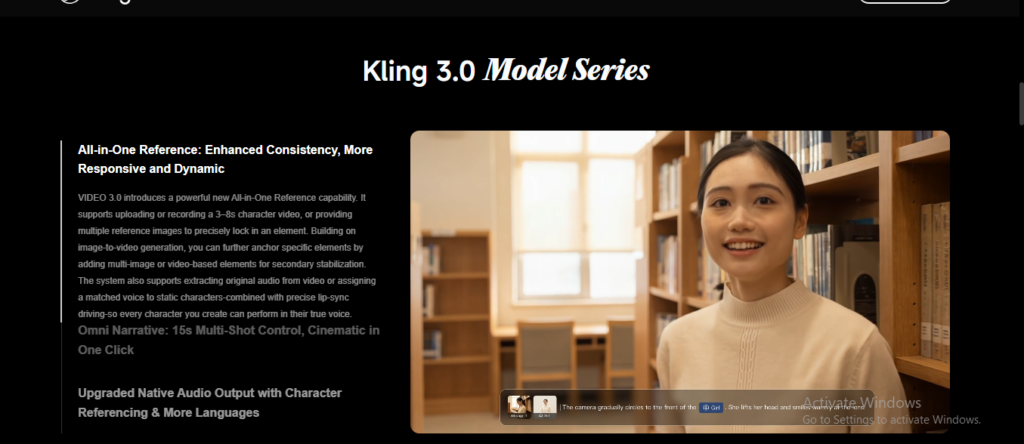
Kling 3.0 isn’t a single model — Kuaishou released it as a suite of four specialized systems, unified under what the company calls the Multi-modal Visual Language (MVL) framework, a fully rebuilt architecture that natively handles text, image, audio, and video as both inputs and outputs within one integrated system, rather than chaining separate specialized tools together.
Visual Chain-of-Thought Reasoning
One of Kling 3.0’s more technically distinctive additions is what Kuaishou describes as Visual Chain-of-Thought reasoning — the model effectively “thinks through” a complex scene’s construction before generating it, which is part of why Kling 3.0 handles multi-element, multi-character scenes with more coherence than earlier versions.
Diffusion Transformer Architecture
Under the hood, Kling continues to use a diffusion-based transformer (DiT) architecture, enhanced with Kuaishou’s own 3D variational autoencoder (VAE) network — the technical foundation that’s been refined across every version since the original 2024 beta.
Native 4K at 60fps: Why This Upgrade Matters
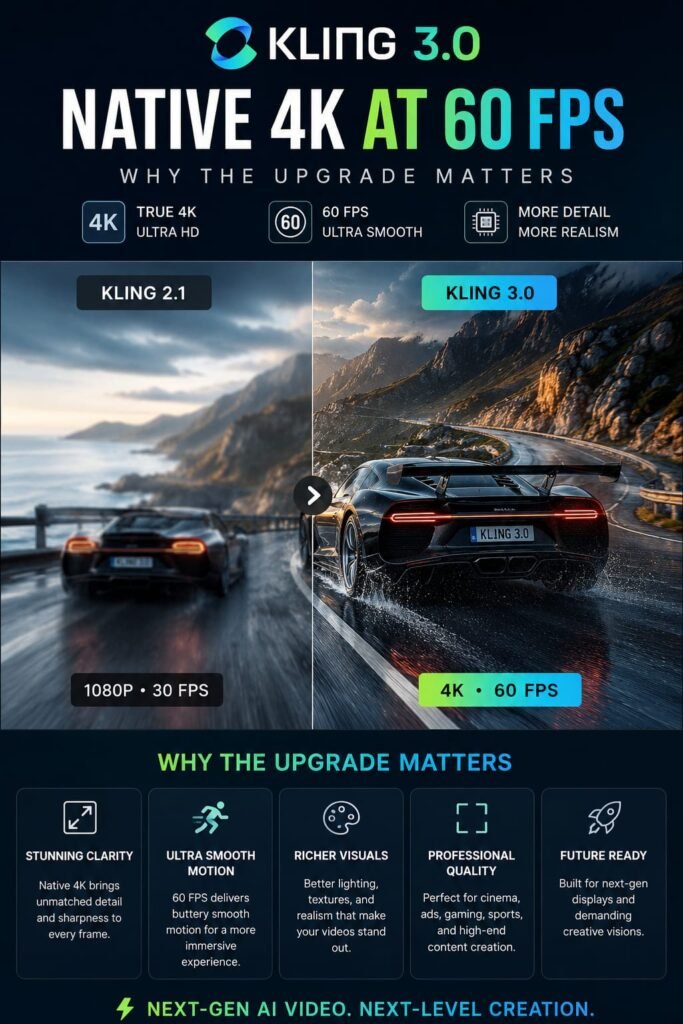
Kling 3.0 generates video at true native 4K resolution (3840×2160) at up to 60 frames per second — not upscaled from a lower resolution — making it, as of its release, the highest output quality of any major AI video model, according to independent comparisons against Sora 2, Veo 3.1, and Seedance 2.
The distinction between “native” and “upscaled” 4K matters more than it might sound. Upscaling takes a lower-resolution generation and algorithmically enlarges it, which can approximate sharpness but doesn’t add real detail the model never generated in the first place. Kling 3.0’s native 4K output actually contains that additional detail from generation, which becomes immediately visible on a large screen — reviewers have specifically noted this as resolving the soft, slightly washed-out look that’s plagued earlier AI video models.
The 60fps frame rate compounds this benefit for a specific category of content: fast motion. Action sequences, product demos, and anything involving quick movement have historically suffered from a visible “stutter” in AI-generated video at lower frame rates — Kling 3.0’s smoother frame rate largely eliminates that specific artifact.
AI Director and Multi-Shot Storyboarding
Kling 3.0’s multi-shot storyboarding feature lets you generate up to 6 distinct camera cuts within a single video generation, with an “AI Director” system that automatically analyzes your script or prompt, dispatches appropriate shot types and camera positions, and manages scene transitions and visual coherence across every cut — without requiring you to generate and stitch together separate clips manually.
This is arguably Kling 3.0’s most conceptually significant new capability. Rather than generating one continuous shot and hoping it captures your full narrative, you can describe a sequence with multiple beats, and Kling 3.0’s AI Director analyzes that script to automatically determine appropriate camera positions and shot types — essentially applying basic cinematographic judgment before generating a single frame. Kuaishou has framed this as moving “from basic video generation to sophisticated professional orchestration,” and it’s a meaningful step beyond earlier single-shot generation limitations.
Example: A creator describing a short product reveal — an establishing shot, a close-up on the product, a reaction shot — could previously need to generate three separate clips and manually edit them together. With Kling 3.0’s multi-shot mode, that same sequence can emerge as a single, coherent generation with automatically managed camera transitions.
Elements 3.0 and Character Consistency: The Director Memory System
Character consistency has been one of AI video’s most persistent weak points — a character’s face or proportions subtly shifting between shots, breaking the illusion the moment a viewer notices. Kling 3.0 addresses this directly through its Elements 3.0 system, built around what Kuaishou calls Director Memory.
Kling 3.0’s Director Memory system extracts both visual and vocal traits from a reference image or clip and binds them to a generated character, maintaining consistency of appearance, voice, and identity across every scene in a generation — with the ability to independently track up to three distinct characters within the same video.
This isn’t limited to how a character looks — the system also preserves vocal characteristics, meaning a character’s generated voice stays consistent alongside their face and proportions across multiple shots and scenes, which matters enormously for any narrative content involving dialogue or a recurring character across a longer piece.
Native Multilingual Audio and Lip-Sync
Kling 3.0’s audio capabilities go well beyond simply adding a soundtrack after the fact. The Video 3.0 Omni variant generates audio natively within the same model as the video — voices, sound effects, and music synchronized frame-by-frame rather than layered on afterward.
Multi-character dialogue is supported in multiple languages, including Chinese, English, Japanese, Korean, and Spanish, with Kling 3.0 specifically adding new lip-sync languages compared to its predecessor. For creators working on multilingual content or dubbing, this native, synchronized approach produces noticeably more convincing results than generating video and audio separately and trying to align them in post-production.
The Four Kling 3.0 Models: Video, Video Omni, Image, and Image Omni
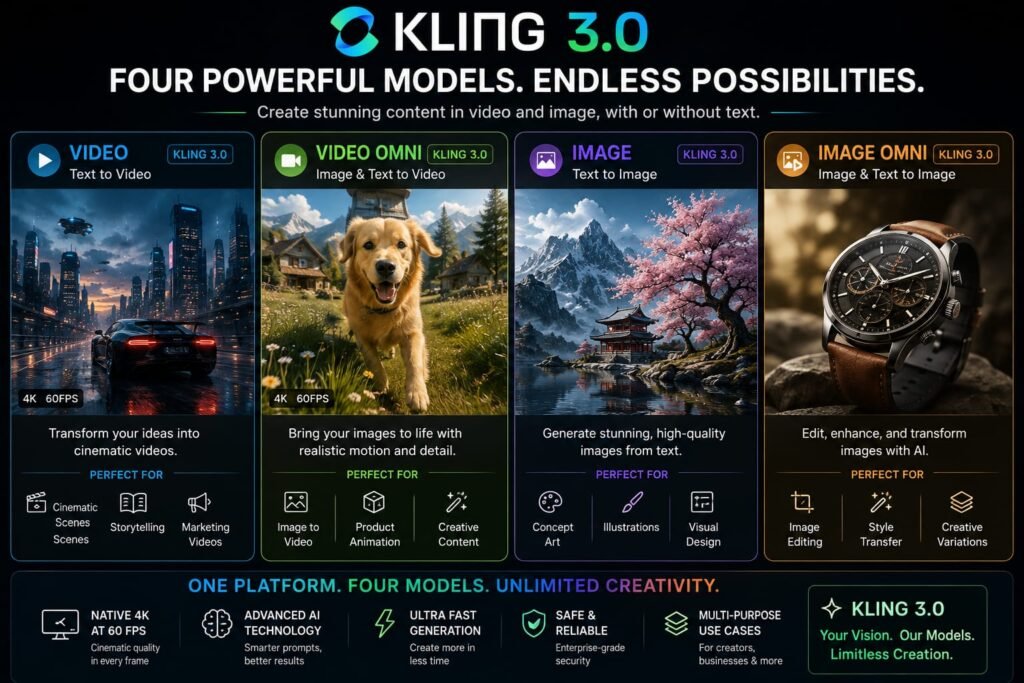
Kling 3.0 launched as a family of four distinct but connected models, each suited to a different part of a creative workflow:
Video 3.0 is the core video generation engine, producing photorealistic, cinematically coherent video with expressive character performances — the model most creators will use for standard text-to-video and image-to-video generation.
Video 3.0 Omni builds on the core video model with native multimodal audio generation added — voices, music, and sound effects generated in sync with the visuals within the same unified pass.
Image 3.0 generates ultra-high-resolution still images, supporting up to 4K output for professional use cases ranging from virtual scene visualization to full production assets.
Image 3.0 Omni extends the image model with the same multimodal input flexibility as its video counterpart, useful for generating reference material to feed back into video generation.
Together, this suite lets creators move between still images, video, and audio within a consistent visual language, rather than switching between separate, disconnected tools for each output type.
Kling 3.0 Pricing: Plans, Credits, and What It Really Costs
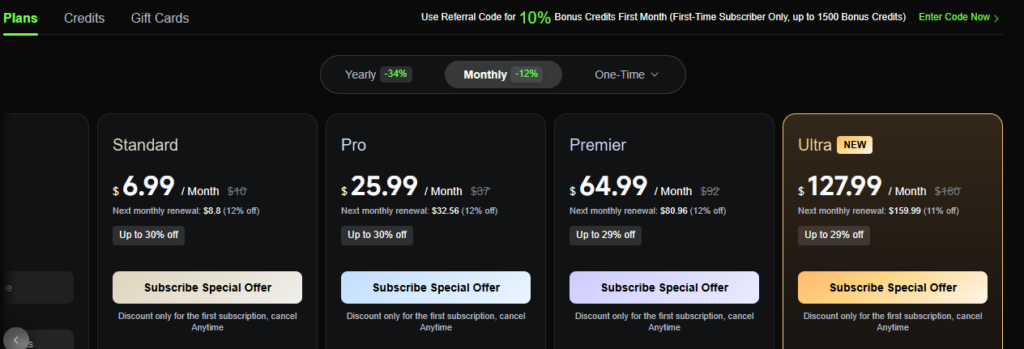
Kling 3.0 uses a credit-based system rather than a flat subscription — the official Kling AI platform offers Basic (free, no commercial use), Standard (~$6.99-$10/month, 660 credits), Pro (~$37/month, 3,000 credits), Premier (~$92/month, 8,000 credits), and Ultra (~$180/month, 26,000 credits), with Kling 3.0 generations costing roughly 6-12 credits per second depending on resolution and whether native audio is included.
How the Credit System Actually Works
Rather than paying a flat monthly fee for unlimited generation, Kling AI’s credit system charges based on four variables: which model version you use, output resolution (720p vs. 1080p vs. 4K), clip duration, and whether native audio is included. For Kling 3.0 specifically, published rates generally range from around 6 credits per second for 720p without audio, up to roughly 12 credits per second for 1080p with native audio included — meaning a realistic 10-second, 1080p clip with a few rounds of revision can add up to around 360 credits in a single project.
The Tier Breakdown
The Basic (free) tier provides no guaranteed monthly credit allowance by default and restricts generated content to non-commercial use — genuinely useful for testing the platform, but not for any real production work. Standard, at roughly $6.99-$10/month depending on current promotional pricing, unlocks commercial usage rights along with 660 monthly credits, working out to roughly 33 short 720p videos. Pro (~$37/month, 3,000 credits) and Premier (~$92/month, 8,000 credits) scale up for regular or higher-volume creators, while Ultra (~$180/month, 26,000 credits) offers the lowest effective cost per credit along with highest-priority processing and early access to unreleased features — though notably, Ultra doesn’t currently offer an annual billing discount the way lower tiers do.
The Part Most Pricing Pages Don’t Emphasize
Here’s the detail that catches a lot of new users off guard: AI video generation is inherently iterative, and Kling 3.0 is no exception. You rarely get exactly the result you want on a first attempt, and each additional attempt consumes credits just like the first — including failed generations, which consume credits with no automatic refund according to multiple independent reviews. Real user reports describe needing three to five prompt iterations to land on a satisfying result for a single clip, meaning the effective cost of a genuinely finished, polished video can run several times higher than the advertised per-second rate suggests. It’s also worth knowing that unused credits typically don’t roll over and expire at the end of each billing cycle, so overbuying “just in case” carries real waste risk.
API and Third-Party Access
For developers, Kling AI Open Platform offers a separate, prepaid-package developer API entirely distinct from consumer membership plans — API credits don’t transfer to the consumer web interface, and a consumer subscription doesn’t grant API access. One meaningful advantage on the API side: failed API tasks generally don’t consume credits, unlike the consumer interface, making it notably more economical for experimental or high-volume programmatic workflows. Third-party resellers, including platforms like EvoLink, also offer pay-as-you-go access to Kling 3.0 at competitive per-second rates, often bundled alongside other video models for easier comparison shopping.
Kling 3.0 vs. Sora 2, Veo 3.1, and Seedance 2.5
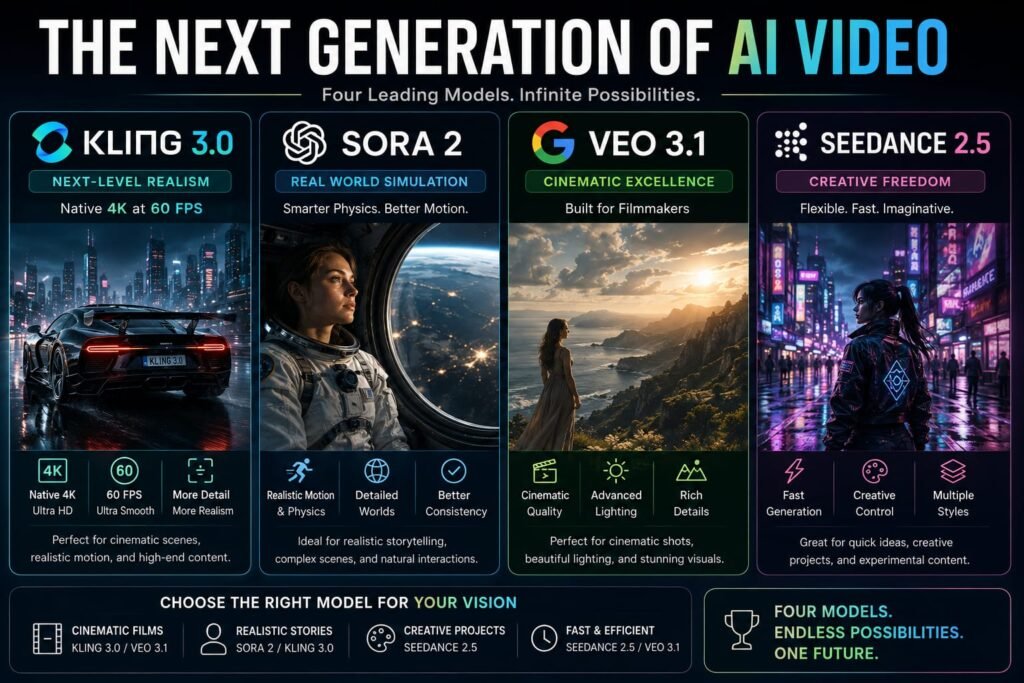
Kling 3.0 enters an increasingly crowded field of frontier AI video models, and independent comparisons have generally been favorable on specific technical dimensions. Kling 3.0 leads on raw resolution (native 4K versus Seedance 2.5’s standard 1080p ceiling), frame rate (60fps versus the 24-30fps common among competitors), multi-shot editing capability (up to 6 automatically managed camera cuts versus more basic multi-shot support elsewhere), and independent multi-character tracking (following up to 3 distinct characters versus reference-based approaches used by some competitors).
Where Kling 3.0 competes less decisively is cost predictability and iteration expense — its credit system, combined with failed generations still consuming credits on the consumer platform, means the real-world cost of a finished, polished video can be less predictable than some competitors’ flatter pricing structures. For creators specifically prioritizing maximum technical output quality resolution, frame rate, and multi-shot narrative control Kling 3.0 currently sets the bar. For creators more sensitive to iteration costs, it’s worth budgeting carefully or testing on a lower tier before committing to heavier usage.
How to Access Kling 3.0
Kling 3.0 is available directly through Kuaishou’s own platforms — kling.ai internationally and klingai.com within China — where you can sign up for a free account and test the model within its daily credit limits before committing to a paid tier. At launch, full access to the Kling 3.0 series was rolled out first as exclusive early access for Ultra subscribers, before becoming broadly available to the public shortly after.
Beyond Kuaishou’s own platform, Kling 3.0 is also accessible through a range of third-party services — including ImagineArt, fal.ai, EvoLink, TwoShot, and others — many of which bundle Kling alongside other leading video models like Sora and Seedance under a single subscription, useful if you want to compare multiple models without managing several separate accounts.
Tips for Getting the Best Results From Kling 3.0
A handful of practical habits make a real difference in both output quality and cost control:
- Plan each generation around a specific story beat, not just maximum duration. A focused 6-second shot can be more efficient and effective than a loose, unfocused 15-second scene use the available duration intentionally rather than defaulting to the maximum.
- Use clear, direct references to reduce retries. Since failed and imperfect generations still consume credits on the consumer platform, clear prompts and well-chosen reference material upfront reduce the number of costly iterations needed to land on a usable result.
- Turn off native audio when you plan to add your own. If you’re planning to layer in your own voiceover or music during post-production, disabling native audio generation in Kling 3.0 reduces the per-second credit cost of the generation.
- Test on a lower tier before committing to heavy usage. Given how quickly credits can disappear across multiple iterations, starting on Standard or Pro and tracking your actual usage pattern before jumping to Premier or Ultra is a more budget-conscious approach than assuming you need the largest tier from day one.
- Consider the API for high-volume, experimental work. Since failed API tasks generally don’t consume credits the way consumer-interface generations do, developers doing heavy iterative testing may find the API path meaningfully more cost-effective than the standard subscription plans.
Frequently Asked Questions
What is Kling 3.0?
Kling 3.0 is Kuaishou’s third-generation AI video and image generation model, released February 4, 2026, offering native 4K video at up to 60fps, clips up to 15 seconds, multi-shot AI-directed storyboarding, and native multilingual audio generation.
Is Kling 3.0 really native 4K, or is it upscaled?
Kling 3.0 generates video at true native 4K resolution (3840×2160), not upscaled from a lower resolution a distinction that produces visibly sharper, more detailed footage compared to models that enlarge a lower-resolution generation algorithmically.
How much does Kling 3.0 cost?
Kling AI uses a credit-based system rather than a flat fee, with consumer plans ranging from a limited free tier up to roughly $180/month for the Ultra plan. Kling 3.0 generations cost roughly 6-12 credits per second depending on resolution and audio settings, and real-world costs often run higher than advertised due to the iterative nature of AI video generation.
Is Kling 3.0 free to use?
Yes, with real limits the free Basic tier provides limited daily credits, enough for one or two short test videos, and restricts generated content to non-commercial use. Commercial usage rights require at least the Standard paid tier.
What makes Kling 3.0 different from Kling 2.6?
Kling 3.0’s major upgrades over 2.6 include extended duration (10 to 15 seconds), resolution moving from 1080p to native 4K, frame rate increasing to 60fps, and the addition of new multilingual lip-sync languages, alongside entirely new features like AI Director multi-shot storyboarding.
How does Kling 3.0 keep characters consistent across scenes?
Through its Elements 3.0 system and Director Memory feature, which extracts visual and vocal traits from a reference and binds them to a generated character, maintaining consistent appearance, voice, and identity across a video and independently tracking up to three distinct characters.
Does Kling 3.0 generate audio, or just video? The Video 3.0 Omni variant generates audio natively within the same model as the video, including synchronized voices, music, and sound effects, with multilingual dialogue and lip-sync support across several languages.
Is Kling 3.0 better than Sora 2 or Veo 3.1?
Independent comparisons generally favor Kling 3.0 on raw technical specs — resolution, frame rate, multi-shot editing, and multi-character tracking though pricing predictability and iteration cost can be less favorable than some competitors, so the better choice depends on your specific priorities.
How many camera shots can Kling 3.0 generate in one video?
Kling 3.0’s multi-shot storyboarding feature supports up to 6 distinct camera cuts within a single generation, with the AI Director system automatically managing shot selection and scene transitions across all of them.
Do failed Kling 3.0 generations still cost credits?
On the consumer Kling AI platform, yes failed or unsatisfactory generations typically still consume credits with no automatic refund, according to multiple independent reviews. On the developer API, failed tasks generally do not consume credits, making it a more cost-effective option for heavy experimental workflows.
My Final Thoughts: Is Kling 3.0 Worth Using in 2026?
Kling 3.0 represents a genuine technical leap for AI video the first major model to deliver true native 4K at 60fps, paired with an AI Director system that handles cinematographic decisions most creators would otherwise need to make (or fake) manually. For anyone whose work depends on output quality that holds up on a large screen, or who needs multi-shot narrative sequences without stitching separate clips together by hand, Kling 3.0 currently sets the technical bar in its category.
The tradeoff worth planning around is cost predictability the credit system, combined with iterations and failed generations both consuming your balance, means real-world spending on a genuinely polished piece often runs higher than the advertised per-second rate implies. The smartest way to find out if it’s worth it for your specific workflow is a small, deliberate test: start on Kling’s free or Standard tier, generate a short, well-planned clip with a clear reference and prompt, and see how many iterations it actually takes to land the result you want. That real cost not the sticker price is what will tell you whether Kling 3.0 belongs in your regular toolkit.
If you’re exploring the latest AI video-generation tools, Kling 3.0 is a great place to start for high-quality video creation, while Seedance 2.5 offers another powerful option for generating creative and dynamic videos. Before choosing a platform, it’s also worth checking Higgsfield AI pricing to compare plans, features, and overall value. Together, these guides can help you understand the differences between the tools and choose the AI video generator that best fits your needs and budget.
Related Reads:
What Is Lovable AI? The Complete Guide to the AI App Builder Everyone’s Talking About
Is Lovable AI Free? Here’s What You Actually Get
Claude Pro vs ChatGPT Plus: The Real Difference Between These $20 AI Plans
How to Fix AI Image Generator Deformities in Fingers, Toes, and Other Anomalies
What Is Meta AI Muse Spark? The Complete 2026 Guide to Meta’s Flagship AI Model
Kimi K3 Explained: Inside Moonshot AI’s Record-Breaking Open Mode
Best AI App Builder in 2026: 10 Top Tools to Build an App Without Coding
Seedance 2: Inside ByteDance’s Most Realistic AI Video Model Yet (2026)