
Seedance 2 explained: ByteDance’s AI video model with native audio, multimodal references, and near-photorealistic motion. Features, access, and pricing.
A pair of figure skaters spin, land, and glide across the ice — and it takes a second glance to remember none of it is real. That demo, released alongside ByteDance’s Seedance 2 launch in February 2026, is a big part of why the model quickly climbed to the top of independent video-generation leaderboards. Objects don’t float. People don’t melt through floors. For an AI video category that’s spent years fighting exactly those problems, Seedance 2 marked a genuine jump forward.
This guide covers everything worth knowing about Seedance 2: what actually changed from the original Seedance model, how its multimodal reference system works, where you can access it, what it costs across the surprisingly fragmented pricing landscape, and the copyright controversy that followed its release almost immediately. By the end, you’ll know exactly what this model can do and whether it belongs in your workflow.
What Is Seedance 2? A Quick Answer
Seedance 2 is ByteDance’s flagship AI video generation model, released February 10, 2026, built on a unified multimodal audio-video architecture that accepts text, images, video clips, and audio as reference inputs simultaneously producing clips up to 15 seconds long at resolutions up to 1080p with native, synchronized audio.
Seedance 2 comes from ByteDance’s Seed research team — the same in-house foundation model program behind the company’s broader push into AI, spanning language, image, and video generation. It’s the second major version of Seedance, following the original model’s release in June 2025, and it represents a meaningful leap in realism, controllability, and audio integration rather than a minor incremental update.
From Seedance 1.0 to Seedance 2: What Actually Changed
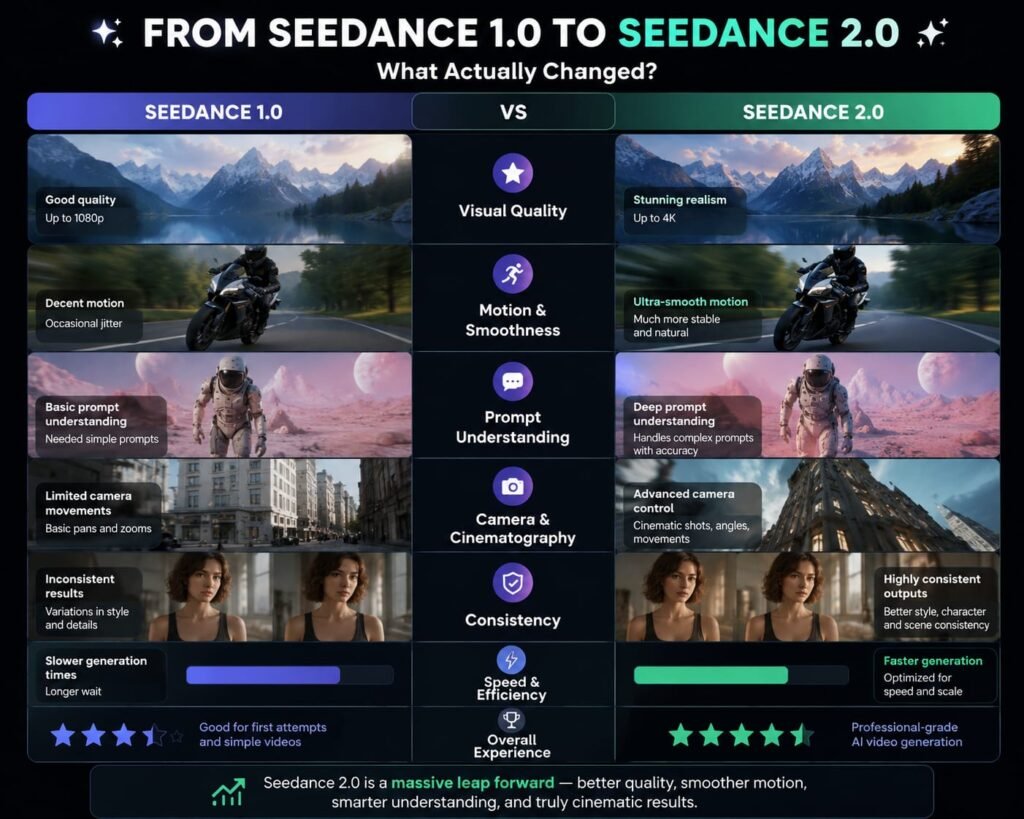
Understanding what makes Seedance 2 notable starts with what its predecessor could and couldn’t do. The original Seedance, released in June 2025, already drew attention — and some controversy for its ability to generate strikingly realistic clips, including ones featuring recognizable actors and characters that went viral, particularly in China, for how convincing they looked.
Seedance 2 builds directly on that foundation with three major upgrades: a unified architecture that generates audio and video together rather than as separate steps, dramatically expanded reference input support (accepting images, video, and audio simultaneously rather than text alone), and a specific focus on physical realism how objects move, collide, and interact with gravity and momentum in a scene.
Key Features of Seedance 2 Explained
Several specific capabilities set Seedance 2 apart from a typical text-to-video generator.
Role-Based Asset Tagging
Rather than describing everything in a single text prompt and hoping the model interprets your intent correctly, Seedance 2 lets you tag what each reference asset is actually for a specific character, a camera movement, a lighting style and the model reads each input’s role automatically rather than needing everything explained in prose.
Reference-Guided Motion
Instead of only describing how something should move, you can feed Seedance 2 an actual reference video showing the motion, composition, or camera movement you want, and the model will apply that reference to your own generated scene.
Stronger Character Consistency
A recurring weak point in earlier AI video models was characters subtly changing appearance from shot to shot. Seedance 2 places specific emphasis on keeping a character’s face, proportions, and details consistent across a generated clip.
Native Audio Generation and Beat-Aware Sync
Rather than generating a silent video you’d need to score separately, Seedance 2 generates audio as part of the same unified process and its beat-aware sync capability aligns visual motion (like a dance move or a cut) with an audio reference’s rhythm, a detail that matters enormously for anything music-driven.
Multimodal Input: How Seedance 2 Actually Uses References
Seedance 2 accepts up to 12 reference assets in a single generation — commonly cited as up to 9 images, 3 video clips (each up to 15 seconds), and 3 audio clips (each up to 15 seconds) combined with a text prompt, letting the model draw composition, motion, and sound cues directly from your own material rather than from text description alone.
This multimodal input system is arguably Seedance 2’s biggest structural advantage over models that rely primarily on text prompts. Rather than trying to describe a specific character’s face, a precise camera pan, or a piece of background music in words, you simply provide the actual reference material and let the model interpret it directly. For creators used to fighting with a text-only model to get a specific visual result, this reference-first approach removes a significant amount of trial and error.
Example: A brand creating a product ad could feed Seedance 2 a few reference images of the product, a short video clip showing the exact camera pan they want, and a music track for the beat-aware sync feature combining all three into a single generation rather than describing each element in text and hoping the result matches.
Physics and Realism: Why Seedance 2 Looks So Convincing
Physical realism has long been one of the clearest tells separating AI-generated video from the real thing objects floating unnaturally, characters walking through doors, glasses passing through tables. Seedance 2 was specifically built to address this, with ByteDance highlighting the model’s motion stability and physical restoration capabilities in complex interaction scenes as a core focus of the release.
The figure skating demo shared alongside Seedance 2’s launch became one of the most cited examples of this improvement — jumps, spins, and landings that hold together with genuinely convincing weight and momentum, rather than the slightly “off” physics that has historically given AI video away. For industries where realism isn’t optional marketing agencies producing client-facing work, game developers prototyping cinematics — this specific improvement is a meaningful practical upgrade, not just an impressive demo reel.
Seedance 2 Resolution, Duration, and Aspect Ratios
Seedance 2 generates video clips ranging from 4 to 15 seconds in length, at resolutions up to 1080p, supporting multiple aspect ratios including 16:9, 9:16, 4:3, 3:4, 21:9, and 1:1 covering standard landscape, vertical social content, and widescreen cinematic formats within a single model.
That aspect ratio flexibility matters in practice: a single model that handles both a 9:16 vertical clip for social media and a 21:9 widescreen shot for a more cinematic project means creators don’t need to switch tools depending on the platform they’re publishing to.
Where You Can Access Seedance 2
Seedance 2 isn’t locked behind a single interface it’s available through several different paths depending on what kind of access you need.
Consumer Apps: CapCut and Dreamina
For most casual creators, the simplest entry point is through ByteDance’s own consumer products CapCut, the widely-used video editing app, and Dreamina (also known as Jimeng in China), ByteDance’s dedicated AI creative platform. Both offer a visual interface for generating clips without needing any technical setup.
Official API Access: BytePlus and Volcengine
For developers building Seedance 2 into their own products, BytePlus ModelArk serves as the official international access point, while Volcengine serves the same role within China. Both offer direct, pay-as-you-go API access rather than a consumer subscription.
Third-Party Platforms and Aggregators
Seedance 2 is also available through a growing list of third-party platforms including fal.ai, PiAPI, Higgsfield, EvoLink, Atlas Cloud, and Novoads — many of which bundle it alongside other video models like Sora, Veo, and Kling under a single account, making it easier to compare or switch between models without managing separate API keys for each.
Seedance 2 Pricing: What It Actually Costs
39+4111
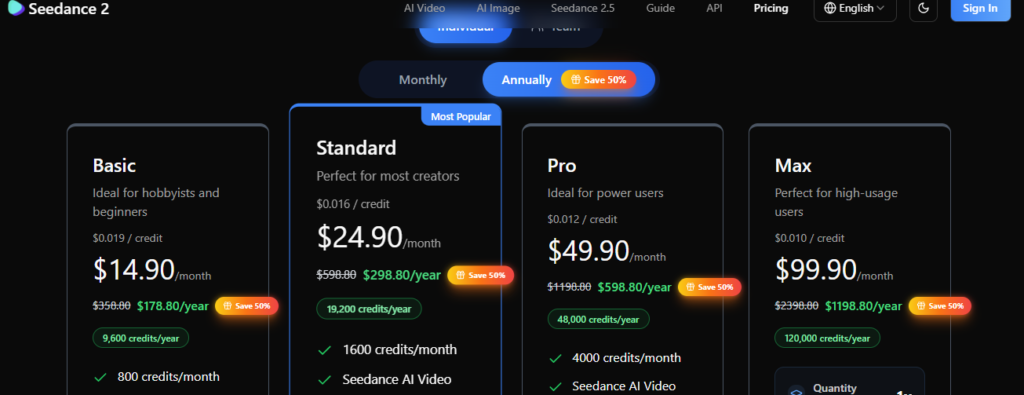
Seedance 2 pricing varies significantly by platform, ranging from roughly $0.02 to $0.30 per second of generated video on API-based platforms, to consumer subscription tiers on Dreamina starting around $9.60/month and scaling up to roughly $45/month for higher-volume plans — with a finished 10-second, 720p clip typically costing somewhere between $1.30 and $6 depending on the path you choose.
This is genuinely one of the more fragmented pricing landscapes in the AI video space right now, since Seedance 2 is resold and repackaged across so many different platforms, each with its own rate structure. A few reference points worth knowing:
- Official Dreamina consumer plans have been reported starting around $9.60/month (69 RMB) for a basic membership, with a Pro-level plan around $45/month offering enough credits for roughly 130-140 standard generations plus priority queue access and 1080p as the default resolution.
- API access through resellers varies widely — some third-party platforms advertise rates as low as $0.02-$0.05 per second for lower-resolution or “fast” processing tiers, while standard, higher-resolution generation typically runs closer to $0.20-$0.30 per second.
- Free trials exist across several platforms, including limited free credits directly from ByteDance’s own platforms and trial credits from various third-party resellers, making it possible to test Seedance 2’s output quality before committing to a paid plan anywhere.
Given how much this pricing landscape shifts between providers and how quickly rates have already changed since the February 2026 launch treat any specific number here as a starting reference rather than a guarantee, and check the specific platform’s current pricing page directly before budgeting a real project around it.
The Copyright and Deepfake Controversy Around Seedance 2
No honest look at Seedance 2 can skip this part of its story. Shortly after release, realistic clips generated using Seedance 2 featuring real actors, TV shows, and films went viral across the internet, raising serious concerns about copyright infringement and the model’s potential to replicate Hollywood-style production without authorization. This echoed similar concerns that followed the original Seedance’s 2025 release, but the improved realism of version 2 made the issue considerably more pointed.
In response, ByteDance has implemented specific guardrails on Seedance 2, including IP protections and C2PA watermarking an industry-standard system for embedding content authenticity and provenance information into generated media, letting platforms and viewers identify AI-generated content and trace its origin. These measures signal where the broader AI video industry appears to be heading on questions of authenticity and intellectual property, even as enforcement and detection remain an evolving, imperfect process.
What this means if you’re using Seedance 2: The model’s own guardrails restrict certain generations involving real, identifiable public figures, but the underlying capability for highly realistic output means responsible use respecting copyright, avoiding the impersonation of real people without consent — matters more with this tool than with earlier, less convincing AI video models.
Seedance 2 vs. Sora 2 vs. Veo vs. Kling: How Does It Compare?
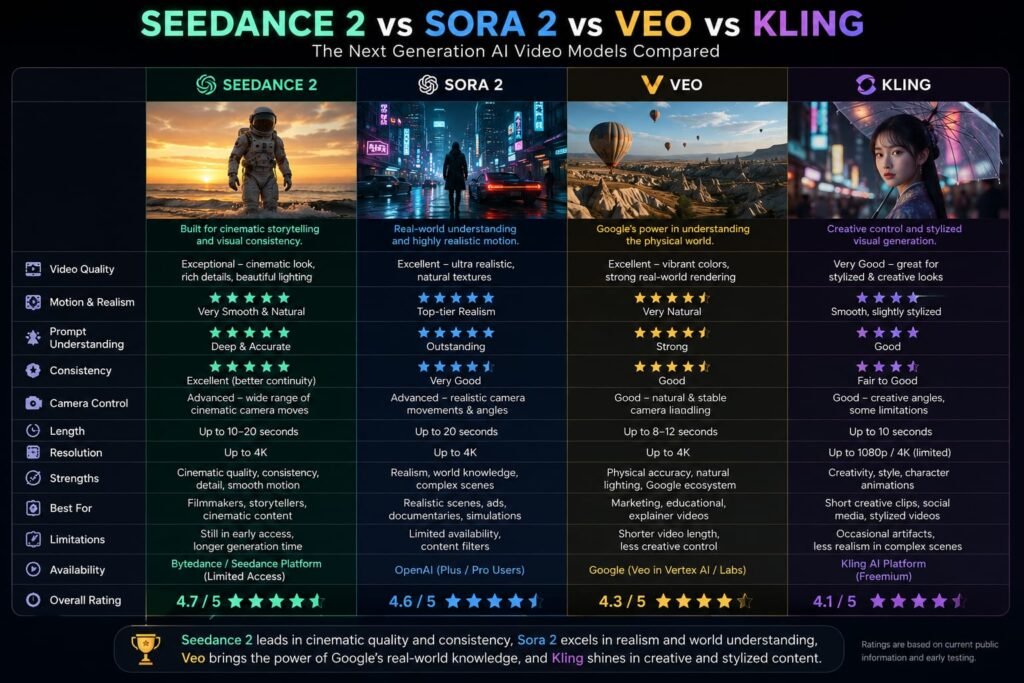
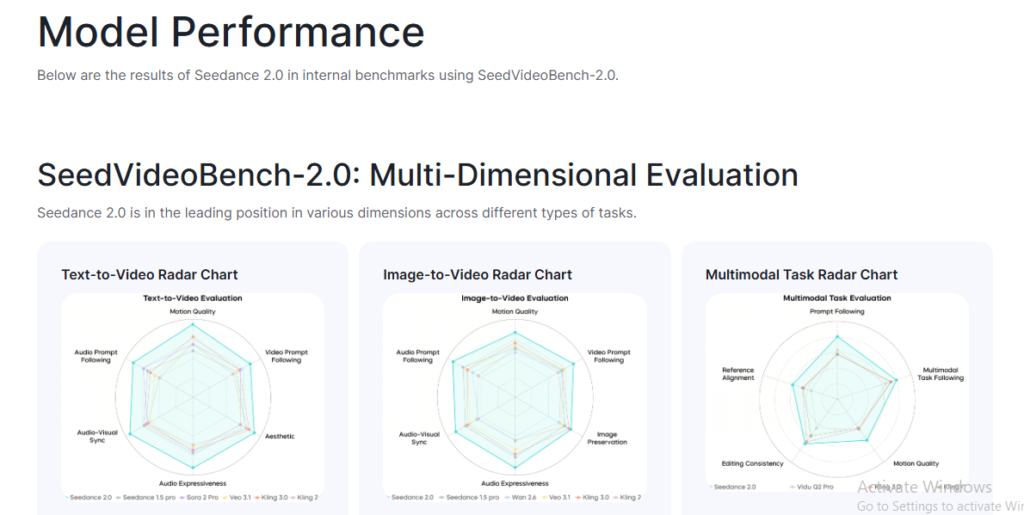
Seedance 2 competes directly against the other major names in AI video generation, and it’s carved out a genuinely strong position. It topped the Artificial Analysis Video Arena leaderboard for both text-to-video and image-to-video in early 2026, a significant, independently-verified result rather than just ByteDance’s own marketing claim.
Where Seedance 2 tends to stand out most is specifically in reference control and audio-visual alignment its multimodal input system and native audio generation give it an edge in workflows where matching a specific visual or sound reference matters more than squeezing out the absolute maximum resolution. On pure pricing, Seedance 2 has also been reported as dramatically cheaper than OpenAI’s Sora 2 at equivalent resolution through certain third-party API providers differences reported as roughly 100x on some specific rate comparisons, though exact figures depend heavily on which specific access path and tier you’re comparing.
For creators specifically prioritizing maximum resolution above all else, some competing models may still have an edge depending on the exact tier compared. But for reference-driven, audio-synced creative work, Seedance 2’s specific combination of features is difficult for competitors to match directly.
Tips for Getting the Best Results From Seedance 2
A handful of practical habits noticeably improve output quality:
- Lean on reference assets rather than pure text description. Since Seedance 2 is specifically built around multimodal input, feeding it an actual reference image, video clip, or audio track will generally get you closer to your intended result than trying to describe the same thing purely in words.
- Use role-based tagging deliberately. Clearly indicating what each reference asset represents a character, a camera move, a lighting style — helps the model apply each input correctly rather than guessing at your intent.
- Test on a lower-cost tier before committing to a final render. Given how many platforms offer a “fast” or lower-resolution tier at a meaningfully lower price, drafting and iterating there before generating your final, full-resolution version is a straightforward way to control costs.
- Plan for the model’s guardrails. If your project involves anything resembling a real, identifiable public figure, expect Seedance 2’s IP protections to restrict certain generations plan your creative approach around fictional or clearly original characters where realism and copyright risk intersect.
Frequently Asked Questions
What is Seedance 2 used for?
Seedance 2 is used for generating short AI video clips — up to 15 seconds for ads, short films, music videos, social media content, and other creative projects, with particular strength in reference-driven, audio-synced workflows.
When was Seedance 2 released?
Seedance 2 was released by ByteDance’s Seed research team on February 10, 2026, following the original Seedance model’s launch in June 2025.
How long can Seedance 2 video clips be?
Seedance 2 generates clips ranging from 4 to 15 seconds in length, at resolutions up to 1080p, across multiple aspect ratios including 16:9, 9:16, and 21:9.
How much does Seedance 2 cost?
Pricing varies significantly by platform roughly $0.02-$0.30 per second through various API providers, or consumer subscription plans on Dreamina starting around $9.60/month, with a typical finished 10-second 720p clip costing somewhere between $1.30 and $6 depending on the access path.
Where can I access Seedance 2?
Seedance 2 is available through ByteDance’s own CapCut and Dreamina consumer apps, official API access through BytePlus (international) or Volcengine (China), and various third-party platforms including fal.ai, PiAPI, and Higgsfield.
Is Seedance 2 better than Sora 2?
Seedance 2 topped the Artificial Analysis Video Arena leaderboard for both text-to-video and image-to-video in early 2026, and it’s been reported as significantly cheaper than Sora 2 through certain API providers, though the “better” model can depend on your specific priorities, like resolution versus reference control and cost.
Does Seedance 2 generate audio, or just video?
Seedance 2 generates audio as part of the same unified process as the video, rather than as a separate step, including a beat-aware sync feature that aligns visual motion with an audio reference’s rhythm.
Why did Seedance 2 cause controversy after launch?
Shortly after release, realistic clips generated with Seedance 2 featuring real actors and film or TV characters went viral, raising copyright infringement concerns. In response, ByteDance added IP protections and C2PA watermarking to the model.
Can Seedance 2 use my own images and videos as references?
Yes. Seedance 2 accepts up to 12 combined reference assets in a single generation — commonly up to 9 images, 3 video clips, and 3 audio clips — letting the model draw directly from your own material for composition, motion, and sound.
Is there a free way to try Seedance 2?
Yes. Several platforms, including some of ByteDance’s own official access points and various third-party resellers, offer limited free credits or trial access, making it possible to test Seedance 2’s output before committing to a paid plan.
My Final Thoughts: Is Seedance 2 Worth Exploring in 2026?
Seedance 2 represents a genuine step forward for AI video generation not just in visual polish, but in the specific combination of multimodal reference input, native synchronized audio, and physical realism that earned it the top spot on independent leaderboards within weeks of launch. For creators who need precise control over a specific look, motion, or sound rather than hoping a text prompt lands right, that reference-driven approach is a real practical advantage over text-only competitors.
The controversy around its realism is worth taking seriously too both as a creator navigating what’s appropriate to generate, and as a viewer increasingly needing tools like C2PA watermarking to tell real footage from AI-generated content. If you’re curious what Seedance 2 can actually do with your own material, the lowest-risk way to find out is a direct test: try one of the free trial options available through ByteDance’s own platforms or a third-party provider, feed it a real reference image or clip, and see how closely the result matches what you had in mind. That hands-on test will tell you more than any spec sheet — including this one.
Seedance 2.0 isn’t just about video quality—the platform you use to access it can make a big difference to the overall cost. If you’re planning to generate a lot of videos with Seedance 2.0, it’s worth comparing the different pricing models, credit systems, and cost per generation before choosing a platform. For a detailed breakdown, check out our [Higgsfield AI pricing guide], where we compare its plans, credits, and the real cost of using Seedance 2.0.
Related Reads:
What Is Lovable AI? The Complete Guide to the AI App Builder Everyone’s Talking About
Is Lovable AI Free? Here’s What You Actually Get
Claude Pro vs ChatGPT Plus: The Real Difference Between These $20 AI Plans
How to Fix AI Image Generator Deformities in Fingers, Toes, and Other Anomalies
What Is Meta AI Muse Spark? The Complete 2026 Guide to Meta’s Flagship AI Model
Kimi K3 Explained: Inside Moonshot AI’s Record-Breaking Open Mode
Best AI App Builder in 2026: 10 Top Tools to Build an App Without Coding