
Kimi AI vs ChatGPT compared: pricing, models, coding agents (Kimi Code vs Codex), Kimi Work, and which one actually fits your workflow.
A year ago, comparing a Chinese AI assistant to ChatGPT would have felt like an unfair fight. That’s no longer true. Kimi AI vs ChatGPT is now a genuinely close comparison Kimi’s latest model has climbed independent benchmarks fast enough to land just behind the top proprietary systems, its free tier is unusually generous, and it now ships its own coding agent and desktop work app to compete directly with OpenAI’s equivalents.
If you’re trying to decide which assistant deserves your time or whether you need both this guide breaks down everything: pricing, model quality, everyday chat performance, and a detailed look at the newer agentic tools on each side, including Kimi Code vs ChatGPT’s Codex, and Kimi Work against ChatGPT’s own multi-step Work agent. By the end, you’ll know exactly which one fits your actual use case.
Kimi AI vs ChatGPT: The Quick Answer
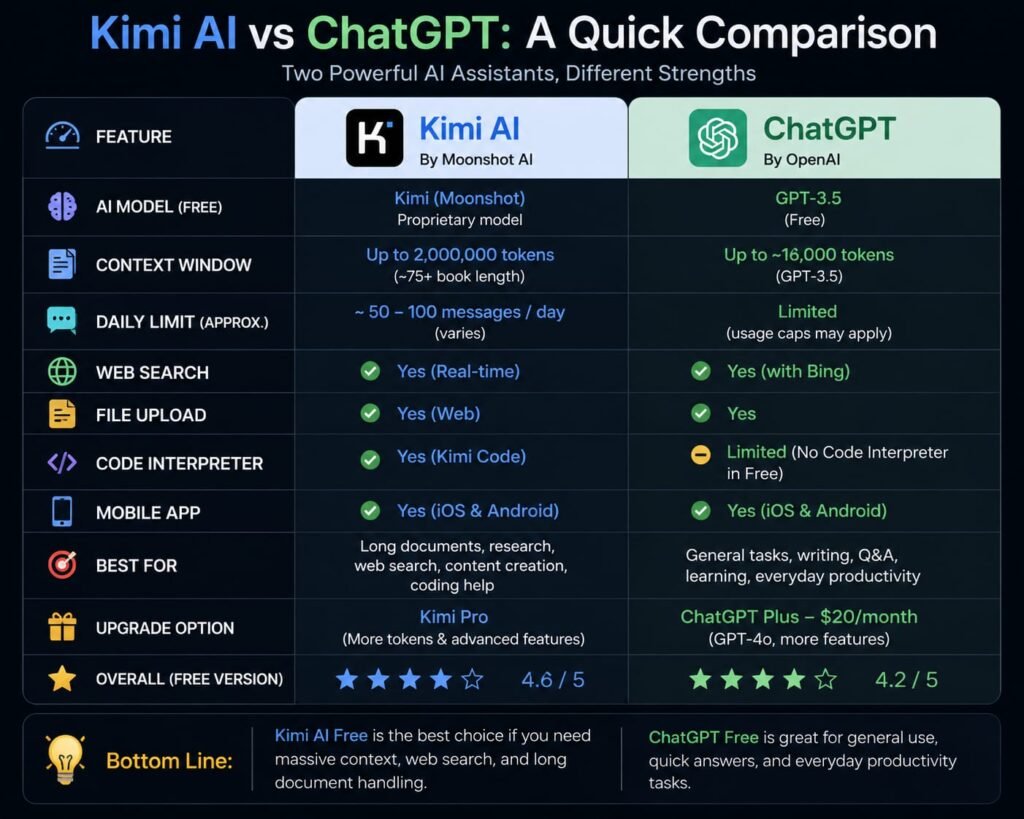
Kimi AI, built by Moonshot AI, generally offers a more generous free tier and stronger dedicated coding and multi-agent research tools, while ChatGPT offers a more polished all-around consumer experience with native voice, image, and video generation, plus a larger ecosystem of integrations. Neither is a universal winner the better choice depends on whether your priority is agentic depth or all-around consumer features.
Both are capable, frequently updated assistants from well-funded labs. The real differences show up once you look past basic chat and into pricing structure, coding capability, and how each one handles multi-step, autonomous tasks which is where this comparison spends most of its time.
Company and Model Background
Understanding where each assistant comes from helps explain their different priorities.
Kimi is developed by Moonshot AI, a Beijing-based lab founded in March 2023. The company built its reputation through a rapid sequence of model releases — from the research-focused Kimi K1.5 in January 2025, through the open-weight Kimi K2 and K2.5, up to Kimi K3 in July 2026, currently the model powering the app. Moonshot has leaned heavily into open-weight releases, a strategy that’s helped it build credibility quickly in a crowded field.
ChatGPT is developed by OpenAI, the company that effectively created the mainstream AI chatbot category in late 2022. ChatGPT now runs on the GPT-5.6 model family, split across different intelligence tiers Sol, Terra, and Luna depending on your plan and which task you’re running. OpenAI has focused its differentiation more on breadth: voice, image and video generation, and a wide ecosystem of connectors and integrations.
Kimi AI vs ChatGPT Pricing Compared
ChatGPT’s core paid tier, Plus, costs $20/month with no annual discount. Kimi offers a genuinely usable free tier plus paid membership tiers (Moderato, Allegretto, Allegro, Vivace) that scale up from roughly $19 to $199/month depending on usage needs meaning Kimi’s entry-level paid cost is generally lower, while ChatGPT’s $20 flat rate covers more consumer-facing extras out of the box.
ChatGPT’s Pricing Structure
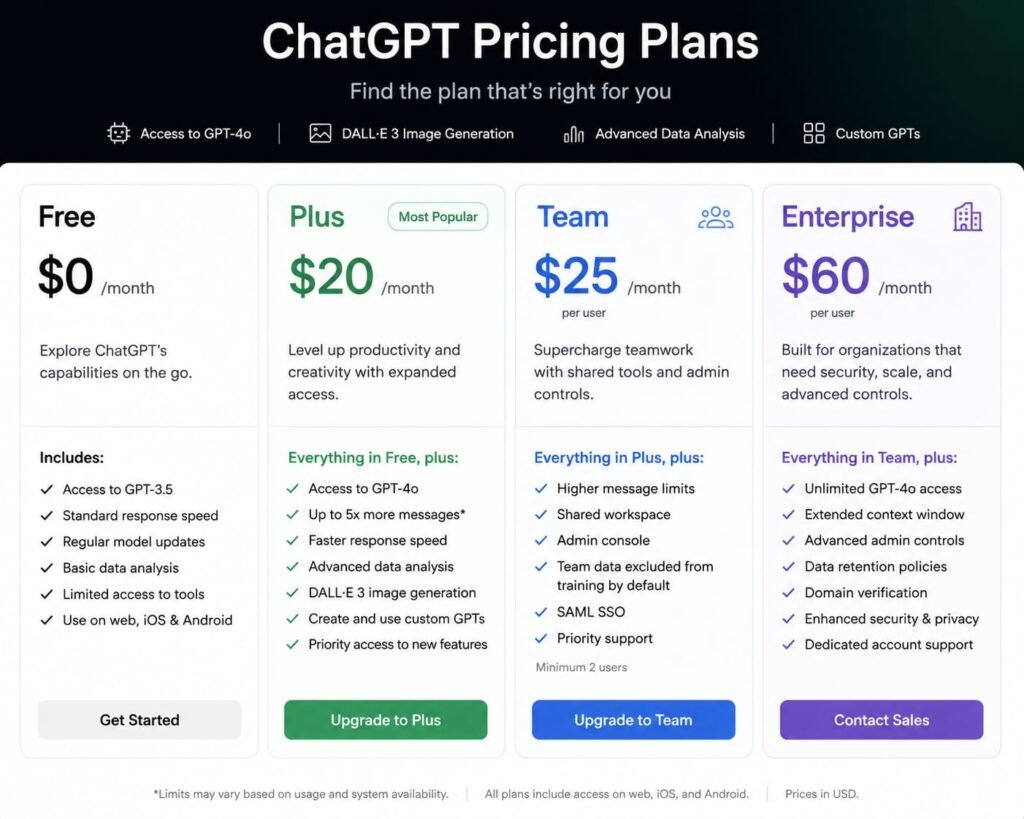
ChatGPT’s lineup includes Free ($0, limited daily messages and a smaller model), Go ($8/month, more messages and a longer memory), Plus ($20/month, the tier most individual users land on), Pro ($100-200/month for power users), and Business (roughly $20-25/seat/month for teams). Plus is monthly-only, with no standing annual discount.
Kimi’s Pricing Structure

Kimi’s free tier is notably generous by comparison ordinary chat on the standard model typically doesn’t consume membership credits at all, and casual users can go a long way without ever paying. Beyond that, Kimi offers four membership tiers (Moderato, Allegretto, Allegro, and Vivace) for users who need more agent capacity, desktop features, or heavier model usage, with the consumer app’s paid tiers generally starting lower than ChatGPT Plus and scaling up for heavier users.
The Practical Difference
If you’re a casual or moderate user, Kimi’s free tier likely covers more of your needs before you’d ever consider paying, compared to ChatGPT’s more limited free tier. If you want a single flat-rate plan that bundles voice, image generation, video generation, and agent tools together without thinking about it, ChatGPT Plus’s $20/month is simpler to reason about.
Model Comparison: Kimi K3 vs. GPT-5.6 Sol
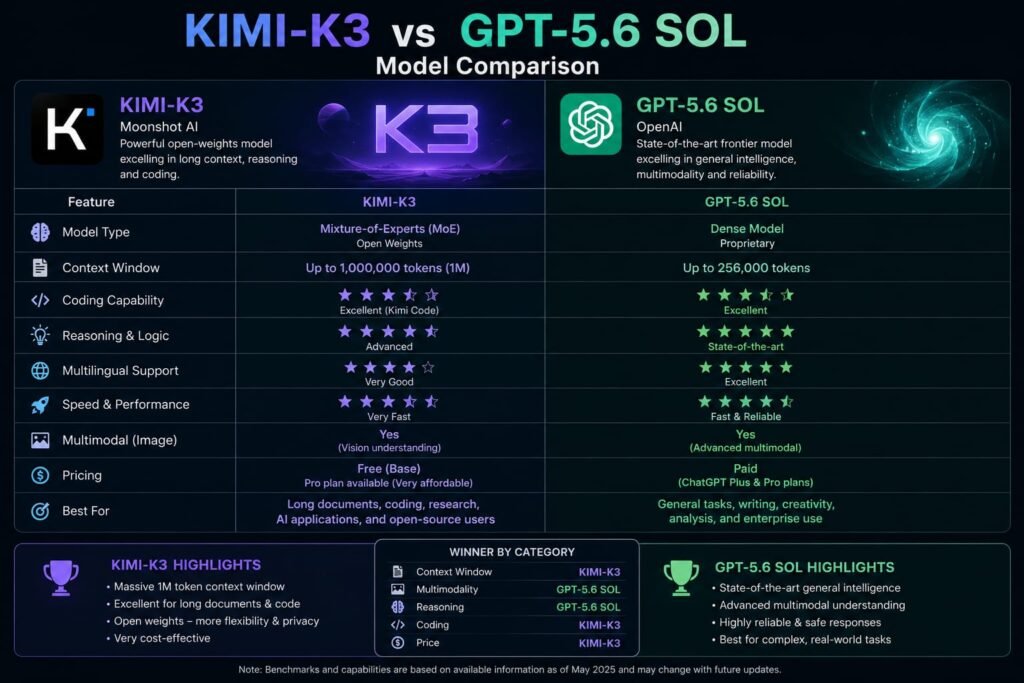
This is the section that should carry real weight, since it’s the foundation everything else builds on.
Kimi K3 is a 2.8-trillion-parameter Mixture-of-Experts model reportedly the largest open-weight model released to date — built with internally developed efficiency techniques (Kimi Delta Attention and Attention Residuals) and a 1-million-token context window. Independent benchmarking from Artificial Analysis placed K3 fourth among 189 tested models on its Intelligence Index, trailing Claude Fable 5 and two GPT-5.6 Sol configurations, but ahead of models like GPT-5.5 and Claude Opus 4.8.
GPT-5.6 Sol is OpenAI’s flagship model tier within the ChatGPT Plus plan, sitting alongside faster variants (Terra) and specialized options (Luna) depending on the task. It’s a closed, proprietary model rather than open-weight, and it consistently ranks among the top tier of frontier models across independent benchmarks.
The realistic read: GPT-5.6 Sol currently edges out Kimi K3 on independent, aggregate benchmark rankings, but the gap has narrowed dramatically and Kimi K3 specifically leads on several individual coding benchmarks. If raw top-tier performance is your only criterion, ChatGPT still holds a slight edge; if you want frontier-level performance with the flexibility of an open-weight model, Kimi K3 is the more unusual and increasingly compelling option.
Kimi vs. ChatGPT for Everyday Chat and Reasoning
For typical daily use answering questions, drafting text, working through a problem — both assistants perform well, but with different personalities.
Kimi’s Thinking Mode shows visible, step-by-step reasoning for complex problems, which is genuinely useful if you want to follow the logic rather than just receive a final answer. Kimi also automatically decides when to search the web based on your question, without requiring a manual toggle.
ChatGPT’s standard chat experience is generally considered slightly more polished for casual conversation and creative writing, with a longer track record of refinement across tone and instruction-following in everyday use. ChatGPT’s Deep Research feature, included on Plus with a capped monthly allowance, produces in-depth, multi-source research reports as a dedicated, well-integrated tool.
Example: Someone drafting a nuanced personal email might find ChatGPT’s tone slightly more naturally calibrated out of the box. Someone working through a multi-step math or logic problem who wants to see the reasoning unfold might prefer Kimi’s Thinking Mode specifically for that transparency.
Kimi Code vs. ChatGPT Codex: The Coding Agent Showdown
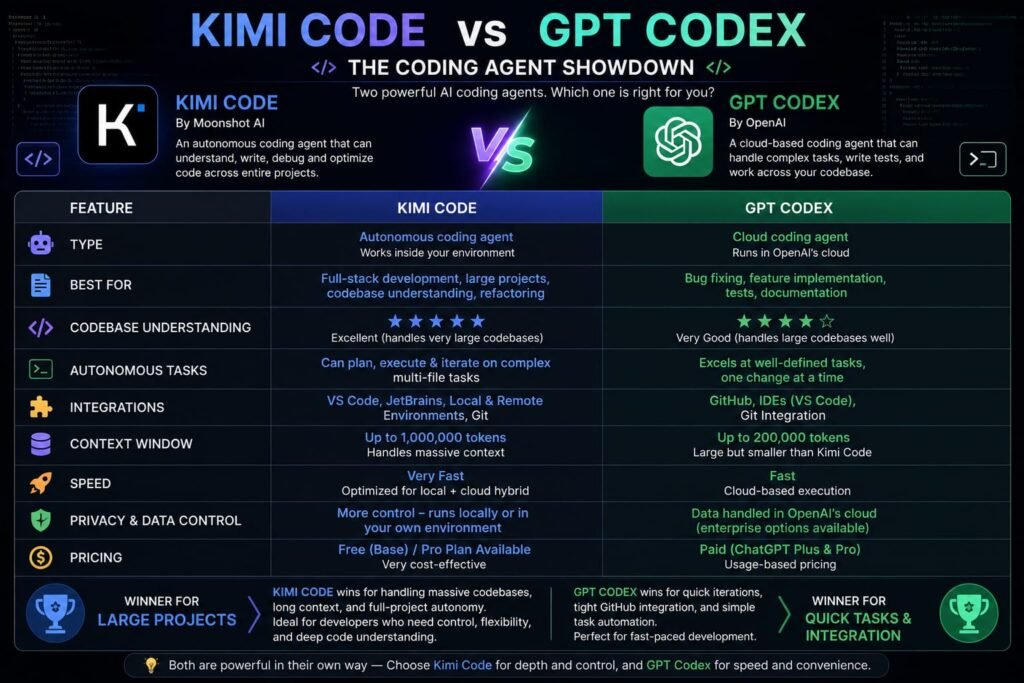
This is one of the most consequential parts of the Kimi AI vs ChatGPT comparison for developers specifically.
Kimi Code is Moonshot AI’s open-source coding agent, integrating with VS Code, Cursor, and Zed, and pulling directly from Kimi K3’s strong coding benchmark performance. ChatGPT Codex is OpenAI’s coding agent, bundled into every paid ChatGPT plan starting at Plus ($20/month), offering 10-60 cloud tasks and 20-50 code reviews per 5-hour window on that tier.
Kimi Code
Kimi Code is built specifically to compete with tools like Claude Code and Gemini CLI, and it’s received frequent updates — including major releases the same day as K3’s launch, adding subagent tooling and background task management. It integrates with popular development environments including VS Code, Cursor, and Zed, and has attracted genuine developer interest, with thousands of GitHub stars reflecting real, organic adoption rather than just hype around the model release.
ChatGPT Codex
Codex is bundled directly into ChatGPT’s subscription tiers rather than sold as a separate product — available on the web, CLI, IDE extension, and iOS starting at Plus. It runs tasks in the background while you continue other work, and independent comparisons have noted that developers using both Codex and competing tools like Cursor often describe Codex as stronger for complex backend tasks specifically. Codex usage is shared with other agentic ChatGPT features, and Fast mode (higher-speed processing) consumes your usage allowance at a steeper rate — reportedly 2-2.5x the standard rate depending on the model.
Which Coding Agent Should You Choose?
If you’re already paying for ChatGPT Plus for other reasons, Codex comes bundled at no extra cost, which makes it an easy default to try. If you want an open-source coding agent with growing community momentum and direct access to one of the strongest current open-weight coding models, Kimi Code is worth a serious look, particularly if you’re already comfortable working with open-source tooling in your development workflow.
Kimi Work vs. ChatGPT’s Work Agent: Multi-Step Tasks and Desktop Tools
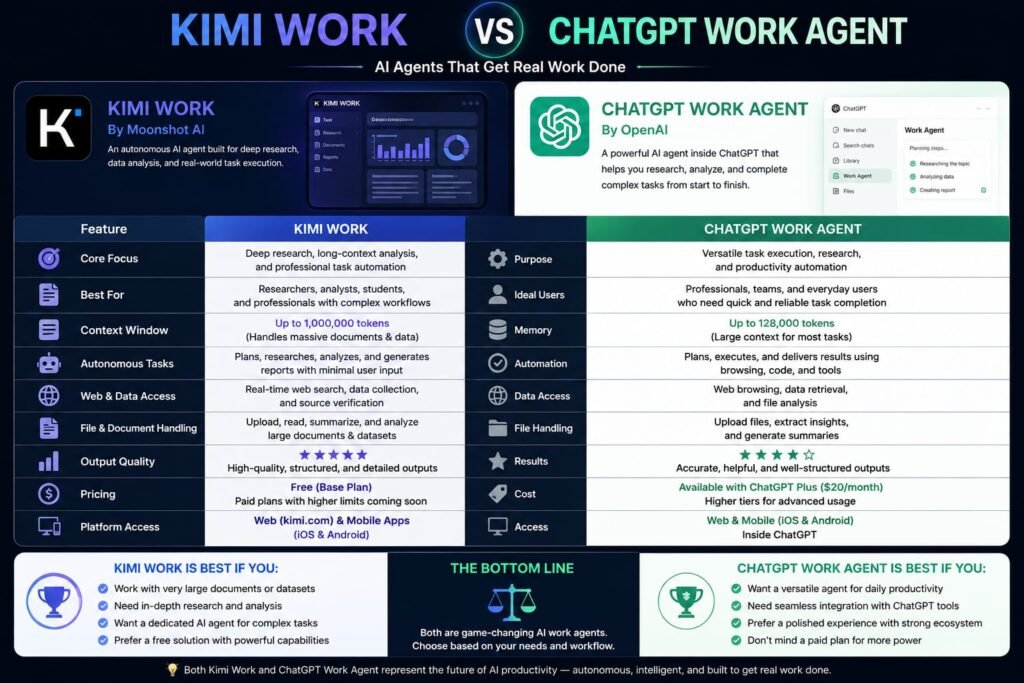
Both platforms have introduced dedicated tools for handling longer, multi-step tasks beyond a single chat exchange, and the naming overlap here — Kimi Work and ChatGPT’s “Work” agent makes this worth untangling clearly.
Kimi Work
Kimi Work is Moonshot’s dedicated desktop application, built for Windows PCs and Apple-silicon Macs specifically, aimed at deeper, sustained work sessions rather than quick mobile interactions. It’s positioned as the environment where Kimi’s more demanding, longer-running tasks — document generation, multi-file research, extended agent workflows are meant to happen, distinct from the lighter mobile app experience.
ChatGPT’s Work Agent
On the ChatGPT side, Plus subscribers get access to a “Work” agent designed for multi-step task completion distinct from Codex, which is specifically coding-focused. This Work agent shares its usage allowance with other agentic ChatGPT features, including Codex, so heavy use of one can affect your remaining capacity for the other within the same billing window.
The Key Difference
Kimi Work is a dedicated desktop application a distinct piece of software you install separately. ChatGPT’s Work agent, by contrast, is a feature accessed within the existing ChatGPT app rather than a standalone desktop product. If having a separate, purpose-built desktop environment for deep work sessions appeals to you, Kimi Work offers something ChatGPT doesn’t directly replicate in the same form.
Agent Swarm vs. ChatGPT Agent Mode: Autonomous, Large-Scale Task Execution
For genuinely large, complex tasks, both platforms offer a step beyond standard agent tools.
Kimi’s Agent Swarm can dynamically deploy up to 300 sub-agents working in parallel, executing thousands of steps to compress work like massive literature reviews or long industry report writing into a dramatically shorter timeframe a distinctive, large-scale approach to parallel task execution.
ChatGPT’s Agent Mode, included on Plus, handles multi-step autonomous tasks as well, though generally through a more linear, single-agent execution model rather than the explicit large-scale parallel swarm approach Kimi advertises.
The practical takeaway: If your work involves genuinely massive, parallelizable research tasks synthesizing dozens of sources into one long report, for instance — Kimi’s Agent Swarm is built with that specific scale in mind. For more typical multi-step tasks that don’t need hundreds of parallel sub-agents, ChatGPT’s Agent Mode is a simpler, more broadly integrated option.
Document and Office File Handling: Kimi vs. ChatGPT
Both assistants handle office-style documents, but with slightly different strengths.
Kimi works directly with Word, PowerPoint, Excel, and PDF files without losing formatting, generating complex Excel formulas and charts and applying layout changes directly within the same workspace — a workflow built specifically around office-document editing as a core feature.
ChatGPT’s Canvas feature supports collaborative document and code editing within the chat interface, and its broader ecosystem includes dedicated tools like ChatGPT for Excel, extending spreadsheet-specific capabilities to Plus and Pro users as a more recent addition.
Both are genuinely useful here; Kimi’s document handling feels slightly more built-in and central to its identity, while ChatGPT’s Canvas and Excel tools are strong, more recently expanded additions to an already broad feature set.
Context Window and Long-Document Handling
Kimi K3’s 1-million-token context window is substantial, letting it hold an entire codebase or a large batch of documents in a single conversation without needing to break the material into smaller chunks. ChatGPT’s context window varies by model and plan tier — non-reasoning models on lower tiers have a notably smaller window (16K on the free tier, for instance), while paid tiers running GPT-5.6 Sol offer significantly more room, though generally still less than Kimi K3’s headline figure.
For teams or individuals routinely working with very large documents or codebases in a single session, Kimi’s context window is a genuine practical advantage.
Kimi AI vs. ChatGPT: Free Tier Comparison
Featured snippet answer: Kimi’s free tier is more generous for everyday use, since ordinary chat with the standard model typically doesn’t consume membership credits at all. ChatGPT’s free tier is more restrictive roughly 10 messages per 5-hour window on a smaller model, with ads shown to US free users since February 2026, and premium features like Advanced Voice Mode, Deep Research, and Agent Mode locked behind a paid plan.
If you’re specifically comparing what you get without paying anything, Kimi’s free experience covers meaningfully more ground before you’d feel pressure to upgrade, particularly for standard chat and everyday use. ChatGPT’s free tier functions more as a taste of the paid experience than a fully usable daily driver.
Which Is Better for Coding, Research, and Writing? A Use-Case Breakdown
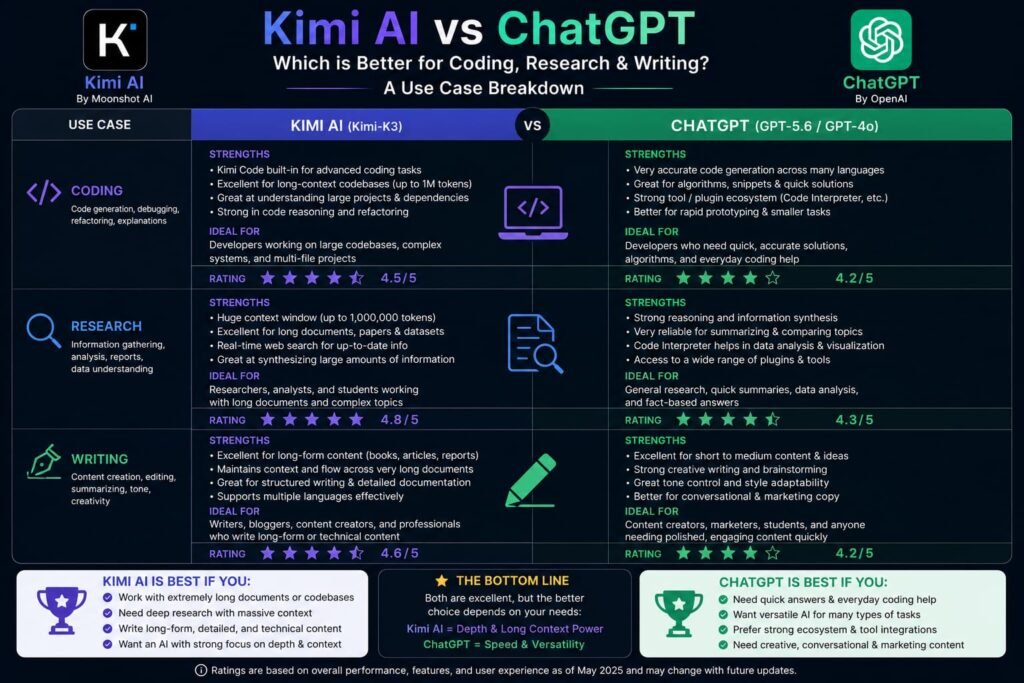
Pulling everything together, here’s how Kimi AI vs ChatGPT shakes out by specific use case:
Best for coding: Close call. ChatGPT’s Codex is bundled conveniently into an existing subscription and performs strongly on complex backend tasks; Kimi Code is a serious open-source alternative backed by K3’s genuinely strong coding benchmarks, with real community momentum behind it.
Best for large-scale research: Kimi, thanks to Agent Swarm’s parallel sub-agent execution and its larger context window for holding many source documents at once.
Best for everyday polish and voice/multimodal features: ChatGPT, with Advanced Voice Mode, native image and video generation through Sora, and a longer track record of refinement in casual conversation.
Best for a generous free tier: Kimi, by a clear margin, for anyone not ready to commit to a paid plan yet.
Best for office document editing: Roughly even, with Kimi’s document handling feeling more central to its design and ChatGPT’s Canvas and Excel tools catching up quickly.
Best for a single, simple flat-rate plan: ChatGPT Plus, since $20/month bundles a wide range of features without needing to think about separate membership tiers.
Frequently Asked Questions
Is Kimi AI better than ChatGPT?
Neither is a universal winner. Kimi tends to offer a more generous free tier and stronger large-scale agentic research tools, while ChatGPT offers a more polished all-around consumer experience with native voice and media generation the better choice depends on your specific priorities.
Is Kimi AI free to use?
Yes, and more generously than ChatGPT’s free tier. Ordinary chat with Kimi’s standard model typically doesn’t consume any membership credits, though heavier agent and desktop features draw from paid membership tiers.
What is Kimi Code, and how does it compare to ChatGPT Codex?
Kimi Code is Moonshot AI’s open-source coding agent, integrating with VS Code, Cursor, and Zed. ChatGPT Codex is OpenAI’s bundled coding agent, included in every paid ChatGPT plan starting at Plus. Both are genuinely capable; Codex has the convenience of being bundled into an existing subscription, while Kimi Code offers an open-source alternative with strong underlying model performance.
What is Kimi Work, and does ChatGPT have an equivalent?
Kimi Work is a dedicated desktop application for Windows and Apple-silicon Macs, built for deeper, sustained work sessions. ChatGPT has a similarly named “Work” agent for multi-step tasks, but it’s a feature within the existing ChatGPT app rather than a separate standalone desktop product like Kimi Work.
Which has a bigger context window, Kimi or ChatGPT?
Kimi K3 offers a 1-million-token context window, which is generally larger than what most ChatGPT tiers provide, particularly on lower-tier or non-reasoning models with smaller context limits.
Is ChatGPT Plus worth $20/month compared to Kimi’s paid tiers?
It depends on your usage pattern. ChatGPT Plus bundles voice, image and video generation, Deep Research, and agent tools into one flat rate, while Kimi’s tiered membership structure can be cheaper for lighter users but requires choosing the right tier for your specific needs.
Does Kimi AI support English well compared to ChatGPT?
Yes. Despite being developed by a Beijing-based company, Kimi’s English interface, chat, and document features are fully supported and generally described as natural rather than machine-translated, making it a genuinely viable option for English-speaking users.
Which is better for large research projects, Kimi or ChatGPT?
Kimi has an edge here, thanks to its Agent Swarm feature, which can deploy up to 300 parallel sub-agents for large-scale research and report writing, combined with its larger context window for holding many source documents in a single session.
Can I use both Kimi and ChatGPT together?
Yes, and given how differently they’re built, many users do using Kimi’s generous free tier and coding tools alongside ChatGPT’s broader multimodal and consumer-facing feature set, rather than treating the choice as strictly either-or.
My Last Verdict: Kimi AI vs ChatGPT — Which Should You Choose?
The Kimi AI vs ChatGPT comparison would have been a lopsided one not long ago. Today, it’s genuinely close, and the right answer depends more on what you’re building than which name is more familiar. If your priorities are a generous free tier, strong coding and research agent tools, and a massive context window, Kimi — including Kimi Code and Kimi Work deserves a real look. If you want a single polished subscription that bundles voice, image and video generation, and a slightly more refined everyday chat experience, ChatGPT Plus remains the safer, more all-around choice.
The best way to settle it for your own workflow is a direct, hands-on test: try the same real task a coding problem, a research request, a document you need formatted on both platforms’ free tiers, and see which one actually gets you a better result faster. That comparison will tell you more than any single spec sheet, and since both offer a meaningful free tier, it won’t cost you anything but a few minutes to find out.
Related Reads:
What Is Lovable AI? The Complete Guide to the AI App Builder Everyone’s Talking About
Is Lovable AI Free? Here’s What You Actually Get
Claude Pro vs ChatGPT Plus: The Real Difference Between These $20 AI Plans
How to Fix AI Image Generator Deformities in Fingers, Toes, and Other Anomalies
What Is Meta AI Muse Spark? The Complete 2026 Guide to Meta’s Flagship AI Model
Kimi K3 Explained: Inside Moonshot AI’s Record-Breaking Open Mode
Best AI App Builder in 2026: 10 Top Tools to Build an App Without Coding
Bolt AI App Builder: The Complete Guide to Building Apps in Your Web Browser
Higgsfield AI Pricing in 2026: Every Plan, Credit Cost, and What You Actually Get
Base 44 Pricing in 2026: Every Plan, Credit Cost, and Hidden Fee Explained
Base44 Reviews 2026: What Real Users Actually Think Before You Build
FlutterFlow AI App Builder: The Complete 2026 Guide to Building Real Native Apps
Kimi AI App: The Complete Guide to Download, Features, and How It WorksIs