
Is Kimi AI worth using for free? This complete 2026 guide explains the Adagio plan, pricing, daily limits, hidden restrictions, and whether you need to pay.
Every month, millions of people open a new AI tool, ask a few questions, and hit a paywall before they have even figured out whether the platform is worth their money. If you are reading this, you are probably wondering the same thing about Kimi: can you actually get meaningful work done on the kimi ai free plan, or is it just a teaser designed to push you toward a subscription?
We have spent weeks testing Kimi AI across every surface—web chat, the desktop Work agent, the VS Code extension, and the Web Bridge browser automation tool—to give you an honest, practical answer. This guide breaks down exactly what the free Adagio tier includes, where the daily caps kick in, how Kimi Code and Kimi Work fit into the picture, and whether you can rely on Kimi as a daily productivity tool without spending a dollar.
By the end, you will know if Kimi AI free is the right starting point for your workflow, or if you should look elsewhere from day one.
What Is Kimi AI and What Does the Free Tier Actually Include?
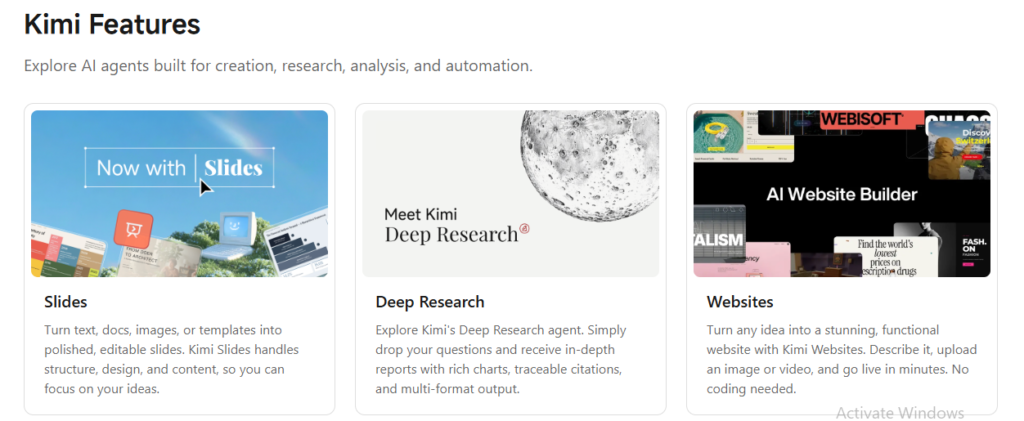
Kimi AI is the flagship consumer product from Moonshot AI, a Beijing-based artificial intelligence lab that has raised over $2 billion at a roughly $20 billion valuation. The platform runs on the Kimi K2 model family, including K2.5 and K2.6, which are natively multimodal and open-source under a Modified MIT license.
The kimi ai free tier is officially called Adagio. It requires no credit card to sign up and gives you immediate access to the chat interface at kimi.com. Here is what you actually get:
- Basic chat with a lighter model variant (not the full K2.6 flagship)
- Web search integration across the internet
- File uploads including documents, PDFs, and images
- A 256K token context window, which is double what most competitors offer for free
- Multimodal input so you can upload images and ask questions about them
- Reasonable daily message quotas that reset every 24 hours
For casual users, students, or anyone who wants to test Kimi’s reasoning quality before committing financially, the free tier is genuinely usable. The 256K context window alone is a standout feature at the free level, letting you paste entire reports or long conversations without the model losing track of earlier details.
However, the free plan runs an older or lighter model variant rather than the full K2.6 flagship. For general questions and document summaries, the quality gap is not dramatic. For heavy coding sessions, extended research runs, or anything requiring the Agent Swarm feature, you will hit the limits quickly.
Kimi Work: Your AI Desktop for Knowledge Work
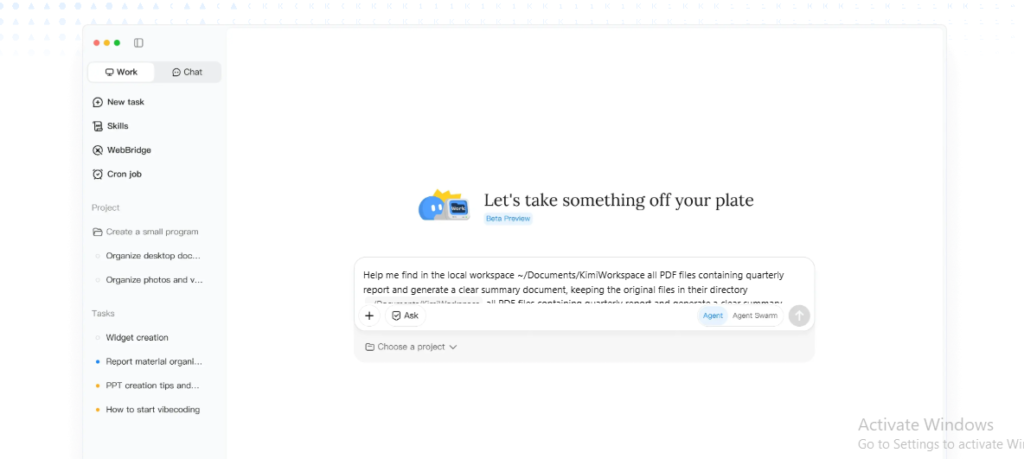
Kimi Work is Moonshot’s desktop agent environment, and it represents a fundamentally different approach from the web chat interface. While web Kimi answers questions like “What does this mean?” Kimi Work answers “Do this every night and put the result in my folder.”
Kimi Work is a free download for macOS (Apple Silicon only) and Windows. It connects to your local files, runs browser automation through Kimi Web Bridge, executes scheduled tasks via Cron, and coordinates agent swarms for complex multi-step workflows. It also includes native finance data tools covering A-shares, Hong Kong, and US equities.
The app itself is free to install, but here is the critical distinction: the desktop agent consumes membership credits, not API keys, by default. On the free Adagio tier, you get approximately six agent task equivalents and one concurrent agent task. Complex tasks burn more credits than simple ones because the shared credit pool is metered by token usage.
What makes Kimi Work powerful is its ability to mount folders on your computer, run multi-site WebBridge sweeps, and output finished documents in Excel, PowerPoint, Word, or PDF format. One Product Hunt user noted that most AI tools stop at “here’s a draft in chat” and then you spend twenty minutes copy-pasting into the actual document. Kimi Work creates the finished file directly.
Featured snippet answer: What is the difference between Kimi Work and web Kimi? Web Kimi is for quick chat and mobile-friendly queries. Kimi Work is a desktop agent that mounts local folders, runs scheduled tasks, automates browsers via WebBridge, and creates finished documents.
Kimi Code: Free Coding Assistance for Developers
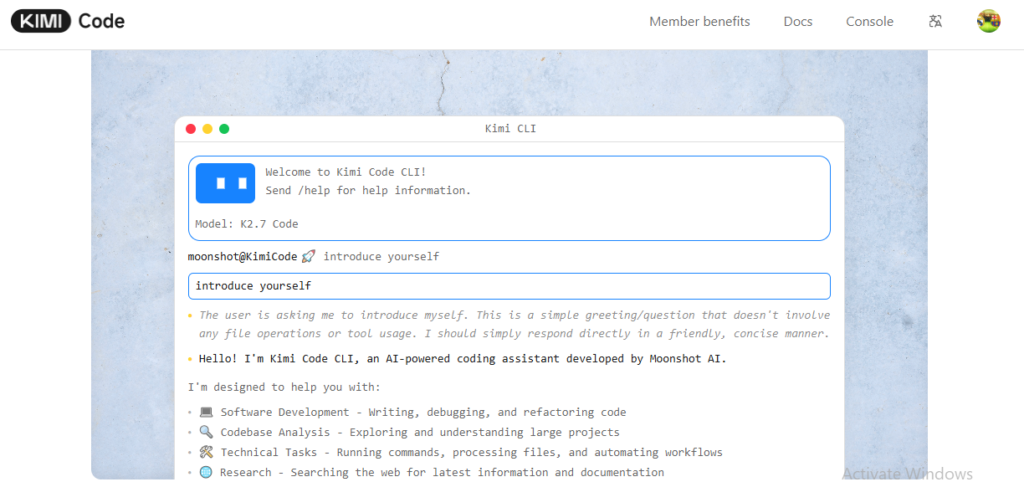
Kimi Code is Moonshot’s AI coding assistant, available as both a VS Code extension and a command-line interface (CLI). It is built for long-context workflows and complex coding tasks, and it can autonomously explore your codebase, read and write code, and run terminal commands with your permission.
The VS Code extension requires VS Code 1.100.0 or later and is available on the marketplace. The CLI installs with a single curl command on macOS and Linux, or a PowerShell command on Windows. After installation, you open a project folder and start the interactive UI with a simple kimi command.
Key features include:
- Thinking controls that let you toggle reasoning effort
- Native editor integration so you review AI-proposed changes directly in VS Code’s diff viewer
- MCP support for extending capabilities with Model Context Protocol servers
- Slash commands like
/initto analyze your project and/compactto manage context
For developers on the kimi ai free plan, the situation is nuanced. Kimi Code is technically available, but the free Adagio tier only includes entry-level coding credits. Sustained daily development work requires at least the Moderato subscription at $19 per month, which unlocks meaningful Kimi Code credits alongside Deep Research and Slides tools.
That said, if you are a hobbyist developer or someone who only needs occasional code help, the free tier gives you enough runway to test whether Kimi Code fits your workflow before upgrading.
Kimi Web Bridge: Browser Automation That Stays Local
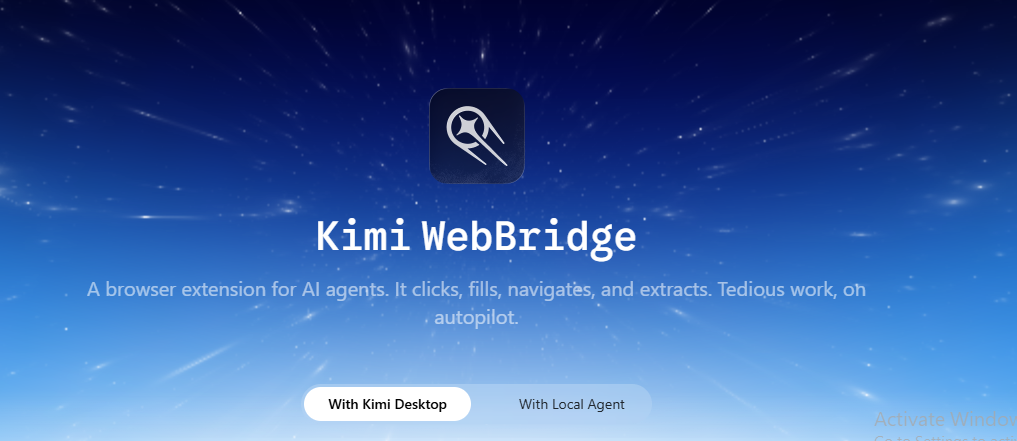
Kimi Web Bridge is a browser extension for Chrome and Edge that turns AI agents into real browser operators. Unlike cloud-based automation tools that route your data through remote servers, Web Bridge runs locally on your machine using the Chrome DevTools Protocol (CDP). Your login sessions, bank accounts, email, and company internal tools never leave your device.
What does this mean in practice? You can ask your agent to browse Amazon for mechanical keyboards under $150 with at least 4.5 stars, and it will navigate the site visually—clicking filters, scrolling, reading reviews—rather than making API calls. You can have it scan LinkedIn job listings across multiple searches and compile them into a spreadsheet, or check prices across ten retailers and report the best deal.
Web Bridge supports multiple AI ecosystems including Kimi Code CLI, Claude Code, Cursor, Codex, Hermes, and OpenClaw. Setup involves installing the browser extension, running a local connection command, and verifying the connected status.
The free Adagio tier can use Web Bridge, but agent tasks consume your limited shared credits. Complex multi-page scraping jobs will burn through your daily allowance fast. For light automation—checking a few pages or filling a single form—the free tier is sufficient. For recurring research pipelines or competitor monitoring, you will need a paid plan.
Featured snippet answer: What is Kimi Web Bridge? It is a local-first browser extension that lets AI agents control Chrome and Edge using your existing login sessions, without sending data to the cloud.
Kimi Platforms: Web, Desktop, Mobile, and API
Kimi AI is available across four distinct surfaces, and understanding the differences matters for free-tier users:
Web (kimi.com): The primary chat interface. Free users get full access to basic chat, web search, and file uploads. This is where most people start.
Desktop (Kimi Work): The local agent for macOS (Apple Silicon only) and Windows. Free to download, but agent tasks require credits. Intel Mac users are currently out of luck—there is no native build advertised.
Mobile (iOS and Android): The Kimi app lets you capture context on the go and trigger consumer swarms. However, local file Cron and Web Bridge do not run on mobile—you need the desktop app for that.
API (platform.moonshot.ai): The developer platform is separate from the consumer chat interface. There is no ongoing free API tier, though you can activate an account with a minimum $1 recharge. When your cumulative recharges hit $5, you receive a $5 voucher.
Important distinction: Subscription plans and API access are completely separate systems. Paying for Moderato does not discount your API tokens, and topping up API credits does not unlock subscription features like Agent Swarm or Kimi Code credits. Keep the two mentally separate.
Daily Limits and What Happens When You Hit the Cap
The most common frustration among kimi ai free users is the daily message cap. Free-tier users get approximately 30 to 50 messages per day, depending on complexity and token consumption.
These limits reset every 24 hours. When you approach your cap, the interface will notify you. Once exhausted, you cannot send additional messages until the reset occurs. There is no option to purchase extra messages à la carte—you must upgrade to a paid tier.
For light use—asking a few questions, summarizing one document, or getting help with a short email—30 to 50 messages is plenty. For power users doing deep research, iterative coding, or running multi-step agent workflows, you will burn through that allocation before lunch.
There is also no priority access during peak usage periods on the free tier. If Kimi’s servers are busy, paid subscribers get faster responses while free users wait in queue.
What the Free Plan Leaves Out
To understand whether kimi ai free is sufficient, you need to know what is locked behind the paywall. Here are the major features missing from Adagio:
- Full K2.6 flagship model access: Free users get a lighter variant.
- Agent Swarm: The parallel multi-agent orchestration requires at least Allegro ($99/month) for meaningful scale, though Moderato includes limited access.
- Kimi Claw: The cloud deployment and browser automation tool for 24/7 operation is Vivace-tier ($199/month).
- Deep Research: The autonomous multi-step research tool requires Moderato or above.
- Kimi Slides and Websites: AI-generated presentations and functional websites are paid features starting at Moderato.
- Custom domains and professional data features: These begin at Allegro.
For casual users, these omissions may not matter. For professionals relying on Kimi as a daily workhorse, the absence of Deep Research and meaningful Kimi Code credits is the biggest practical gap.
Is Kimi AI Free Enough for Real Work?
This is the question that matters most, and the answer depends entirely on your definition of real work.
If your work involves writing short emails, summarizing articles, answering research questions, or drafting social media posts, the free tier is genuinely sufficient. The 256K context window means you can paste lengthy source material, and the web search integration keeps answers current.
If your work involves software development, multi-step research reports, presentation creation, or automated data pipelines, the free tier is a testing ground—not a production tool. You will hit the message cap, exhaust agent credits, and find yourself waiting for daily resets.
One practical approach is to treat the free tier as a permanent evaluation license. Use it for two weeks. Track how often you hit the daily limit. If you are bumping against the cap more than twice per week, the $19 Moderato plan pays for itself in saved frustration.
How Kimi Free Compares to ChatGPT and Claude
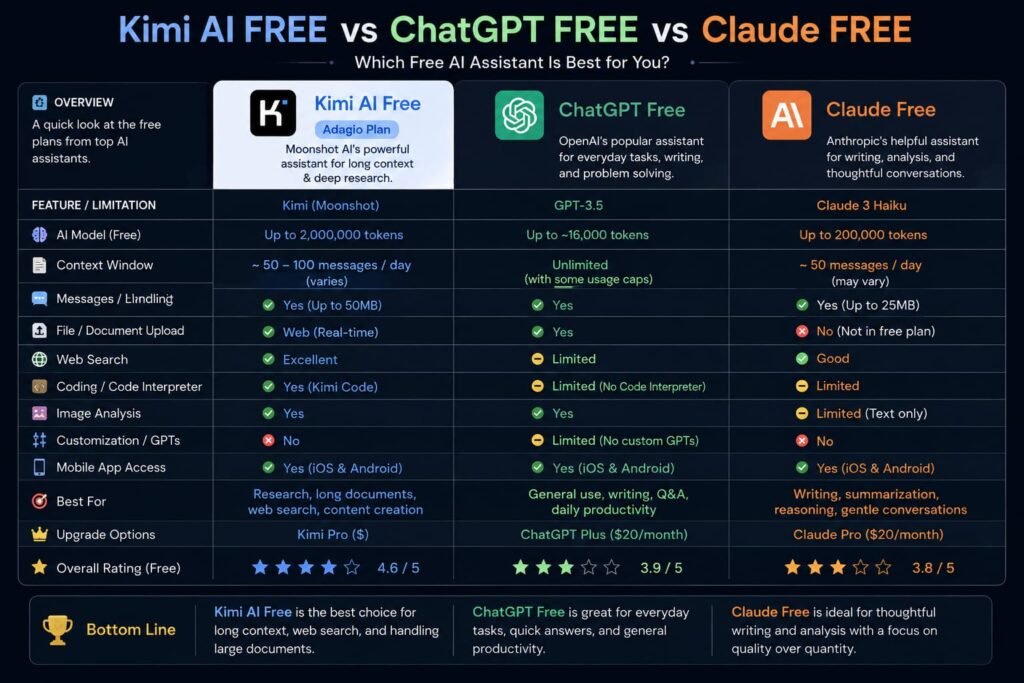
Context matters when evaluating whether kimi ai free is competitive.
| Feature | Kimi Adagio (Free) | ChatGPT Free | Claude Free |
|---|---|---|---|
| Daily messages | ~30-50 | Limited, unspecified | Limited, unspecified |
| Context window | 256K tokens | 128K tokens | 200K tokens |
| Web search | Yes | Yes | No |
| File uploads | Yes (docs, PDFs, images) | Yes | Yes |
| Multimodal | Yes | Yes | Yes |
| Code execution | Limited | Yes (partial) | No |
| Agent features | Very limited | No | No |
Kimi’s free tier holds its own on raw context length and includes web search, which Claude’s free tier lacks. ChatGPT’s free tier is more polished for English-language interactions, while Kimi was built with native Chinese language understanding as a core strength.
For developers, Kimi Code’s integration with VS Code gives it an edge over ChatGPT’s free coding assistance. For general consumers who want the most conversational English experience, ChatGPT still leads on polish.
Tips to Get the Most from Your Free Messages
If you are sticking with kimi ai free, these strategies will stretch your daily allocation further:
1. Combine multiple questions into one message. Instead of asking three separate questions about a document, paste the document and ask all three in a single prompt. You burn one message instead of three.
2. Use the context window strategically. With 256K tokens available, you can paste an entire report, a codebase section, or a long email thread. Do not break content into multiple messages unless necessary.
3. Save simple queries for other tools. Use Kimi for tasks that benefit from its long context or reasoning. For basic factual questions, a standard search engine is faster and costs nothing.
4. Test Kimi Work tasks carefully. Since agent tasks consume shared credits, start with a simple smoke prompt like “Summarize this article and save bullet notes to my folder” before attempting complex multi-site scrapes.
5. Set expectations for peak hours. If you need a response urgently during busy periods, free-tier queueing can add delays. Plan important tasks for off-peak hours when possible.
Frequently Asked Questions
Is Kimi AI completely free?
The basic chat interface at kimi.com is free with no credit card required. However, advanced features like Agent Swarm, Deep Research, Kimi Code credits, and Kimi Claw require paid subscriptions starting at $19 per month. The developer API requires a minimum $1 recharge to activate.
How many messages do I get on Kimi AI free?
Free-tier users receive approximately 30 to 50 messages per day, depending on complexity and token usage. The cap resets every 24 hours.
What is Kimi Work and is it free?
Kimi Work is Moonshot’s desktop agent for knowledge work. The app is free to download for macOS (Apple Silicon) and Windows, but agent tasks consume membership credits. The free Adagio tier includes roughly six agent task equivalents per month.
What is Kimi Web Bridge?
Kimi Web Bridge is a browser extension for Chrome and Edge that lets local AI agents interact with websites using your existing login sessions. It runs locally via the Chrome DevTools Protocol, so your data never leaves your machine.
Can I use Kimi Code for free?
Kimi Code is available on the free tier but with very limited credits. Meaningful daily development work requires at least the Moderato plan ($19/month) for adequate Kimi Code allocation.
Does Kimi free have a context limit?
Yes, but it is generous. The free tier offers a 256K token context window, which is larger than ChatGPT Free (128K) and comparable to Claude Free (200K).
Is Kimi AI free better than ChatGPT free?
Kimi offers a larger free context window and built-in web search, while ChatGPT offers a more polished English conversational experience. For research and document analysis, Kimi’s 256K context is a genuine advantage. For casual chat, ChatGPT’s interface feels more refined.
Can I export my data from Kimi AI free?
Yes. You can export your conversation data and files. The underlying K2 model weights are also open-source on Hugging Face under a Modified MIT license, so developers can self-host if they have the GPU infrastructure.
What platforms support Kimi AI free?
You can access the free tier via web browser at kimi.com, the Kimi Work desktop app (macOS Apple Silicon and Windows), and the mobile app for iOS and Android. The API requires separate billing.
Will Kimi AI free stay free?
Moonshot has maintained the Adagio free tier since launch with no indication of removing it. However, the specific quotas, model variant, and feature access can change. Always check the current pricing page before making long-term workflow decisions.
My Last Conclusion: Should You Build Your Workflow Around Kimi AI Free?
The kimi ai free tier is not a toy. It is a genuinely capable AI assistant with a 256K context window, web search, file uploads, and multimodal support that rivals many paid tiers from competitors. For students, casual researchers, and anyone who needs occasional AI assistance without a monthly bill, Adagio is one of the more generous free offerings in the market right now.
But be honest about your usage patterns. If you find yourself counting messages, waiting for daily resets, or wishing you could run that research agent just one more time, the free tier has done its job—it has proven the value of the platform to you. At that point, the $19 Moderato plan is a reasonable next step that unlocks Deep Research, meaningful Kimi Code credits, and the productivity tools that turn Kimi from a chatbot into a true work companion.
My recommendation: Sign up for the free tier today. Use it for your actual tasks for one full week. Track how many times you hit the daily cap. If the answer is zero, stay free. If the answer is more than three, you have your answer—and your upgrade justification.
Ready to try Kimi AI free? Head to kimi.com, create an account with no credit card required, and start with one representative task from your real workflow. Test the context window by pasting a long document. Try a file upload. See how the reasoning feels for your specific use case. The best way to know if Kimi fits your work is to let it do your work.
Related Reads:
What Is Lovable AI? The Complete Guide to the AI App Builder Everyone’s Talking About
Is Lovable AI Free? Here’s What You Actually Get
Claude Pro vs ChatGPT Plus: The Real Difference Between These $20 AI Plans
How to Fix AI Image Generator Deformities in Fingers, Toes, and Other Anomalies
What Is Meta AI Muse Spark? The Complete 2026 Guide to Meta’s Flagship AI Model
Kimi K3 Explained: Inside Moonshot AI’s Record-Breaking Open Mode
Best AI App Builder in 2026: 10 Top Tools to Build an App Without Coding
Bolt AI App Builder: The Complete Guide to Building Apps in Your Web Browser
Higgsfield AI Pricing in 2026: Every Plan, Credit Cost, and What You Actually Get
Base 44 Pricing in 2026: Every Plan, Credit Cost, and Hidden Fee Explained
Base44 Reviews 2026: What Real Users Actually Think Before You Build
FlutterFlow AI App Builder: The Complete 2026 Guide to Building Real Native Apps
Kimi AI App: The Complete Guide to Download, Features, and How It Works