

Discover the HappyHorse AI video model: version 1.1 features, pricing, audio, reference images, use cases, limitations, and how it compares with rivals.
AI video generation is moving incredibly quickly. Every few weeks, a new model appears promising better motion, more realistic characters, improved audio, or greater control over the final shot.
But HappyHorse AI is a particularly interesting addition to the competition.
The model first attracted widespread attention in April 2026 after appearing anonymously on the Artificial Analysis Video Arena and performing extremely well in blind human evaluations. Alibaba later confirmed that HappyHorse was developed by its AI innovation organization. Just two months later, Alibaba released HappyHorse 1.1, bringing improvements to motion, subject consistency, instruction following, visual quality, and audio.
That makes HappyHorse worth watching if you create AI videos for YouTube, social media, advertising, product marketing, storytelling, or filmmaking.
In this guide, we’ll explain what the HappyHorse AI video model is, how it works, what HappyHorse 1.1 can do, how much it costs, where you can use it, its biggest strengths and weaknesses, and how it compares with models such as Kling and Seedance.
What Is the HappyHorse AI Video Model?
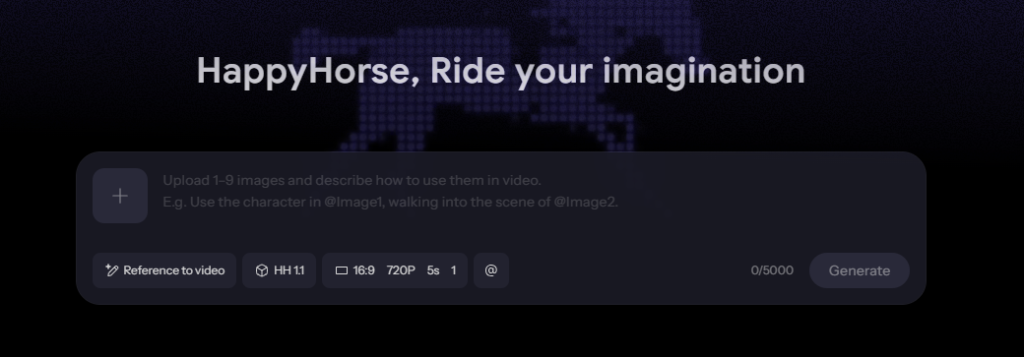
The HappyHorse AI video model is an AI system designed to generate short videos from text prompts, images, and reference material.
In simple terms, you describe the scene you want, provide an image when necessary, and HappyHorse generates a video showing the requested action.
The current generation is HappyHorse 1.1, which was launched on June 22, 2026. Alibaba describes it as a cinematic video-generation model with improvements in dynamic performance, visual quality, and consistency. It is available through Alibaba Cloud Model Studio, where both text-to-video and image-to-video versions are offered.
The model is particularly interesting because it isn’t simply focused on making attractive individual frames. Its improvements target several problems that AI video creators regularly encounter:
- Characters changing appearance between frames
- Unnatural movement
- Prompts being partially ignored
- Poor continuity between shots
- Artificial-looking skin and textures
- Dialogue and lip-sync problems
- Difficulty controlling scenes with multiple references
HappyHorse 1.1 attempts to address these issues while keeping video generation relatively fast and accessible.
In short: HappyHorse is designed to turn written ideas and visual references into short, cinematic AI-generated videos with increasingly strong control over movement, characters, scenes, and audio.
The Story Behind HappyHorse
One of the reasons HappyHorse received so much attention was its unusual introduction.
Instead of arriving with a major public marketing campaign, HappyHorse 1.0 appeared anonymously on the Artificial Analysis Video Arena in April 2026.
It quickly attracted attention because it performed strongly in blind comparisons against established video-generation systems.
Alibaba confirmed on April 10 that HappyHorse was developed by its AI innovation unit under Alibaba Token Hub (ATH). The company said the model was still in internal testing at that stage and that API access would become available.
This created an unusual situation.
People were evaluating a model before many users even knew who was behind it.
The mystery also helped generate interest among AI researchers and creators. HappyHorse was eventually identified as an Alibaba project, and the company subsequently integrated the model into its cloud AI ecosystem.
Then came the next major step.
HappyHorse 1.1 arrives
On June 22, Alibaba launched HappyHorse 1.1.
Rather than simply increasing a version number, the update focused on several practical areas:
- Better motion expression
- Better character and subject consistency
- Stronger instruction following
- Improved visual quality
- Better audio and synchronization
Alibaba Cloud currently lists HappyHorse 1.1 alongside other major foundation models in Model Studio, with text-to-video, image-to-video, and reference-to-video capabilities.
That is important because AI video generation is no longer just about image quality. Creators increasingly need models that can understand what should happen, who should remain consistent, and how the camera and characters should move.
HappyHorse 1.1: What’s New?
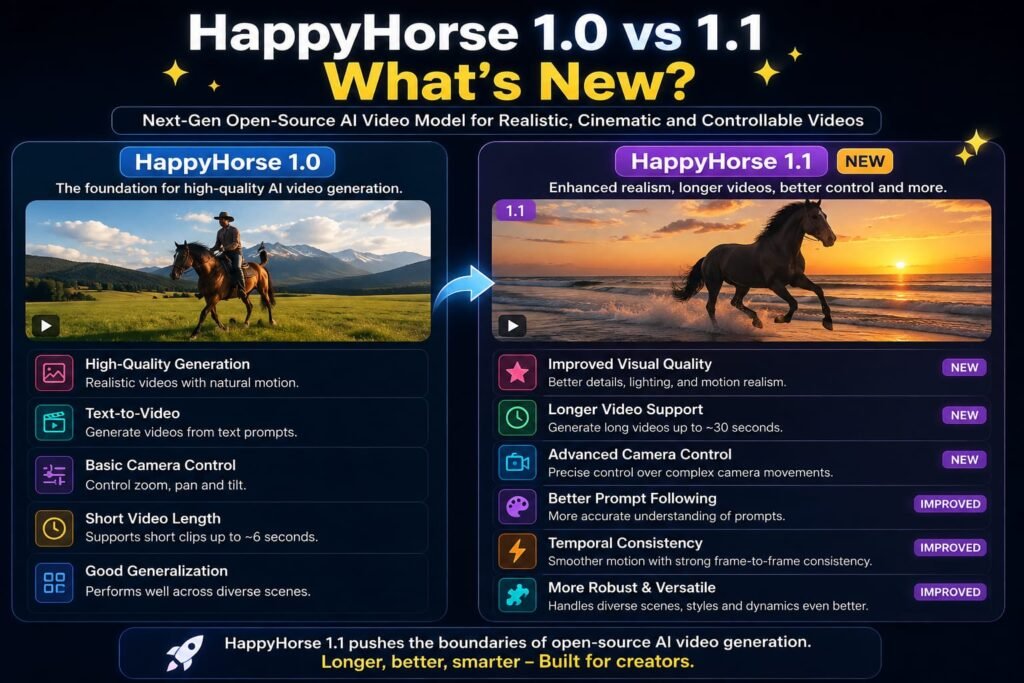
The biggest reason to pay attention to the current HappyHorse AI video model is the jump from 1.0 to 1.1.
Alibaba describes the update as a systematic improvement across multiple dimensions. Third-party coverage of the release also highlights smoother movement, better subject consistency, improved prompt adherence, more natural visual rendering, and stronger audio performance.
Let’s look at the upgrades individually.
1. More Natural Motion
Motion is one of the hardest problems in AI video.
A model can create a beautiful opening frame, but the quality can fall apart once a person starts running, a vehicle turns, or several objects interact.
HappyHorse 1.1 focuses heavily on dynamic expression.
The goal is to make movements feel less mechanical and more continuous.
For example, instead of simply generating:
“A woman walks through a city.”
A stronger prompt can describe her walking through a crowded street while the camera follows from behind, her coat responding to the wind and surrounding lights reflecting on wet pavement.
The model’s job is then to translate those instructions into a coherent sequence rather than treating every frame as an isolated image.
2. Improved Character Consistency
Character consistency is another major challenge.
Imagine creating a five-shot advertisement featuring the same person. If the character’s face, hairstyle, clothing, or body proportions change every few seconds, the result becomes difficult to use professionally.
HappyHorse 1.1 adds reference-to-video functionality that can use multiple reference images. Current implementations support up to nine reference images, allowing creators to provide more information about the desired characters or visual elements.
This is potentially valuable for:
- Character-driven stories
- Product advertisements
- Fashion campaigns
- Short films
- Game cinematics
- Consistent social-media characters
- Storyboards
How HappyHorse AI Video Generation Works
HappyHorse 1.1 supports several ways of creating video.
The exact interface depends on the platform you use, but the underlying workflow can be divided into three major modes.
Text-to-Video
Text-to-video is the simplest option.
You provide a written description and the model generates a video.
For example:
Prompt:
A cinematic aerial shot of new york at sunrise, warm golden light illuminating historic rooftops, birds flying across the frame, slow camera movement, realistic architecture, atmospheric haze.
The model interprets the description and generates the corresponding video.
Text-to-video is useful when you don’t already have a visual asset.
Image-to-Video
Image-to-video starts with a still image.
Instead of asking the model to invent everything, you give it a starting visual and tell it what should happen.
For example:
Use the uploaded product image as the first frame. Slowly rotate the product while the camera moves closer. Maintain the exact shape and branding. Studio lighting, subtle reflections, premium commercial aesthetic.
This approach can provide more control over the visual starting point.
Alibaba’s Model Studio documentation specifically provides an image-to-video API for generating smooth-motion video from a first-frame image and an optional text prompt.
Reference-to-Video
Reference-to-video is particularly interesting for creators.
Instead of relying on a single starting image, you can provide multiple reference images.
These references can help communicate:
- Character appearance
- Clothing
- Environment
- Products
- Objects
- Visual style
- Scene relationships
Current HappyHorse 1.1 implementations support up to nine reference images.
This can be useful when you want the AI to understand a character or product from multiple angles.
HappyHorse 1.1 Video Specifications
Here are the important specifications currently associated with HappyHorse 1.1.
| Feature | HappyHorse 1.1 |
|---|---|
| Text-to-video | Yes |
| Image-to-video | Yes |
| Reference-to-video | Yes |
| Reference images | Up to 9 |
| Output resolution | 720p / 1080p |
| Video duration | 3–15 seconds |
| Native audio capabilities | Yes, depending on access/mode |
| Aspect ratios | Multiple formats |
| API access | Yes |
| Alibaba Cloud Model Studio | Yes |
Alibaba Cloud currently lists HappyHorse 1.1 at $0.14 per second for 720p and $0.18 per second for 1080p in its international Model Studio pricing documentation, although promotional discounts and regional pricing can change.
Third-party implementations such as Replicate also currently expose HappyHorse 1.1 with 720p and 1080p output, 3–15 second durations, and several aspect-ratio options.
Native Audio Is One of HappyHorse’s Interesting Features
AI video has historically required creators to treat video and audio as separate problems.
You might generate a video first and then use another tool for:
- Voiceovers
- Sound effects
- Dialogue
- Music
- Ambient sound
- Lip-sync
HappyHorse takes a different approach.
Its architecture was designed around joint audio-video generation, meaning the model can generate visual content and synchronized sound together.
The original HappyHorse 1.0 was described as a unified multimodal model capable of generating video and audio together. Its reported capabilities included dialogue, ambient sounds, sound effects, and multilingual lip synchronization.
For creators, the practical advantage is obvious.
Instead of generating a silent video and spending another hour trying to make the audio fit, you can potentially create a more complete audiovisual clip in a single generation workflow.
That doesn’t mean every output will be perfect.
AI-generated dialogue, sound effects, and lip-sync can still contain mistakes. Professional creators should always review the final output before publishing.
What Can You Create With HappyHorse?
The HappyHorse AI video model is particularly suitable for short-form visual content.
Here are some practical applications.
1. Social Media Videos
TikTok, Instagram Reels, YouTube Shorts, and similar platforms require a constant supply of visual content.
HappyHorse can be used to turn concepts into short clips without traditional filming.
For example:
- Product demonstrations
- Cinematic transitions
- Short stories
- Travel concepts
- Fashion clips
- Character videos
- Visual explainers
2. Advertising
Advertising is one of the most obvious use cases.
A brand could start with a product image and generate a short promotional sequence around it.
For example:
A luxury perfume bottle on a black marble table, surrounded by soft mist and floating water droplets. Slow cinematic camera push-in, dramatic rim lighting, premium advertising style.
Instead of organizing a studio shoot, a creator can use AI to produce early concepts and variations.
3. E-Commerce
E-commerce businesses frequently have hundreds of product images but relatively few product videos.
Image-to-video can help transform static product photography into short promotional clips.
This is particularly useful for:
- Clothing
- Jewelry
- Cosmetics
- Electronics
- Home products
- Food packaging
For an Indian e-commerce seller, for example, a single product photograph could potentially become a 5–10 second social-media advertisement without arranging a physical shoot.
4. Storytelling and Short Films
The ability to work with references makes the model interesting for storytelling.
A filmmaker could prepare character reference images and then use them while generating different scenes.
This doesn’t replace a full production pipeline, but it can speed up:
- Concept development
- Storyboarding
- Previsualization
- Scene exploration
- Short experimental films
5. Game and Cinematic Concepts
Game developers can use AI video models to explore environments, characters, action sequences, and cinematic ideas before investing in full production.
HappyHorse can therefore be viewed not only as a final-video generator but also as a visual ideation tool.
Why Use HappyHorse Instead of Another AI Video Model?
This is where things become more interesting.
The AI video market is crowded. You have models from Alibaba, ByteDance, Kuaishou, Google, OpenAI, MiniMax, Runway, and other companies.
So why should anyone use HappyHorse?
Strong multimodal workflow
HappyHorse isn’t limited to simple text-to-video generation.
Its current capabilities include text-to-video, image-to-video, and reference-to-video workflows.
Strong emphasis on consistency
The reference-image workflow is particularly useful when maintaining a character or subject matters.
Integrated audio
Native audio-video generation can reduce the need for separate audio workflows.
1080p generation
The model supports 1080p output, making it more useful for higher-quality social, marketing, and creative work.
Competitive API pricing
At the current Alibaba Cloud list price, HappyHorse 1.1 is $0.14 per second at 720p and $0.18 per second at 1080p for international deployment.
That means a 5-second 1080p clip would cost approximately $0.90 at list price before applicable discounts, taxes, or platform-specific charges.
For developers generating hundreds of clips, that difference can become meaningful.
HappyHorse AI Pricing: How Much Does It Cost?

Pricing is one of the most important things to understand before choosing an AI video model.
The answer depends on where you access HappyHorse.
Alibaba Cloud Model Studio
Alibaba’s official Model Studio documentation currently lists HappyHorse 1.1 at:
- 720p: $0.14 per second
- 1080p: $0.18 per second
These are listed international prices, and Alibaba currently shows a limited-time promotional discount in its pricing documentation.
At the standard list price:
| Video Length | 720p | 1080p |
|---|---|---|
| 5 seconds | $0.70 | $0.90 |
| 10 seconds | $1.40 | $1.80 |
| 15 seconds | $2.10 | $2.70 |
These calculations are based on the published per-second list prices.
Actual charges may vary depending on region, promotional pricing, taxes, platform, and whether you use another provider.
Important: Don’t assume that every website advertising “HappyHorse AI” uses the official Alibaba service. There are multiple third-party websites using the HappyHorse name, so checking the provider and pricing terms is important.
How to Use HappyHorse AI
For beginners, the process is relatively straightforward.
Step 1: Choose your generation mode
Decide whether you want:
- Text-to-video
- Image-to-video
- Reference-to-video
If you already have a strong image, image-to-video is often the easiest starting point.
Step 2: Write a detailed prompt
Don’t simply write:
“A woman walking.”
Instead, describe the scene more like a director.
For example:
A young woman walks slowly through a rain-soaked Tokyo street at night. Neon signs reflect across the wet pavement. The camera follows her from a low three-quarter angle as she holds a transparent umbrella. Natural walking motion, realistic rain, cinematic lighting, shallow depth of field, subtle background movement.
This gives the model much more information.
Step 3: Describe the camera
Camera instructions can make a major difference.
Useful terms include:
- Slow push-in
- Tracking shot
- Dolly shot
- Wide establishing shot
- Close-up
- Over-the-shoulder
- Low-angle shot
- High-angle shot
- Handheld camera
- Static camera
- Slow orbit
Step 4: Describe movement
Tell the model what should actually move.
For example:
The woman walks toward the camera while her hair moves gently in the wind.
This is better than simply saying:
“Cinematic woman.”
Step 5: Add lighting and atmosphere
Lighting can dramatically change the appearance of an AI-generated scene.
Try descriptions such as:
- Golden-hour sunlight
- Soft studio lighting
- Neon night lighting
- Overcast daylight
- Warm candlelight
- Cool moonlight
- Dramatic rim lighting
Step 6: Generate multiple versions
Your first generation doesn’t necessarily need to be the final one.
AI video generation is iterative.
Generate several versions, identify what went wrong, adjust your prompt, and try again.
Best HappyHorse Prompt Example
Here’s a practical example for a cinematic product advertisement:
A premium black smartwatch rests on a polished black stone surface in a dark luxury studio. Slow cinematic camera movement from left to right as the watch rotates slightly. Tiny water droplets roll across the glass surface. Soft blue rim lighting outlines the watch while a warm spotlight highlights the metallic edges. Photorealistic materials, realistic reflections, shallow depth of field, premium commercial advertising aesthetic. Smooth natural motion. No text, no logos, no additional objects.
Notice that the prompt describes four different things:
Subject + movement + camera + visual style.
That’s generally more useful than filling the prompt with dozens of random adjectives.
HappyHorse vs Kling vs Seedance
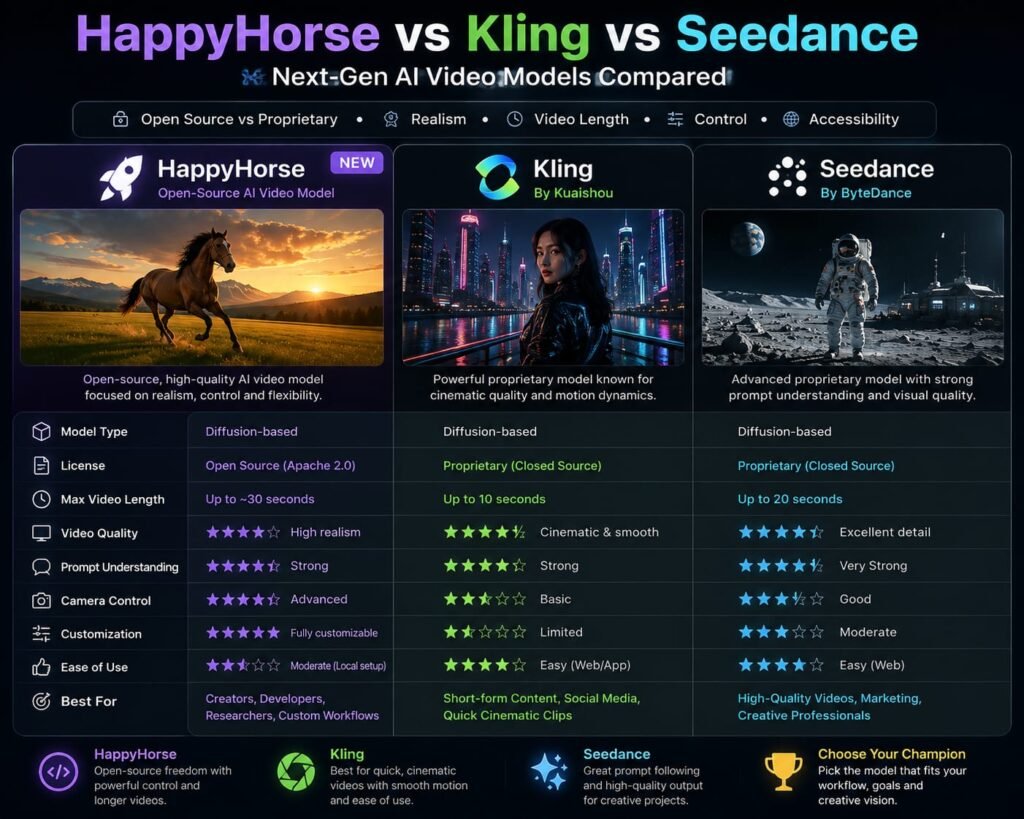
If you’re already researching AI video generation, you’re likely comparing HappyHorse with models such as Kling and Seedance.
The three tools have overlapping capabilities, but their strengths can differ depending on the specific generation.
HappyHorse vs Kling
Kling has established itself as one of the major AI video-generation platforms, particularly for cinematic generation and creative control.
HappyHorse’s strongest differentiators are its multimodal workflow, reference-image capabilities, and integrated audio approach.
If you’re already using Kling, you don’t necessarily need to replace it.
A better strategy is to test the same prompt in both models.
For example, generate:
- A human walking
- A product advertisement
- A complex action scene
- A dialogue scene
- A multi-reference character scene
Then compare:
- Motion
- Character consistency
- Prompt adherence
- Lighting
- Physics
- Audio
- Generation cost
HappyHorse vs Seedance
Seedance is another major competitor in AI video generation.
ByteDance’s models have received considerable attention for cinematic composition, camera movement, and complex scene generation.
HappyHorse’s reference-image workflow and integrated audio capabilities make it an interesting alternative.
There is no universal winner.
A model that produces the best result for one prompt may perform worse on another.
For serious creators, benchmark testing with your own prompts is more useful than relying entirely on leaderboard rankings.
What Are the Limitations of HappyHorse?
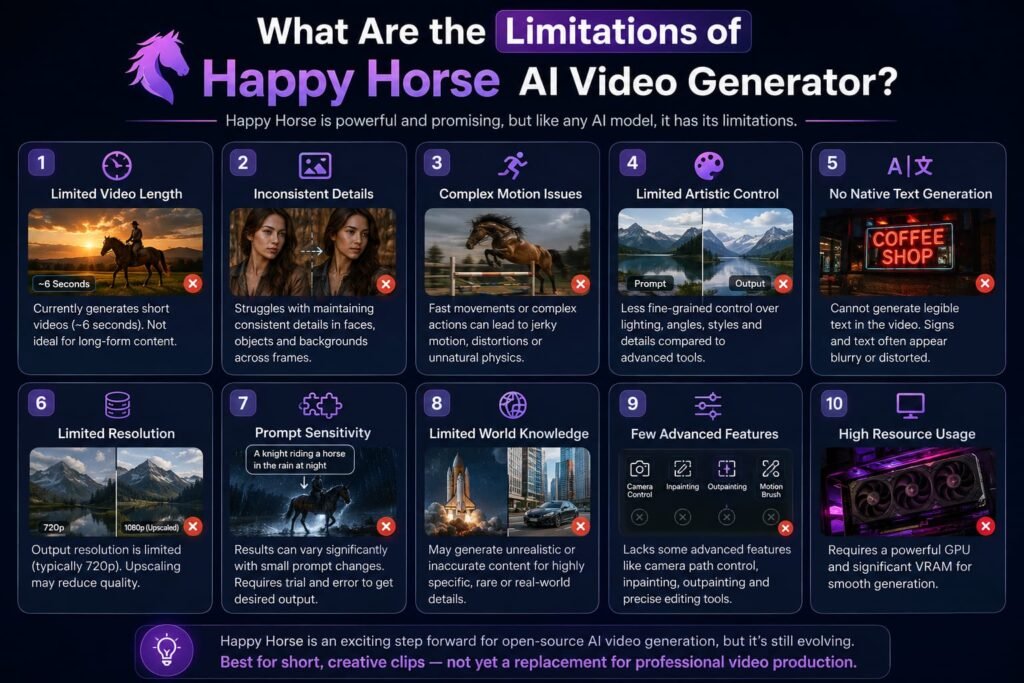
Despite the impressive capabilities, HappyHorse isn’t magic.
There are several limitations worth understanding.
Short video duration
Current HappyHorse 1.1 implementations support clips of approximately 3 to 15 seconds.
That means longer videos still require multiple generations and editing.
A five-minute YouTube video isn’t going to come from one prompt.
Instead, you’ll need to create individual shots and assemble them.
AI artifacts still happen
Complex scenes can still produce:
- Incorrect hands
- Strange facial expressions
- Object deformation
- Inconsistent clothing
- Physics errors
- Unnatural interactions
- Background changes
No current AI video model is immune to these problems.
Complex scenes remain difficult
The more characters and objects you introduce, the more opportunities there are for something to go wrong.
For example:
“Ten people running through a crowded market while three cars drive behind them and a dog crosses the street.”
is much harder than:
“One woman walking through a quiet street.”
Start simple when possible.
Audio isn’t always perfect
Native audio is a major feature, but that doesn’t mean every generated dialogue sequence will be production-ready.
Always check:
- Pronunciation
- Lip-sync
- Background noise
- Voice consistency
- Sound effects
- Dialogue timing
Pricing varies by provider
Alibaba’s official API pricing is relatively straightforward, but third-party platforms may use their own credit systems.
Always calculate the effective cost per generated second, not just the monthly subscription price.
Is HappyHorse Good for Beginners?
Yes, particularly if you are already familiar with AI image or video generation.
However, beginners should avoid trying to create complicated cinematic sequences immediately.
Start with simple prompts.
Beginner workflow
First test:
Generate a five-second landscape scene.
Second test:
Animate a single image.
Third test:
Create a product advertisement.
Fourth test:
Try a character using multiple reference images.
Fifth test:
Experiment with dialogue and audio.
This progression lets you understand how the model responds before you start spending significant credits.
Who Should Use HappyHorse?
HappyHorse is worth considering for several groups.
Content creators
If you regularly publish short-form content, AI video can dramatically increase the number of visual concepts you can test.
Marketers
Marketing teams can use it for advertising concepts, social-media creatives, product videos, and campaign experimentation.
E-commerce sellers
Static product photography can be transformed into short promotional clips.
Filmmakers
HappyHorse can be useful for previsualization, storyboards, concept scenes, and experimental filmmaking.
Developers
The API makes it possible to integrate video generation into applications and automated workflows.
AI enthusiasts
If you simply want to experiment with one of the newer high-performance video models, HappyHorse is an interesting addition to the current AI video stack.
Is HappyHorse Better Than Kling or Seedance?
There isn’t a simple yes-or-no answer.
AI video leaderboards can tell you something about average performance, but your own workflow matters more.
A model might be excellent at cinematic landscapes but less reliable for dialogue.
Another might be excellent at maintaining a character but weaker at complicated physics.
Another might produce better audio.
So instead of asking:
“Which AI video model is the best?”
ask:
“Which model is best for the videos I need to make?”
For example:
| Requirement | What to look for |
|---|---|
| Product ads | Image/reference control |
| Short films | Character consistency |
| Dialogue | Audio + lip-sync |
| Social videos | Speed + cost |
| Cinematic scenes | Camera and motion quality |
| E-commerce | Image-to-video |
| Character stories | Reference-to-video |
| Large-scale production | API + predictable pricing |
That’s a much more useful way to choose an AI video generator.
Practical Tips for Better HappyHorse Results
If your first generations don’t look right, don’t immediately blame the model.
Your prompt may need improvement.
Keep the subject clear
Don’t overload the scene with unnecessary characters.
Specify movement
Tell the model exactly what should happen.
Specify camera movement
A camera instruction can help establish the visual language.
Use reference images strategically
Don’t add nine references simply because you can.
Use the references that actually provide useful information.
Keep prompts logically organized
A useful structure is:
Subject → Action → Environment → Camera → Lighting → Style → Constraints
For example:
A young man in a black jacket walks through a futuristic Mumbai street at night. He looks toward a glowing storefront as pedestrians move naturally in the background. Slow tracking camera from the side. Wet pavement reflecting neon signs. Realistic cinematic photography, shallow depth of field, natural human movement.
This is easier for an AI model to interpret than a long collection of disconnected keywords.
The Future of AI Video Is Moving Toward Multimodal Generation
HappyHorse is part of a broader trend in AI video.
The industry is moving away from simple:
Text → Silent Video
toward:
Text + Images + References + Audio + Direction → Complete Video
That’s a significant shift.
Creators increasingly want to provide a character reference, product image, storyboard, dialogue, camera direction, and environment and have the model understand all of those inputs together.
HappyHorse 1.1 fits directly into that trend.
Its reference-to-video capability, audio generation, and focus on consistency show where AI video generation is heading.
The competition will likely become less about who can create the prettiest single frame and more about who can produce consistent, controllable sequences that creators can actually use in production.
Frequently Asked Questions About the HappyHorse AI Video Model
1. What is the HappyHorse AI video model?
The HappyHorse AI video model is Alibaba’s AI video-generation technology for creating short videos from text prompts, images, and reference material. The current version is HappyHorse 1.1, launched in June 2026.
2. Who created HappyHorse?
HappyHorse was developed by an AI innovation organization under Alibaba’s Token Hub structure. Alibaba publicly confirmed its connection to the project in April 2026 after the model initially appeared anonymously in AI video evaluations.
3. Is HappyHorse 1.1 better than HappyHorse 1.0?
Yes. HappyHorse 1.1 was released with improvements to motion dynamics, subject consistency, instruction following, visual quality, and audio performance.
4. Can HappyHorse generate videos from images?
Yes. HappyHorse supports image-to-video generation. Alibaba Cloud provides an image-to-video API that uses a first-frame image with an optional text prompt.
5. Can HappyHorse use multiple reference images?
Yes. Current HappyHorse 1.1 implementations support reference-to-video generation using up to nine images. This can help maintain characters, subjects, and visual elements across a generated sequence.
6. Does HappyHorse generate audio?
Yes. Native audio-video generation is one of the model family’s notable capabilities. The system is designed to generate synchronized audio alongside video rather than requiring creators to add all audio separately afterward.
7. What resolution does HappyHorse support?
HappyHorse 1.1 supports both 720p and 1080p generation. Alibaba Cloud currently lists separate per-second pricing for both resolutions.
8. How long can HappyHorse videos be?
Current HappyHorse 1.1 implementations support videos from approximately 3 to 15 seconds, depending on the platform and generation configuration.
9. How much does HappyHorse 1.1 cost?
Alibaba Cloud’s current international list pricing is $0.14 per second for 720p and $0.18 per second for 1080p, although promotional discounts and regional pricing may apply.
10. Is HappyHorse free?
Some platforms may offer introductory credits or promotional access, but free availability depends on the provider. Alibaba Cloud Model Studio currently documents a free quota for certain international deployments, subject to its conditions.
11. Is HappyHorse better than Kling?
Not universally. Kling remains a strong competitor, and the better model depends on your particular prompt, subject, style, motion requirements, and budget.
12. Is HappyHorse better than Seedance?
Again, there is no universal winner. HappyHorse is particularly interesting for reference-driven workflows and integrated audio, while different creators may prefer Seedance for specific cinematic or motion-generation tasks.
13. Can businesses use HappyHorse?
Yes, HappyHorse is available through commercial platforms and Alibaba Cloud’s model infrastructure. However, businesses should always check the licensing and commercial-use terms of the specific service through which they access the model.
14. Can developers access HappyHorse through an API?
Yes. Alibaba Cloud provides API documentation for HappyHorse text-to-video and image-to-video generation through Model Studio.
My Final Verdict: Is HappyHorse Worth Trying?
The HappyHorse AI video model is one of the more interesting developments in AI video generation in 2026.
Its biggest appeal isn’t simply that it can generate attractive videos. The more important story is the combination of text-to-video, image-to-video, reference-driven generation, improved subject consistency, high-resolution output, and integrated audio capabilities.
HappyHorse 1.1 also shows that Alibaba is treating AI video as a serious part of its broader generative-AI ecosystem. The model is already available through Alibaba Cloud Model Studio, with documented API access and transparent per-second pricing.
However, don’t expect it to replace every other AI video tool.
The smartest approach is to treat HappyHorse as another powerful tool in your AI video toolkit. Test it against the models you already use, especially Kling and Seedance, using the same prompts and reference images.
If you’re building an AI video workflow, start with a few simple generations, compare the results, calculate your actual cost per usable clip, and then decide whether HappyHorse deserves a permanent place in your workflow.
Want to explore more AI video tools? Start with our Kling 3.0 Explained guide, then read our breakdown of Seedance 2.5, ByteDance’s AI video model, and check our Higgsfield AI pricing guide to compare the cost of different AI video platforms.
The AI video race is moving fast—and HappyHorse is now firmly part of it.
Related Reads:
What Is Lovable AI? The Complete Guide to the AI App Builder Everyone’s Talking About
Is Lovable AI Free? Here’s What You Actually Get
Claude Pro vs ChatGPT Plus: The Real Difference Between These $20 AI Plans
How to Fix AI Image Generator Deformities in Fingers, Toes, and Other Anomalies
What Is Meta AI Muse Spark? The Complete 2026 Guide to Meta’s Flagship AI Model
Kimi K3 Explained: Inside Moonshot AI’s Record-Breaking Open Mode
Best AI App Builder in 2026: 10 Top Tools to Build an App Without Coding
Seedance 2: Inside ByteDance’s Most Realistic AI Video Model Yet (2026)
Is Kling 3.0 Unlimited? The Honest Truth About Free Credits, Paid Plans, and Hidden Costs in 2026