
FlutterFlow vs Bubble: which no-code platform wins in 2026? Compare pricing, features, code ownership, scalability, and real user reviews to pick the right tool.
If you are trying to decide between FlutterFlow vs Bubble, you have probably already spent hours reading conflicting opinions, watching demo videos, and maybe even started a free trial on both platforms only to feel more confused than when you began. You are not alone.
Every week, founders, product managers, and small business owners face the same question: which no-code platform actually delivers on its promises? Both FlutterFlow and Bubble are powerful tools with passionate user bases, but they are built for fundamentally different types of projects. Picking the wrong one can cost you months of work, thousands of dollars, and the momentum that comes from shipping fast.
This guide cuts through the marketing noise. We have analyzed real user reviews from G2, Capterra, Trustpilot, and Product Hunt, tested both platforms’ latest features, and spoken with founders who have shipped real products on each. By the end of this article, you will know exactly which platform fits your project, your budget, and your technical comfort level.
Here is what we will cover: what each platform actually does, how their pricing compares when you include hidden costs, who wins on mobile versus web, the truth about code ownership, real performance ceilings, and what users love and hate about each tool. Let us get into it.
What Is FlutterFlow?
FlutterFlow is a visual app builder powered by Google’s Flutter framework. It lets you design and build cross-platform mobile applications for iOS, Android, web, and desktop using a drag-and-drop canvas with over 200 UI elements. The apps you create are written in Dart, Google’s programming language for Flutter, which means they compile to native code and run with the same performance as custom-built apps.
The platform was founded in 2020, came out of Y Combinator, and raised a $25.5 million Series A led by Google Ventures at roughly a $170 million valuation in early 2024. It is a Google Cloud technology partner, though it is independently operated and not owned by Google.
FlutterFlow’s standout feature is code export. Starting on the $39-per-month Basic plan, you can download your entire project as real Flutter and Dart source code. This means you are never fully trapped on the platform. You can hand the codebase to a developer, continue building in your own IDE, or deploy independently.
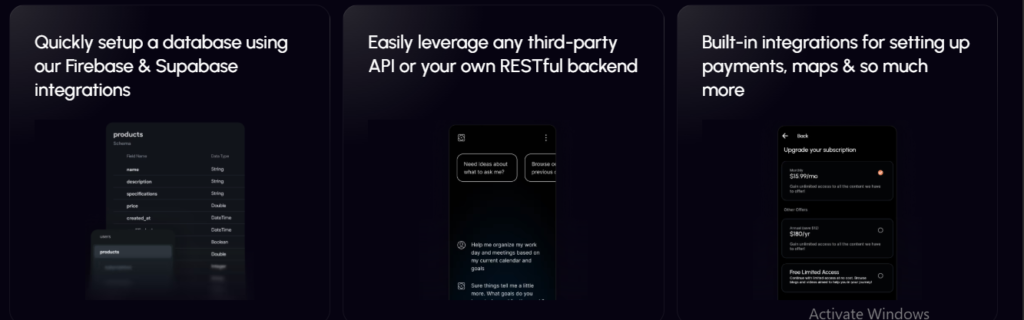
However, there is an important distinction: FlutterFlow is primarily a frontend tool. It does not include a built-in backend. For data storage, authentication, and server-side logic, you must connect a separate service like Firebase or Supabase. This two-service architecture is central to understanding whether FlutterFlow fits your needs.
What Is Bubble?
Bubble is a full-stack no-code platform founded in 2012 that lets you build complex web applications using a completely visual editor. Unlike FlutterFlow, which focuses on mobile frontends, Bubble handles everything in one place: responsive web design, database management, backend workflows, user authentication, privacy rules, hosting, and deployment.
With over 7 million apps created on the platform, Bubble has matured into one of the most capable no-code tools available. It is particularly strong for multi-user applications like SaaS products, marketplaces, CRMs, and internal tools. Everything is configured visuallyworkflows, database relationships, conditional logic, API connections without requiring you to write code.
Bubble’s native mobile app builder entered public beta in 2025-2026, allowing users to build true native iOS and Android apps from the same editor used for web apps. These mobile apps share the same backend as your web app, so you do not duplicate data or logic across platforms.
The trade-off is vendor lock-in. Bubble does not currently support exporting your app as standalone source code. Your workflows, database structure, and business logic live entirely on Bubble’s infrastructure. You can export your data at any time, but leaving the platform means rebuilding from scratch.
FlutterFlow vs Bubble: Side-by-Side Comparison
Before diving into individual categories, here is a quick reference table that summarizes how these platforms stack up against each other.
| Feature | FlutterFlow | Bubble |
|---|---|---|
| Primary Focus | Mobile apps (iOS, Android, web, desktop) | Web apps + native mobile (beta) |
| Backend | External (Firebase, Supabase, REST APIs) | Built-in database + workflows |
| Code Export | Yes—real Flutter/Dart code | No |
| True No-Code? | Low-code (Dart needed for advanced work) | Fully no-code |
| Pricing Model | Per seat, from $39/month | Per project, from $29/month |
| Mobile Performance | Native compiled | Native mobile (beta) or responsive web |
| Web App Capability | Limited | Excellent |
| Learning Curve | Medium (technical concepts help) | Medium-High (visual logic is unique) |
| User Ratings (G2) | 4.5/5 | 4.4/5 |
| Best For | Mobile-first apps, code ownership | Complex web SaaS, internal tools, marketplaces |
This table tells the core story: FlutterFlow vs Bubble is not really a contest where one platform is universally better. It is a choice between mobile-first with code export versus web-first with full-stack simplicity.
Pricing and Total Cost of Ownership
Pricing is where many founders get surprised, because the sticker price on each platform’s homepage rarely reflects what you will actually pay once your app is live.
FlutterFlow Pricing
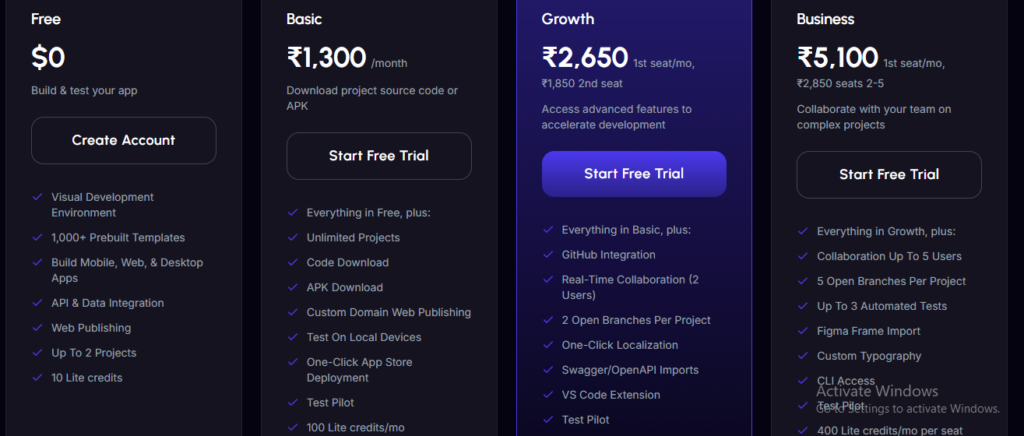
FlutterFlow uses per-seat billing. As of 2026, the structure looks like this:
| Plan | Monthly Price | Key Features |
|---|---|---|
| Free | $0 | Visual editor, web preview, 1,000+ templates |
| Basic | $39 | Code export, app store publishing, custom domains |
| Growth | $80 + $55/additional seat | GitHub sync, real-time collaboration, branching |
| Business | $150 + $85/additional seat | Up to 5 seats, automated tests, CLI access |
The critical detail: the Free plan does not let you export code or build an app file. For anyone serious about shipping, $39 per month is the real entry price, not $0.
But that is not the whole bill. Because FlutterFlow has no built-in backend, production apps almost always require a separate Firebase or Supabase subscription. Firebase costs scale with database reads, writes, and storage. A moderately active app can easily add $50 to $200 per month in Firebase fees on top of FlutterFlow’s subscription. For teams, the per-seat model adds up quickly: a three-person Business team runs well over $300 per month before backend costs.
Bubble Pricing
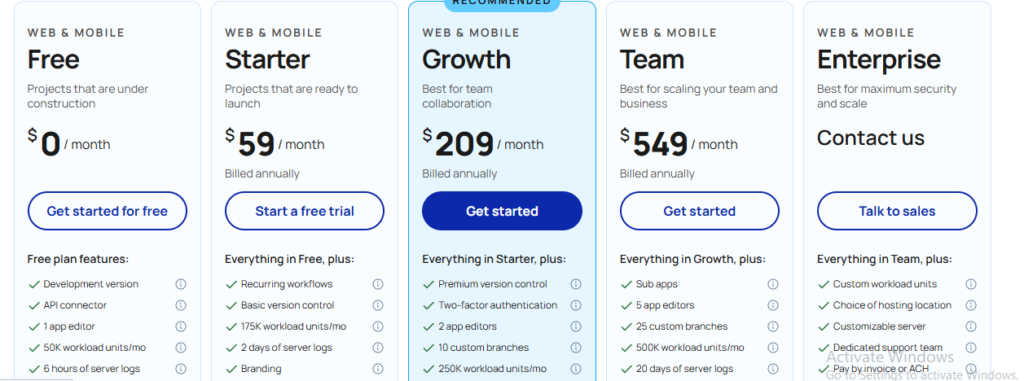
Bubble charges per project, not per user. Monthly web-only plans are Starter at $32, Growth at $134, and Team at $399. Mobile-enabled plans cost more: $42 for Starter with mobile, $119 for Growth web-only, and $349 for Team.
The base prices are reasonable, but Bubble’s real cost driver is Workload Units (WU). WU are a composite metric measuring database operations, workflow runs, and page loads. Every plan includes a monthly WU allowance, and overages cost $0.30 per thousand units with no spending cap.
This means a viral event or poorly optimized search can spike your bill unpredictably. One widely shared account from a CTO reported Bubble costing roughly ten times what the same product cost after a rewrite to Node.js at scale.
The bottom line on cost: For a solo builder making a simple mobile app, FlutterFlow’s $39 Basic plan plus a small Firebase bill is predictable. For a complex web app with multiple users, Bubble bundles everything into one subscription but carries the risk of WU overages. Teams should budget 1-2 months of WU auditing before expecting stable costs on Bubble.
Backend, Database, and Full-Stack Capabilities
This is arguably the most important difference when comparing bubble vs flutterflow, because it determines how much external setup and ongoing management your project requires.
FlutterFlow: Bring Your Own Backend
FlutterFlow has no built-in database. From day one, you must connect Firebase, Supabase, or another backend service to store data, manage authentication, and run server-side logic.
For developers already comfortable with Firebase, this is fine. It gives you control, independence from FlutterFlow’s platform, and the ability to scale your backend on its own terms. For non-technical founders, however, this creates real friction. Setting up Firestore security rules, configuring authentication providers, and understanding Firebase’s pricing model all require technical knowledge that the “no-code” label implies you should not need.
Bubble: Everything Under One Roof
Bubble includes a built-in database, visual workflow builder, authentication system, and privacy rules—all configurable without leaving the platform. When the Bubble AI Agent creates data types, it can automatically generate privacy rules that you adjust visually.
This integrated approach means faster initial development. You do not need to wire together separate services or learn multiple documentation sets. When something breaks, you trace the bug from the UI through the workflow to the data without switching tools.
The trade-off is dependence. Your entire backend lives on Bubble. If Bubble changes pricing, experiences downtime, or you outgrow the platform, your backend is affected with no independent exit.
Does FlutterFlow have a built-in backend? No. FlutterFlow requires you to connect an external backend like Firebase or Supabase. Bubble has a built-in backend with database, workflows, and authentication included.
Code Ownership and Exit Strategy
If you are building something serious, you need to think about what happens if you outgrow your no-code platform or want to sell your company.
FlutterFlow: You Own Your Code
FlutterFlow’s clearest advantage is code export. On the Basic plan and above, you can download a real Flutter project written in Dart. The code is sometimes verbose and not structured exactly as a senior developer would write it, but it is functional, readable, and deployable outside FlutterFlow entirely.
This matters for investors, acquirers, and technical teams who view code ownership as a requirement. It is also a safety net: if FlutterFlow ever shuts down or changes direction, you have a codebase you can continue with.
Bubble: You Own Your Data, Not Your Code
Bubble does not export source code. Your app runs on Bubble’s proprietary infrastructure. You can export your data freely at any time, but the workflows, logic, and frontend design are not portable.
Bubble has committed that if the company is ever discontinued, it will release its platform source code under an open-source license. That is a meaningful commitment, but it is not the same as having your own codebase today.
Can you export code from Bubble? No. Bubble does not currently support exporting your app as standalone source code. FlutterFlow allows code export on paid plans starting at $39 per month.
Performance, Speed, and Scalability
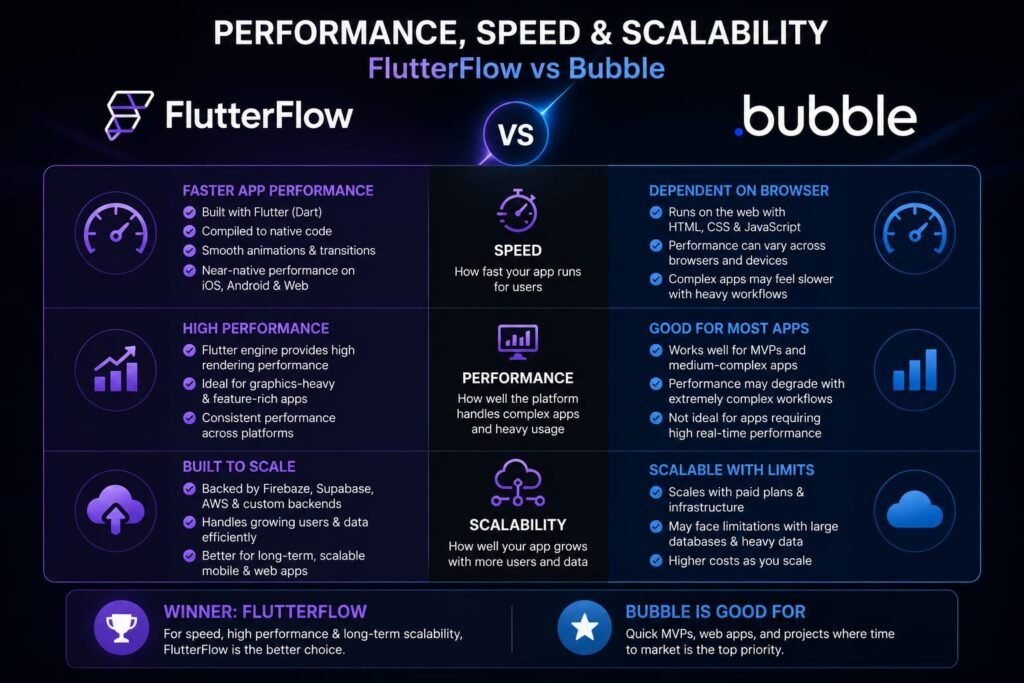
Performance expectations differ dramatically between these platforms because of their underlying architectures.
FlutterFlow Performance
Because FlutterFlow apps compile to native code, they run with the same performance floor as custom-built Flutter apps on mobile. The UI is smooth, animations are fluid, and the app feels native because it is native.
Backend performance depends entirely on your Firebase or Supabase configuration. Poorly structured Firestore queries are the most common bottleneck. A well-configured backend scales well; a poorly configured one creates laggy experiences that are hard to debug without technical expertise.
Bubble Performance
Bubble performs well at low to moderate complexity and user volume. The performance ceiling becomes visible as workflow complexity increases, database queries multiply, and concurrent users grow.
Specific documented limits include: workflows timing out at a hard 5-minute limit, nested repeating groups multiplying render cost exponentially, and sorted searches over approximately 60,000 records degrading noticeably. The editor itself slows significantly on complex apps with 40+ page types or 100+ workflows.
The common pattern is that Bubble scales well to a few thousand users but struggles beyond that without careful optimization. For internal tools, MVPs, and early-stage SaaS products, this is rarely a problem. For high-traffic consumer apps, it becomes a constraint.
Which is more scalable, FlutterFlow or Bubble? FlutterFlow scales better for mobile apps because it compiles to native code. Bubble scales well for web apps with moderate traffic but hits performance ceilings with high complexity or large user bases.
AI Features and Development Speed
Both platforms have integrated AI, but the scope and usefulness differ.
FlutterFlow AI
FlutterFlow’s AI Gen feature focuses on the frontend. You describe a screen—like a product listing page with filters and a card grid—and the tool generates the layout with placeholder data, immediately editable on the canvas.
What AI generation does not cover is your backend. Database structure, authentication, and server-side logic still need manual setup through Firebase or Supabase. For logic beyond what visual blocks support, you are writing Dart.
Bubble AI
Bubble AI generates a complete app foundation in one pass—UI, database schema, and workflows together. The Bubble AI Agent stays with you through iterations, can diagnose data-related issues using your app’s sample data, and generates privacy rules automatically.
For non-technical founders, this difference is significant. Bubble’s AI covers the full stack; FlutterFlow’s AI covers the frontend only.
Development speed reality: Bubble gets you to a working web product faster for complex multi-user applications because the backend is ready immediately. FlutterFlow is faster than custom coding for mobile but slower than Bubble for web because of the Firebase setup overhead.
Mobile App Development Compared
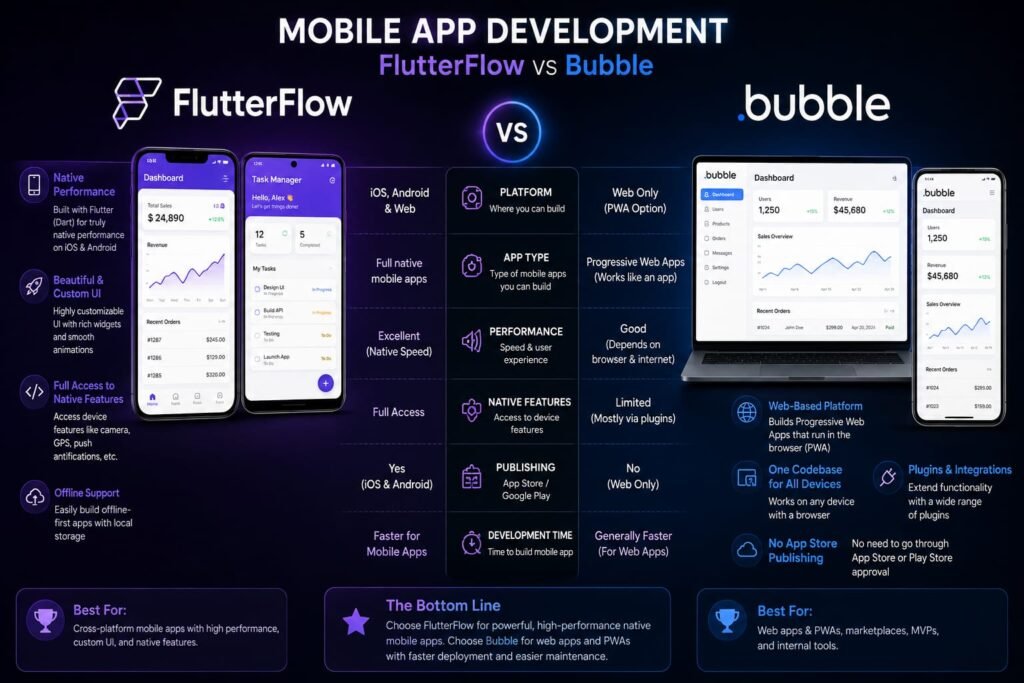
If your primary goal is building a mobile app for the App Store and Google Play, this section matters most.
FlutterFlow for Mobile
FlutterFlow is purpose-built for mobile. It generates true native iOS and Android apps with smooth performance, native gestures, and access to device features like camera, GPS, and push notifications. One-click publishing to app stores is available on paid plans.
The UI output is polished and modern. For consumer mobile apps where user experience is a competitive advantage, FlutterFlow delivers a level of polish that is hard to match with responsive web approaches.
Bubble for Mobile
Bubble’s native mobile builder is in public beta as of 2026. It uses React Native’s new architecture—the same foundation behind apps from Amazon, Discord, and Facebook. You can build from mobile-specific components, use swipe and long-press gestures, access native device features, and monetize with in-app purchases.
Over-the-air updates let you push minor fixes without app store resubmission. Because mobile and web apps share the same backend, you do not duplicate logic.
However, Bubble’s mobile offering is newer and less mature than FlutterFlow’s. For mobile-first products where the app store experience is central, FlutterFlow currently has the edge.
Is Bubble or FlutterFlow better for mobile apps? FlutterFlow is better for mobile-first apps because it compiles to true native code and has mature app store publishing. Bubble offers native mobile in beta but is primarily a web app platform.
Customization and Flexibility
FlutterFlow Customization
FlutterFlow allows full Dart custom actions, custom widgets, and Flutter package integration. This gives technical teams significantly more extensibility than Bubble. Pixel-level UI control, custom animations, and complex component behavior are all achievable.
The catch: accessing this depth requires Dart knowledge. Non-technical builders hit a ceiling where the visual editor ends and real code begins. Reviewers consistently report that meaningful apps require some Flutter and Dart knowledge, making FlutterFlow low-code rather than true no-code.
Bubble Customization
Bubble handles most standard UI patterns without custom code. Its visual workflow builder manages multi-step business logic, conditional branching, scheduled tasks, and API orchestration. Multi-role systems, permissions, and data privacy rules are all configured visually.
The limitation appears with highly specific animations, custom component behavior, or UI interactions outside Bubble’s component library. At that point, workarounds become necessary.
Is FlutterFlow no-code or low-code? FlutterFlow is low-code. While it has strong visual tools, reviewers consistently find that real apps require Dart knowledge for advanced customization and backend logic.
Real User Reviews: What People Actually Say?
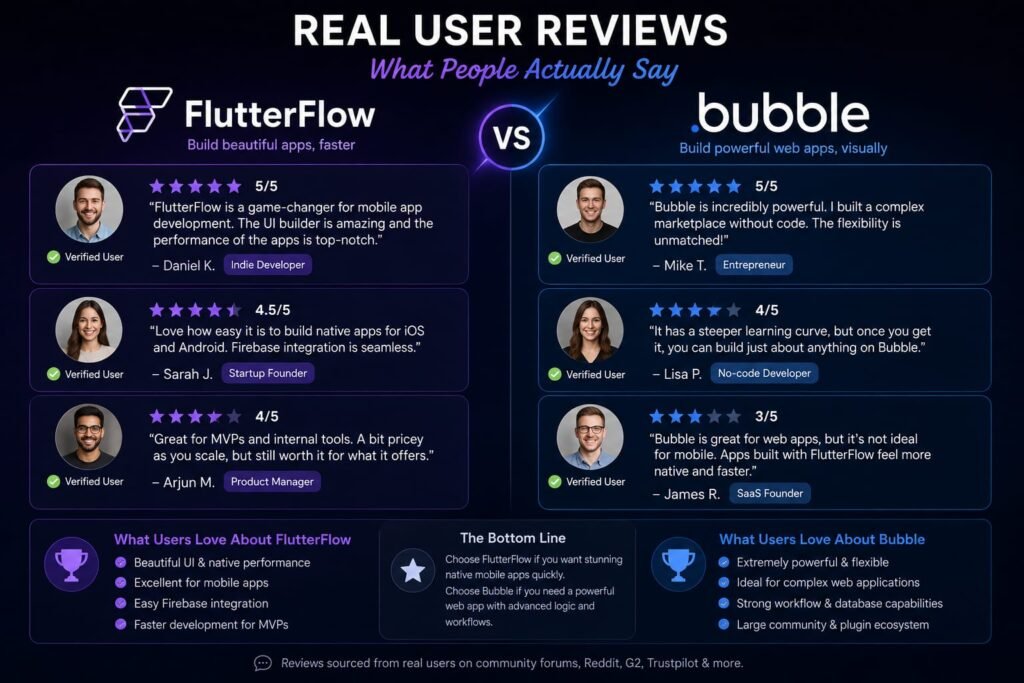
User sentiment is one of the most reliable ways to cut through marketing claims. Here is what real users report.
FlutterFlow Reviews
On G2, FlutterFlow holds a strong 4.5 out of 5 rating. On Product Hunt, it scores 4.4. Users praise the code export, polished mobile UI generation, and the fact that you are never fully locked in.
The recurring complaints are consistent: support draws heavy criticism, with users reporting week-long waits for responses. The editor slows on larger projects. And the pricing model frustrates users who feel essential features are increasingly behind paywalls. One Product Hunt reviewer wrote: “the company’s new business model and subscription offerings are becoming significantly worse, with more essential features behind ever increasingly pay walls.”
Bubble Reviews
Bubble is one of the most polarizing platforms in no-code. On G2, it holds 4.4 from 166 reviews. On Capterra, 4.6 from 333 reviews. Product Hunt users call it an “essential tool for rapid prototyping, but also for serious products.”
Trustpilot tells a different story, with a rating around 1.7. The one-star reviews are dominated not by product complaints but by billing and cancellation issues. A verified complaint states: “I attempted to cancel my subscription but found the process unnecessarily complicated… there was no cancellation button available on the website as claimed.”
The synthesis: People who review Bubble as a product rate it highly. A meaningful cluster who review it as a vendor report billing friction. Both are real, and both should factor into your decision.
Who Should Choose FlutterFlow?
FlutterFlow is the right choice if:
- You are building a consumer mobile app where native performance and app store presence matter most.
- Code ownership is non-negotiable for your investors, acquirers, or technical roadmap.
- You have some technical background or access to a developer who can handle Dart and Firebase configuration.
- You want cross-platform deployment (iOS, Android, web, desktop) from a single build.
- You are comfortable managing a separate backend service and its associated costs.
Internal linking opportunity: Link to a dedicated guide on Firebase pricing and setup for no-code founders.
Who Should Choose Bubble?
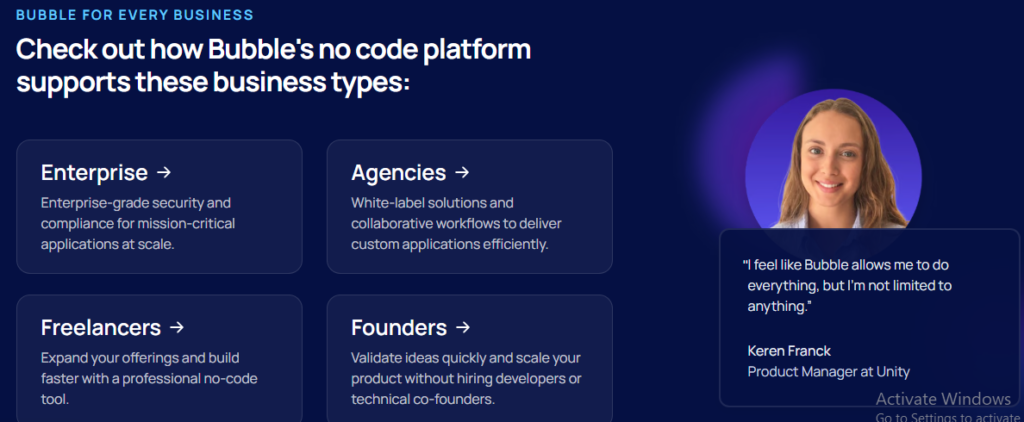
Bubble is the right choice if:
- You are building a complex web application, SaaS product, marketplace, or internal tool.
- You are a non-technical founder who wants to stay in true no-code territory without touching code.
- You need multi-role systems, complex workflows, scheduled tasks, or intricate business logic.
- You want one predictable bill that bundles hosting, database, and backend logic.
- You need both web and mobile apps sharing the same backend and data.
Internal linking opportunity: Link to a guide on optimizing Bubble Workload Units and a tutorial on building your first SaaS on Bubble.
Frequently Asked Questions
Is FlutterFlow better than Bubble?
It depends on what you are building. FlutterFlow is better for mobile-first apps and code ownership. Bubble is better for complex web apps, SaaS products, and non-technical founders who want a fully integrated backend without managing separate services.
Is FlutterFlow really no-code?
No. Despite the marketing, FlutterFlow is low-code. Reviewers consistently report that meaningful apps require some Flutter and Dart knowledge, especially for backend logic, custom actions, and debugging.
Can Bubble make native mobile apps?
Yes. Bubble’s native mobile app builder is in public beta as of 2026. It builds true native iOS and Android apps using React Native’s architecture, with access to device features, push notifications, and in-app purchases.
Which is cheaper, FlutterFlow or Bubble?
For a solo builder, FlutterFlow’s $39 Basic plan is comparable to Bubble’s $29 Starter plan. However, FlutterFlow typically requires a separate Firebase or Supabase bill, while Bubble bundles hosting and database into one subscription. At scale, Bubble’s Workload Unit overages can make it more expensive than expected, while FlutterFlow’s per-seat pricing adds up quickly for teams.
Can I export my app from Bubble?
No. Bubble does not support exporting your app as standalone source code. You can export your data at any time, but workflows and logic are proprietary to the platform. FlutterFlow allows full code export on paid plans.
Is Bubble good for beginners?
Bubble is accessible to non-technical founders, but it has a steep learning curve. Real proficiency takes weeks to months of consistent practice. The visual workflow builder is powerful but unique, meaning skills do not transfer directly from other tools.
Does FlutterFlow require coding?
For basic apps, no. For production apps with custom logic, integrations, or backend workflows, yes. You will need to understand Dart, Firebase security rules, and state management concepts to build and maintain anything beyond a simple prototype.
Which platform is better for a SaaS app?
Bubble is the stronger choice for SaaS apps, marketplaces, and any product requiring complex databases, multi-role authentication, and business logic handled within one environment. FlutterFlow is better suited for frontend-heavy mobile apps.
Can I switch from FlutterFlow to Bubble later?
You cannot directly import a FlutterFlow project into Bubble. You would need to rebuild your frontend in Bubble’s visual editor and migrate your data into Bubble’s built-in database. The process is essentially a full rebuild.
Is FlutterFlow owned by Google?
No. FlutterFlow is an independently operated, privately held company backed by Google Ventures and Y Combinator. It is a Google Cloud technology partner, but not a Google subsidiary. The Flutter framework it is built on is maintained by Google.
My Final Verdict: Making Your Right Choice
After comparing flutterflow vs bubble across pricing, architecture, performance, code ownership, and real user feedback, the decision comes down to one question: what are you actually building?
If you are a non-technical founder building a web-based SaaS, marketplace, or internal tool, Bubble is the safer bet. Its fully integrated backend, visual workflow builder, and true no-code approach let you build complex logic without ever touching a line of code. The trade-off is vendor lock-in and the need to master Workload Unit optimization as you scale.
If you are building a mobile-first consumer app, need native performance, or require code ownership for investor or acquisition purposes, FlutterFlow is the better choice. The ability to export real Flutter code is a genuine differentiator. The trade-off is managing a separate backend, navigating per-seat pricing, and accepting that “no-code” becomes “low-code” once your app grows beyond basic functionality.
My recommendation: Do not commit to either platform based on a landing page. Both offer free plans. Spend one week building a small prototype of your actual app on each. Test the database setup, try a custom workflow, and simulate a few hundred users. The platform that feels intuitive for your specific project is the right one—regardless of what any comparison chart says.
The no-code landscape in 2026 is mature enough that both tools can ship real products. The founders who win are not the ones who pick the “best” platform. They are the ones who pick the right platform for their specific product, team, and timeline—and then ship.
Ready to start building? Sign up for a free trial on both platforms this week. Build the same core screen on each. Time how long it takes, note where you get stuck, and measure which one feels like a tool you could live with for the next year. That hands-on test will tell you more than any article ever could.
Related Reads:
What Is Lovable AI? The Complete Guide to the AI App Builder Everyone’s Talking About
Is Lovable AI Free? Here’s What You Actually Get
Claude Pro vs ChatGPT Plus: The Real Difference Between These $20 AI Plans
How to Fix AI Image Generator Deformities in Fingers, Toes, and Other Anomalies
What Is Meta AI Muse Spark? The Complete 2026 Guide to Meta’s Flagship AI Model
Kimi K3 Explained: Inside Moonshot AI’s Record-Breaking Open Mode
Best AI App Builder in 2026: 10 Top Tools to Build an App Without Coding
Bolt AI App Builder: The Complete Guide to Building Apps in Your Web Browser
Higgsfield AI Pricing in 2026: Every Plan, Credit Cost, and What You Actually Get
Base 44 Pricing in 2026: Every Plan, Credit Cost, and Hidden Fee Explained
Base44 Reviews 2026: What Real Users Actually Think Before You Build
FlutterFlow AI App Builder: The Complete 2026 Guide to Building Real Native Apps