
ChatGPT Go vs Plus: compare pricing, models, limits, image generation, file uploads, deep research, and features to find the best plan in 2026.
If you use ChatGPT regularly, the difference between ChatGPT Go vs Plus can be confusing. Both are paid plans, both give you more access than the Free version, and both can handle everyday tasks such as writing, research, file analysis, image creation, and problem-solving.
So, is ChatGPT Plus actually worth paying more for, or is the cheaper Go plan enough?
That depends largely on how you use ChatGPT.
ChatGPT Go is designed as a lower-cost way to get substantially more access to popular ChatGPT features. Plus is aimed more at people who need broader model access, advanced reasoning, higher limits, and more powerful research and productivity capabilities. OpenAI currently lists Plus at $20 per month, while Go launched internationally at $8 per month in the U.S.; pricing can be localized by country. (OpenAI)
In this guide, I’ll compare the two plans feature by feature, explain who should choose each one, discuss the biggest limitations, and look at alternatives such as Claude, Gemini, and other AI tools.
Quick answer: For most casual users, students, creators, and people who mainly want more ChatGPT usage at a lower price, ChatGPT Go offers excellent value. If you regularly perform complex research, need advanced reasoning, use connected apps, or want broader access to premium capabilities, ChatGPT Plus is the better choice.
ChatGPT Go vs Plus at a Glance
Before getting into the details, here’s the simplest way to understand the difference.
| Feature | ChatGPT Go | ChatGPT Plus |
|---|---|---|
| Monthly price | Lower-cost plan | $20/month in the U.S. |
| More access than Free | Yes | Yes |
| Text conversations | Expanded access | Higher limits |
| Image generation | Expanded | Expanded |
| File uploads | Expanded | Higher limits |
| Data analysis | Yes | Yes |
| Memory | Longer | More extensive |
| Reasoning capabilities | Available, subject to current plan access | Broader advanced reasoning access |
| Deep research | Limited | Full/expanded access |
| Apps | Availability varies | Broader access |
| Custom GPTs | Yes | Yes |
| Projects | Yes | Yes |
| Tasks | Yes | Yes |
| Codex | More limited plan availability | Available |
| Best for | Everyday users and value seekers | Power users and professionals |
The exact models, limits, and available features can change as OpenAI updates ChatGPT, so the plan comparison shown inside your account is the final authority. OpenAI specifically notes that model availability and limits can change over time. (OpenAI Help Center)
What Is ChatGPT Go?
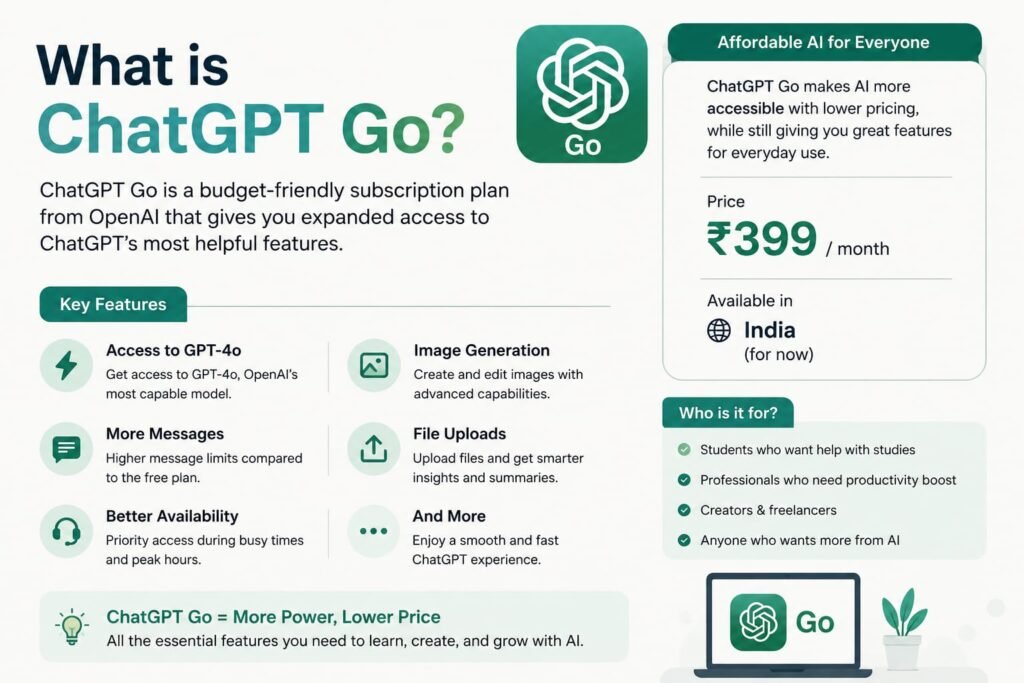
ChatGPT Go is OpenAI’s lower-cost paid subscription.
It was initially introduced in India in 2025 at ₹399 per month including GST, before being expanded internationally. OpenAI describes Go as a plan designed to provide expanded access to the features people use most often. (OpenAI Help Center)
The idea behind Go is straightforward: you don’t necessarily need the most expensive ChatGPT subscription to get substantial benefits over Free.
With Go, you get expanded access to things such as:
- ChatGPT conversations
- Image generation
- File uploads
- Data analysis
- Longer memory
- Projects
- Tasks
- Custom GPTs
OpenAI says Go provides higher usage limits than Free for eligible features and includes larger file uploads, expanded image generation, advanced data analysis, and longer memory. (OpenAI Help Center)
For someone who uses ChatGPT several times a day but doesn’t constantly need the most advanced research or reasoning capabilities, this makes Go particularly attractive.
What Is ChatGPT Plus?
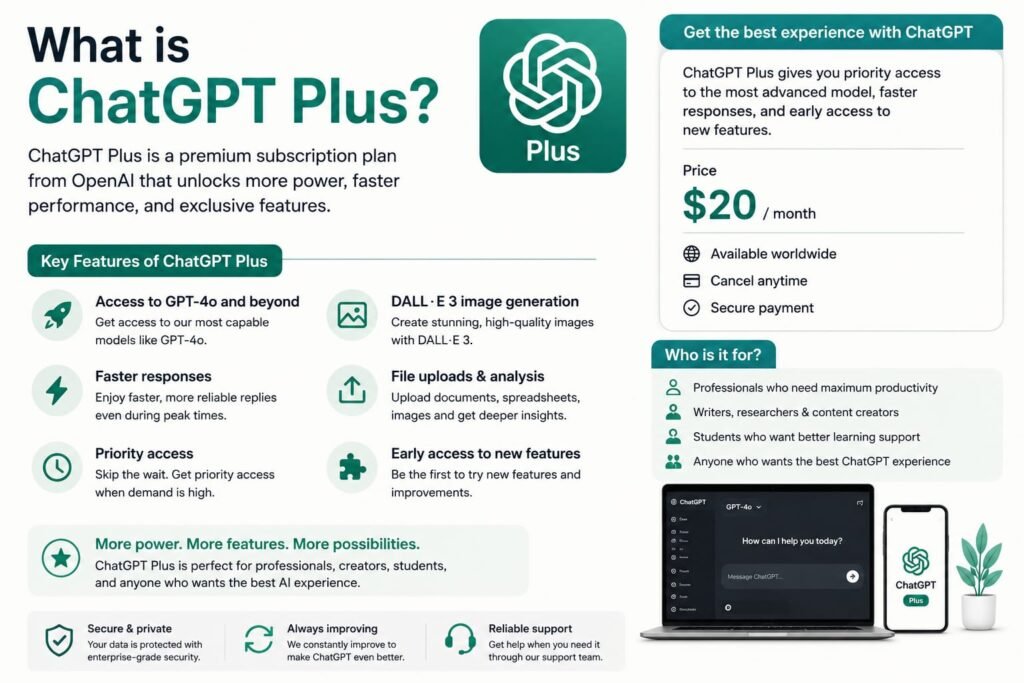
ChatGPT Plus is the more established premium individual subscription.
OpenAI currently lists Plus at $20 per month. It provides broader model and tool access than Free and includes higher limits, faster responses, advanced reasoning options, file analysis, image generation, voice features, and deep research capabilities. (OpenAI Help Center)
Plus is particularly useful if ChatGPT is more than a casual chatbot for you.
For example, you might use it to:
- Research business ideas
- Analyze large documents
- Work with spreadsheets
- Write long-form content
- Perform complicated analysis
- Conduct multi-step research
- Work with connected apps
- Use advanced reasoning
- Build or debug software
- Manage longer projects
That’s where the additional cost starts making more sense.
ChatGPT Go vs Plus: The Biggest Difference
The biggest mistake is thinking that Plus is simply “Go but slightly faster.”
That’s not really the best way to look at these plans.
The important distinction is depth of access.
Go is designed to give you considerably more of the everyday ChatGPT experience without requiring the price of Plus.
Plus goes further by providing broader access to advanced capabilities and higher limits.
OpenAI describes Plus as a plan for work requiring deeper reasoning, including writing and editing documents, learning and research, and data analysis. It also provides higher limits for messages, uploads, memory, and context compared with Go. (OpenAI)
That means the decision should be based on your workflow rather than simply asking which plan has “more features.”
ChatGPT Go vs Plus for Everyday Chatting
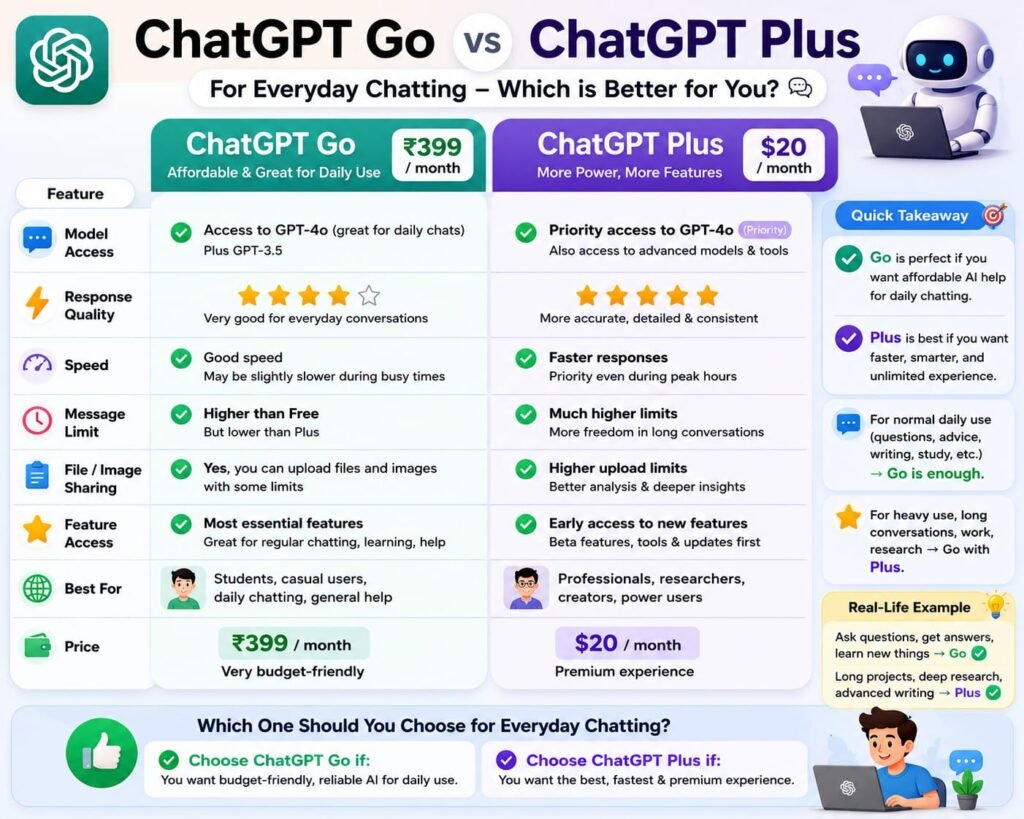
For normal conversations, both plans are excellent.
Suppose you use ChatGPT for:
- Asking questions
- Writing emails
- Rewriting text
- Brainstorming
- Summarizing information
- Creating social media captions
- Planning trips
- Learning new subjects
You may not notice a dramatic difference every time you switch between Go and Plus.
That’s because Go is intentionally designed to cover many common ChatGPT use cases.
Go is enough if you mainly:
- Chat with AI throughout the day
- Ask questions
- Write content
- Generate images
- Upload documents occasionally
- Analyze smaller datasets
- Use ChatGPT for personal productivity
Plus becomes more attractive if:
- You frequently hit usage limits
- Your conversations are complex
- You conduct extensive research
- You work with large files
- You need advanced reasoning regularly
- You use connected applications
- You depend on ChatGPT professionally
For casual users, paying an additional $12 per month for Plus may not produce enough additional value.
ChatGPT Go vs Plus for Writing
This is an interesting category because both plans are capable writing assistants.
You can use either plan for:
- Blog posts
- Product descriptions
- Emails
- Social media posts
- Scripts
- Reports
- Outlines
- Editing
- Rewriting
- Brainstorming
For someone running a website, Go can be surprisingly capable.
For example, you could use Go to create an article outline, rewrite an introduction, generate title ideas, analyze a document, and create supporting images.
However, Plus becomes more useful when writing is part of a larger research workflow.
Imagine you’re writing a 4,000-word software review.
You might need to:
- Research multiple companies.
- Compare their features.
- Analyze pricing.
- Review documentation.
- Examine customer use cases.
- Create a content outline.
- Draft the article.
- Fact-check claims.
- Optimize the article.
- Create supporting content.
That’s the kind of multi-step workflow where the additional capabilities of Plus can become valuable.
ChatGPT Go vs Plus for Image Generation
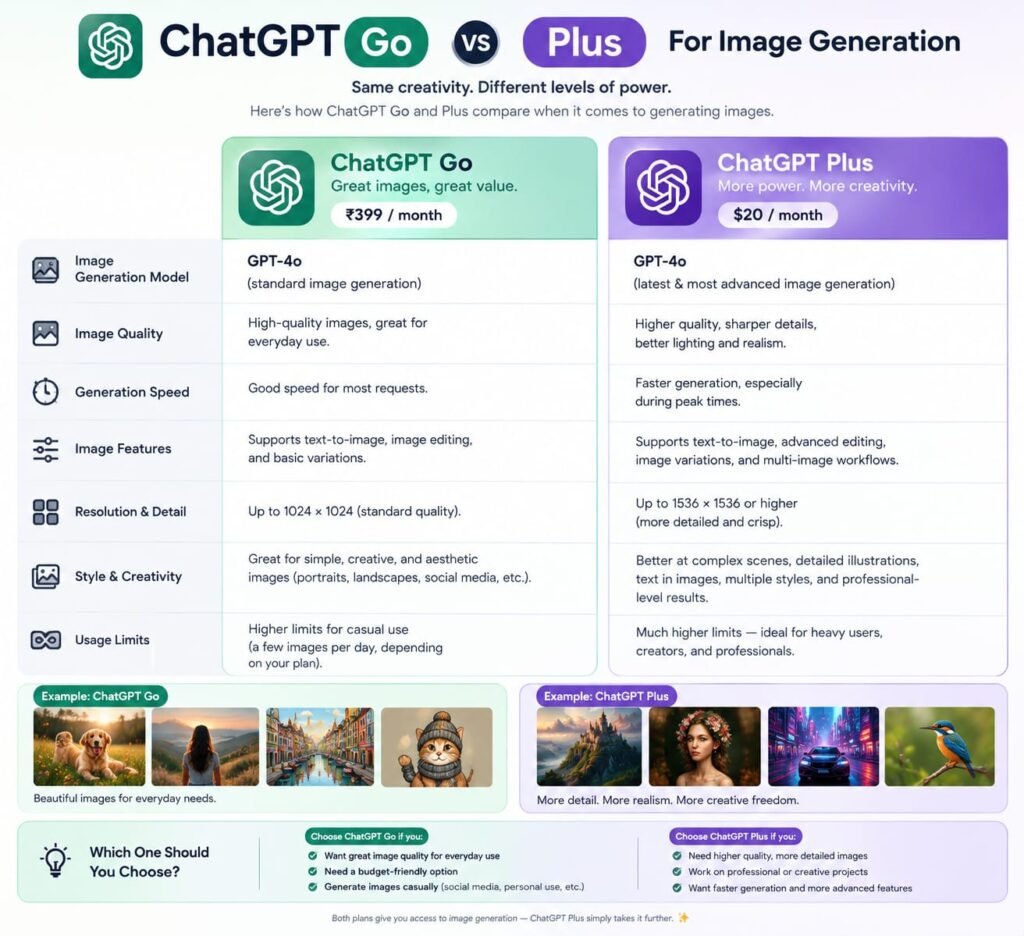
Both plans provide image-generation capabilities, but usage limits and access can vary.
OpenAI specifically lists extended image generation as one of the benefits of Go compared with Free. (OpenAI Help Center)
This makes Go particularly interesting for:
- Bloggers
- Social media creators
- Small businesses
- Students
- Website owners
- Marketing professionals
For example, if you’re creating featured images for blog posts, you may not need Plus simply for image generation.
My verdict for images
Winner for value: Go
Winner for heavier overall usage: Plus
If image creation is your only reason for upgrading from Free, Go may provide the better price-to-value ratio.
ChatGPT Go vs Plus for File Uploads and Data Analysis
This is another area where Go has become much more useful than a traditional low-cost subscription might suggest.
OpenAI says Go includes expanded access to file uploads and advanced data analysis. (OpenAI Help Center)
You can use these capabilities to work with things such as:
- PDFs
- Word documents
- Spreadsheets
- CSV files
- Business reports
- Tables
- Research documents
Imagine you have an Excel file containing six months of sales.
You could ask ChatGPT to:
“Find my highest-selling products, calculate monthly growth, identify weak months, and suggest three ways to improve revenue.”
That’s exactly the type of practical analysis that makes an AI subscription useful.
Where Plus has the advantage
If you’re doing this kind of analysis constantly, Plus is the better option because it provides higher limits and broader access to advanced capabilities. (OpenAI Help Center)
ChatGPT Go vs Plus for Deep Research
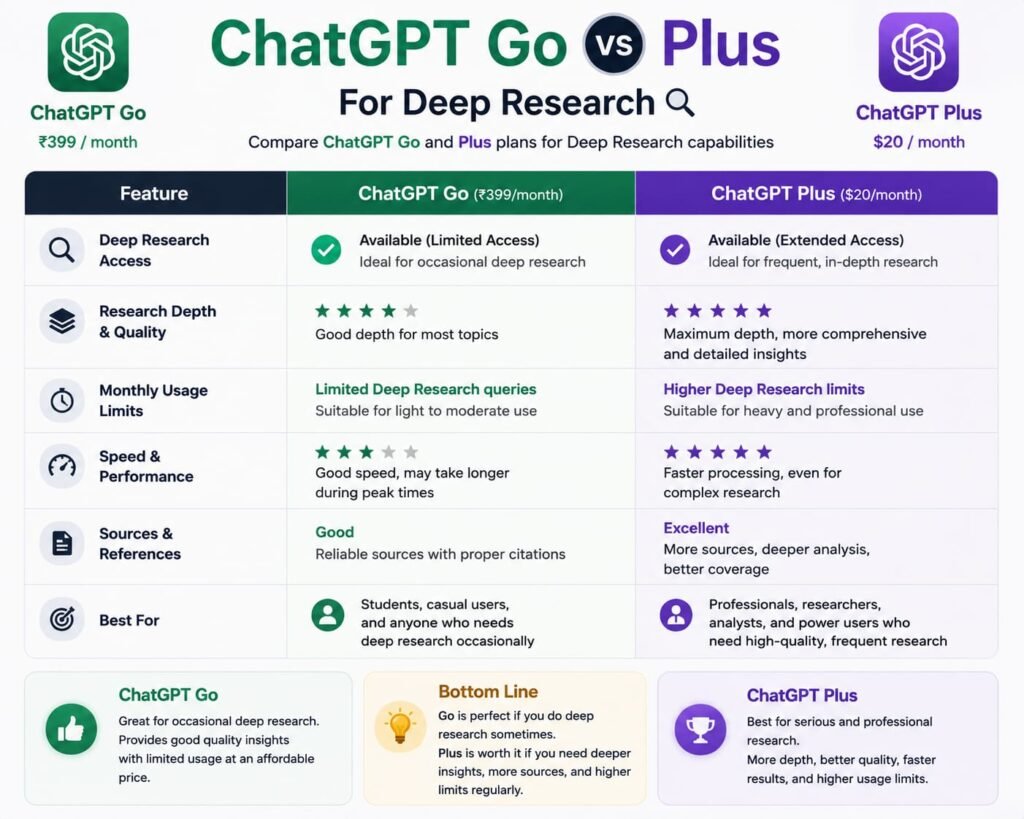
This is one of the most important differences.
Deep research is designed for more complex research tasks involving multiple sources and structured analysis.
According to OpenAI’s current plan information, Go has limited access to some app and research capabilities, while Plus has broader access. (OpenAI Help Center)
If your work involves serious research, this matters.
For example:
“Compare the 10 best AI website builders in 2026. Analyze pricing, features, SEO capabilities, customer reviews, integrations, and target audiences. Cite reliable sources.”
A workflow like this benefits considerably from advanced research functionality.
Who needs it?
Deep research is particularly useful for:
- Bloggers
- Journalists
- Researchers
- Business owners
- Students
- Consultants
- Market researchers
- SEO professionals
If research is a major part of your work, Plus gets my vote.
ChatGPT Go vs Plus for Reasoning
Reasoning is another area where the difference becomes more important for advanced users.
Not every question requires advanced reasoning.
If you’re asking:
“Write a caption for Instagram.”
You don’t need a premium reasoning workflow.
But consider:
“Analyze these three business models, compare their unit economics, identify the biggest risks, and recommend which model has the best chance of reaching profitability.”
That’s much more demanding.
OpenAI says Plus provides access to advanced reasoning options currently available to the account, while Go provides access to reasoning capabilities subject to the current plan’s feature availability. Plan/model availability can change over time. (OpenAI Help Center)
For complex decision-making, coding, planning, and multi-step analysis, Plus is the safer choice.
ChatGPT Go vs Plus for Memory and Long Conversations
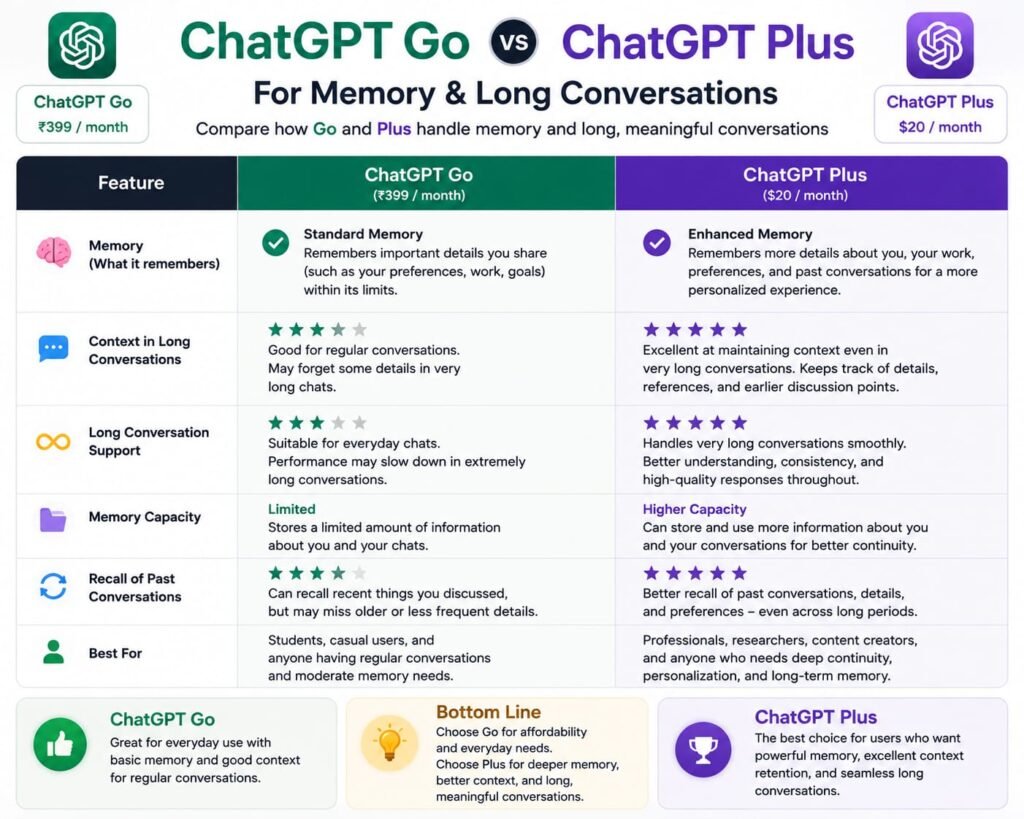
Memory is easy to overlook.
But if you use ChatGPT regularly, it can make a significant difference.
Go includes longer memory compared with Free. (OpenAI Help Center)
Plus provides broader limits for memory and context compared with Go. (OpenAI)
This matters when you’re working on a project over multiple conversations.
For example, you might have an ongoing website project where you repeatedly discuss:
- Content strategy
- SEO
- Article ideas
- Affiliate marketing
- Website structure
- Competitor research
- Internal linking
The ability to maintain more context can make the experience feel considerably more continuous.
Winner
Plus, especially for long-running professional workflows.
ChatGPT Go vs Plus for Apps and Integrations
ChatGPT can connect with external applications and services.
However, access isn’t identical across plans.
OpenAI’s current documentation shows that Go has limited app search and deep-research capabilities, whereas Plus has broader access. Some individual apps may also require specific plans. (OpenAI Help Center)
This is important because “apps available in ChatGPT” doesn’t necessarily mean every app is available to every subscriber.
If you want ChatGPT to work alongside your existing tools, Plus is generally the better choice.
For example, connected apps can potentially allow ChatGPT to search and reference information from external services rather than requiring you to manually upload everything. (OpenAI Help Center)
ChatGPT Go vs Plus for Bloggers and SEO Professionals
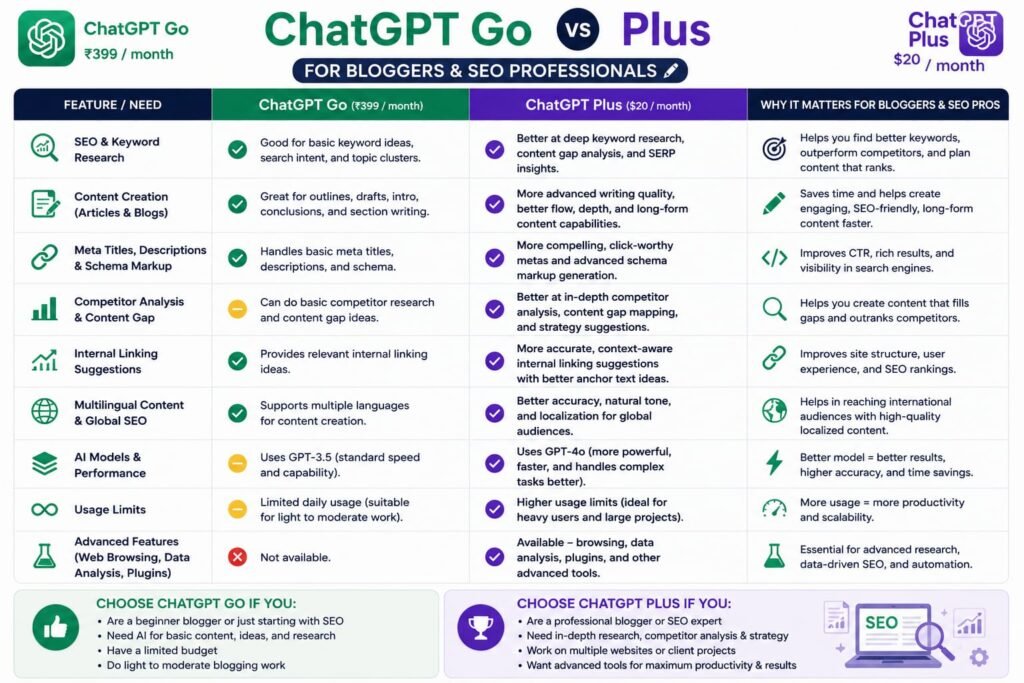
If you run a blog, the choice becomes easier.
Choose Go if you:
- Write articles with AI
- Generate images
- Upload PDFs
- Brainstorm keywords
- Create meta descriptions
- Rewrite content
- Create social media posts
- Occasionally analyze data
Choose Plus if you:
- Perform extensive SEO research
- Analyze competitors
- Research multiple sources
- Create large content strategies
- Work on long-form projects
- Use advanced research frequently
- Need higher usage limits
For a small blog, Go can be sufficient.
For someone treating content creation as a serious business, Plus can justify the additional cost.
ChatGPT Go vs Plus for Students
Students are one of the strongest use cases for Go.
A student might use ChatGPT for:
- Explaining difficult topics
- Summarizing PDFs
- Creating study notes
- Brainstorming assignments
- Analyzing spreadsheets
- Practicing interviews
- Learning languages
- Generating study questions
You don’t necessarily need every premium capability for these tasks.
My recommendation
Go is the better value for most students.
Plus becomes worthwhile if you’re doing advanced research, extensive document analysis, programming, or demanding academic projects.
And, as always, students should use AI as a learning aid rather than submitting AI-generated work as their own where their institution prohibits it.
ChatGPT Go vs Plus for Business Owners
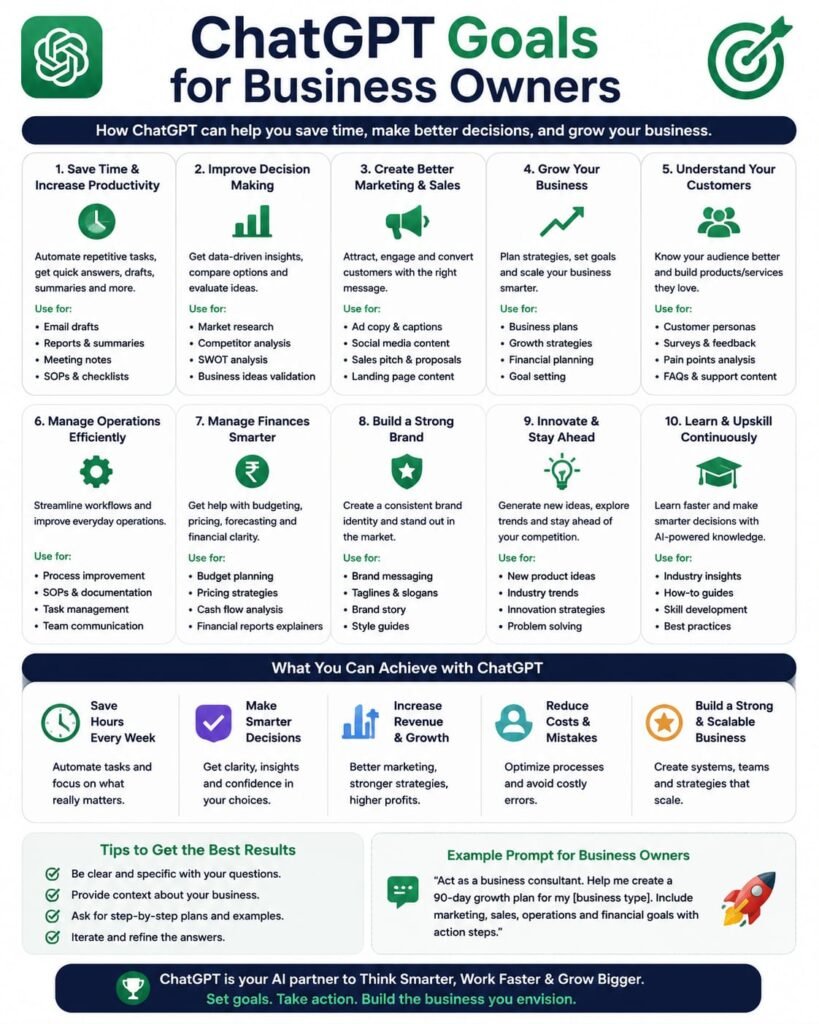
Business users should think differently.
If ChatGPT helps you make money, save significant time, or automate repetitive work, the subscription price becomes less important.
Suppose ChatGPT saves you five hours every month.
Even a relatively small improvement in productivity can make Plus worthwhile.
Go is ideal for:
- Small businesses
- Solopreneurs
- Freelancers
- Local businesses
- Basic marketing
- Email writing
- Social media
- Product descriptions
Plus is better for:
- Consultants
- Researchers
- Marketing professionals
- Developers
- Content businesses
- Agencies
- People managing complex projects
ChatGPT Go Pros and Cons
Pros of ChatGPT Go
1. Lower price
This is the biggest advantage.
You get substantially more access than Free without paying the full Plus price.
2. More image generation
Useful for creators, bloggers, marketers, and businesses.
3. More file uploads
You can work with more documents and files than the Free tier.
4. Data analysis
You can use advanced data-analysis capabilities for practical tasks.
5. Longer memory
This makes ongoing conversations more useful.
6. Projects, tasks, and custom GPTs
Go isn’t merely a “chat more” subscription. It provides access to several useful ChatGPT features. (OpenAI Help Center)
Cons of ChatGPT Go
1. Fewer advanced capabilities than Plus
Plus is still the stronger option for power users.
2. Lower limits
If you use ChatGPT heavily, you may eventually encounter limitations.
3. Limited access to some app capabilities
OpenAI’s current documentation shows broader app search and deep-research access on Plus. (OpenAI Help Center)
4. Not designed primarily for advanced professional workflows
If ChatGPT is central to your job, Plus may make more sense.
ChatGPT Plus Pros and Cons
Pros of ChatGPT Plus
1. Advanced reasoning
This is one of the biggest reasons to upgrade.
2. Higher limits
Heavy users get more room to work.
3. Deep research
Very useful for serious research and content production.
4. Broader app access
Plus provides broader access to connected app capabilities. (OpenAI Help Center)
5. Better for complex projects
Longer workflows become easier to manage.
6. Faster responses
OpenAI lists faster response speeds as a Plus benefit. (OpenAI Help Center)
Cons of ChatGPT Plus
1. More expensive
At $20 per month in the U.S., it’s significantly more expensive than Go. (OpenAI Help Center)
2. You may not use the additional features
If you only use ChatGPT for simple questions, Plus can be unnecessary.
3. Limits still exist
Plus isn’t literally unlimited for every capability. OpenAI notes that usage limits can apply and can vary with system conditions. (OpenAI Help Center)
My Experience: Using Go and Plus
The best way to compare these subscriptions isn’t simply to read the feature list.
It’s to think about what happens during a normal week of usage.
For straightforward tasks, the difference can be surprisingly small.
If I’m writing a short email, generating a social media caption, brainstorming a title, or asking a normal question, I wouldn’t pay an extra $12 simply because Plus exists.
Go is already very capable for this type of work.
But the situation changes when I start stacking tasks together.
For example:
Research → analyze sources → upload documents → compare information → create a strategy → write a long article → analyze data → revise the article
That’s where I would rather have Plus.
The higher limits and broader advanced capabilities make the workflow less restrictive.
My overall assessment
ChatGPT Go: 8.5/10 for value
ChatGPT Plus: 9.2/10 for power users
ChatGPT Go: 9/10 for casual-to-moderate users
ChatGPT Plus: 10/10 for serious daily users
These are editorial ratings rather than official OpenAI scores.
ChatGPT Go vs Plus: Which Is Better for You?
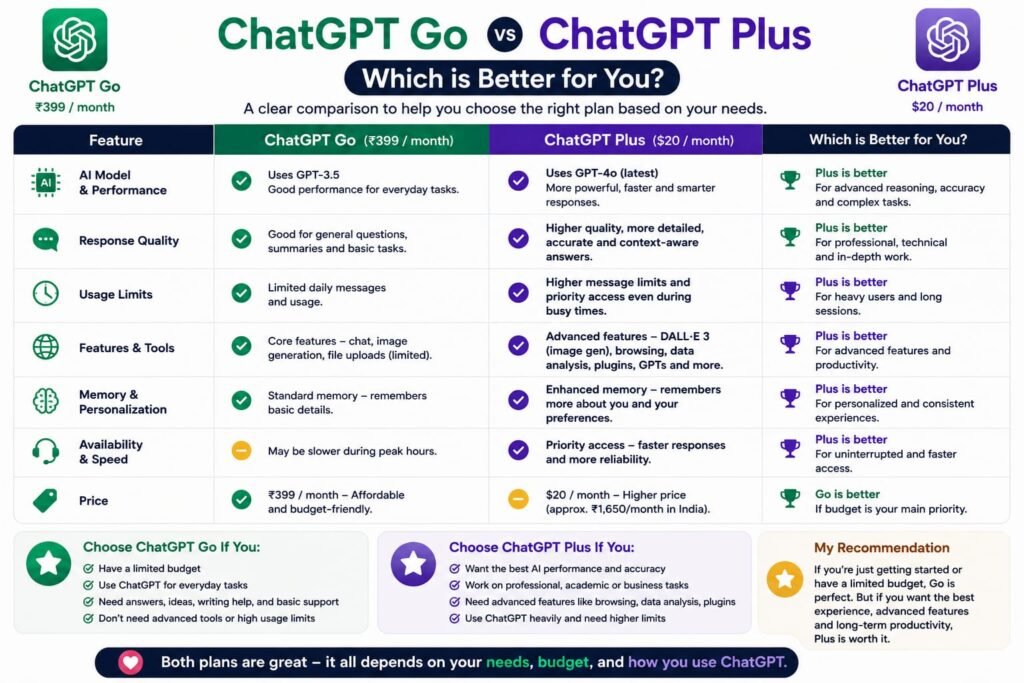
Here’s my simple decision tree.
Choose ChatGPT Go if:
- You want an affordable paid ChatGPT plan.
- You use ChatGPT every day.
- You want more messages than Free.
- You generate images regularly.
- You upload documents.
- You use data analysis.
- You’re a student.
- You’re a blogger.
- You’re a freelancer.
- You don’t regularly need advanced research.
Go is the value winner.
Choose ChatGPT Plus if:
- ChatGPT is part of your professional workflow.
- You perform serious research.
- You frequently use advanced reasoning.
- You work with lots of files.
- You need higher limits.
- You use connected apps.
- You manage complex projects.
- You regularly use ChatGPT for coding.
- You want broader access to premium capabilities.
Plus is the power-user winner.
ChatGPT Go vs Plus vs Free
Don’t automatically assume that you need a paid subscription.
The Free plan can already handle many everyday tasks.
OpenAI provides Free users with access to ChatGPT and a range of tools, although with lower limits than paid plans. (OpenAI)
Think about the three levels this way:
Free
Best for: Occasional users
Use it when you only need ChatGPT from time to time.
Go
Best for: Regular users who want value
Use it when you’re using ChatGPT frequently and want more messages, images, files, memory, and analysis without paying for Plus.
Plus
Best for: Professional and advanced users
Use it when ChatGPT is an important part of your work and you need deeper research, advanced reasoning, higher limits, and broader capabilities.
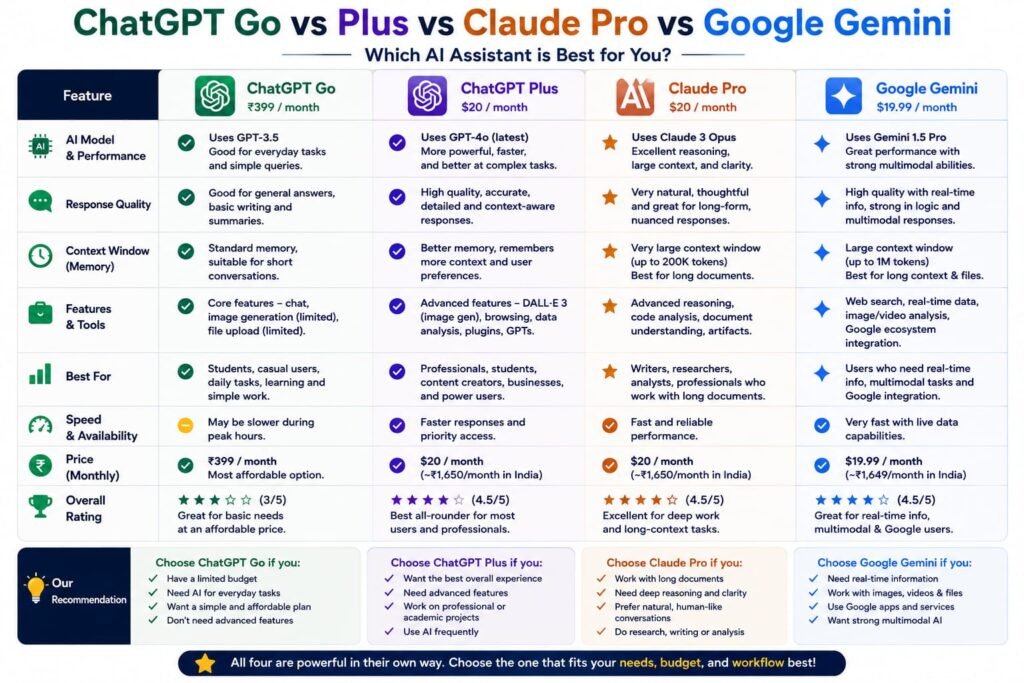
ChatGPT Go vs Plus vs Claude
ChatGPT isn’t the only AI assistant worth considering.
Claude is one of the biggest competitors and is particularly popular for writing, long documents, reasoning, and coding.
For many users, the choice isn’t simply:
Go or Plus?
It is:
ChatGPT or Claude?
Claude can be excellent for long-form writing and document-heavy workflows, while ChatGPT has a broader ecosystem of tools and capabilities.
If you already use ChatGPT heavily, moving to Claude just to save a few dollars may not make sense.
Instead, consider what you actually need:
| Need | Strong choice |
|---|---|
| General AI assistant | ChatGPT |
| Long-form writing | ChatGPT / Claude |
| Advanced research | ChatGPT Plus |
| AI images | ChatGPT |
| General productivity | ChatGPT |
| Coding | ChatGPT / Claude |
| Large document workflows | ChatGPT / Claude |
The best tool is the one that fits your workflow rather than the one with the longest feature list.
ChatGPT Go vs Plus vs Google Gemini
Google Gemini is another major alternative.
Gemini can be particularly attractive to people deeply invested in Google’s ecosystem.
For example, if most of your digital work happens inside Google services, an AI assistant closely integrated with that ecosystem can be convenient.
ChatGPT, however, offers a broader standalone AI workspace with conversations, projects, file analysis, image generation, research capabilities, custom GPTs, and other tools.
Which should you choose?
Choose ChatGPT if you want a dedicated general-purpose AI workspace.
Consider Gemini if your workflow revolves heavily around Google’s ecosystem.
Consider Claude if your priorities lean heavily toward long-form writing and document-based reasoning.
Is ChatGPT Go Worth It in 2026?
Yes, for the right user.
The biggest reason is simple: Go sits in an attractive middle ground.
Free can be restrictive for frequent users.
Plus can be more than some people need.
Go fills that gap.
You get expanded access to popular features such as messages, images, files, data analysis, and memory without paying the full Plus price. (OpenAI Help Center)
If you use ChatGPT primarily for content creation, everyday work, studying, brainstorming, and occasional document analysis, I think Go is one of the most sensible choices.
Is ChatGPT Plus Worth It in 2026?
For heavy users, yes.
The $20 price becomes easier to justify when ChatGPT saves meaningful amounts of time.
For example, if you use it every working day for:
- Research
- Writing
- Analysis
- Coding
- Document processing
- Brainstorming
- Planning
- Data analysis
then the difference between Go and Plus can become noticeable.
The important thing is not whether Plus has more features.
It obviously does.
The real question is:
Will you actually use those additional capabilities?
If the answer is yes, Plus is worth considering.
If not, Go is probably the smarter purchase.
How Much Does ChatGPT Go Cost in India?
ChatGPT Go was initially launched in India at ₹399 per month, including GST. OpenAI later expanded Go globally, and current pricing can vary by market and billing method. (OpenAI Help Center)
OpenAI also supports UPI payments for Go and Plus in India, which makes subscribing considerably easier for Indian users. (OpenAI Help Center)
Because OpenAI can change regional pricing and promotions, check the subscription screen in your account before purchasing rather than relying on an old article or screenshot.
Important: Go and Plus Don’t Include API Credits
This is a common misunderstanding.
Buying ChatGPT Go or ChatGPT Plus does not mean you automatically receive API credits.
OpenAI states that API usage is billed separately from the ChatGPT Plus subscription. (OpenAI Help Center)
So if you’re building an application using OpenAI’s API, don’t assume a ChatGPT subscription covers your API usage.
The ChatGPT subscription is for using ChatGPT.
The API is a separate service.
Which ChatGPT Plan Should a Blogger Choose?
For bloggers, I’d break it down like this:
Beginner blogger
Choose Go.
You can use it for:
- Article ideas
- Outlines
- Writing assistance
- Images
- SEO brainstorming
- File analysis
- Social media content
Growing blogger
Go or Plus.
If you’re publishing several articles every week and doing moderate research, Go can be enough.
Professional SEO/content publisher
Choose Plus.
If you’re doing competitor analysis, deep research, large content projects, extensive document analysis, and regular data work, Plus makes more sense.
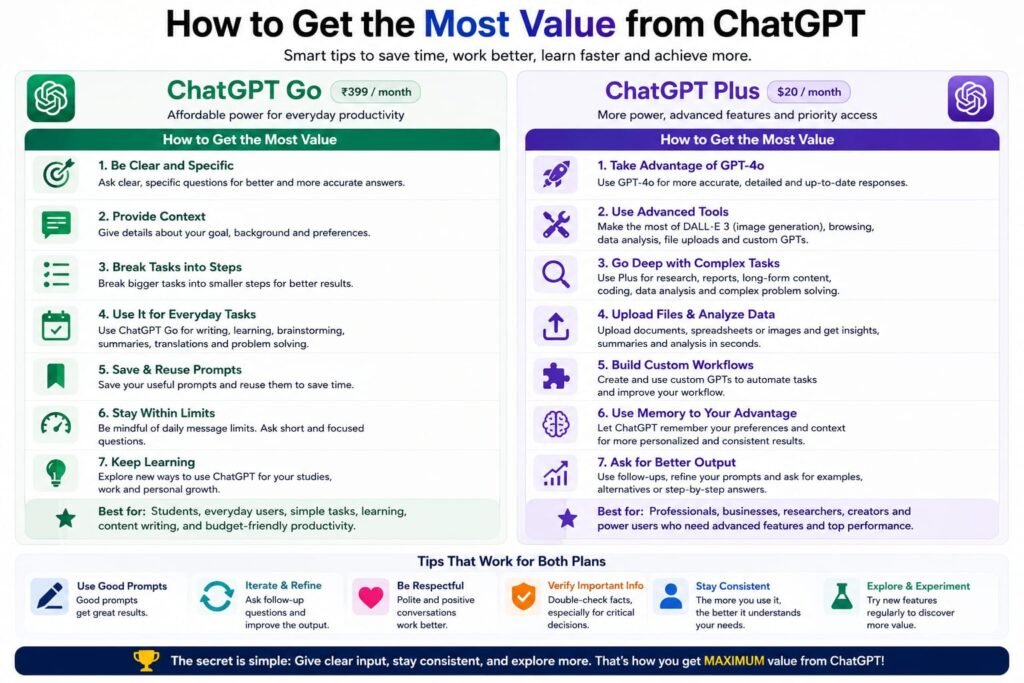
How to Get the Most Value From ChatGPT Go
If you choose Go, don’t treat it simply as a chatbot.
Use it as a complete productivity assistant.
For example:
Content
Ask it to:
“Create a content brief for this keyword and identify the search intent, article structure, FAQs and internal-linking opportunities.”
Research
Ask it to:
“Compare these competitors and organize their major differences into a table.”
Documents
Upload a report and ask:
“Summarize this document and identify the five most important actionable points.”
Data
Upload a spreadsheet and ask:
“Find the strongest and weakest-performing categories and explain what the data suggests.”
Images
Create:
- Blog featured images
- Infographics
- Social media graphics
- Product concepts
- Diagrams
The more you combine these capabilities, the more value you get from your subscription.
How to Get the Most Value From ChatGPT Plus
Plus is most valuable when you use it for multi-step workflows.
Instead of:
“Write an article about AI.”
Try:
“Research the topic, identify the search intent, create an SEO content outline, identify important questions readers have, develop a detailed comparison table, write the article in a natural conversational style, identify claims that need verification, and create an internal-linking strategy.”
That is where an advanced AI subscription becomes much more useful.
You aren’t simply asking for text.
You’re delegating a workflow.
Frequently Asked Questions
Is ChatGPT Go better than Plus?
No single plan is universally better. Go is better for value and everyday use, while Plus is better for advanced users who need higher limits, deeper research, advanced reasoning, and broader capabilities.
Is ChatGPT Go cheaper than Plus?
Yes. Go is positioned as a lower-cost subscription. OpenAI launched it in the U.S. at $8 per month, compared with $20 per month for Plus, although regional pricing may differ. (OpenAI)
Does ChatGPT Go include image generation?
Yes. OpenAI lists expanded image generation as one of the benefits of Go. (OpenAI Help Center)
Does ChatGPT Go include file uploads?
Yes. Go includes expanded access to file uploads compared with Free. (OpenAI Help Center)
Does ChatGPT Go have advanced data analysis?
Yes. OpenAI lists advanced data analysis among Go’s included capabilities. (OpenAI Help Center)
Does ChatGPT Plus include deep research?
Yes. Plus includes access to deep research, although limits and availability can change. (OpenAI Help Center)
Can I use ChatGPT Go for SEO?
Absolutely. Go can be used for keyword brainstorming, outlines, content planning, editing, competitor-analysis frameworks, and other SEO workflows. For intensive research, Plus is the stronger option.
Can I switch from Plus to Go?
OpenAI provides account options for changing ChatGPT subscriptions. The exact billing transition depends on your subscription and platform. (OpenAI)
Does ChatGPT Plus include API access?
No. API usage is billed separately. (OpenAI Help Center)
Does ChatGPT Go include custom GPTs?
OpenAI lists custom GPT access among the features available with Go, subject to current feature availability. (OpenAI Help Center)
Does ChatGPT Go have reasoning models?
Yes, reasoning access can be available on Go, but the exact models and capabilities differ from Plus and can change over time. OpenAI’s current help documentation should be checked for the latest availability. (OpenAI Help Center)
Is ChatGPT Plus worth $20 a month?
For people who use advanced research, reasoning, data analysis, coding, and other premium capabilities regularly, yes. For light or moderate use, Go may offer better value.
My Final Verdict: ChatGPT Go vs Plus in 2026
After comparing the two plans, my recommendation is simple.
🏆 Best value: ChatGPT Go
Choose Go if you want a significant upgrade over Free without spending $20 every month.
It’s particularly good for:
- Students
- Bloggers
- Freelancers
- Creators
- Small-business owners
- Everyday ChatGPT users
🏆 Best overall power: ChatGPT Plus
Choose Plus if ChatGPT is an important part of your professional workflow.
It’s better suited to:
- Researchers
- Developers
- SEO professionals
- Consultants
- Agencies
- Professional writers
- Heavy AI users
- People working with complex projects
My final score
| Category | Winner |
|---|---|
| Price/value | 🏆 Go |
| Everyday use | 🏆 Go |
| Image generation | Go |
| File analysis | Plus |
| Advanced reasoning | 🏆 Plus |
| Deep research | 🏆 Plus |
| Heavy professional use | 🏆 Plus |
| Beginners | 🏆 Go |
| Students | 🏆 Go |
| Power users | 🏆 Plus |
| Overall value | 🏆 Go |
| Overall capability | 🏆 Plus |
The bottom line: You don’t need ChatGPT Plus simply because it’s the more expensive plan. For many people, ChatGPT Go is the smarter subscription in 2026. But if you use AI as a serious research, coding, writing, or productivity tool, Plus is worth the additional cost.
If you’re still unsure, start by asking yourself one question: “Am I paying for features I will actually use?” If you mainly want more everyday ChatGPT access, choose Go. If you routinely push ChatGPT into complex, multi-step work, choose Plus.
Want to explore more AI tools and ChatGPT alternatives? If you’re comparing AI assistants, check out our detailed guide on [Kimi AI vs ChatGPT: Which AI Assistant Actually Wins in 2026?] to see how Kimi compares with ChatGPT in features, performance, and everyday use. If you’re deciding between premium AI subscriptions, our [Claude Pro vs ChatGPT Plus: The Real Difference Between the $20 AI Plans] breaks down the key differences between these two popular options. And if you want to explore beyond ChatGPT and discover more powerful AI solutions, take a look at our [Top 7 AI Tools in 2026: Best Apps for Work, Writing, and Productivity] for a broader comparison of the best AI tools available today.
Related Reads:
What Is Lovable AI? The Complete Guide to the AI App Builder Everyone’s Talking About
Is Lovable AI Free? Here’s What You Actually Get
Claude Pro vs ChatGPT Plus: The Real Difference Between These $20 AI Plans
How to Fix AI Image Generator Deformities in Fingers, Toes, and Other Anomalies
What Is Meta AI Muse Spark? The Complete 2026 Guide to Meta’s Flagship AI Model
Kimi K3 Explained: Inside Moonshot AI’s Record-Breaking Open Mode
Best AI App Builder in 2026: 10 Top Tools to Build an App Without Coding
Seedance 2: Inside ByteDance’s Most Realistic AI Video Model Yet (2026)
Is Kling 3.0 Unlimited? The Honest Truth About Free Credits, Paid Plans, and Hidden Costs in 2026
Merlin AI Extension Review 2026: I Used It for 90 Days — Here’s the Honest Verdict