

An honest, hands-on Merlin AI extension review after 90 days of daily use. Features, pricing, pros, cons, and how it compares to ChatGPT and rivals.
Introduction
I had twelve browser tabs open the day I installed the Merlin AI extension: one for ChatGPT, one for Claude, one for Gemini, plus a handful of half-read articles I was too lazy to summarize myself. That chaos is exactly the problem Merlin claims to solve — one shortcut, one sidebar, every major AI model, right inside whatever page you’re already on.
I’ve now used it daily for three months, across Gmail, LinkedIn, YouTube, and more Google Docs than I’d like to admit. This isn’t a rewritten press release. It’s what actually happened when I replaced my usual AI workflow with the Merlin AI extension for 90 straight days — the parts that genuinely saved me time, the parts that annoyed me, and whether I’m still using it now that the “new tool” excitement has worn off.
Here’s what this guide covers:
- What the merlin ai extension actually is and how it works
- A real 90-day usage review, not a five-minute first impression
- How to complete a merlin app download on desktop and mobile
- A detailed comparison with ChatGPT, Monica AI, and other browser copilots
- Pricing, limitations, and who this tool genuinely suits
- Answers to the most common questions people search before installing it
If you’re deciding whether Merlin is worth adding to your browser, this is the honest, detailed answer.
What Is the Merlin AI?
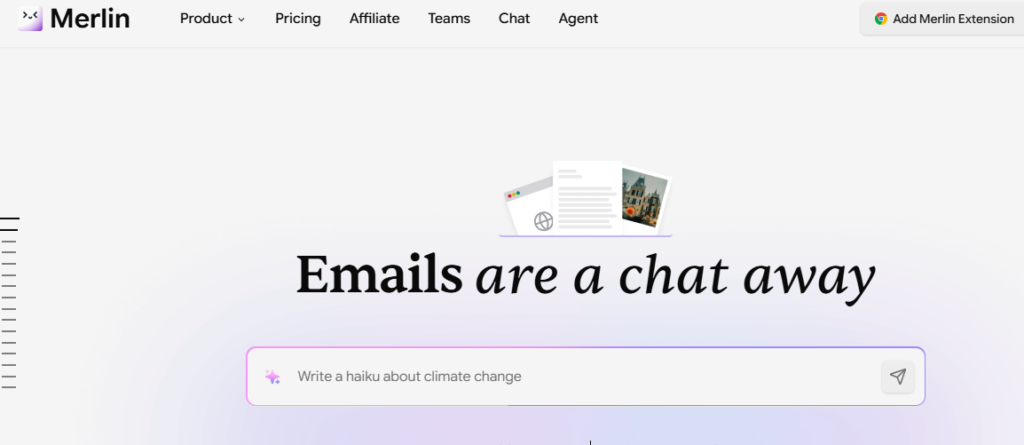
Merlin is a browser-based AI assistant that overlays on top of any website you visit, rather than living on its own separate site the way ChatGPT does. Press a keyboard shortcut — Cmd+M on Mac or Ctrl+M on Windows — and a sidebar opens right where you’re working, whether that’s your inbox, a LinkedIn post, a YouTube video, or a research PDF.
Instead of forcing you to pick one AI model and stick with it, Merlin bundles access to several leading models — including versions of GPT, Claude, and Gemini — into a single interface. You choose which model answers your prompt, or let Merlin pick a sensible default, without juggling separate logins or subscriptions.
Merlin launched in 2021 as a fairly simple ChatGPT extension and has since grown into a broader AI workspace. Today it spans three surfaces:
- The Merlin AI extension — the Chrome (and Edge/Firefox) add-on most people use daily
- Merlin web — a full dashboard at getmerlin.in with heavier features like Projects and file uploads
- Merlin mobile apps — iOS and Android versions for on-the-go use
(Internal linking opportunity: link to a related “best AI browser extensions” comparison post if available on your site.)
How the Merlin AI Extension Actually Works
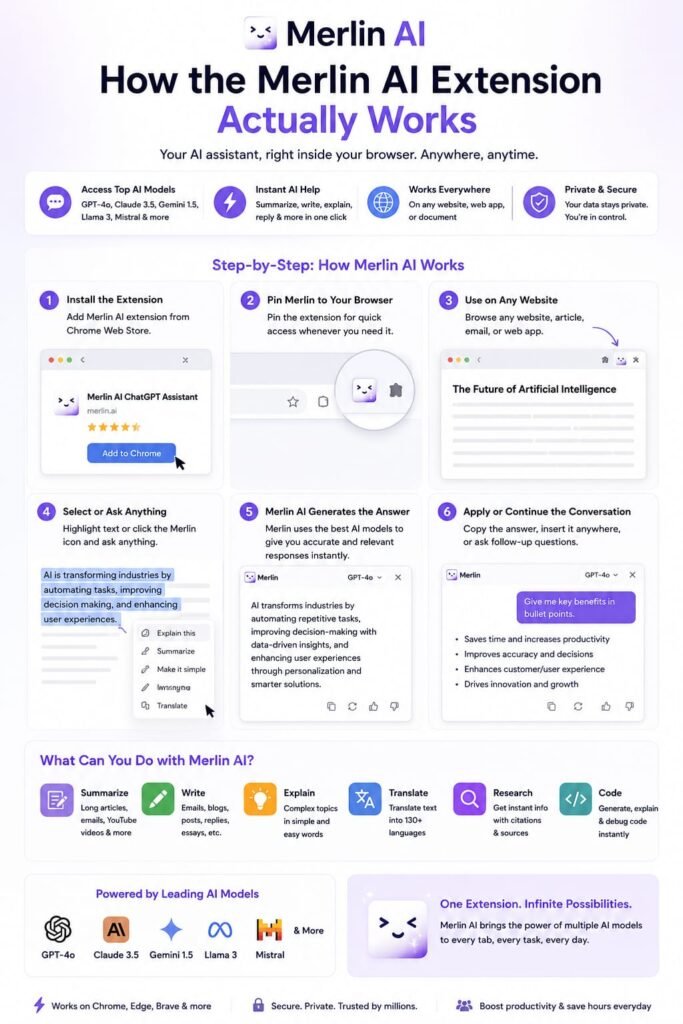
Installing and Activating It
Once installed from the Chrome Web Store, Merlin sits quietly in your browser toolbar until you need it. You don’t have to click anything to summon it — the keyboard shortcut brings up a floating sidebar on whatever page is open, without reloading the page or losing your place.
Choosing Your AI Model
Inside the sidebar, you can switch between different AI models depending on the task. Some are better at reasoning through complex questions, others are faster for quick rewrites — having them side by side, without re-logging into different platforms, is genuinely one of the more practical parts of the experience.
Working Inside the Page You’re Already On
This is Merlin’s real differentiator. Instead of copying text out of an email, pasting it into a separate chatbot tab, and pasting the result back, Merlin reads the context of the page you’re on and lets you generate or edit content directly inside it — a drafted reply sitting right in your Gmail compose box, for example, instead of a separate window you have to copy from.
Saving Prompts and Building Projects
For repeat tasks, Merlin lets you save prompts you use often and organize ongoing work into “Projects,” which keep relevant context together so you’re not re-explaining the same background every time you open a new chat.
My 90-Day Merlin AI Extension Review: What Actually Happened
I’ll break this down by month, because my experience genuinely shifted the longer I used it.
Days 1–30: The Honeymoon Phase
The first few weeks were mostly about discovering how much the extension could do. I used it constantly for drafting email replies and summarizing long articles I didn’t have time to fully read. The Gmail integration in particular saved real time — instead of staring at a blank reply box, I’d get a solid first draft I could edit down in seconds. YouTube summaries were a close second favorite: dropping into a 40-minute tutorial and getting a timestamped summary before deciding whether to actually watch it changed how I consumed video content.
The novelty of switching between models without leaving the sidebar also stood out early on. I found myself comparing how differently two models handled the same prompt, which was a small but genuinely useful habit to build.
Days 31–60: The Friction Started Showing
By the second month, the initial excitement gave way to a more realistic picture. I started running into the daily query cap on the free plan more often than I expected, especially on days when I was doing heavier research work. The extension also occasionally felt sluggish on pages with a lot of dynamic content, and I noticed I was relying on it less for anything that needed real precision — like technical writing — and more for quick, low-stakes tasks.
This was also the point where I upgraded to a paid plan, mostly because hitting the free cap mid-task was breaking my flow more than I wanted to admit.
Days 61–90: Where It Settled Into My Routine
By the final month, Merlin had earned a specific, narrower role in my workflow rather than replacing everything. It became my default for email replies, quick LinkedIn post drafts, and summarizing anything long I didn’t have time to read in full. For deeper writing or anything requiring nuanced judgment, I still preferred going straight to a dedicated chat interface rather than the sidebar.
The honest bottom line after 90 days: Merlin didn’t replace my other AI tools entirely, but it did remove a genuine amount of tab-switching friction from my day-to-day browser work — and that alone made it worth keeping installed.
Key Features of the Merlin AI Extension
Multi-Model Access in One Sidebar
You’re not locked into a single AI provider. Merlin gives you access to multiple leading models in one place, so you can pick whichever tends to handle your specific task best.
Gmail Integration
Compose and reply to emails with AI-generated drafts that account for the context of the conversation you’re replying to, directly inside your inbox.
YouTube Video Summaries
Get a summary — often with timestamps — of a video’s content without watching the whole thing, useful for research or deciding whether a video is actually worth your time.
LinkedIn and Twitter Writing Help
Draft posts, comments, and connection messages that read as thoughtful without starting from a blank text box every time.
Document and PDF Chat
Upload or open a PDF and ask questions about it directly, rather than manually scanning for the information you need.
Real-Time Web Search Integration
Merlin can pull in live web information for prompts that need current data, rather than relying only on a model’s static training knowledge.
Cross-Platform Account Sync
Your account and saved prompts carry across the Chrome extension, the web app, and the mobile apps, so switching devices doesn’t mean starting over.
Multi-Language Support
Content generation and translation work across a wide range of languages, which matters if you’re writing for an international audience or team.
How to Complete a Merlin App Download (Desktop and Mobile)
Merlin Extension Download for Chrome, Edge, and Firefox
- Visit the Chrome Web Store (or your browser’s equivalent extension store) and search for “Merlin AI.”
- Click “Add to Chrome” (or your browser’s equivalent install button).
- Pin the extension to your toolbar for quick access.
- Create a free account or sign in with an existing Google account.
- Use Cmd+M (Mac) or Ctrl+M (Windows) on any page to activate the sidebar.
Merlin App Download for iOS and Android
- Open the App Store (iOS) or Google Play Store (Android).
- Search for “Merlin AI” and confirm it’s the official app from the developer.
- Download and install the app.
- Log in using the same account as your browser extension to keep your history and Projects in sync.
Accessing Merlin Com and Merlin Web Directly
If you’d rather skip the extension entirely, you can go straight to Merlin’s web dashboard at getmerlin.in and use the full-featured version in a browser tab, which includes heavier tools like Projects and expanded file handling that the sidebar doesn’t always show in full.
Merlin AI vs. Other AI Tools in 2026
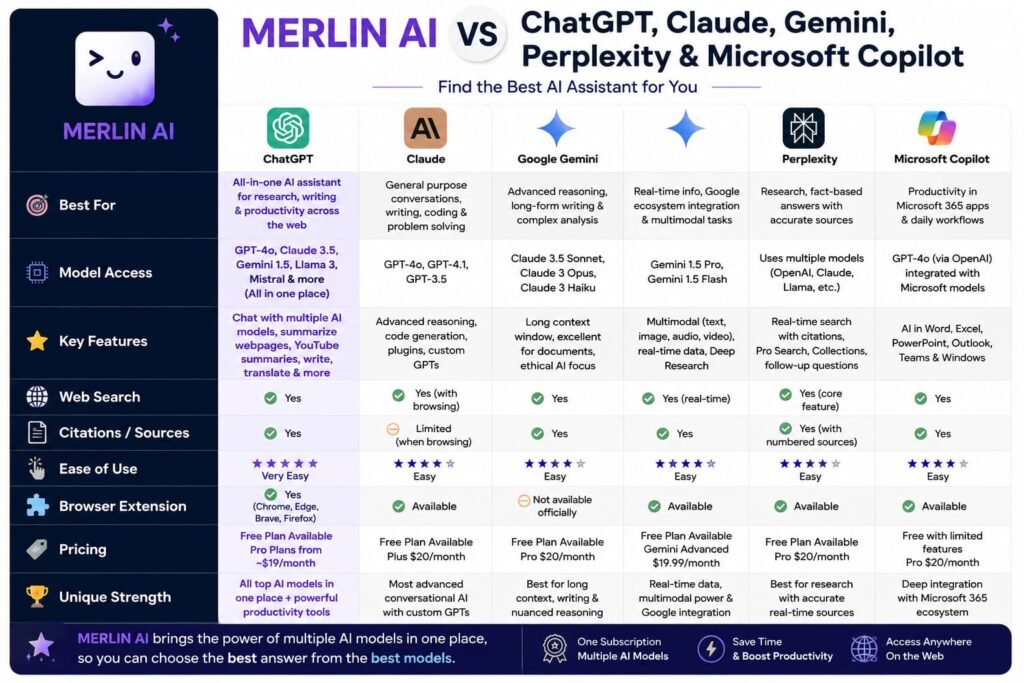
Merlin vs. ChatGPT
ChatGPT is a standalone destination — you go to it. Merlin instead layers AI features on top of whatever site you’re already using, which removes a genuine amount of tab-switching for browser-heavy tasks like email and social media. On the other hand, ChatGPT’s native interface tends to offer more developed memory and deeper data-analysis tools for people who rely heavily on a single model rather than switching between several.
Merlin vs. Monica AI
Monica is one of Merlin’s closest direct competitors, offering a similar browser-overlay approach with multi-model access. The two are genuinely close in functionality; the right pick often comes down to which one’s specific integrations (Gmail, LinkedIn, YouTube, etc.) feel smoother in your particular workflow, so it’s worth trialing both on the free tier before committing.
Merlin vs. Single-Model Extensions
Plenty of simpler extensions bolt ChatGPT onto your browser and stop there. Merlin’s advantage is breadth — multiple models, document chat, YouTube summaries, and cross-platform sync — but that breadth can also mean it’s less polished at any single task than a tool built to do just one thing exceptionally well.
The Honest Trade-Off
If your priority is having one flexible tool that handles a wide range of browser-based tasks without constant tab-switching, Merlin earns its place. If you need deep, specialized performance in one narrow area — heavy-duty coding, for instance — a purpose-built tool will likely outperform Merlin’s general-purpose approach.
(Internal linking opportunity: link to a “best ChatGPT alternatives” roundup post if you have one.)
Merlin AI Pricing
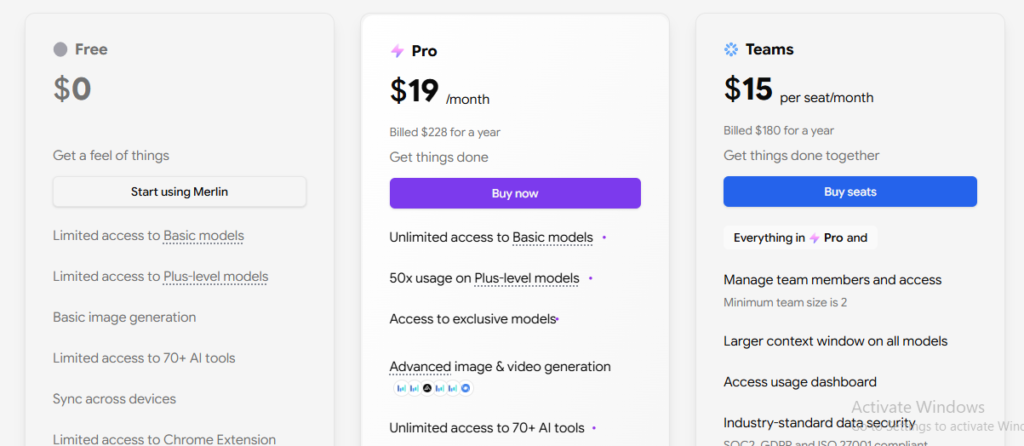
Merlin operates on a freemium model: a free plan with a daily query cap, and paid tiers that raise or remove those limits and unlock heavier features like expanded model access and higher usage on tools like image generation.
A few things worth knowing before you commit to a plan:
- The free plan is genuinely usable day-to-day, not just a token trial — but you will hit the daily cap if you’re using it heavily for research or long work sessions.
- Paid plans are generally priced comparably to a single-model subscription like ChatGPT Plus, while giving you access to multiple models instead of just one.
- Fair use limits can still apply to paid plans for the most resource-intensive features, so read the specifics before assuming “unlimited” means truly unlimited.
- Pricing details shift periodically, so check Merlin’s official pricing page directly before budgeting for a specific plan.
Pros and Cons of the Merlin AI Extension
Pros
- Genuinely useful for reducing tab-switching during everyday browser work
- Access to multiple leading AI models without separate subscriptions
- Strong, practical integrations with Gmail, LinkedIn, and YouTube
- Free plan is functional enough for light daily use, not just a demo
- Cross-platform sync between extension, web, and mobile keeps context consistent
Cons
- Free plan’s daily query cap can interrupt heavier work sessions
- Can feel less polished than specialized tools for any single deep task
- Occasional lag on pages with heavy dynamic content
- Some advanced features (like certain image generation tools) carry their own usage limits even on paid plans
Common Pain Points With the Merlin AI Extension
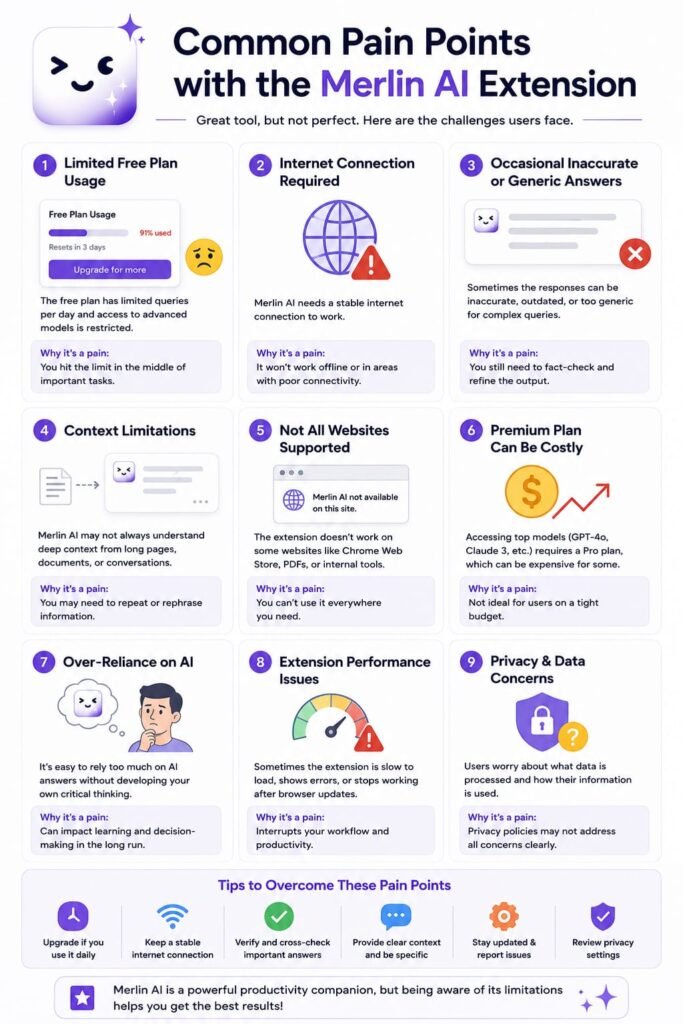
Hitting the Free Plan Limit Mid-Task
The most common frustration is running into the daily query cap in the middle of active work. If you rely on Merlin heavily, budgeting for a paid plan upfront avoids the disruption of hitting a wall mid-session.
Choosing the Right Model for the Task
With several models available, it’s easy to default to whichever one you used last rather than the one best suited to your current task. Spending a little time learning each model’s relative strengths pays off over weeks of regular use.
Overreliance on Auto-Drafted Content
It’s tempting to accept the first AI-drafted email or post without editing it. Treat Merlin’s output as a strong first draft, not a finished product, especially for anything going to a client or your professional network.
Sync Issues Across Devices
Occasionally, saved prompts or Projects don’t sync instantly between the extension and mobile app. Logging out and back in typically resolves it, but it’s worth knowing about before you rely on cross-device continuity for something time-sensitive.
Who Should Use the Merlin AI Extension?

Professionals Who Live in Their Inbox and Browser
If a large share of your day happens in Gmail, LinkedIn, and research tabs, Merlin’s in-context editing genuinely cuts down on repetitive copy-pasting.
Students and Researchers
Document chat, PDF summarization, and YouTube summaries make it a practical study and research aid, particularly for digesting long material quickly.
Content Creators and Marketers
Quick drafts for social posts, captions, and content ideas across multiple platforms, without needing a separate tool for each one.
Teams Managing Multiple AI Subscriptions
If your team currently pays for several individual AI tools, Merlin’s multi-model bundling can consolidate that cost into a single subscription.
Who Might Want to Look Elsewhere
If you need one AI model’s most advanced, specialized capabilities — deep coding assistance or long-term conversational memory, for example — a dedicated, single-model platform will likely serve you better than a general-purpose extension.
Frequently Asked Questions
What is the Merlin AI extension used for?
It’s a browser extension that brings AI assistance directly into the websites you’re already using — drafting emails in Gmail, summarizing YouTube videos, writing LinkedIn posts, and chatting with PDFs — without needing to switch to a separate AI website.
Is Merlin AI free to use?
Yes, Merlin offers a free plan with a daily query limit, which is usable for light, everyday tasks. Heavier or more frequent use typically requires upgrading to a paid plan.
How do I complete a Merlin app download?
For desktop, install the extension from the Chrome Web Store (or your browser’s equivalent) and pin it to your toolbar. For mobile, search “Merlin AI” in the App Store or Google Play Store and download the official app, then log in with the same account used on your browser extension.
Is Merlin AI safe to use?
Merlin follows standard Chrome extension security practices and requires an account login to use its features. As with any browser extension that reads page content, it’s worth reviewing the permissions it requests during installation and avoiding pasting highly sensitive personal data into any AI tool, including this one.
What’s the difference between Merlin’s extension and the Merlin web app?
The extension is a lightweight sidebar that overlays on any website, ideal for quick, in-context tasks. The Merlin web app (at getmerlin.in) is a fuller dashboard with expanded features like Projects and heavier file handling, better suited to more involved work sessions.
Does Merlin AI work on mobile devices?
Yes, Merlin has dedicated iOS and Android apps that sync with your browser extension account, so your history and saved prompts carry across devices.
How does Merlin compare to using ChatGPT directly?
ChatGPT is a standalone platform you visit separately, while Merlin overlays AI features directly onto the page you’re already working on, cutting down on tab-switching. ChatGPT’s native interface still tends to offer stronger memory and data-analysis features for users who stick to one model.
Can I use multiple AI models within the Merlin extension?
Yes, one of Merlin’s core features is bundling access to several leading AI models into a single sidebar, letting you switch between them depending on the task without separate logins or subscriptions.
Is the Merlin AI extension worth paying for?
If you regularly hit the free plan’s daily query cap or rely on it for consistent daily work, the paid plan is generally worth it, especially compared to paying for multiple separate single-model subscriptions. If your use is occasional, the free plan may be sufficient.
Does Merlin AI collect or store my data?
Like most AI tools, Merlin processes the prompts and page content you interact with to generate responses. It’s worth reviewing Merlin’s official privacy policy directly for specifics on data handling and retention before using it with sensitive information.
My Final Thoughts: Is the Merlin AI Extension Worth Installing in 2026?
After 90 days of actual daily use, my take is straightforward: the Merlin AI extension earns a real, specific place in a browser-heavy workflow, even if it doesn’t replace every other AI tool you use. The value isn’t in any single flashy feature — it’s in the accumulated time saved from not constantly switching tabs, copying text back and forth, and re-logging into separate AI platforms throughout the day.
It’s not perfect. The free plan’s query cap will frustrate you if you lean on it heavily, and for genuinely deep, specialized work, I still reach for a dedicated single-model interface. But for the everyday grind of emails, quick content drafts, and digesting long articles or videos faster, it’s stuck around in my toolbar long after the initial novelty wore off — and that’s usually the best sign a tool is actually earning its space.
If you’re on the fence, the lowest-risk way to find out is to install the extension, try the free plan for a week of real work, and see whether it removes friction from your specific routine. If it does, upgrading is an easy call. If it doesn’t fit how you work, you’ve lost nothing but a few minutes of setup.
If you’re exploring the Merlin AI Extension, you may also want to compare other AI assistants and productivity tools to find the right fit for your needs. Check out Kimi AI vs ChatGPT: Which AI Assistant Actually Wins? for a detailed comparison of two powerful AI assistants, then see Claude Pro vs ChatGPT Plus: The Real Difference Between These Models to understand how their premium plans differ. For a deeper look at Merlin itself, read Merlin AI Review: Features, Pricing, App Downloads, Alternatives & 90-Day Experience, and if you’re interested in using AI for online business and marketing, don’t miss System.io Review: The World’s Easiest All-in-One Marketing Platform.
Related Reads:
What Is Lovable AI? The Complete Guide to the AI App Builder Everyone’s Talking About
Is Lovable AI Free? Here’s What You Actually Get
Claude Pro vs ChatGPT Plus: The Real Difference Between These $20 AI Plans
How to Fix AI Image Generator Deformities in Fingers, Toes, and Other Anomalies
What Is Meta AI Muse Spark? The Complete 2026 Guide to Meta’s Flagship AI Model
Kimi K3 Explained: Inside Moonshot AI’s Record-Breaking Open Mode
Best AI App Builder in 2026: 10 Top Tools to Build an App Without Coding
Seedance 2: Inside ByteDance’s Most Realistic AI Video Model Yet (2026)
Is Kling 3.0 Unlimited? The Honest Truth About Free Credits, Paid Plans, and Hidden Costs in 2026