
Rocket AI app builder explained: how Solve, Build, and Intelligence work together, real pricing, templates, integrations, and honest pros and cons.
Most AI app builders answer one question: can you turn a prompt into a working app? The Rocket AI app builder is trying to answer a bigger one — should you even build this in the first place, and what happens to your product once it’s live? That’s the pitch behind Rocket.new’s “Vibe Solutioning” positioning: a single platform that researches your idea, builds the actual product, and then keeps watching your competitors after launch.
Whether that combination is genuinely useful or just clever marketing depends on how each piece actually holds up, so this guide breaks down every part of the Rocket AI app builder how Solve, Build, and Intelligence work individually and together, the real resources and integrations built into the platform, current pricing and credit mechanics, and how it stacks up against better-known names like Lovable, Bolt, and Rork. By the end, you’ll know exactly what you’re evaluating.
What Is the Rocket AI App Builder?
Rocket (Rocket.new) is an AI-powered platform built around three connected products Solve, Build, and Intelligence that let you validate a product idea with market research, generate a production-ready web or mobile app from natural language, and monitor competitors continuously after launch, all sharing one workspace and one credit balance.
Made by Rocket USA Inc., the platform describes itself as the world’s first “Vibe Solutioning” platform, extending the now-familiar idea of “vibe coding” (building software by describing it conversationally) into the stages before and after the build itself. According to the company, more than 1.5 million people have tried the platform across 180 countries, and each of its three pillars Solve, Build, Intelligence can be used independently or combined, depending on what a given project actually needs.
The “Vibe Solutioning” Approach: Why Rocket Positions Itself Differently
Rocket’s core argument is that most AI app builders solve only the middle step of a much longer process. You still have to figure out whether an idea is worth building in the first place, and once it’s live, you still need to track how the market and your competitors are responding tasks that typically require switching to entirely separate tools.
Rocket’s answer is a shared context layer that carries information across all three products. A market insight surfaced during Solve informs what gets built during Build; the integrations and features generated during Build feed into what Intelligence knows to monitor after launch. In principle, this reduces the repeated re-explaining that happens when you’re bouncing between a research tool, a build tool, and a separate competitor-tracking tool.
Solve: Rocket’s Market Research and Validation Tool
Solve is Rocket’s research and validation product, letting users describe a market problem or product idea in plain language and receive a structured report with data, evidence, and recommendations — including PRD-style documentation before any code gets written.
Rather than jumping straight into building, Solve is meant to answer the “should I build this” question first. You describe the opportunity or problem you’re evaluating, and Rocket returns a structured report combining market research, evidence, and a clear recommendation, ready to present to a stakeholder or hand directly to a developer. For a SaaS idea, this might include which integrations the product will likely need before you’ve specified them yourself the platform has cited detecting a need for subscription billing and transactional email automatically once it recognizes a SaaS pattern, and split-payment infrastructure once it recognizes a marketplace pattern.
This is arguably Rocket’s most distinctive feature relative to typical AI app builders, most of which start and end at code generation without any structured validation step built in.
Build: How the Rocket AI App Builder Actually Creates Apps
Rocket’s Build product turns natural-language prompts, Figma files, or existing URLs into production-ready code generating React/Next.js for web apps and Flutter for native iOS and Android apps with database, authentication, payments, and other integrations wired automatically rather than left for you to configure separately.
From Prompt to Production Code
You can start a Build project by typing a description of what you want — a SaaS dashboard, a customer portal, a mobile app or by importing an existing Figma design, pasting a URL to reference, or starting from Rocket’s extensive template library. The platform then generates what it describes as production-ready code, not a throwaway prototype meant to be rebuilt before launch.
Automatic Backend Wiring
This is where Rocket differentiates itself most sharply from a large share of the AI app builder market. According to the company, many competing tools generate polished front ends with no working backend behind them no real payment processing, no email system, no database, no authentication — leaving users to wire everything manually or hire a developer to finish the job. Rocket’s Build product automatically connects Supabase for the database, Stripe for payments, and authentication and hosting infrastructure based on what your app actually needs, rather than requiring you to specify and configure each piece separately.
Continuous Context Across Iterations
As you continue prompting changes after the initial build, Rocket maintains context from earlier decisions, aiming to prevent new changes from breaking work you’ve already completed a common pain point across AI app builders where later edits sometimes undo or conflict with earlier ones.
Intelligence: Competitive Monitoring After Launch
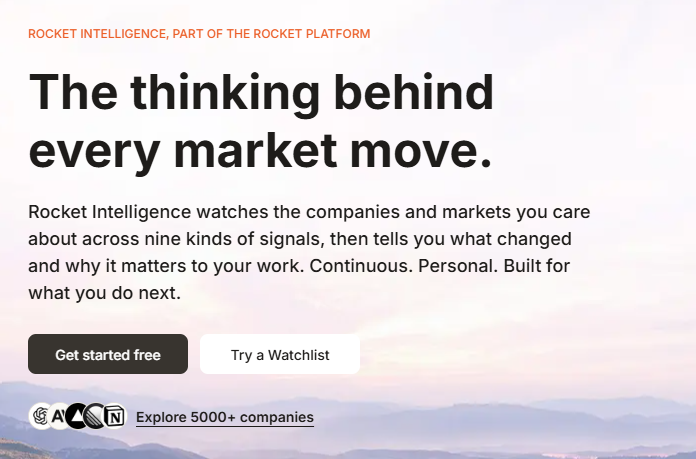
Intelligence is Rocket’s post-launch monitoring product, providing continuous competitor tracking through automated daily briefs, pricing change alerts, and trend signals, set up once and running automatically from a dedicated workspace dashboard.
Once your app is live, most AI app builders consider their job done. Rocket’s Intelligence product is built specifically for what happens next — tracking how competitors are moving, what pricing changes they’re making, and what broader trends are emerging in your space, surfaced through a dashboard rather than requiring manual research sessions. This is the piece of the platform most directly tied to Rocket’s “Vibe Solutioning” framing: the idea that building a product is one stage in an ongoing cycle, not a one-time event.
Resources Built Into the Rocket AI App Builder
Beyond the three core products, Rocket includes a set of underlying resources that shape how far your building sessions actually go.
The Template Library
Rocket includes a library of more than 25,000 templates, free to use on every tier, including the free plan. Rather than always starting from a blank prompt, you can pick a template close to what you need and let Rocket adapt it to your specific brand, tech stack, and goals — a detail the company says helps save up to 80% of token usage compared to generating everything from scratch, since a template-first approach requires less generation work than building a full app from nothing.
Native Integrations
Rocket reports more than 25 native integrations available from the first build — spanning payments (Stripe, including Stripe Connect for marketplaces), backend infrastructure (Supabase), analytics, and transactional email, among others. This stands in contrast to several well-known competitors that, according to Rocket’s own comparisons, either lack a native integration layer entirely or require plugin configuration that can take considerably longer to set up.
Tech Stack: Next.js for Web, Flutter for Mobile
Rocket generates React/Next.js code for web applications and Flutter code for native iOS and Android apps from the same underlying prompt — meaning a single description can produce both a web version and a native mobile version of your product, both built on established, real-world production frameworks rather than a proprietary in-house stack.
GitHub Sync and Developer Workflow
Generated code stays synced with your GitHub repository, supporting a full developer workflow where you can pull external changes in and push your own changes out — a meaningful feature for teams that want to eventually bring in a developer without losing access to a real, version-controlled codebase.
Rocket AI App Builder Pricing and Credits Explained
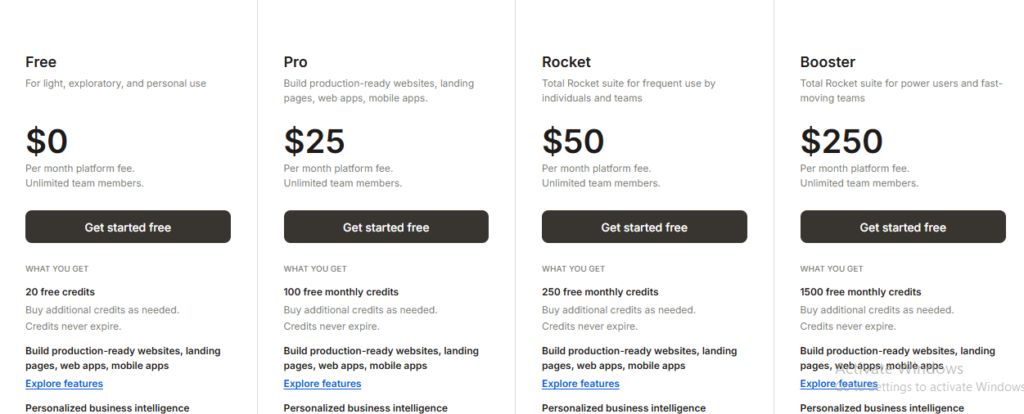
Rocket runs on a single credit balance shared across Solve, Build, and Intelligence. The Free plan includes 20 one-time credits with no credit card required; paid plans range from roughly $25/month (Build-focused) up to around $250-350/month for the full Solve + Build + Intelligence tier, with credits on paid plans rolling over and never expiring.
Free Plan ($0)
New users get 20 one-time credits with no time limit and no credit card required enough to explore the platform’s build quality, test authentication flows, and evaluate real output, though not enough for sustained, ongoing product work.
Paid Tiers
Rocket’s paid tiers scale based on which products you need and how much credit volume your work requires. A Build-focused entry tier has been reported around $25/month, including hosting, custom domains, unlimited team members, version control, mobile app support, and the platform’s integration library. The full combined Solve + Build + Intelligence tier has been reported starting around $50/month and scaling up toward $250-350/month for the highest-volume plans, depending on team size and usage.
How Credits Actually Work
Every action — a Solve report, a Build session, an Intelligence setup draws from the same shared credit balance rather than separate pools for each product. On paid plans, unused credits roll over between billing cycles and never expire, a meaningfully different policy from several competitors whose unused monthly credits simply disappear at reset. On the free plan, the one-time 20-credit allotment doesn’t renew or roll over in the same way, since it’s designed purely for initial evaluation.
No Per-Seat Pricing
Unlike many competing platforms that charge per team member, Rocket’s paid plans include unlimited team members at a flat monthly platform fee a structural advantage for small teams or agencies that would otherwise pay a premium per collaborator on other tools.
Annual Billing Savings
Choosing annual billing brings a 20% discount across all paid tiers, paid upfront for the full year, with credits still allocated on the same monthly schedule despite the annual payment structure.
Security and Compliance
For teams evaluating Rocket for business or enterprise use, the platform reports a notably comprehensive security posture out of the box — SOC 2, ISO 27001, GDPR, CCPA, and SSO/SAML support, along with role-based access controls and audit logs, positioned as defaults rather than add-ons bolted on later. This level of compliance tooling is more commonly associated with larger enterprise-focused platforms than typical AI app builders, and it’s a meaningful differentiator if procurement requirements are part of your decision process.
Native Mobile and Web Output From the Same Prompt
A specific practical advantage worth calling out: Rocket can generate both a web app and native iOS/Android apps from the same underlying description, publishing directly to the App Store and Google Play without leaving the platform. Many AI app builders force a choice between web-only output (Lovable, Bolt.new) or mobile-only output (Rork, FlutterFlow) Rocket’s ability to cover both from one workflow is a genuine structural advantage for founders who eventually need both a website and a mobile app for the same product.
Who Should Use the Rocket AI App Builder?
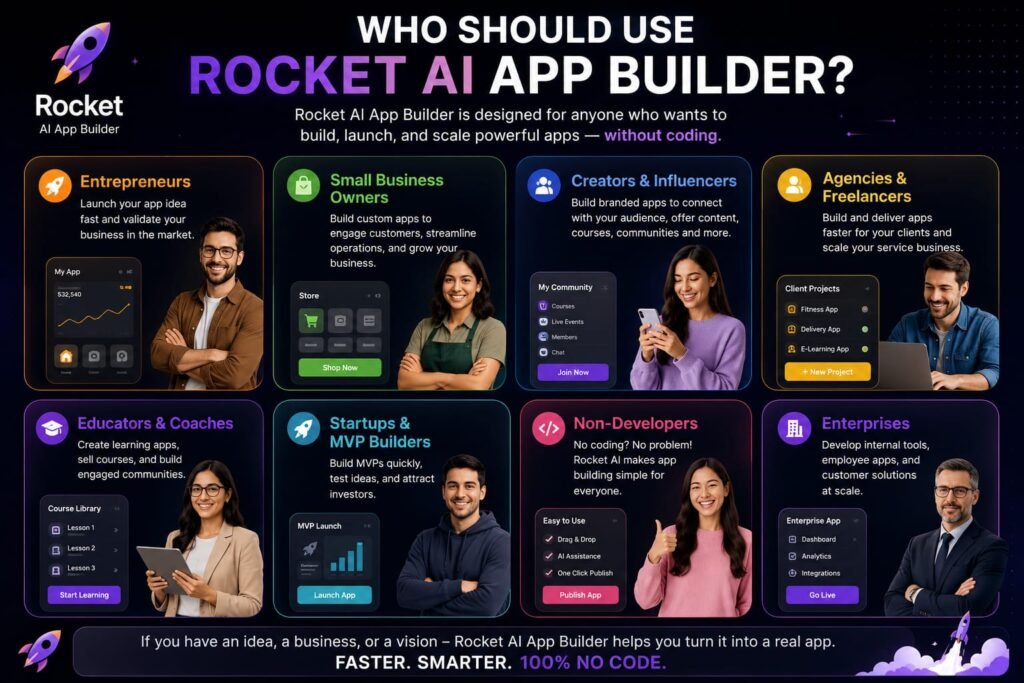
Based on how the platform is built and positioned, a few user types stand out as particularly good fits:
Solo founders validating an MVP — Solve’s research step plus Build’s production-ready output means you can move from idea to a real, testable product with genuine code ownership from day one, rather than a throwaway demo.
Agencies shipping client work — flat, per-platform pricing rather than per-seat billing, combined with a clean GitHub handoff, supports predictable billing and a professional client deliverable.
Technical teams building internal tools — admin panels, internal dashboards, and landing pages benefit from Rocket’s automatic integration wiring, reducing the manual backend setup that slows down internal tooling projects.
Enterprise teams with compliance requirements — built-in SOC 2, ISO 27001, GDPR, and SSO/SAML support means Rocket can pass procurement checks that would otherwise rule out many lighter-weight AI app builders.
Rocket vs. Other AI App Builders: How Does It Compare?
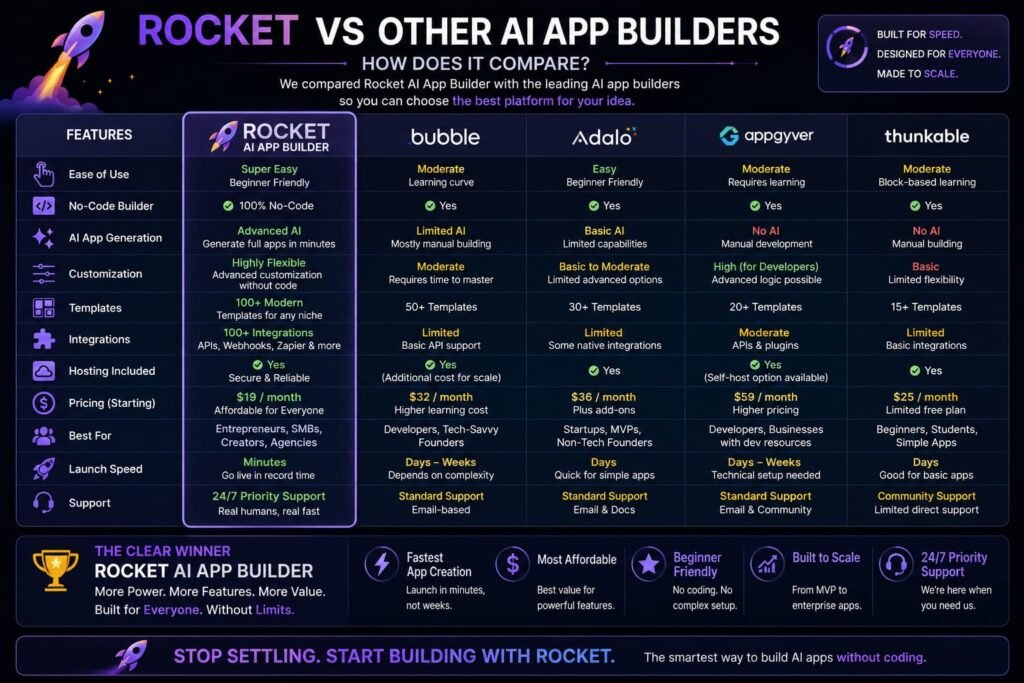
Understanding where Rocket sits relative to its closest competitors clarifies what you’re actually trading off.
Rocket vs. Lovable and Bolt.new
Both Lovable and Bolt generate polished web app front ends quickly, but according to Rocket’s own comparisons (worth reading with the understanding that a company’s own competitive claims deserve independent verification), neither includes a native integration layer for payments or email out of the box something Rocket bundles automatically. Rocket also extends to native mobile output, which neither Lovable nor Bolt currently offers.
Rocket vs. Rork
Both platforms support native mobile app generation, but with different free-tier structures: Rocket’s free plan offers 20 one-time credits with no daily cap, while Rork’s free plan offers a larger monthly allowance but resets daily rather than rolling over. Rocket credits also roll over indefinitely on paid plans and never expire, whereas Rork’s unused monthly credits are lost at each reset — a meaningful difference for builders with inconsistent monthly usage patterns.
Rocket vs. Emergent and Similar Credit-Based Builders
Compared to platforms like Emergent, which charges separately and scales quickly as deployment and iteration eat into a smaller credit pool, Rocket’s combined Solve + Build + Intelligence tier has been positioned as offering meaningfully more scope for a comparable or lower price at higher usage tiers, though exact comparative value depends heavily on your specific usage pattern.
The Honest Tradeoff
Rocket’s broader scope — research, build, and monitoring in one platform — is also where new users report the most friction. Because a single shared credit balance covers three different products, it’s easy to underestimate usage early on, and real user feedback (including discussions on Reddit) describes the platform’s credit allowance feeling generous at first but disappearing quickly once an app grows past a handful of screens. Serious, ongoing product work generally requires actively tracking your credit balance rather than treating it as a flat, “set and forget” monthly fee.
Getting Started With the Rocket AI App Builder
If you want to evaluate Rocket for yourself, the lowest-risk path is straightforward: sign up for the free plan (no credit card required), and use your 20 starting credits to test a real, small version of an idea you’re actually considering ideally something with authentication and at least one integration, since that will show you more about production readiness than a purely cosmetic prototype. From there, compare how far those credits actually took you against your expected usage before deciding whether Build alone, or the full Solve + Build + Intelligence tier, better fits your project.
Frequently Asked Questions
What is the Rocket AI app builder used for?
Rocket is used to validate a product idea through market research (Solve), generate a production-ready web or mobile app from natural language (Build), and monitor competitors continuously after launch (Intelligence) all from a single connected platform.
Is the Rocket AI app builder free to use?
Yes, Rocket offers a free plan with 20 one-time credits and no credit card required, enough to explore the platform’s build quality and core workflow, though not enough for sustained, ongoing product development.
How much does Rocket cost after the free plan?
Paid tiers range from roughly $25/month for a Build-focused plan up to approximately $250-350/month for the full Solve + Build + Intelligence tier at higher usage levels, with a 20% discount available on annual billing.
Does Rocket generate native mobile apps, or just web apps?
Both. Rocket generates React/Next.js code for web applications and Flutter code for native iOS and Android apps, and can publish directly to the App Store and Google Play from the same platform.
What makes Rocket different from Lovable or Bolt.new?
Rocket bundles automatic backend integrations (payments, database, email) into its Build product by default, extends to native mobile app generation, and adds two additional products Solve for market research and Intelligence for post-launch competitor monitoring — that neither Lovable nor Bolt.new currently offer.
Do Rocket’s credits expire?
On paid plans, unused credits roll over between billing cycles and never expire. The free plan’s 20 credits are a one-time allotment intended for initial platform evaluation rather than an ongoing renewing allowance.
What is Solve, and do I need to use it?
Solve is Rocket’s market research and validation product, generating structured reports and recommendations before you commit to building. It’s optional — Rocket’s three products can be used independently, so you can go straight to Build if you’ve already validated your idea elsewhere.
Is Rocket good for teams, or built mainly for solo founders?
Both. Rocket’s flat, per-platform pricing (rather than per-seat billing) includes unlimited team members on paid plans, making it cost-effective for small teams and agencies, while its research-to-build-to-monitoring scope also serves solo founders validating and launching an idea independently.
Does Rocket support enterprise security and compliance requirements?
Yes. Rocket reports SOC 2, ISO 27001, GDPR, CCPA, and SSO/SAML support built in by default, along with role-based access controls and audit logs — a notably comprehensive security posture for an AI app builder in this category.
Can I export the code Rocket generates? Y
es. Rocket’s generated code syncs with your GitHub repository, supporting a full developer workflow where you can pull changes in and push changes out, rather than locking your app permanently inside the platform.
My Final Thoughts: Is the Rocket AI App Builder Worth It?
The Rocket AI app builder makes a genuinely different argument than most of its competitors: building the app is only one part of the job, and a platform that also helps validate the idea beforehand and monitor the market afterward can save real time compared to juggling three separate tools. Whether that combined scope is worth it for you depends on how much you actually value the Solve and Intelligence pieces specifically if you just need a fast, well-integrated app builder, Rocket’s Build product alone competes seriously with Lovable, Bolt, and similar tools, particularly on backend integration depth and native mobile support.
The best way to find out is a direct, hands-on test rather than reading another comparison article. Sign up for the free plan, describe a real project you’re actually considering, and pay close attention to how far your 20 starting credits actually take you and how the generated app’s backend integrations hold up. That firsthand experience will tell you far more about whether Rocket fits your workflow than any single feature list — including this one.
Related Reads:
What Is Lovable AI? The Complete Guide to the AI App Builder Everyone’s Talking About
Is Lovable AI Free? Here’s What You Actually Get
Claude Pro vs ChatGPT Plus: The Real Difference Between These $20 AI Plans
How to Fix AI Image Generator Deformities in Fingers, Toes, and Other Anomalies
What Is Meta AI Muse Spark? The Complete 2026 Guide to Meta’s Flagship AI Model
Kimi K3 Explained: Inside Moonshot AI’s Record-Breaking Open Mode
Best AI App Builder in 2026: 10 Top Tools to Build an App Without Coding
Bolt AI App Builder: The Complete Guide to Building Apps in Your Web Browser
Higgsfield AI Pricing in 2026: Every Plan, Credit Cost, and What You Actually Get
Base 44 Pricing in 2026: Every Plan, Credit Cost, and Hidden Fee Explained
Base44 Reviews 2026: What Real Users Actually Think Before You Build
FlutterFlow AI App Builder: The Complete 2026 Guide to Building Real Native Apps
Kimi AI App: The Complete Guide to Download, Features, and How It WorksIs
Kimi AI vs ChatGPT: Which AI Assistant Actually Wins in 2026?
Moonshot AI Kimi K2 Explained: The Open-Source Model Series That Changed AI in 2026