
Discover the top 7 AI tools in 2026 for writing, research, productivity, marketing, and everyday work. Compare features, pricing, pros, cons, and more.
Artificial intelligence has moved far beyond simple chatbots. In 2026, AI tools can research the web, summarize long documents, write and edit content, analyze data, create images, generate presentations, automate repetitive tasks, and even work inside the apps you already use.
The difficult part is no longer finding an AI tool. It is choosing the right one.
There are hundreds of AI applications available, and many appear to offer almost identical features. Some are excellent for writing, while others are better for research, business productivity, marketing, or working with documents.
In this guide, we compare the top 7 AI tools in 2026 based on their capabilities, ease of use, strengths, limitations, and the type of user they are best suited for.
Our list includes:
- ChatGPT — Best overall AI assistant
- Claude — Best for writing and long-form work
- Google Gemini — Best for Google users and research
- Perplexity — Best for AI-powered research
- Microsoft Copilot — Best for Microsoft 365 productivity
- Merlin AI — Best for accessing multiple AI models in one place
- Jasper — Best AI tool for marketing teams
If you want one AI tool that can handle writing, research, analysis, brainstorming, files, images, and everyday productivity, ChatGPT is the strongest all-round choice. However, Claude, Gemini, Perplexity, Copilot, Merlin, and Jasper can be better choices for specific workflows.
What Are the Best AI Tools in 2026?
The best AI tool depends heavily on what you want to accomplish.
A student researching a topic does not necessarily need the same tool as a marketing team producing hundreds of pieces of branded content. Similarly, someone working primarily in Microsoft Word and Excel may get considerably more value from Copilot than from a standalone AI chatbot.
For this comparison, we looked at several practical factors:
- Overall AI capabilities
- Writing quality
- Research capabilities
- Document and file handling
- Productivity features
- Ease of use
- Integration with other applications
- Availability of free plans or trials
- Value for money
- Suitability for different types of users
Another important point is that AI models and pricing change frequently. The information below reflects the tools and features available around August 2026, but users should always check the provider’s current pricing before purchasing.
1. ChatGPT — Best Overall AI Tool in 2026


If you want just one AI application for a wide variety of tasks, ChatGPT is one of the easiest recommendations.
It can be used for writing, brainstorming, research, data analysis, file analysis, image generation, coding, learning, and many other workflows.
ChatGPT’s Deep Research feature is particularly useful when a question requires information from multiple sources. It can research the web, work with uploaded files and connected apps, and produce a documented report with citations. (OpenAI Help Center)
What makes ChatGPT useful?
ChatGPT is particularly strong because it combines several capabilities in one interface.
You can use it to:
- Write blog posts and articles
- Rewrite and edit existing content
- Brainstorm ideas
- Summarize PDFs and documents
- Analyze spreadsheets
- Explain complicated subjects
- Generate images
- Conduct research
- Create custom GPTs
- Help with coding
- Work with files
- Assist with business planning
For someone running a website, for example, ChatGPT can help move from keyword research → article outline → content creation → editing → FAQ generation → social media content without requiring several separate tools.
ChatGPT pricing
ChatGPT has a free tier, while ChatGPT Plus is $20 per month. Paid access provides higher limits and broader access to advanced models and features such as file analysis, image generation, voice, and Deep Research where available. (OpenAI Help Center)
Pros
- Excellent all-round AI assistant
- Strong writing and reasoning capabilities
- File and image support
- Research capabilities
- Useful for both beginners and professionals
- Large ecosystem of tools and integrations
Cons
- Usage limits can apply
- Advanced features may vary by plan
- AI-generated information still needs verification
- Some advanced capabilities can be overwhelming for beginners
Best for
Best overall, content creators, students, professionals, researchers, entrepreneurs, and everyday users.
2. Claude — Best AI for Writing and Long-Form Work


Claude from Anthropic has developed a particularly strong reputation among people who use AI for writing, analysis, documents, and complex knowledge work.
Anthropic describes Claude as useful for researching, analyzing information, creating content, working with files, and building interactive artifacts. (Anthropic)
One of Claude’s standout features is Artifacts.
Artifacts allow Claude to create substantial, standalone content such as documents, visualizations, tools, and interactive applications that users can continue editing. (Anthropic Help Center)
Why choose Claude?
Claude is particularly attractive if your workflow involves a lot of text.
For example, you can use it for:
- Blog writing
- Editing long documents
- Summarizing research
- Analyzing PDFs
- Brainstorming
- Business writing
- Coding
- Creating interactive content
- Document analysis
It can also work with uploaded documents and images, making it useful when you want an AI assistant to analyze information rather than simply answer a short question. (Anthropic)
Claude pricing
Claude Pro currently costs $20 per month in the United States, with local-currency pricing available in some regions. Annual plans are also available. (Anthropic Help Center)
Pros
- Excellent long-form writing
- Strong document analysis
- Useful Artifacts feature
- Good for complex reasoning
- Clean interface
Cons
- Usage limits apply
- Some features depend on the plan
- It may not be the best choice if your primary workflow revolves around Google’s ecosystem
Best for
Writers, researchers, students, professionals, developers, and people working with long documents.
3. Google Gemini — Best AI Tool for Google Users


If you spend much of your day inside Google’s ecosystem, Gemini deserves serious consideration.
Gemini has evolved into more than a conversational chatbot. Google’s current Gemini experience includes advanced reasoning, Deep Research, Canvas, file analysis, and connections to Google’s broader ecosystem. (Gemini)
Gemini Deep Research
One of Gemini’s most useful features is Deep Research.
Google says Gemini can analyze hundreds of sources in real time to create comprehensive research reports. Users can also upload their own files and images as research sources. (Gemini)
This can be useful for:
- Market research
- Competitor research
- Academic research
- Business planning
- Learning
- Content research
- Summarizing large amounts of information
Gemini Canvas
Canvas provides a workspace for creating and refining documents, code, and other content. Google says users can generate a first draft and then refine sections, tone, length, and formatting. (Gemini)
Pros
- Excellent Google ecosystem integration
- Strong research capabilities
- Useful document and file analysis
- Canvas for creating and refining content
- Strong multimodal capabilities
Cons
- Some advanced features require paid Google AI plans
- Features can change quickly
- The best experience may be most valuable to people already using Google’s services
Best for
Google Workspace users, students, researchers, content creators, and people heavily invested in Google’s ecosystem.
4. Perplexity — Best AI Tool for Research


If your biggest question is “Which AI tool is best for researching information?”, Perplexity is one of the strongest options.
Unlike a conventional chatbot, Perplexity is built around AI-powered search and research.
It searches the web and provides conversational answers backed by citations and links to sources. (Perplexity AI)
Why Perplexity stands out
Perplexity is particularly useful when you need to answer questions such as:
- What happened recently?
- What are the latest statistics?
- Which product should I buy?
- What are the differences between two companies?
- What does current research say?
- What are competitors doing?
- What sources support this claim?
Its Pro Search feature performs multiple searches and synthesizes information from different sources. (Perplexity AI)
Perplexity’s Advanced Deep Research has also added features such as document uploads, data analysis, broader web research, progress tracking, and editable reports. (Perplexity AI)
Perplexity for content creators
For bloggers and SEO professionals, Perplexity can be particularly useful during the research stage.
For example:
Research the latest developments in AI writing tools in 2026, identify five major trends, cite reliable sources, and highlight information that would be useful for a comparison article.
You can then verify the sources before using the information in your article.
Pros
- Excellent research experience
- Citations make verification easier
- Real-time web information
- Deep Research
- Multiple AI models available in advanced plans
Cons
- Research answers can still contain mistakes
- Not primarily a long-form writing platform
- Advanced features require paid access
Best for
Researchers, students, journalists, bloggers, SEO professionals, analysts, and anyone who wants source-backed answers.
5. Microsoft Copilot — Best AI for Microsoft 365


Microsoft Copilot makes the most sense when your working life revolves around Word, Excel, PowerPoint, Outlook, and Teams.
Instead of opening a separate chatbot every time you need help, Copilot can work directly within Microsoft’s productivity ecosystem.
Microsoft says Microsoft 365 Copilot can provide AI assistance inside applications such as Word, Excel, PowerPoint, Outlook, and Teams, while also connecting AI capabilities to work data. (Microsoft)
What can you do with Copilot?
Examples include:
- Drafting documents in Word
- Summarizing emails
- Creating presentations
- Analyzing spreadsheets
- Preparing meeting summaries
- Searching work information
- Generating business content
- Creating AI-powered workflows
This makes Copilot particularly compelling for companies that already rely heavily on Microsoft 365.
Microsoft Copilot pricing
Microsoft’s India pricing pages currently list Microsoft 365 Copilot options starting around ₹1,495.73 per user/month when billed yearly for the applicable business offering, with a qualifying Microsoft 365 plan required. Pricing and plan structures vary by product and commitment. (Microsoft)
Pros
- Excellent Microsoft 365 integration
- Useful for business productivity
- Works inside familiar applications
- Strong enterprise controls
- Useful for Word, Excel, PowerPoint, Outlook and Teams
Cons
- Best value comes if you already use Microsoft 365
- Pricing can be more complicated than standalone AI tools
- Some features are aimed primarily at business users
Best for
Businesses, professionals, Microsoft 365 users, corporate teams, and organizations.
6. Merlin AI — Best for Using Multiple AI Models


Merlin AI takes a different approach from traditional AI assistants.
Instead of focusing on only one underlying AI model, Merlin brings multiple AI models and tools together inside one platform.
According to Merlin’s current website, the platform can provide access to models from providers such as OpenAI, Anthropic, DeepSeek, Llama, Mistral and others. It also offers browser-based functionality for tasks such as summarizing webpages and YouTube videos, writing, document analysis, social media content, and email-related workflows. (Merlin AI)
Why Merlin is interesting
Imagine you regularly switch between several AI platforms.
You might use one model for writing, another for research, and another for a specific reasoning task.
Merlin attempts to put those capabilities under one roof.
Its current plans also include access to more than 70 AI tools, depending on the plan. (Merlin AI)
Merlin for content creators
For bloggers, marketers, and SEO professionals, Merlin can be useful for:
- Writing and rewriting
- Summarizing articles
- YouTube research
- Social media posts
- Email replies
- Document analysis
- Brainstorming
- Research
- Browser-based AI assistance
This makes Merlin particularly interesting for users who want one subscription covering several AI models and workflows.
Merlin pricing
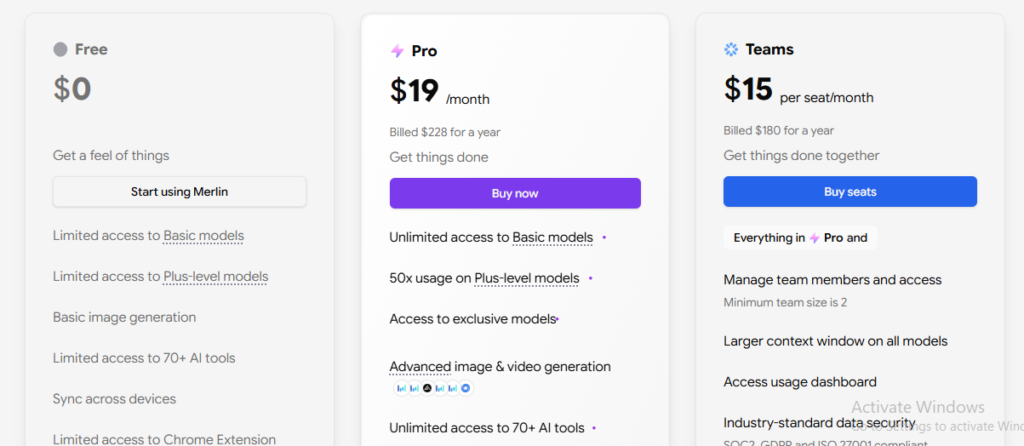
Merlin currently advertises a free plan with limited access. Its Pro plan is listed at $19/month when billed annually, while other Merlin products and plans have separate pricing. (Merlin AI)
Pros
- Multiple AI models in one platform
- Browser extension
- Large selection of AI tools
- Useful for content creators
- Can reduce the need to maintain several separate subscriptions
Cons
- Usage limits still apply
- Having many models can make choosing the right one confusing
- Advanced capabilities may require a paid plan
Best for
Content creators, marketers, researchers, social media managers, students, and people who want multiple AI models in one place.
7. Jasper — Best AI Tool for Marketing


Jasper is different from general-purpose AI assistants such as ChatGPT and Claude.
Its focus is marketing and branded content.
That makes it particularly interesting for businesses, agencies, marketing departments, and content teams that need to produce consistent content at scale.
Jasper’s current platform includes a Canvas workspace, marketing agents, brand voices, knowledge assets, audiences, and other tools designed around marketing workflows. (Jasper)
What can Jasper do?
Jasper can help marketing teams with:
- Blog content
- Website copy
- Email campaigns
- Social media content
- Brand messaging
- Marketing campaigns
- Content optimization
- Research
- Content workflows
One of its biggest advantages is the emphasis on brand consistency.
A company can provide brand information and guidelines so content is created with a more consistent voice.
Jasper pricing
Jasper’s current Pro plan is listed at $69/month when billed monthly or $59/month when billed annually. Business pricing is customized. Jasper also offers a seven-day free trial for Pro. (Jasper)
Pros
- Built specifically for marketing
- Brand voice features
- Marketing-focused AI agents
- Useful for teams
- Designed for scaled content production
Cons
- More expensive than many general AI assistants
- Overkill for casual users
- Best suited to marketing rather than general-purpose AI tasks
Best for
Marketing teams, agencies, businesses, content marketers, and companies producing content at scale.
Top 7 AI Tools in 2026 Compared
Here’s a quick overview of how these tools differ.
| AI Tool | Best For | Biggest Strength | Best User |
|---|---|---|---|
| ChatGPT | Overall AI | Versatility | Almost everyone |
| Claude | Writing & analysis | Long-form work | Writers & professionals |
| Gemini | Google ecosystem | Research & integration | Google users |
| Perplexity | Research | Web search + citations | Researchers & bloggers |
| Microsoft Copilot | Office productivity | Microsoft 365 integration | Businesses |
| Merlin AI | Multi-model AI | Several AI models in one platform | Creators & marketers |
| Jasper | Marketing | Brand-focused content | Marketing teams |
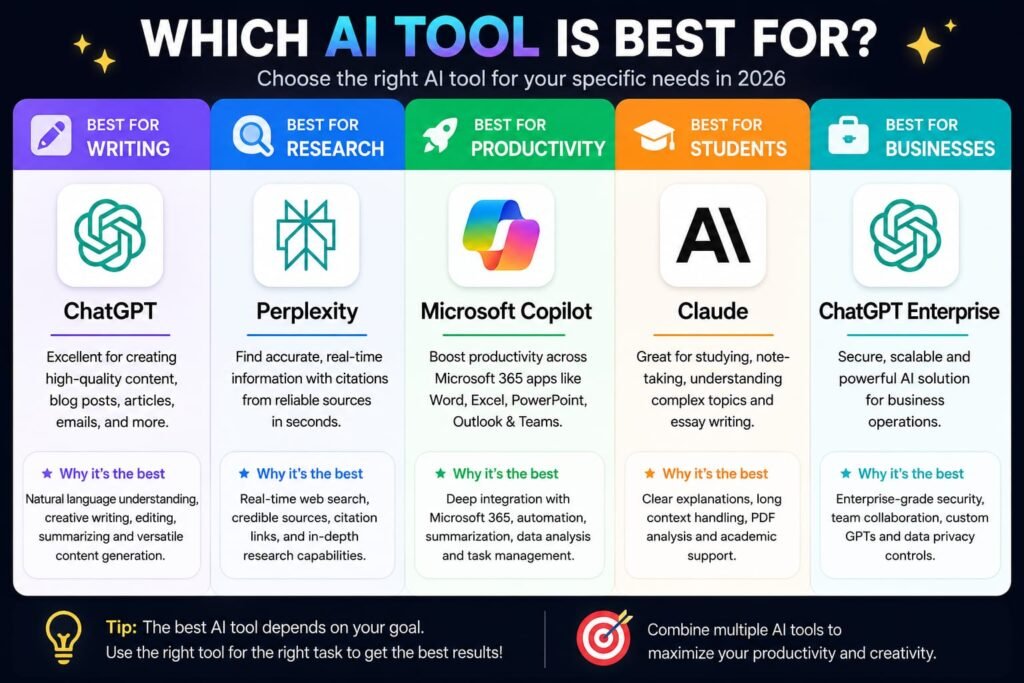
Which AI Tool Is Best for Writing?
For general writing, ChatGPT and Claude are two of the strongest choices.
Claude is particularly appealing for long-form editing and document-heavy workflows, while ChatGPT provides a broader collection of capabilities around writing, research, files, images, and productivity.
For marketing teams, Jasper can be a better choice because it focuses heavily on brand consistency and marketing workflows.
Best AI writing tools
For general writing: ChatGPT
For long-form editing: Claude
For marketing content: Jasper
For browser-based writing: Merlin AI
Which AI Tool Is Best for Research?
For research, Perplexity is one of the most specialized options on this list.
Its entire experience is designed around finding information on the web and presenting answers with source citations. Its advanced research features can search across many sources and create detailed reports. (Perplexity AI)
ChatGPT and Gemini are also excellent choices when you need deeper reasoning combined with research.
Best AI research tools
- Perplexity — Best dedicated research experience
- ChatGPT — Best overall research + productivity combination
- Gemini — Excellent research and Google integration
- Claude — Strong analysis and document research
Which AI Tool Is Best for Productivity?
There is no universal winner because productivity depends on your existing workflow.
If you use Google products heavily, Gemini makes sense.
If your company runs on Microsoft 365, Copilot may be the obvious choice.
If you want one general-purpose AI assistant that can handle many different tasks, ChatGPT is difficult to beat.
For someone who frequently switches between different AI models, Merlin can be a practical alternative.
Which AI Tool Is Best for Students?
Students should prioritize tools that help them understand information, rather than simply generating assignments.
Perplexity can help with research because answers include sources. Claude and ChatGPT are useful for explaining difficult concepts, reviewing documents, brainstorming, and creating study materials.
Gemini can also be useful for students who already use Google’s ecosystem.
A good student workflow
Instead of asking:
“Write my assignment.”
Try:
“Explain this topic in simple language, give me five important concepts, test me with questions, and point out areas I should research further.”
This turns AI from an answer generator into a learning assistant.
Which AI Tool Is Best for Businesses?
For businesses, the answer depends on the existing technology stack.
Choose Microsoft Copilot if:
Your organization already relies heavily on Microsoft 365.
Choose ChatGPT if:
You want a flexible general-purpose AI platform.
Choose Claude if:
Your employees frequently work with long documents, analysis, writing, and knowledge-intensive tasks.
Choose Gemini if:
Your organization relies heavily on Google’s ecosystem.
Choose Jasper if:
Your primary requirement is marketing and branded content.
Choose Merlin if:
Your employees want access to multiple AI models and browser-based AI tools.
Are Free AI Tools Good Enough in 2026?
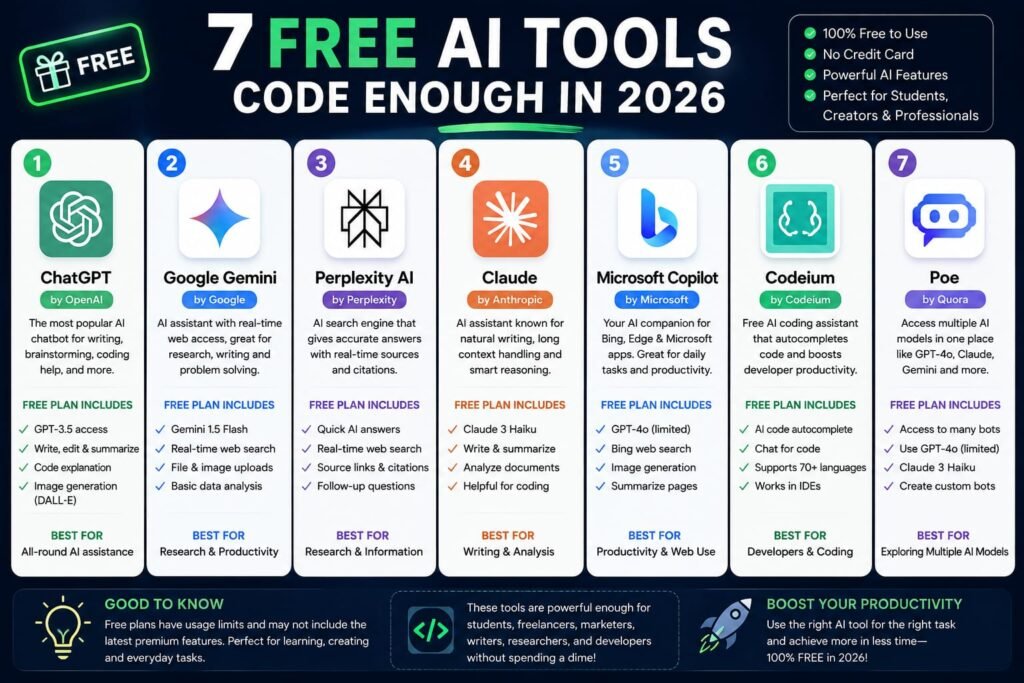
Yes.
You do not necessarily need to pay for seven different AI subscriptions.
Free tiers are often enough for:
- Occasional writing
- Basic brainstorming
- Simple research
- Learning
- Summaries
- Everyday questions
Paid plans become more attractive when you use AI frequently and need:
- Higher usage limits
- Advanced reasoning
- Deep Research
- Larger file limits
- More image generation
- Better business integrations
- Advanced models
- Team features
A smart approach is to start with free versions and pay for the one tool that genuinely saves you time.
How to Choose the Right AI Tool
Before buying an AI subscription, ask yourself five questions.
1. What do I actually use AI for?
Writing? Research? Marketing? Data analysis? Emails?
Your primary use case should determine your tool.
2. Do I need current information?
If yes, prioritize tools with strong web search and research capabilities.
Perplexity is particularly strong in this area.
3. What software do I already use?
Google users should consider Gemini.
Microsoft 365 users should consider Copilot.
4. Do I need multiple AI models?
If you regularly want to switch between models, Merlin can be worth considering.
5. How often will I use it?
If you only use AI a few times per week, a free plan may be enough.
If AI is part of your daily work, a paid subscription can quickly pay for itself through time savings.
How We Compared These AI Tools
Rather than ranking these tools solely on benchmark scores, we focused on real-world usefulness.
A benchmark can tell you how a model performed on a particular test, but it does not necessarily tell you whether an application will make your daily workflow easier.
We considered:
- Ease of use
- Writing
- Research
- Productivity
- File handling
- Integrations
- Specialized capabilities
- Pricing
- Value
- Target audience
This is also why there isn’t a single “winner” in every category.
The best AI tool is the one that fits your workflow.
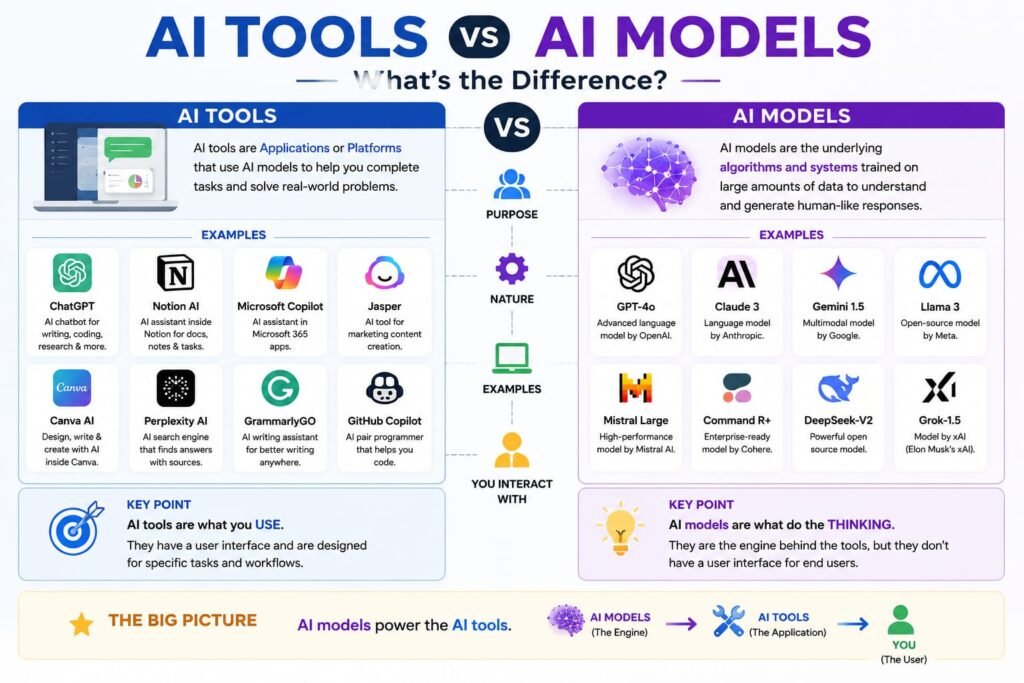
AI Tools vs AI Models: What’s the Difference?
This distinction is easy to miss.
An AI model is the underlying technology that generates or processes information.
An AI tool is the application through which you use that technology.
For example, a single AI platform can sometimes give users access to several underlying models.
That’s part of what makes platforms such as Merlin interesting. Its current offering brings multiple model providers together rather than requiring users to subscribe to each service individually. (Merlin AI)
This means that comparing AI tools purely by the model behind them can be misleading.
The interface, integrations, workflow, usage limits, research tools, and pricing can be just as important.
The Future of AI Productivity
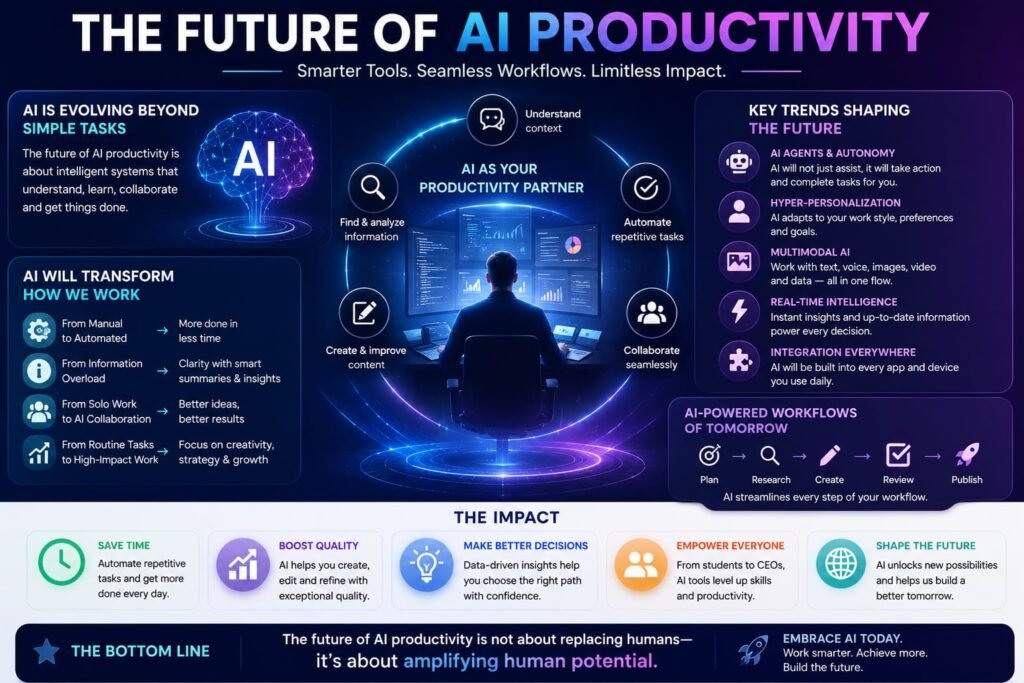
The biggest trend in AI in 2026 isn’t simply that models are becoming better at answering questions.
It is that AI is becoming more action-oriented.
Modern AI platforms increasingly combine:
- Search
- Reasoning
- File analysis
- Research
- Image generation
- Data analysis
- Applications
- Integrations
- Automation
- Agents
For example, ChatGPT’s newer Work capabilities are designed for longer tasks involving connected apps, files, documents, spreadsheets, presentations, and reports. (OpenAI Help Center)
Perplexity is also expanding beyond search into areas such as creating files and apps and scheduled computer tasks. (Perplexity AI)
This suggests an important shift:
AI is moving from “answer my question” toward “help me complete the task.”
For consumers and businesses, that could ultimately be more important than small differences between individual AI models.
Frequently Asked Questions About the Top AI Tools in 2026
1. What is the best AI tool in 2026?
ChatGPT is the best overall AI tool for most users because it combines writing, reasoning, research, file analysis, image generation, and productivity capabilities in one platform.
However, the best tool depends on your needs.
2. Which AI tool is best for writing?
Claude and ChatGPT are excellent general-purpose writing tools. Jasper is particularly useful for marketing teams that need consistent branded content.
3. Which AI tool is best for research?
Perplexity is one of the strongest choices for AI-powered research because it searches the web and provides citations with its answers. Its advanced research tools can also produce detailed reports. (Perplexity AI)
4. Is ChatGPT better than Gemini?
Neither is universally better.
ChatGPT is a strong general-purpose option, while Gemini can be particularly attractive to users who rely heavily on Google’s ecosystem and research capabilities.
5. Is Claude better than ChatGPT for writing?
Claude is an excellent option for long-form writing, editing, and document-heavy workflows. ChatGPT offers a broader collection of capabilities beyond writing.
The better choice depends on your workflow.
6. Is Perplexity better than ChatGPT for research?
Perplexity has a particularly strong research-first experience, with web search and citations at the center of the product.
ChatGPT is more of an all-purpose AI assistant that also offers powerful research capabilities.
7. Is Merlin AI worth using?
Merlin can be worth considering if you want access to multiple AI models and tools through one platform. It can be particularly useful for content creators, marketers, researchers, and people who frequently work in a browser. (Merlin AI)
8. Is Jasper better than ChatGPT?
Jasper is not necessarily “better” overall.
Jasper is designed specifically around marketing workflows and brand consistency, whereas ChatGPT is a much broader general-purpose AI assistant.
For a marketing department, Jasper may be the better fit. For general use, ChatGPT is more versatile.
9. Can I use AI tools for SEO?
Yes. AI tools can help with:
- Keyword research
- Search intent analysis
- Content outlines
- Competitor research
- Content briefs
- FAQs
- Topic clustering
- Content editing
- Meta descriptions
- Internal-link ideas
However, AI should support SEO strategy rather than replace it. Search engines still reward useful, original content that genuinely satisfies users.
10. Are paid AI tools worth it?
They can be.
If an AI subscription saves you several hours each month, the cost can be worthwhile.
However, don’t subscribe to multiple tools simply because they are popular. Start with one, measure how much value you get, and add another only when it solves a specific problem.
11. Can AI replace human writers?
AI can automate parts of the writing process, but human judgment remains important.
The strongest workflow is usually human expertise + AI assistance.
AI can help with research, outlines, first drafts, editing, and brainstorming. Humans should remain responsible for accuracy, originality, experience, opinions, and final quality.
12. Which AI tool should beginners start with?
For most beginners, ChatGPT is a sensible starting point because it can handle a wide range of tasks without requiring technical knowledge.
Once you understand what you actually need from AI, you can explore specialized tools such as Perplexity, Claude, Gemini, Copilot, Merlin, or Jasper.
My Final Verdict: Which AI Tool Should You Choose in 2026?
There isn’t one AI application that wins every category.
After comparing the top 7 AI tools in 2026, here’s the simplest way to choose:
- 🏆 Best overall: ChatGPT
- ✍️ Best for writing: Claude
- 🔎 Best for research: Perplexity
- 🔵 Best for Google users: Gemini
- 💼 Best for Microsoft 365: Copilot
- 🧩 Best for multiple AI models: Merlin AI
- 📣 Best for marketing: Jasper
For most people, I’d recommend starting with ChatGPT, Claude, Gemini, or Perplexity and seeing which one fits your workflow.
If you’re a content creator or SEO professional, however, a combination can be more powerful. For example, you could use Perplexity for research, ChatGPT or Claude for writing, and Jasper for large-scale marketing workflows.
The key isn’t to collect as many AI subscriptions as possible.
The goal is to find the smallest set of AI tools that makes your work meaningfully faster and better.
If you’re building an AI-powered workflow for your business or website, start with one tool, learn it properly, and expand only when you encounter a genuine limitation.
Which AI tool are you using in 2026? Try one of the tools above, compare it with your current workflow, and choose the platform that actually saves you time.
If you want to explore more AI tools beyond this list, check out our detailed HIX AI review, where we cover its features, pricing, HIX AI Humanizer, and our 60-day testing experience. You can also read our Merlin AI review to learn about its features, pricing, app download options, and the best Merlin AI alternatives. If you’re comparing AI assistants for everyday use, our Kimi AI vs ChatGPT comparison takes a closer look at which AI assistant comes out on top. And for entrepreneurs and marketers looking for an all-in-one platform, our Systeme.io review explores whether it really is the world’s easiest all-in-one marketing platform.
Related Reads:
What Is Lovable AI? The Complete Guide to the AI App Builder Everyone’s Talking About
Is Lovable AI Free? Here’s What You Actually Get
Claude Pro vs ChatGPT Plus: The Real Difference Between These $20 AI Plans
How to Fix AI Image Generator Deformities in Fingers, Toes, and Other Anomalies
What Is Meta AI Muse Spark? The Complete 2026 Guide to Meta’s Flagship AI Model
Kimi K3 Explained: Inside Moonshot AI’s Record-Breaking Open Mode
Best AI App Builder in 2026: 10 Top Tools to Build an App Without Coding
Seedance 2: Inside ByteDance’s Most Realistic AI Video Model Yet (2026)
Is Kling 3.0 Unlimited? The Honest Truth About Free Credits, Paid Plans, and Hidden Costs in 2026
Merlin AI Extension Review 2026: I Used It for 90 Days — Here’s the Honest Verdict