
Discover how the Bubble AI app builder helps you turn ideas into working web apps without code. Features, pricing, pros, cons, and a step-by-step guide inside.
Introduction
A few years ago, if you wanted to build a web app, you needed one of three things: a technical co-founder, a hefty budget for developers, or months of your own time spent learning to code. That barrier kept a lot of good ideas stuck on notepads and in Notion docs, never making it to actual users.
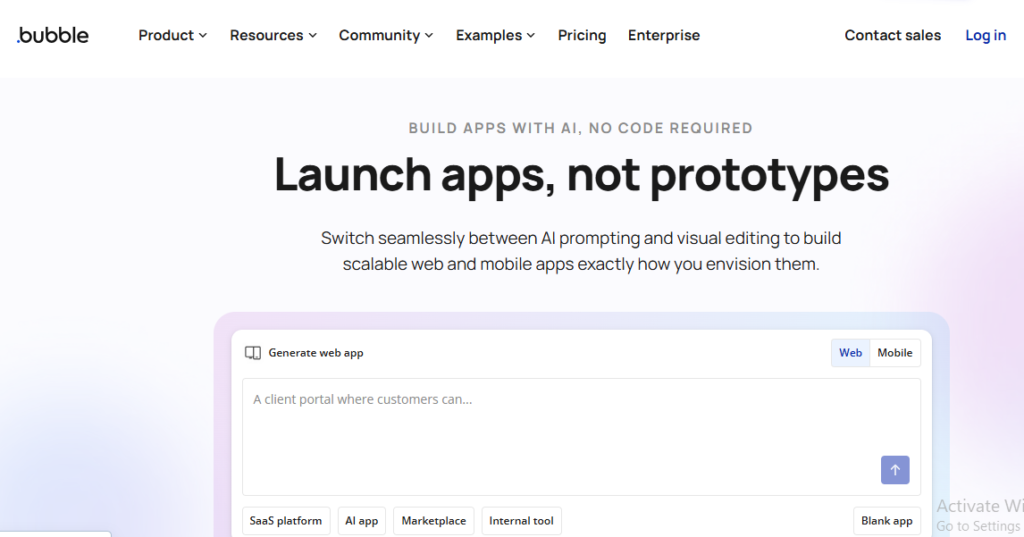
Bubble changed that equation, and its AI-powered app builder has changed it again. Instead of dragging elements onto a blank canvas and guessing at workflows, you can now describe what you want to build in plain English and watch Bubble scaffold a working app complete with a database, user login, and basic logic in a matter of minutes.
But is the Bubble AI app builder actually good enough to launch a real product on, or is it just a flashy demo that falls apart once you need something more complex? That’s exactly what this guide answers.
By the time you finish reading, you’ll know:
- What the Bubble AI app builder actually does (and doesn’t do)
- How it compares to newer AI-first tools like Lovable and Base44
- A realistic, step-by-step path for building your first app
- Pricing, limitations, and who this tool is genuinely built for
- Answers to the questions people ask most before committing to Bubble
Whether you’re a solo founder testing an idea, a small business owner who needs an internal tool, or someone simply curious about no-code development, this guide will give you a clear, honest picture.
What Is the Bubble AI App Builder?
Bubble is a visual, no-code development platform that lets you build fully functional web applications — think SaaS products, marketplaces, internal tools, directories, and booking platforms without writing traditional code. You design the interface with a drag-and-drop editor, define your data structure visually, and build workflows (the “if this happens, do that” logic) using a point-and-click system instead of programming languages.
The AI app builder is the newer layer sitting on top of that foundation. Instead of starting from a blank page, you type a prompt describing your app idea, and Bubble’s AI generates:
- A starter set of pages and UI elements
- A basic database structure suited to your idea
- Suggested workflows connecting your screens
- Initial styling you can customize further
In short, the AI layer removes the intimidating “blank canvas” problem. You’re no longer staring at an empty editor wondering where to start you’re editing and refining something that already exists.
How Does the Bubble AI App Builder Actually Work?
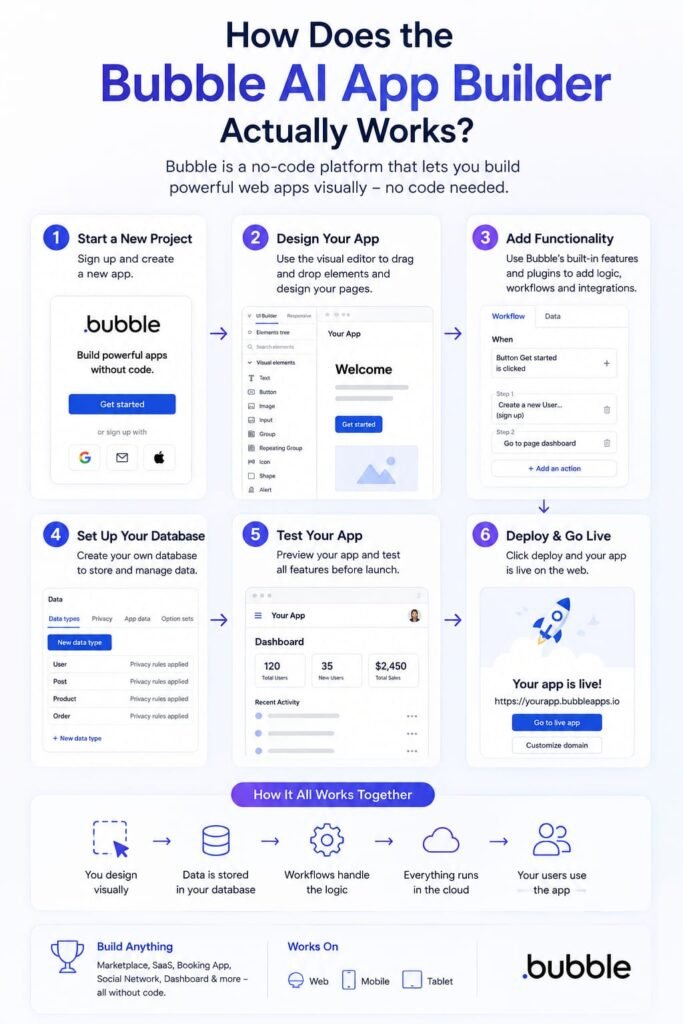
Understanding the mechanics helps set realistic expectations before you start building.
Step 1: You Describe Your App in Plain English
Instead of technical specifications, you write a natural-language prompt something like “a marketplace where freelance photographers can list their services and clients can book and pay for shoots.” The more specific and detailed your prompt, the better the starting point Bubble generates.
Step 2: Bubble Generates a Working Draft
Within a few minutes, Bubble’s AI produces an initial version of your app. This typically includes core screens (sign-up, login, dashboard, listing pages), a rough database schema, and some connecting workflows. It won’t be launch-ready, but it gives you real structure to work from rather than a blank editor.
Step 3: You Refine It With the Visual Editor
This is the part that separates Bubble from many AI-only tools. Once the AI has done its initial pass, you drop into Bubble’s full visual editor the same one experienced Bubble developers use to adjust layouts, fine-tune workflows, connect APIs, and polish the design element by element.
Step 4: You Test, Iterate, and Launch
Bubble includes a built-in preview and testing mode, so you can click through your app exactly as a user would before pushing it live. From there, deployment happens directly on Bubble’s hosting, with custom domain support on paid plans.
Key Features of the Bubble AI App Builder
AI-Generated Page Layouts
Describe a screen and Bubble’s AI proposes elements, structure, and basic styling automatically, saving you from building every layout from scratch.
Smart Workflow Suggestions
As you build, the AI recommends logical next steps in your workflows flagging missing actions or gaps that could otherwise cause broken user flows down the line.
Automatic Database Structuring
Tell Bubble what kind of data your app needs to store, and it proposes a relational database structure, including fields and relationships between data types.
Full Visual Editor Access
Unlike some AI-only builders that lock you into chat-based editing, Bubble gives you complete access to its mature drag-and-drop editor, so you can manually control every pixel and every piece of logic.
Massive Plugin Marketplace
Bubble’s plugin marketplace has grown to include thousands of add-ons covering everything from payment processing to AI model integrations, letting you extend your app’s functionality without custom code.
Native API Connector
You can connect Bubble to virtually any external service Stripe, OpenAI, Google Sheets, Airtable, and more using its built-in API connector, no backend coding required.
Responsive Design Tools
Apps built in Bubble automatically adapt across devices using its responsive engine, so you’re not manually rebuilding layouts for mobile and desktop separately.
AI Model Integration
Beyond just building your app, Bubble makes it straightforward to plug large language models like GPT or Claude into your app’s workflows useful if you’re building an AI-powered product rather than just a standard web app.
Bubble AI App Builder vs. Other No-Code AI Tools
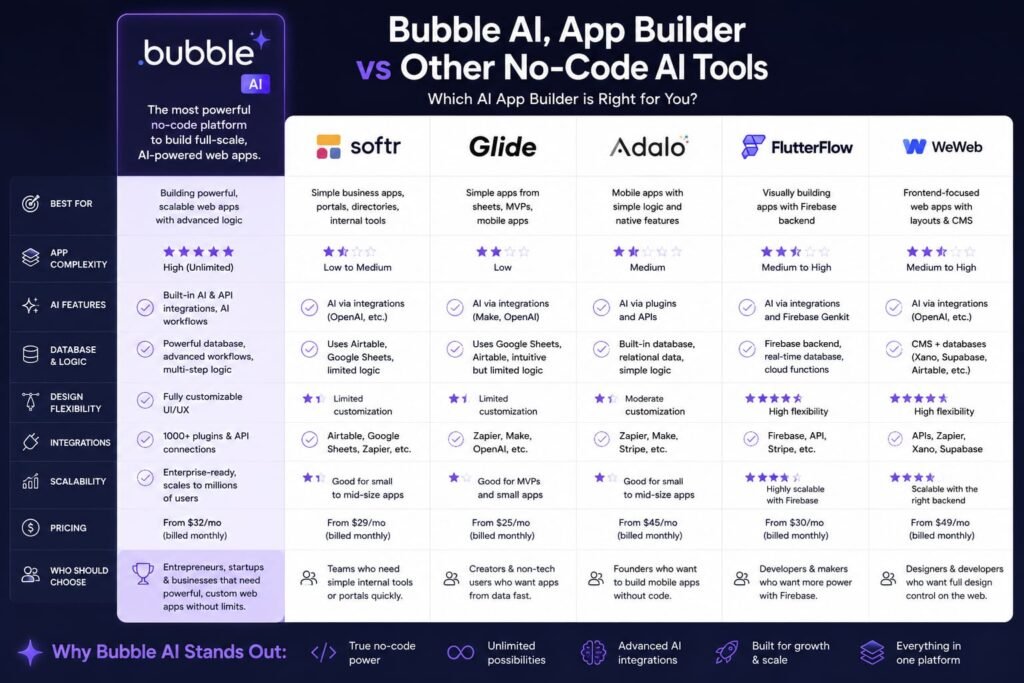
If you’ve been researching app builders, you’ve likely come across names like Lovable, Base44, Glide, and Adalo. Here’s how Bubble’s approach genuinely differs.
Bubble vs. Lovable
Lovable leans heavily into a conversational, chat-based building experience you describe changes and it makes them, with less manual editing. It’s often faster to get a polished-looking result for simple apps, but you have less granular control. Bubble, by contrast, gives you AI to get started fast, then hands you the wheel with a full visual editor for the fine details.
Bubble vs. Base44
Base44 is another AI-first builder aimed at speed and simplicity, particularly appealing to complete beginners who want ongoing AI assistance throughout the build process. Bubble’s AI builder is less “hand-holding” once you’re past the initial generation step it assumes you’ll eventually want to work directly in the editor, which suits people planning to build something more complex or long-term.
Bubble vs FlutterFlow
If you are trying to decide between FlutterFlow vs Bubble, you have probably already spent hours reading conflicting opinions, watching demo videos, and maybe even started a free trial on both platforms only to feel more confused than when you began. You are not alone.
Every week, founders, product managers, and small business owners face the same question: which no-code platform actually delivers on its promises? Both FlutterFlow and Bubble are powerful tools with passionate user bases, but they are built for fundamentally different types of projects. Picking the wrong one can cost you months of work, thousands of dollars, and the momentum that comes from shipping fast.
Bubble vs. Traditional No-Code (Glide, Adalo)
Tools like Glide and Adalo are generally simpler and more restrictive, often better suited to lightweight mobile apps or basic internal tools. Bubble supports significantly more complex logic, larger data structures, and more advanced workflows, making it a better fit for genuine SaaS products or marketplaces.
The Honest Trade-Off
The consensus among experienced no-code builders is fairly consistent: Bubble’s AI generates a solid minimum viable product (MVP) quickly, but it’s best suited to people who are willing to learn the platform and take manual control afterward. If you want a tool that holds your hand at every single step with ongoing conversational AI, something like Lovable or Base44 may feel more approachable initially but Bubble tends to offer more power and flexibility as your app grows in complexity.
(Internal linking opportunity: link to a “best no-code tools compared” roundup post if you have one.)
Who Should Use the Bubble AI App Builder?
Solo Founders Testing an MVP
If you have a business idea and need to validate it with real users before investing in custom development, Bubble lets you go from concept to a testable product without hiring anyone.
Non-Technical Entrepreneurs
You don’t need to know how to code to use Bubble, but you do need patience to learn the platform’s logic it has more depth than most drag-and-drop tools, and that depth is exactly what makes it capable of building real products.
Small Businesses Needing Internal Tools
Bubble is a strong fit for internal dashboards, inventory systems, client portals, or booking tools that don’t need to scale to millions of users but do need to be genuinely functional.
Freelance No-Code Developers and Agencies
Many freelancers and small agencies build client projects entirely in Bubble, using the AI builder to speed up the initial scaffolding stage before doing custom work for the client.
Who Might Want to Look Elsewhere
If you need a native mobile app (not just a responsive web app), extremely simple internal tools, or a fully hands-off experience with no interest in ever touching a visual editor, a more specialized or beginner-friendly tool might serve you better.
Step-by-Step: Building Your First App With Bubble AI
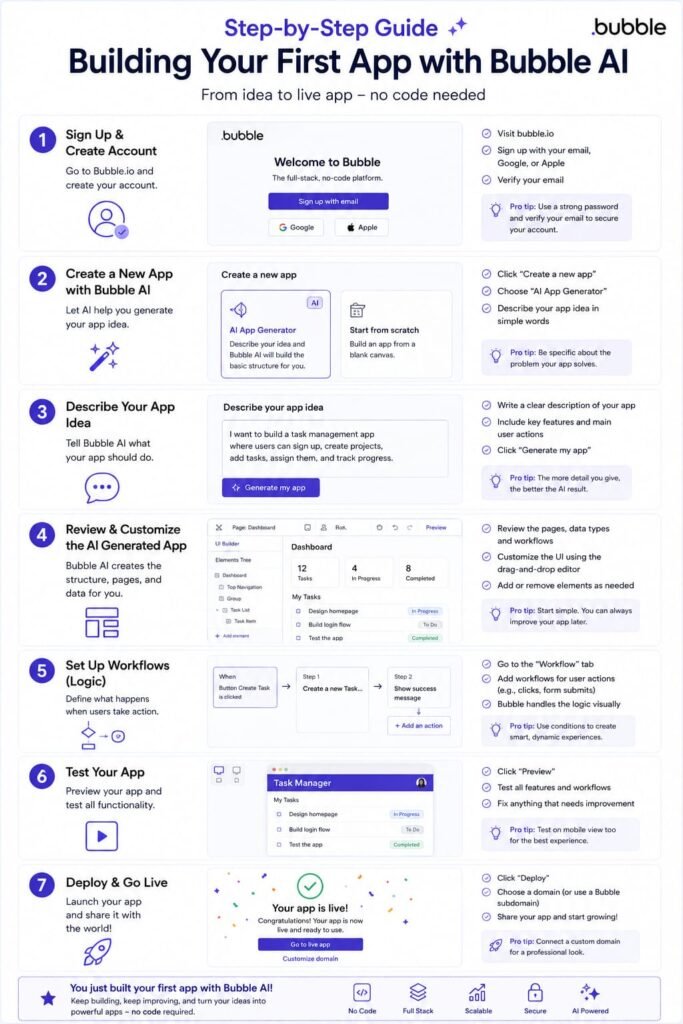
Here’s a realistic walkthrough of what the process looks like from start to finish.
1. Define Your App Idea Clearly Before You Start
Write down exactly what your app does, who it’s for, and what the core user action is (book something, buy something, post something, connect with someone). A clear idea produces a much better AI-generated starting point.
2. Write a Detailed AI Prompt
Vague prompts produce vague results. Instead of “a fitness app,” try “a fitness app where users log workouts, track progress with charts, and can follow other users for accountability.” Specificity upfront saves hours of rework later.
3. Review What the AI Generates
Don’t assume the first draft is right. Walk through every generated screen and workflow, and note what needs to change, what’s missing, and what can stay as-is.
4. Clean Up the Data Structure
The AI-proposed database is a starting point, not a final answer. Review field types, relationships between data, and privacy rules before you build much further on top of it.
5. Refine Workflows Manually
Go through each workflow the AI created and test the logic step by step. This is where Bubble’s visual editor becomes essential — you’ll likely need to add conditions, error handling, and edge cases the AI didn’t anticipate.
6. Add Plugins for Extra Functionality
Search the plugin marketplace for anything your app needs that isn’t built in natively — payment processing, email automation, or AI integrations are common additions.
7. Test Thoroughly Before Launch
Use Bubble’s preview mode to click through your app as a real user would. Test on both desktop and mobile views, since responsive behavior can need manual adjustment.
8. Launch and Iterate
Publish your app, get it in front of real users, and treat the AI-generated version as a first draft you’ll keep improving based on actual feedback — not a finished product.
Bubble AI App Builder Pricing: What You’ll Actually Pay
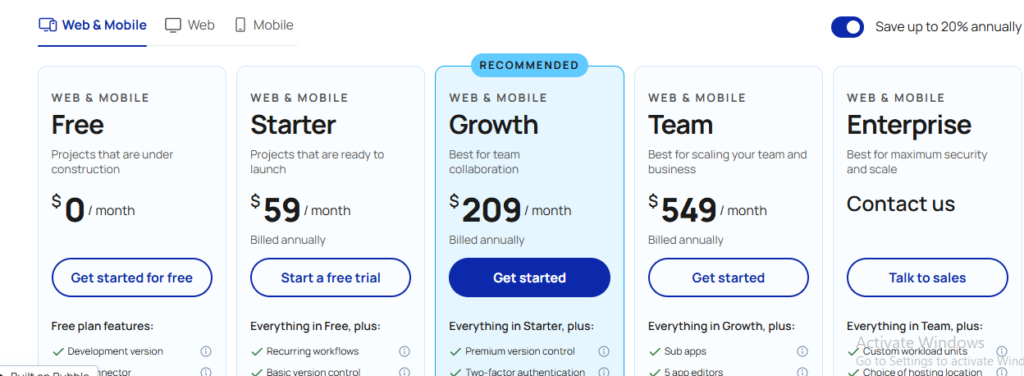
Bubble uses a tiered subscription model, with a free plan for learning and testing, and paid plans that unlock custom domains, higher capacity, and production-level performance. Exact pricing and plan names shift periodically as Bubble updates its offerings, so it’s worth checking Bubble’s official pricing page directly before committing, especially if you’re budgeting for a specific project.
A few general things to know when evaluating cost:
- Free plans are typically fine for learning the platform and building a prototype, but usually can’t be used for a live product with real users.
- Paid plans scale based on your app’s capacity needs (traffic, data storage, and workflow complexity), not just feature access.
- Plugin and API costs can add up separately — many third-party plugins and connected services (like OpenAI’s API) charge their own usage fees on top of your Bubble subscription.
- Agency or custom development costs apply only if you hire outside help to build or refine your app beyond what you do yourself.
Common Pain Points When Using the Bubble AI App Builder
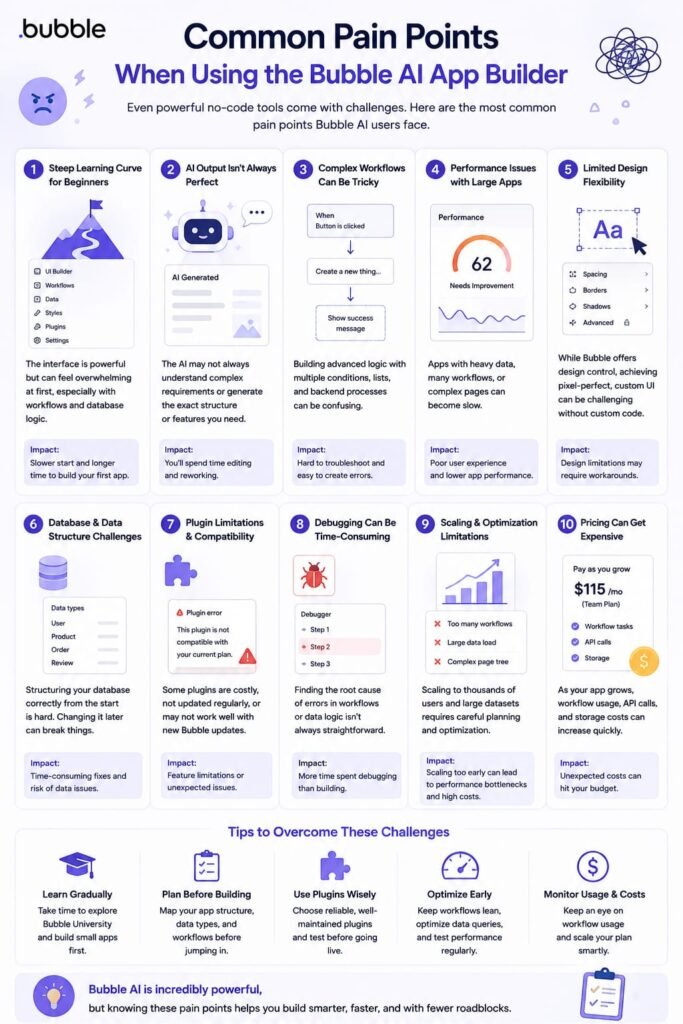
The Learning Curve Is Steeper Than It Looks
Bubble’s AI makes the starting point easier, but the platform itself still has real depth data types, conditional workflows, and privacy rules take time to understand properly. Budget for a genuine learning period, not just a weekend.
AI-Generated Structure Isn’t Production-Ready
The AI draft is a scaffold, not a finished product. Treat it as a rough sketch that needs review, especially around data relationships and security rules, before you consider launching to real users.
Design Customization Can Feel Complex
Getting pixel-perfect, highly custom designs in Bubble takes more effort than in some purpose-built design tools, since you’re balancing visual design with underlying app logic simultaneously.
Performance at Scale Requires Planning
As your user base grows, workflow efficiency and database structure start to matter for app speed. Apps that were fine as a prototype sometimes need real optimization work once they have significant traffic.
It’s Not Built for Native Mobile Apps
Bubble apps are responsive web apps, not native iOS or Android apps. If a true native mobile experience is essential to your product, you’ll need an additional tool or a wrapper solution.
Tips for Getting the Most Out of Bubble’s AI Features
- Write prompts like you’re briefing a new developer — the more context and specifics you give, the better the AI’s first draft will be.
- Don’t skip the review stage. Treat every AI-generated workflow and data field as a suggestion, not a final decision.
- Learn the basics of the visual editor early, even if you’re leaning on AI heavily you’ll need it for anything beyond a simple app.
- Join the Bubble community forum to learn from other builders’ mistakes rather than repeating them yourself.
- Start smaller than you think you need to. Launch a focused version of your app first, then expand based on real user feedback rather than assumptions.
Frequently Asked Questions
Is the Bubble AI app builder good for beginners?
It’s approachable for beginners in the sense that the AI removes the blank-canvas problem, but Bubble still has a genuine learning curve compared to simpler tools. Complete beginners who want constant AI hand-holding may find tools like Lovable or Base44 easier initially, while Bubble rewards those willing to learn its visual editor.
Do I need to know how to code to use Bubble?
No. Bubble is a no-code platform, meaning you build using visual tools and point-and-click logic instead of writing code. That said, understanding basic programming concepts like conditionals and data relationships will help you build more effectively.
How long does it take to build an app with Bubble’s AI builder?
The AI can generate an initial MVP scaffold — including authentication, a database, and basic workflows — in about five to seven minutes. Turning that scaffold into a genuinely usable, polished product typically takes anywhere from a few days to several weeks, depending on your app’s complexity.
Can I build a mobile app with Bubble?
Bubble builds responsive web apps that work well on mobile browsers, but it does not produce native iOS or Android apps. If you specifically need a native app experience, you’ll need a separate tool or a wrapper service.
Is Bubble free to use?
Bubble offers a free plan suitable for learning and prototyping, but launching a live app with real users typically requires a paid plan. Check Bubble’s official pricing page for current plan details, since pricing structures are updated periodically.
How does Bubble’s AI app builder compare to Lovable or Base44?
Bubble’s AI generates a solid starting scaffold and then hands you full manual control through its mature visual editor, making it well-suited to people who want depth and flexibility. Lovable and Base44 lean more heavily into ongoing conversational AI assistance, which can feel easier for complete beginners but may offer less granular control as your app grows.
Can Bubble apps scale to handle real business traffic?
Yes, Bubble is designed to support apps ranging from small internal tools to full SaaS products with significant user bases, though scaling well requires attention to workflow efficiency and database structure as your traffic grows.
What kinds of apps can I actually build with Bubble?
Bubble is commonly used to build SaaS products, marketplaces, booking platforms, internal business tools, directories, community platforms, and AI-powered applications that integrate with tools like GPT or Claude.
Do I still need a developer if I use Bubble’s AI builder?
Many people successfully launch and run Bubble apps without ever hiring a developer, especially for MVPs and small-to-medium projects. That said, some founders bring in an experienced Bubble developer or agency to handle complex features or optimize performance once the app has real traction.
What happens if I outgrow Bubble?
Some fast-growing companies eventually migrate off Bubble to custom-coded infrastructure once their scale or technical requirements exceed what a no-code platform comfortably handles. For most early-stage products, though, this is a “good problem to have” that arrives well after Bubble has already helped you validate and grow your idea.
My Final Thoughts: Is the Bubble AI App Builder Worth It?
My honest answer is: it depends on what you’re building and how much control you want along the way. If you’re looking for the fastest possible path from idea to a testable product, without the steep manual setup that Bubble used to require, the AI app builder genuinely delivers on that promise. It won’t hand you a launch-ready product in five minutes, but it will hand you a real, working starting point which is often the hardest part to get past.
Where Bubble stands out from newer AI-only competitors is that it doesn’t ask you to choose between speed and control. You get AI-assisted scaffolding to start fast, and then a mature, powerful visual editor to build something genuinely robust once you’re ready to go deeper. For founders, small business owners, and no-code builders who plan to stick with a product long-term rather than just prototype and abandon it, that combination is hard to beat.
If you’re sitting on an app idea right now, the best way to find out whether Bubble is right for you isn’t to keep reading comparisons — it’s to open the editor, write a detailed prompt, and see what it builds for you in the next five minutes. Start small, test it with real users early, and let their feedback not your assumptions guide what you build next.
If you’re exploring Bubble AI Builder and wondering how it compares with other no-code and AI-powered app development platforms, there are several useful options to consider. Our detailed guide on FlutterFlow vs. Bubble: Which No-Code Builder Is Better? compares the two platforms to help you choose the right one for your project. You can also check out our Base44 Review 2026 to see how this AI-powered builder performs for creating applications with minimal coding. If you’re looking for more alternatives, our guide to the 10 Best AI App Builders in 2026 covers the top tools you can use to build apps without coding. And if you’re interested in another popular AI-powered platform, take a look at our guide on What Is Lovable AI App Builder? to learn how Lovable works and whether it’s right for your app-building needs.
Related Reads:
What Is Lovable AI? The Complete Guide to the AI App Builder Everyone’s Talking About
Is Lovable AI Free? Here’s What You Actually Get
Claude Pro vs ChatGPT Plus: The Real Difference Between These $20 AI Plans
How to Fix AI Image Generator Deformities in Fingers, Toes, and Other Anomalies
What Is Meta AI Muse Spark? The Complete 2026 Guide to Meta’s Flagship AI Model
Kimi K3 Explained: Inside Moonshot AI’s Record-Breaking Open Mode
Best AI App Builder in 2026: 10 Top Tools to Build an App Without Coding
Seedance 2: Inside ByteDance’s Most Realistic AI Video Model Yet (2026)
Is Kling 3.0 Unlimited? The Honest Truth About Free Credits, Paid Plans, and Hidden Costs in 2026