

What is Lovable AI? A complete 2026 guide to the AI app builder that turns plain-English prompts into real, working web applications.
If you’ve spent any time in startup or no-code circles lately, you’ve probably seen the name Lovable pop up next to phrases like “built my SaaS in a weekend” or “launched without writing a line of code.” So what is Lovable AI, exactly, and does it actually live up to the hype?
In plain terms, Lovable is an AI-powered app builder that turns a written description of what you want into a real, working web application front end, back end, database, and login system included. You type a prompt, watch the app take shape in a live preview, and keep chatting with the AI to refine it until it matches what you had in mind.
This guide covers everything you need to understand what Lovable AI actually is: how it works, what it can and can’t build, how much it costs, who it’s genuinely useful for, and how it stacks up against the other AI builders competing for the same audience. By the end, you’ll know whether it deserves a spot in your own toolkit.
What Is Lovable AI, in Simple Terms?
Lovable AI is a full-stack app builder that generates complete web applications including the front end, database, and authentication — from natural-language prompts, letting people build software by describing it rather than coding it by hand.
Instead of opening a code editor and writing React components line by line, you describe your app in plain English: “build me a task tracker with user logins and a dashboard showing overdue items,” for example. Lovable interprets that request and generates the actual code behind a working version of the app, which appears in a live preview you can click through immediately.
The company behind Lovable started in Stockholm as an open-source project called GPT Engineer, founded by Anton Osika, before relaunching under the Lovable name in late 2024. Its growth since then has been unusually fast for a developer tool the company reportedly reached $100 million in annual recurring revenue within eight months of relaunching, and its valuation has climbed into the billions with backing from major venture arms.
How Lovable AI Actually Works
Understanding what is Lovable AI at a technical level means understanding its two core working modes.
Plan Mode vs. Build Mode
Lovable typically separates the process into a planning stage and a building stage. In Plan mode, you describe the app at a high level and the AI maps out the structure — what pages it needs, what data it should store, what the user flow looks like before writing any code. In Build mode, it actually generates the application based on that plan, updating the live preview as it works.
This two-stage approach matters because it catches misunderstandings early. If the AI misreads what you’re asking for, you’ll see it in the plan before any code gets written, rather than discovering the mismatch after a full app has already been generated.
The Underlying Code
One detail that sets Lovable apart from some competitors is that it doesn’t lock your app inside a proprietary black box. The application it produces is real, editable code — typically React and TypeScript on the front end — and it syncs directly to GitHub. That means if you outgrow Lovable or want a developer to take over, you’re handing them an actual, portable codebase rather than something only Lovable itself can open.
The Credit System
Lovable runs on a credit-based pricing model rather than a flat unlimited-use subscription. Every message you send to the AI consumes credits, and different types of requests cost different amounts a simple styling tweak uses a small fraction of a credit, while a more complex feature like setting up user authentication uses noticeably more. This is a meaningful difference from flat-fee code editors, and it’s worth understanding before you commit to a plan (more on that below).
What Kinds of Apps Can You Build With Lovable?
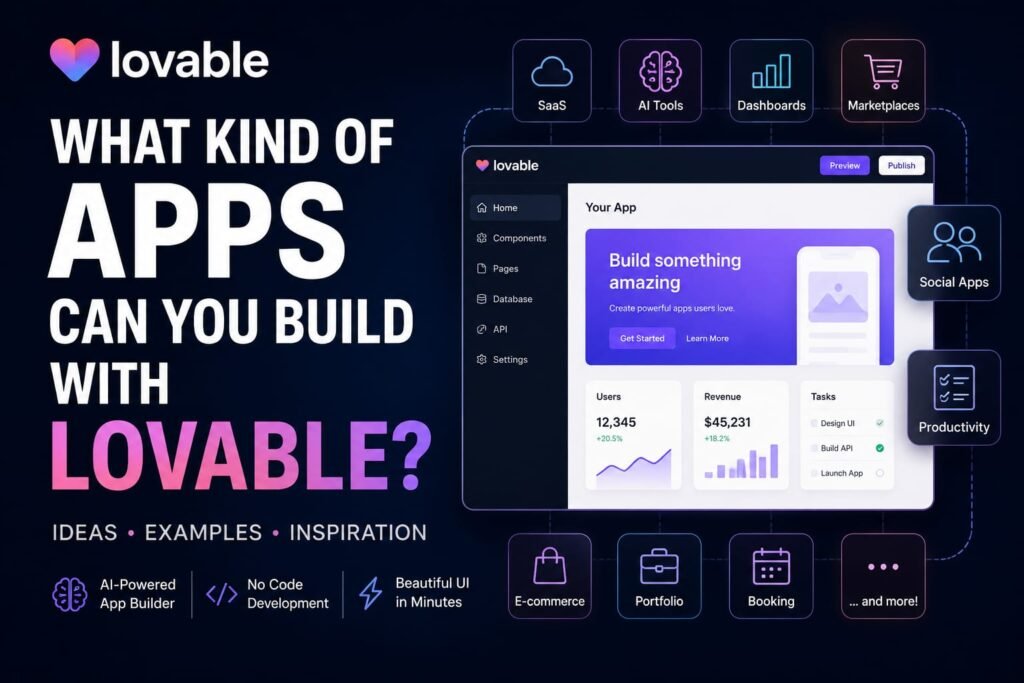
Lovable is built around full-stack web applications meaning it handles both what the user sees and the systems running behind the scenes. In practice, that covers:
- SaaS MVPs — an early, testable version of a software product you’re validating before investing further
- Internal tools — things like lead trackers, content calendars, or admin dashboards for your own team
- Landing pages and waitlist apps — often the fastest thing to build and launch, sometimes within a couple of hours
- Directory and marketplace sites — apps that list, filter, and display structured data
- Simple e-commerce and subscription tools — with payment processing built in through a Stripe integration
Lovable connects to Supabase for its database and authentication layer, which means user accounts, login flows, and file storage come built in rather than requiring a separate backend setup. It also supports one-click deployment with custom domains once your app is ready to go live.
Example: A non-technical founder wanting to validate a subscription-box idea could describe the product, ask Lovable to build a landing page with an email signup form and a simple admin view of collected emails, and have a testable version live within an afternoon no developer required for that first pass.
What Lovable AI Can’t Do (Yet)
Part of genuinely understanding what Lovable AI is means being honest about its limits, and this is where a lot of first-time users get tripped up.
Lovable is excellent at standard, well-understood patterns — login flows, dashboards, CRUD apps, simple payment integrations. It slows down noticeably on unusual custom logic: complex permission systems, multi-role invitation flows, or highly specific business rules often need several rounds of clarifying prompts to get right, and sometimes still need manual code cleanup afterward.
It’s also worth noting that Lovable is a web app builder specifically it doesn’t produce native iOS or Android apps, so if mobile is your priority, you’d need a different tool built for that purpose. And while the code it generates is often described as being somewhere around 60-70% production-ready, most experienced builders still recommend a human review pass before shipping anything handling real user data or payments at scale.
In short: Lovable is genuinely strong for early-stage builds, prototypes, and internal tools, but it isn’t a full replacement for a software engineer once a product’s complexity grows past a certain point.
Lovable AI Pricing: What It Actually Costs

Lovable’s pricing runs on tiers, with credits layered on top as the actual usage cost. As of mid-2026, the structure generally looks like this:
- Free — $0/month, including a small daily credit allowance (enough for light exploration or a single small project), unlimited public projects, and GitHub integration.
- Pro — around $25/month for roughly 100 monthly credits, plus private projects, custom domains, and the ability to remove Lovable’s branding from your app.
- Business — around $50/month, adding team features like single sign-on and the option to opt out of having your data used for model training.
- Enterprise — custom pricing for larger organizations needing dedicated support and infrastructure.
Featured snippet answer: Lovable AI’s pricing starts free, with a Pro plan around $25/month and a Business plan around $50/month, both billed on top of a credit system where different actions consume different amounts of credits.
The credit system is the part most new users underestimate. A basic app with authentication can burn through 30 to 60 credits just for the initial build, and a couple of rounds of revisions plus a payment integration can use up an entire month’s Pro allowance before the first week is over. If you’re planning serious usage, it’s worth budgeting more conservatively than the sticker price suggests, and keeping an eye on the in-app credit tracker as you work.
Is Lovable AI Secure and Private?
Security has been a genuine point of scrutiny for Lovable, and to its credit, the company has responded with concrete changes. New projects are now private by default rather than public, and a security scanner runs automatically before an app is published, flagging common vulnerabilities before they go live.
That said, for any app handling sensitive user data — health information, payment details, personal records — treating that automated scan as a first pass rather than a final security review is the safer approach. An independent review before launch is still worth the investment for anything beyond a low-stakes prototype.
Who Is Lovable AI Actually For?
Lovable tends to work best for a specific set of people, and understanding where it fits is as important as understanding what it does.
Non-technical founders validating an early product idea get real value here you can go from an idea to a clickable, testable app without hiring a developer for the first pass.
Designers and product people benefit from features like centralized theming, which lets you define your brand’s colors and typography once and have it propagate across every generated page useful if you’re building client work or want a consistent visual identity without touching CSS.
Freelancers and small agencies use Lovable to get a client’s first version live fast, then either continue iterating inside the platform or hand the exported codebase to a developer for the production build.
Experienced developers tend to use Lovable differently often for the first 4-6 weeks of a project to get a working prototype fast, then switching to a code-first tool for the production version once the app’s complexity outgrows what prompting alone can handle comfortably.
How Lovable Compares to Other AI App Builders
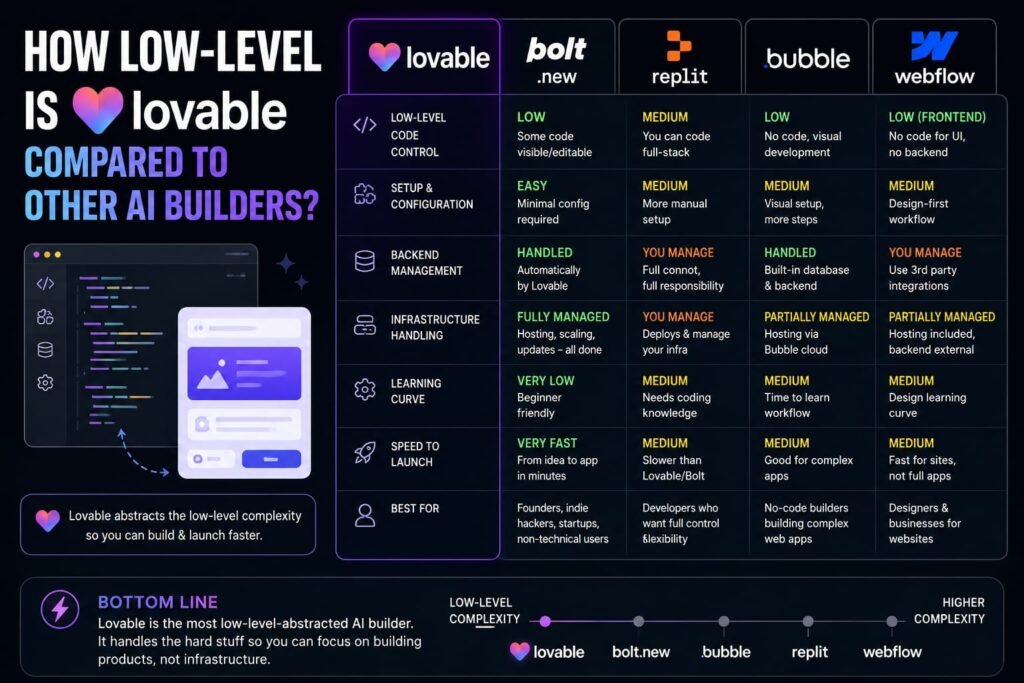
Lovable isn’t the only tool in this space, and knowing where it stands relative to its closest competitors helps clarify what it’s actually good at.
- Bolt.new runs directly in the browser and offers near-instant previews, making it a strong choice for fast, simple, single-page prototypes — but it handles less complexity than Lovable once an app needs a real backend.
- v0 is component-first, meaning it excels at generating polished, well-designed UI pieces, but it doesn’t natively handle full-stack app logic the way Lovable does.
- Cursor works inside an existing codebase rather than generating one from scratch, making it a better fit for developers who want AI assistance while retaining full manual control over their code.
- Base44 removes even more configuration decisions than Lovable, automating database, authentication, and hosting entirely — a good option for absolute beginners who want the fastest possible path to a working app.
Among this group, Lovable is generally considered the strongest all-around choice specifically for full-stack apps that need both a real database and user accounts, which is exactly the gap between “quick prototype” and “genuinely usable product.”
Frequently Asked Questions
What is Lovable AI used for?
Lovable AI is used to build full-stack web applications SaaS prototypes, internal business tools, landing pages, and simple marketplaces — by describing them in natural language instead of writing code manually.
Is Lovable AI free to use?
Yes, Lovable offers a free plan with a limited daily credit allowance, enough to explore the platform or build a small project, though private projects and higher usage require a paid Pro or Business plan.
Do I need coding skills to use Lovable AI?
No. Lovable is designed for people without a coding background, though having some technical understanding helps when you need to troubleshoot an edge case or hand the code off to a developer later.
Can Lovable AI build mobile apps?
No. Lovable is focused on web applications. If you need native iOS or Android apps, you’ll need a different tool built specifically for mobile development.
How is Lovable AI different from ChatGPT or Claude?
General AI chat tools like ChatGPT and Claude can help write code when you ask them to, but Lovable is purpose-built to generate, preview, and deploy a complete working application from your prompt, with a database and hosting already wired in.
Is the code Lovable generates actually usable, or is it locked to the platform?
The code is real and portable it’s synced to GitHub as standard React and TypeScript, so you can export it, hand it to a developer, or continue building elsewhere if you ever move off the platform.
Is Lovable AI good enough for a serious business, or just prototypes?
It’s strong for MVPs, internal tools, and early-stage products, but most builders eventually pair it with a code-first tool as their product’s complexity grows — very few businesses run a serious, high-complexity SaaS purely on Lovable past the first few months.
My Final Thoughts: Should You Try Lovable AI?
So, what is Lovable AI in one sentence? It’s the tool that lets you turn a plain-English description into a real, working web app front end, database, and login system included — without opening a code editor.
That makes it a genuinely strong starting point if you’re validating an idea, building an internal tool, or getting a client’s first version live fast. It’s less suited to complex, highly customized products at scale, where its limitations tend to show up after the first few weeks of real use.
If you’ve got an app idea sitting in a notes file somewhere, the lowest-risk way to find out if Lovable is right for you is simply to try the free plan and describe that idea in your own words. You’ll know within your first prompt or two whether this workflow clicks for the way you think about building software.
Wondering whether you can use Lovable AI without spending any money? Check out our detailed guide, “Is Lovable AI Really Free? Here’s What You Actually Get“ for a complete breakdown of the free plan, credit limits, and what’s included.
If you’re exploring AI-powered coding and app-building tools beyond Lovable AI, you may also want to check out our related guides. Learn what LLM Replit uses to understand the AI models behind Replit and how they power its coding features, then compare Replit vs Cursor to see how the two platforms differ in AI-assisted development, coding workflows, and ease of use. If you’re interested in building complete applications with minimal coding, our guide to Rocket AI App Builder offers another option worth exploring. And for beginners who prefer a more visual, low-code approach, our guide to FlutterFlow AI App Builder explains how you can use AI-assisted features to start creating mobile and web applications without extensive programming knowledge. Comparing these tools with Lovable AI can help you choose the platform that best matches your skill level, project requirements, and preferred development workflow.
Related Reads:
What Is Lovable AI? The Complete Guide to the AI App Builder Everyone’s Talking About
Is Lovable AI Free? Here’s What You Actually Get
Claude Pro vs ChatGPT Plus: The Real Difference Between These $20 AI Plans
How to Fix AI Image Generator Deformities in Fingers, Toes, and Other Anomalies
What Is Meta AI Muse Spark? The Complete 2026 Guide to Meta’s Flagship AI Model
Kimi K3 Explained: Inside Moonshot AI’s Record-Breaking Open Mode
Best AI App Builder in 2026: 10 Top Tools to Build an App Without Coding
Bolt AI App Builder: The Complete Guide to Building Apps in Your Web Browser
Higgsfield AI Pricing in 2026: Every Plan, Credit Cost, and What You Actually Get
Base 44 Pricing in 2026: Every Plan, Credit Cost, and Hidden Fee Explained
Base44 Reviews 2026: What Real Users Actually Think Before You Build