

Looking for a Cursor AI alternative? Compare Cline, Claude Code, Copilot, Windsurf, Zed, and Bolt.new in 2026—pricing, features, and which fits your workflow.
If you are a developer who has hit the monthly credit ceiling on Cursor by the second week of the billing cycle, you are not alone. Since Cursor shifted to credit-based billing in mid-2025, the same $20 Pro plan that once covered 500 premium requests now effectively covers roughly 225. Heavy agent sessions on large codebases can drain your daily pool before lunch.
That frustration has fueled an explosion of cursor ai alternative tools. In 2026, the market split into two clear camps: open-source bring-your-own-key agents that cost nothing upfront, and proprietary IDEs that reimagined billing to avoid Cursor’s mid-month drought. Some alternatives are free. Some are faster. Some are built for terminal-first workflows. And some—like Bolt.new—are not code editors at all, but full-stack app builders that compete for the same builders.
This guide cuts through the noise. We have tested the top alternatives across real projects, compared pricing models, and analyzed the 2026 shifts that matter—including Windsurf’s rebranding as Devin Desktop, Cursor’s acquisition of Continue.dev, and the rise of terminal-native agents. By the end, you will know exactly which tool to switch to, whether you care about price, speed, open-source freedom, or simply escaping credit anxiety.
Why Developers Are Leaving Cursor in 2026

Before comparing alternatives, it helps to understand what is driving the exodus. Cursor remains a powerful tool—over 1 million paying subscribers and usage inside 64% of Fortune 500 companies prove that.
But three pain points keep appearing in user feedback:
1. Credit-based billing unpredictability. The June 2025 overhaul cut effective Pro requests from 500 to roughly 225 per month at the same $20 price. Power users regularly report $40–$50 in effective monthly costs after hitting the ceiling mid-month.
2. The VS Code fork lock-in. Cursor is a proprietary VS Code fork. That means no JetBrains, no Neovim, no terminal-native workflow for CLI-first developers. If your team uses mixed editors, Cursor forces everyone into the same fork.
3. Agent mode exhaustion on large codebases. Agent sessions spanning 10+ files can exhaust the daily credit pool before lunch, leaving you rationing requests until the next billing cycle.
These are not deal-breakers for everyone. But if any of them resonate with you, the alternatives below are genuinely mature enough to consider.
The Best Cursor AI Alternatives at a Glance
Here is how the top alternatives stack up on the dimensions that matter most.
| Tool | Best For | Price | License | Editor Support |
|---|---|---|---|---|
| Cline | Free, open-source, in-editor agent | Free (BYOK) | Apache-2.0 | VS Code, JetBrains, CLI |
| opencode | Free, terminal-first agent | Free (BYOK) | MIT | Terminal, desktop, IDE |
| Claude Code | Highest code quality, deep agents | $20/mo Pro | Proprietary | Terminal, VS Code, JetBrains, web |
| GitHub Copilot | Cheapest major vendor, wide IDE support | Free / $10 Pro | Proprietary | VS Code, JetBrains, Neovim, Xcode |
| Windsurf (Devin Desktop) | Most Cursor-like experience | Free / $20 Pro | Proprietary | VS Code, JetBrains |
| Zed | Fastest editor, Rust-native | Free / $10 Pro | OSS (Rust) | Zed editor only |
| Bolt.new | Full-stack app building from prompts | Free / $25 Pro | Proprietary | Browser |
| Lovable | Design-forward web apps | Free / $25/mo | Proprietary | Browser |
What is the best free Cursor alternative? For a free, open-source in-editor agent, Cline is the top choice with 63,998 GitHub stars and Apache-2.0 licensing. For terminal-centric workflows, open code leads with 180,301 GitHub stars. Both are free to run—you only pay for model inference via your own API key.
Cline: The Best Free Open-Source Alternative
If you want to leave Cursor but stay inside VS Code, Cline is the most natural landing spot. It is an open-source (Apache-2.0) extension with 63,998 GitHub stars. The tool itself costs $0. You bring your own API key and pay only for the model inference you actually use.
Key Strengths
- Model freedom: Cline supports 30+ LLM providers including Anthropic, OpenAI, Google, OpenRouter, AWS Bedrock, Groq, Cerebras, and DeepSeek. You can switch models per task—Claude Opus for a complex refactor, GPT-4o for boilerplate, a local Ollama model for sensitive code.
- Automatic model routing: The v3.2 update added smart routing that picks the cheapest capable model per task, bringing typical monthly API costs to $8–$12 for moderate use.
- Human-in-the-loop control: Unlike Cursor’s Composer, which applies changes automatically, Cline proposes each step and waits for your approval. You never lose visibility into what the AI is doing.
Limitations
- No tab completion: Cline is an agent, not an autocomplete engine. If you rely on Cursor’s sub-second inline suggestions for small edits, you will feel the loss.
- API bill unpredictability: A single complex refactoring session can cost $5–$15. While the tool is free, heavy usage can exceed Cursor’s $20 flat rate.
Verdict: Best for developers who want full model flexibility, zero vendor lock-in, and complete visibility into every AI action.
Claude Code: The Highest-Quality Coding Agent
Claude Code is Anthropic’s terminal-native coding agent, and it posts the highest published code quality scores in this comparison. Running Claude Opus 4.8, it scores 88.6% on SWE-bench Verified and 69.2% on SWE-bench Pro—the highest numbers in the set.
Key Strengths
- Deep reasoning on architecture: Claude Code handles multi-step plans that hold together across 15+ file edits. It is particularly strong at understanding why code is structured a certain way, not just what it does.
- Sub-agents and memory: The Pro tier includes sub-agents, agent teams, background sessions, hooks, skills, and CLAUDE.md memory files that persist context across sessions.
- Multi-surface availability: Runs in terminal, VS Code, JetBrains, desktop, web, and CI pipelines.
Limitations
- No visual diffs: All review happens in your terminal or git client. There are no inline suggestions or syntax-highlighted previews.
- Rate limits on Pro: Heavy Opus sessions can hit the $20 Pro plan’s 5-hour rolling window limits within 2–3 hours, pushing power users toward the $100–$200 Max tiers.
Verdict: Best for developers who treat the editor as one tool among many, and who prioritize benchmark code quality over visual polish.
GitHub Copilot: The Cheapest Major Vendor Option
At $10 per month for Pro, GitHub Copilot is half the price of Cursor and includes the widest IDE support. It works in VS Code, all JetBrains products, Neovim, Xcode, and Visual Studio.
Key Strengths
- Strongest free tier: Copilot Free offers 2,000 code completions and 50 chat requests per month with no API key required—access to Haiku 4.5 and GPT-5 mini.
- Ecosystem gravity: Native GitHub integration for PR reviews, Actions, repository-aware suggestions, and IP indemnity on Business and Enterprise plans.
- Third-party agents: The Pro tier can run Claude Code and OpenAI Codex as third-party agents from one subscription.
Limitations
- Shallower agent mode: Copilot’s agent capabilities lag behind Cursor’s Composer on complex multi-file refactors.
- New credit uncertainty: The June 2026 shift to token-based AI Credits billing means heavy agent sessions now produce variable costs similar to Cursor’s model.
Verdict: Best for teams already embedded in the GitHub ecosystem who want the lowest reliable monthly cost.
Windsurf (Devin Desktop): The Most Cursor-Like Experience

Windsurf—now rebranded as Devin Desktop after Cognition acquired Codeium for $250 million—is the closest visual and functional match to Cursor. It is a VS Code fork with Cascade, an agentic AI system that handles multi-file editing and terminal commands.
Key Strengths
- Daily quota refresh: Unlike Cursor’s monthly credit pool, Windsurf refreshes daily and weekly quotas automatically. This eliminates the anxiety of hitting a ceiling on Thursday and rationing requests until the billing cycle resets.
- JetBrains support: Windsurf supports both VS Code and JetBrains IDEs, covering workflows that Cursor’s fork cannot.
- One-click VS Code migration: All existing VS Code configurations transfer in a single click.
Limitations
- Complex refactor accuracy: On the hardest tasks spanning 10+ files, Cursor’s full codebase indexing still produces more accurate results than Windsurf’s SWE-1.5 model.
- Price matched Cursor: The March 2026 increase from $15 to $20 per month eliminated Windsurf’s pricing advantage.
Verdict: Best for developers who want the easiest transition from Cursor with similar UI and agent features, but without the mid-month credit drought.
Zed: The Fastest AI Code Editor
Zed is a Rust-native code editor built by the creators of Atom and Tree-sitter. It uses GPU-accelerated rendering for sub-millisecond keystroke latency and includes AI through the open Agent Client Protocol (ACP).
Key Strengths
- Speed that changes how you work: Zed launches in 0.4 seconds and idles at around 180MB of RAM, compared to 650MB or more for VS Code and its forks. Keystrokes register instantly. File search returns results before you finish typing.
- Cheapest hosted AI option: At $10 per month, Zed Pro is the cheapest paid tier among full editors.
- Open protocol, no lock-in: The ACP connects to Claude, GPT, Gemini, local Ollama models, and external agents. You are not locked into a single provider.
Limitations
- Extension gap: Zed has roughly 800 extensions versus VS Code’s 50,000. If you depend on a specialized debugger or niche language server, check availability before switching.
- Younger AI depth: Multi-file editing works well, but the agent has not yet matched Cursor’s depth on large-scale refactors spanning complex dependency chains.
Verdict: Best for performance-obsessed developers on macOS or Linux who want speed above all else.
Bolt.new and Sites Like Bolt.new

Not every cursor ai alternative is a code editor. Some builders need to ship an entire app from a prompt without touching a local IDE at all. That is where Bolt.new and sites like bolt.new enter the picture.
What Bolt.new Does
Bolt.new is a browser-based AI app builder that generates full-stack applications from natural language prompts. It uses StackBlitz WebContainers to run Node.js entirely in the browser—no local setup required. You describe what you want, and Bolt scaffolds the frontend, backend, and database, giving you a live preview and deployable code.
Pricing: Free tier with 1M tokens per month (300K daily cap). Pro at $25 per month with 10M tokens and no daily limit. Teams at $30 per member per month.
The token trap: Bolt’s pricing is consumption-based. Larger projects consume more tokens per prompt because the AI must read the entire codebase context each time. A complete SaaS app can consume approximately 3 million tokens in total. Debugging cycles burn tokens rapidly.
Notable Sites Like Bolt.new
If Bolt.new does not fit your workflow, several sites like bolt.new offer similar prompt-to-app capabilities with different trade-offs:
| Tool | Best For | Free Plan | Paid Plan |
|---|---|---|---|
| Lovable | Design-forward, polished UI web apps | 30 daily credits | $25/mo (100 credits) |
| Base44 | Non-technical founders, full-stack with backend | 25 message credits | $20/mo (100 messages) |
| Replit | Collaborative cloud IDE with AI agents | 1 app, limited AI | $25/mo ($25 credits) |
| v0 by Vercel | Production React components, frontend only | $5 monthly credits | $20/mo ($20 credits) |
| Banani | Hi-fi interactive prototyping before development | 20 monthly credits | $20/mo (100 credits) |
| Dyad | Privacy-conscious developers, local ownership | Free (BYO API key) | $20/mo (200 credits) |
What are the best sites like Bolt.new? Top alternatives include Lovable for design-forward apps, Base44 for non-technical founders, Replit for collaborative cloud development, v0 by Vercel for React components, and Banani for interactive prototyping.
Cursor vs Bolt: AI Editor vs AI App Builder
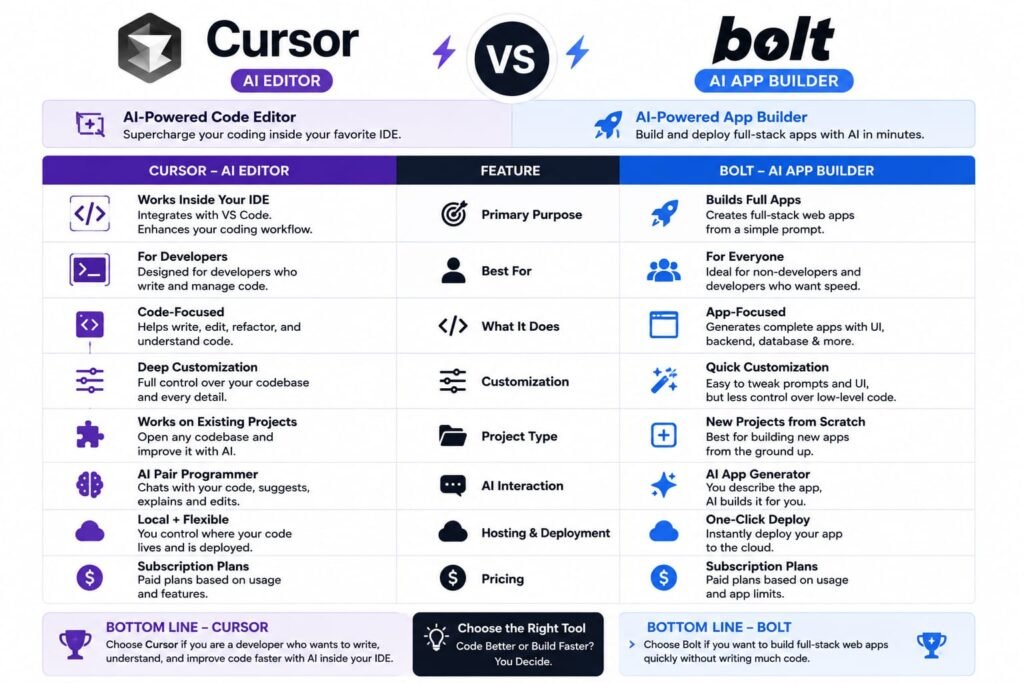
The cursor vs bolt comparison is one of the most common questions in 2026, but it is fundamentally a category mismatch. They serve different user intents.
| Dimension | Cursor | Bolt.new |
|---|---|---|
| Primary use | Editing and refactoring code | Building full-stack apps from prompts |
| Environment | Desktop VS Code fork | Browser |
| Setup | Local installation required | Zero setup |
| Code location | Your local filesystem | Browser-based WebContainers |
| Deployment | External (Vercel, AWS, etc.) | Built-in or export to GitHub |
| Best for | Professional developers | Prototyping, non-coders, rapid validation |
| Entry price | $20/mo | $25/mo |
Is Cursor or Bolt.new better? Cursor is better for professional developers editing existing codebases with full local control. Bolt.new is better for rapid prototyping and building full-stack apps from natural language prompts without local setup.
If you are a developer maintaining a production codebase, Cursor (or its alternatives) is the right category. If you are a founder who wants to validate an idea in an afternoon without installing anything, Bolt.new or sites like bolt.new such as Lovable and Base44 are the better fit.
Open-Source vs Proprietary: What the Licensing Means for You
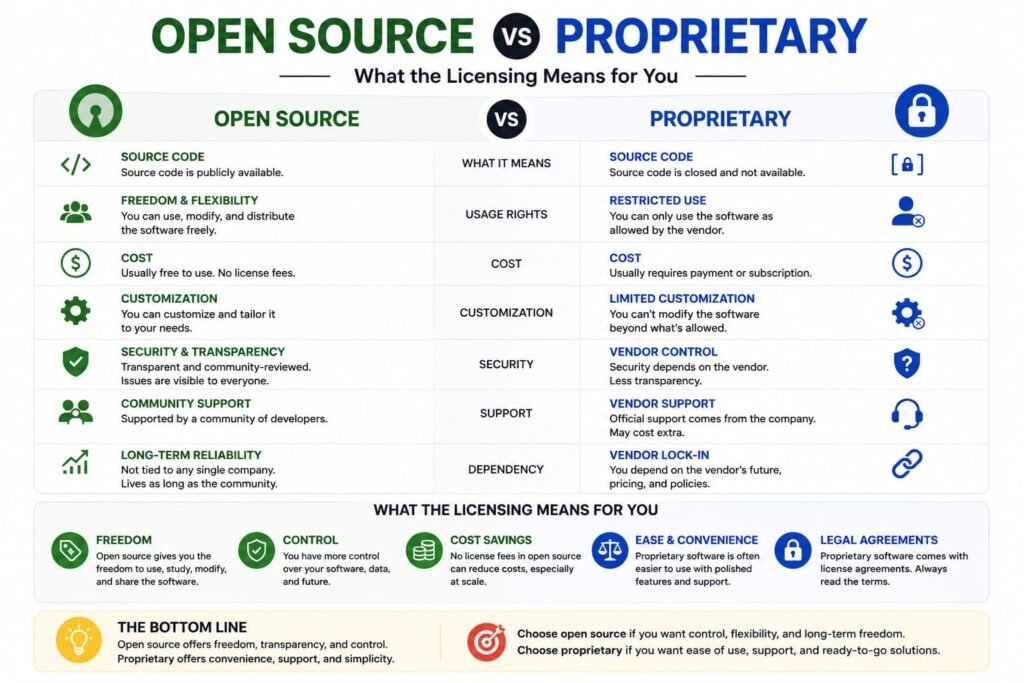
One of the biggest divides among cursor ai alternative tools is licensing. This matters more than most developers initially realize.
Open-Source Tools (Free, BYOK)
Cline (Apache-2.0, 63,998 stars), opencode (MIT, 180,301 stars), Kilo Code (MIT, 25,038 stars), and Aider (Apache-2.0, 46,808 stars) are all free to use and modify. You bring your own API key and pay only for model inference.
Advantages:
- Zero tool cost
- Full model flexibility
- No vendor lock-in
- Community-driven development
Disadvantages:
- No bundled inference (you manage API keys and billing)
- No tab completion in most cases
- Support comes from community, not a dedicated team
Proprietary Tools (Subscription)
Claude Code, GitHub Copilot, Windsurf, Cursor, and Zed are closed-source products with subscription billing.
Advantages:
- Polished UX with tab completion and inline suggestions
- Managed infrastructure and support
- Integrated billing (one invoice, no API key management)
Disadvantages:
- Vendor lock-in to the tool’s model choices
- Subscription costs regardless of usage
- Feature roadmaps controlled by the company
Is there a free alternative to Cursor? Yes. Cline, opencode, Kilo Code, and Aider are free and open-source. You bring your own API key and pay only for model inference. GitHub Copilot also offers a free tier with 2,000 completions and 50 chat requests per month.
How to Choose the Right Cursor Alternative
The decision framework is simpler than it looks. Match your primary frustration with Cursor to the tool designed to solve it.
| Your Priority | Best Alternative | Why |
|---|---|---|
| Escape credit anxiety | Windsurf (Devin Desktop) | Daily quotas prevent mid-month drought |
| Zero cost, full control | Cline or opencode | Free, open-source, model-agnostic |
| Cheapest paid plan | GitHub Copilot or Zed | $10/mo vs Cursor’s $20 |
| Highest code quality | Claude Code | 88.6% SWE-bench Verified with Opus 4.8 |
| Fastest editor | Zed | Rust-native, 0.4s launch, 180MB RAM |
| Build apps without coding | Bolt.new or Lovable | Browser-based, prompt-to-app |
| Enterprise scale | Augment Code | Indexes 500K+ files across repos |
| Terminal-native workflow | Claude Code or opencode | No IDE required |
Internal linking opportunity: Link to dedicated guides for each tool: “Cline Setup Guide: Connecting Your API Keys,” “Claude Code Tutorial for Terminal Users,” “Bolt.new Token Optimization Guide.”
Frequently Asked Questions
What is the best Cursor alternative in 2026?
It depends on your priority. For a free, open-source in-editor agent, Cline is the best choice. For the highest code quality, Claude Code leads with 88.6% SWE-bench Verified. For the cheapest paid plan, GitHub Copilot at $10/mo is half the price of Cursor. For the most Cursor-like experience, Windsurf (Devin Desktop) is the closest match.
Is there a completely free alternative to Cursor?
Yes. Cline, opencode, Kilo Code, and Aider are all free and open-source. The tools themselves cost $0. You bring your own API key and pay only for the model inference you consume. For a free option with no API key at all, GitHub Copilot Free offers 2,000 completions and 50 chat requests per month.
What is the best open-source Cursor alternative on GitHub?
opencode is the most-starred open-source coding agent at 180,301 GitHub stars (MIT, terminal-first). Cline (63,998 stars, Apache-2.0) is the leading open-source in-editor option for VS Code and JetBrains.
Is Claude Code better than Cursor?
Claude Code scores higher on code quality benchmarks (88.6% SWE-bench Verified vs Cursor’s unpublished score) and handles architecturally complex multi-file changes better. However, Cursor has faster tab completions, a plugin marketplace, and a visual IDE experience. Claude Code is terminal-native with no inline diffs. The “better” choice depends on whether you prioritize benchmark quality or IDE polish.
Is Bolt.new better than Cursor?
No—and yes. They serve different purposes. Cursor is an AI code editor for professional developers working on existing codebases. Bolt.new is a browser-based AI app builder for rapid prototyping and full-stack generation from prompts. If you are a developer, Cursor is better. If you are a non-technical founder validating an idea, Bolt.new is better.
Can I use Cursor alternatives with VS Code?
Yes. Cline, Kilo Code, GitHub Copilot, and Claude Code all run as VS Code extensions or integrations. opencode, Aider, and OpenAI Codex run in the terminal. Zed and Windsurf are their own editors.
Why did Cursor switch to credit-based billing?
Cursor shifted to a metered credit pool in June 2025 to align costs with the actual compute required for frontier model usage. The practical effect was that the same $20 Pro plan that previously covered ~500 premium requests now effectively covers roughly 225, with heavy agent users reporting $40–$50 effective monthly costs.
What happened to Windsurf?
Windsurf was acquired by Cognition (the Devin team) in early 2026 and rebranded as Devin Desktop. It remains a VS Code fork with Cascade agent mode but now operates under Cognition’s infrastructure. The Pro price increased from $15 to $20 per month in March 2026.
Are Cursor alternatives safe for production code?
Yes. Cline, Claude Code, GitHub Copilot, and Windsurf are all used by professional developers on production codebases. The open-source alternatives (Cline, opencode) have large, active communities and transparent codebases. As with any AI tool, you should review all generated code before committing to production.
Can I run local models with Cursor alternatives?
Yes. Cline, Kilo Code, and Zed all support local models via Ollama and LM Studio. This is ideal for privacy-sensitive code or situations where you cannot send proprietary code to cloud APIs.
My Final Conclusion: The Right Cursor Alternative Is the One That Fixes Your Specific Pain
The cursor ai alternative landscape in 2026 is not about finding a single “best” tool. It is about matching the right tool to the specific frustration that sent you searching. If credit anxiety is your problem, Windsurf’s daily quotas solve it. If cost is your problem, Cline or Copilot solve it. If speed is your problem, Zed solves it. If you need to build without coding at all, Bolt.new and sites like bolt.new solve it.
The common thread across every successful switch we observed was this: developers who left Cursor did not leave because Cursor became bad. They left because their needs outgrew Cursor’s specific trade-offs. The tool that wins is the one whose trade-offs align with your workflow.
My recommendation: Do not commit to a new tool based on a feature list. Run a one-week experiment. Pick your top two alternatives from this guide—maybe Cline and Claude Code, or Windsurf and Zed. Use each for your actual daily work. Track how often you hit limits, how the completions feel, and whether the workflow friction is lower or just different. The tool that disappears into your workflow is the right one.
Related Reads-
What Is Lovable AI? The Complete Guide to the AI App Builder Everyone’s Talking About
Is Lovable AI Free? Here’s What You Actually Get
Claude Pro vs ChatGPT Plus: The Real Difference Between These $20 AI Plans
How to Fix AI Image Generator Deformities in Fingers, Toes, and Other Anomalies
What Is Meta AI Muse Spark? The Complete 2026 Guide to Meta’s Flagship AI Model
Kimi K3 Explained: Inside Moonshot AI’s Record-Breaking Open Mode
Best AI App Builder in 2026: 10 Top Tools to Build an App Without Coding
Bolt AI App Builder: The Complete Guide to Building Apps in Your Web Browser
Higgsfield AI Pricing in 2026: Every Plan, Credit Cost, and What You Actually Get
Base 44 Pricing in 2026: Every Plan, Credit Cost, and Hidden Fee Explained
Base44 Reviews 2026: What Real Users Actually Think Before You Build
FlutterFlow AI App Builder: The Complete 2026 Guide to Building Real Native Apps
Kimi AI App: The Complete Guide to Download, Features, and How It WorksIs
Kimi AI vs ChatGPT: Which AI Assistant Actually Wins in 2026?
Moonshot AI Kimi K2 Explained: The Open-Source Model Series That Changed AI in 2026
Rocket AI App Builder: The Complete Guide to Solve, Build, and Intelligence
What LLM Does Replit Use? A Complete Guide to Replit’s AI Models, Agents, and Integrations in 2026
Replit vs Lovable: Which AI App Builder Should You Actually Use in 2026?
Replit vs Cursor (2026): The Honest Comparison for Builders, Founders, and Developers
Hostinger AI Website Builder Review: Is It Actually Worth It in 2026?