
Hostinger AI website builder review: real pricing, features, ease of use, pros and cons is it actually good enough for your website?
Typing a few sentences about your business and watching a complete, ready-to-edit website appear less than a minute later sounds like the kind of claim that rarely survives contact with reality. That’s exactly what Hostinger’s AI website builder promises, and it’s a big part of why so many people searching for an affordable way to get online are landing on this specific tool.
This Hostinger AI website builder review digs into whether that promise actually holds up — how the AI generation really works, what you get at each price tier, how it compares to bigger names like Wix and Squarespace, and the honest limitations that don’t always make it into the glowing five-star write-ups. Whether you’re asking “is Hostinger easy to use” or genuinely trying to decide “is Hostinger website builder good” for your specific project, this guide covers everything you need before signing up.
What Is the Hostinger AI Website Builder?
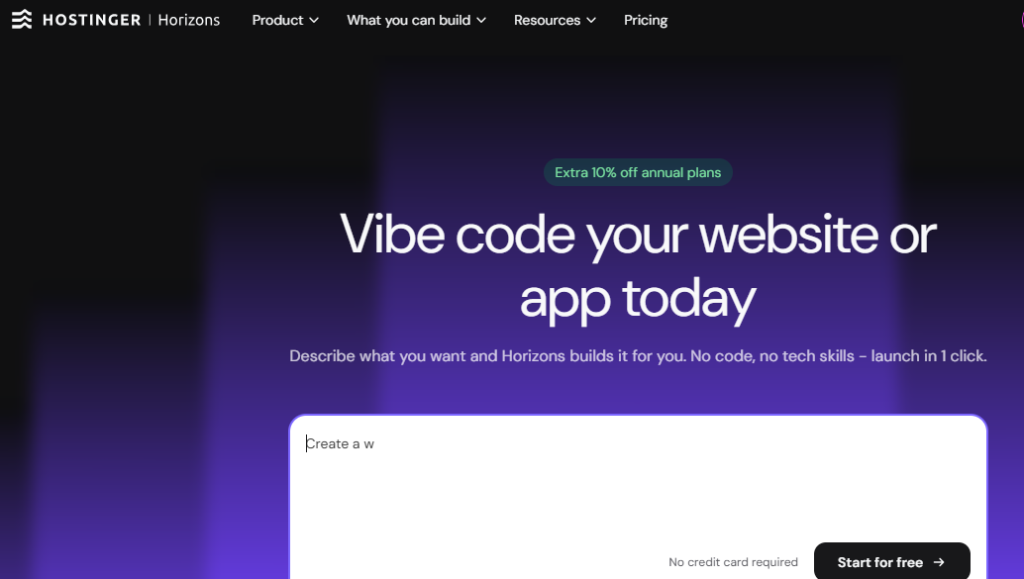
The Hostinger AI website builder is a web design tool built into Hostinger’s hosting platform that generates a complete, multi-page website from a written description of your business, skipping template selection entirely and pairing the result with hosting, a free domain, and a suite of additional AI tools.
Hostinger itself has been around since 2004, evolving from a budget shared-hosting provider into a broader all-in-one platform serving more than 3.45 million customers across over 150 countries. The company has grown quickly in recent years — Financial Times ranked it among Europe’s fastest-growing companies in 2026, following a reported 65% year-over-year revenue increase. The AI website builder is a newer piece of that broader platform, aimed at solving one specific problem: getting a decent-looking website live fast, without hiring a designer or learning to code.
How the Hostinger AI Website Builder Actually Works
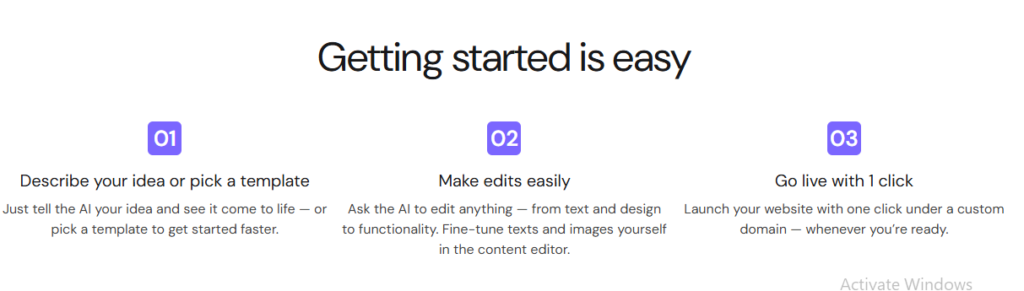
Unlike traditional website builders that start you off browsing a template gallery, Hostinger’s AI tool skips that step almost entirely.
Step 1: Describe Your Business
You start by describing your business in a few sentences — your industry, the products or services you offer, your target audience, and any style preferences you have in mind.
Step 2: The AI Generates a Complete Site
Based on that description, Hostinger’s AI generates a full, multi-page website customized to your specific business type, complete with relevant sections, placeholder copy already written in context (rather than generic lorem ipsum text), and a coordinated design scheme applied automatically — reportedly in under 60 seconds.
Step 3: Review and Customize in the Visual Editor
From there, you move into a visual, drag-and-drop editor where you can rearrange elements, swap out images, edit text directly, and adjust colors and layout to your liking. This is also where the built-in AI writing tool becomes useful you can describe what you want a specific section of copy to accomplish, and have the AI refine or rewrite that text on the spot.
Step 4: Connect a Domain and Publish
Once you’re happy with the result, you add your domain (a free one is included on annual plans for the first year), configure any eCommerce or booking features you need, and publish. Hostinger handles the hosting infrastructure behind the scenes — including its LiteSpeed servers, SSL certificates, and content delivery.
Is Hostinger Easy to Use? A Beginner’s Honest Perspective
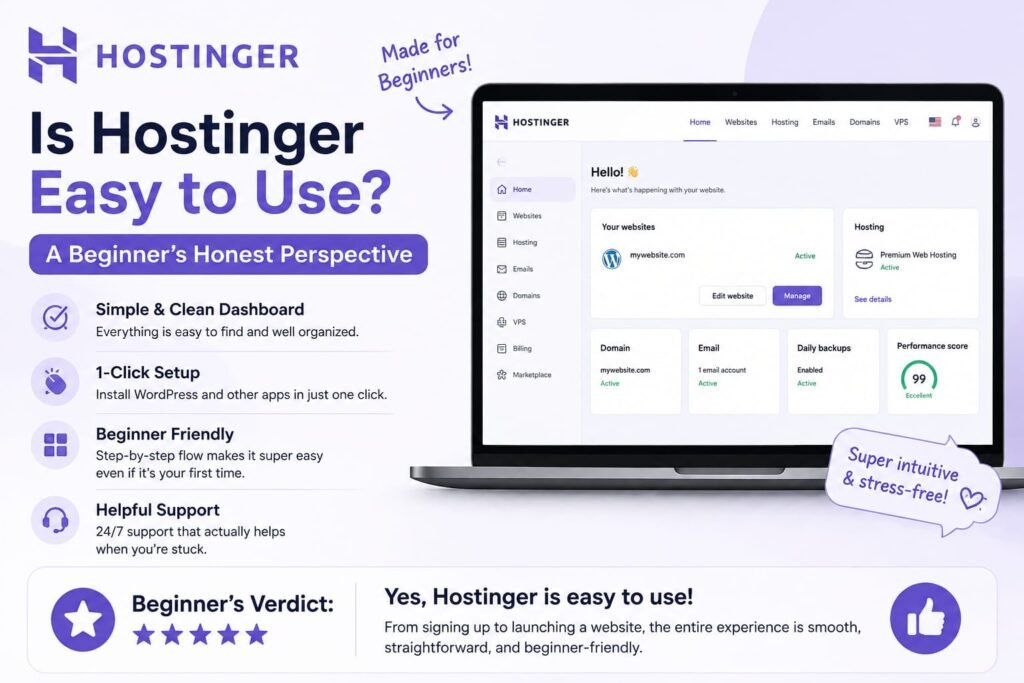
Yes, Hostinger’s AI website builder is genuinely easy to use, particularly for complete beginners — the AI handles the hardest part (initial design and structure decisions), and the drag-and-drop editor that follows requires no coding knowledge, which is why it consistently scores well on ease-of-use in independent reviews.
For anyone who’s ever stared at a blank template gallery unsure where to even start, the value of Hostinger’s approach becomes clear quickly: you describe your business, and the hardest design decisions are made for you before you ever touch the editor. Independent reviewers have specifically praised this AI-first, template-skipping approach for reducing the “blank page” problem that trips up a lot of first-time website builders.
That said, “easy” doesn’t mean “limitless.” The editor itself is intuitive, but the level of granular design control you get is intentionally simpler than a fully custom design tool a reasonable tradeoff for the speed and simplicity you get in return, but worth knowing upfront if you’re the type of user who wants pixel-level control over every element.
Hostinger AI Website Builder Pricing: Premium vs. Business
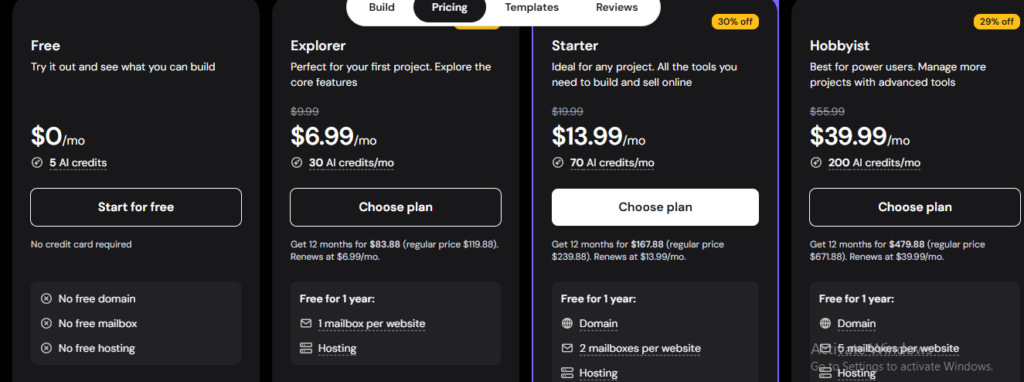
Hostinger’s AI website builder is available on two plans — Premium (starting around $2.99-$4.99/month on a discounted introductory rate) and Business (starting around $3.99-$5.99/month) — with the Business plan unlocking eCommerce features and the full AI tool suite, including an AI Writer, AI Image Generator, and AI SEO Assistant.
Premium Plan
The Premium plan is Hostinger’s entry point, aimed at smaller-scale sites like portfolios, personal brands, or simple business pages. It typically includes the core AI website builder, unlimited bandwidth, a solid storage allowance (commonly cited around 25 GB), the ability to host multiple sites under one account, a couple of business email mailboxes, and unlimited SSL certificates.
Business Plan
Stepping up to Business roughly doubles your storage allowance and adds the features most small online sellers actually need: eCommerce functionality with inventory management, product pages, multiple payment options, and notably -0% transaction fees, a real differentiator compared to platforms like Wix or Squarespace, which typically take a cut of your sales. Business also unlocks Hostinger’s fuller AI toolkit, including AI Writer, AI Image Generator, and AI SEO Assistant, along with daily backups.
The Renewal Price Catch
Here’s the detail that matters most for anyone comparing sticker prices across builders: Hostinger’s advertised low rates are introductory, and renewal prices increase substantially once your first term ends — commonly cited in the range of $9.99 to $14.99 per month, depending on the plan and length of your initial commitment. Independent reviews have flagged renewal increases as steep as 235% over the introductory rate. This isn’t unique to Hostinger — most budget hosting providers use a similar model but it’s an important number to factor into your real, long-term cost rather than judging the platform purely on its headline price.
Free Trial and Money-Back Guarantee
Hostinger offers a 14-day free trial of the AI website builder, letting you build and preview a site before committing though you can’t actually publish it live until you upgrade to a paid plan. All plans also come with a 30-day money-back guarantee, giving you a reasonable window to test the platform risk-free after subscribing.
Key AI Features Included in Hostinger’s Toolkit
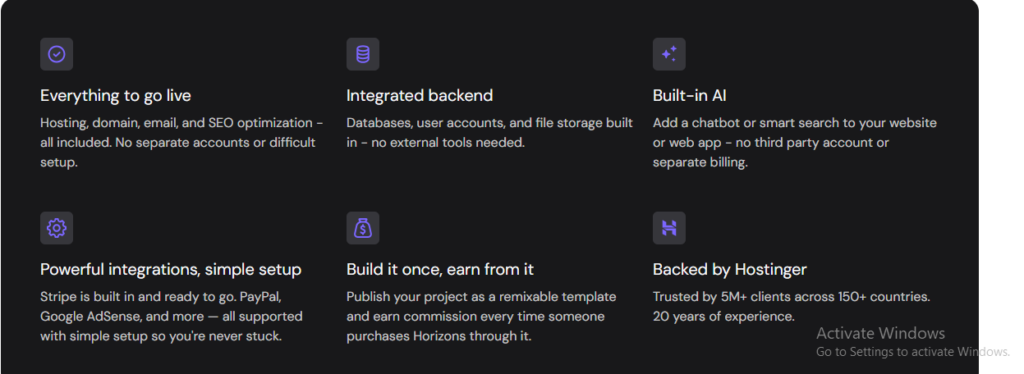
Beyond the core AI Website Builder generation itself, Hostinger bundles several additional AI tools depending on your plan:
- AI Writer — generates and refines page copy based on a description of what you want that section to accomplish
- AI Logo Maker — creates a logo for your brand without needing separate design software
- AI Image Generator — produces custom images for your site rather than relying solely on stock photo libraries
- AI SEO Assistant — offers guidance and suggestions aimed at improving your site’s search visibility
- Heatmap Tool — shows where visitors are actually clicking and scrolling on your published site, useful for conversion optimization
- Business Name Generator — helps generate name ideas if you’re still finalizing your brand identity
Together, these tools are positioned to reduce or eliminate the need to hire a separate designer, copywriter, or SEO consultant for a straightforward small business site a meaningful value proposition at this price point specifically.
Design and Customization: How Much Control Do You Actually Get?
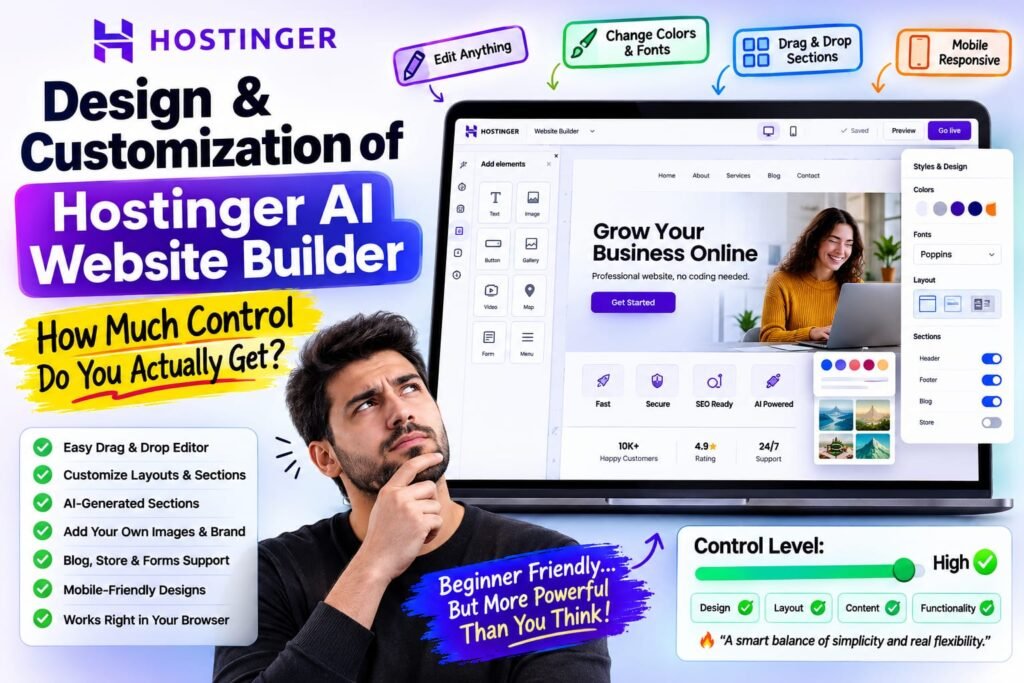
Hostinger’s visual editor supports the standard drag-and-drop customization you’d expect — moving sections around, adjusting colors and fonts, swapping images, and editing text directly on the page. It’s intuitive enough for non-technical users to make meaningful changes without touching any code.
Where Hostinger is more limited compared to design-first competitors is template and layout variety. Independent reviews have specifically flagged a comparatively limited template library as one of Hostinger’s weaker points, particularly for users who want a highly distinctive, unconventional design. If your priority is maximum design flexibility over speed and affordability, this is worth weighing carefully.
It’s also worth knowing that Hostinger fully supports WordPress, meaning you can start with the AI builder for speed and simplicity, and migrate to a full WordPress site later if your needs outgrow the builder’s design ceiling a meaningful safety net that not every AI website builder offers.
eCommerce Features on the Business Plan
If you’re planning to sell products or services online, the Business plan is where Hostinger becomes genuinely competitive with larger, more established eCommerce-focused builders. It includes inventory management, dedicated product pages, and support for multiple payment options plus that notable 0% transaction fee policy, which can add up to real savings compared to platforms that take a percentage of every sale on top of your subscription cost.
Example: A small business owner selling handmade goods online, doing a modest $3,000 a month in sales, would pay nothing in Hostinger transaction fees on top of their subscription — compared to potentially hundreds of dollars a year in fees on platforms that charge even a small percentage per transaction.
Performance and Hosting Quality
Since Hostinger is fundamentally a hosting company that added a website builder, its underlying infrastructure is a genuine strength. It runs on LiteSpeed servers with NVMe storage, and independent testing has cited page load times as fast as roughly 0.6 seconds under standard conditions a meaningfully strong result for a budget-tier hosting platform.
That said, some reviews note that performance can degrade under heavier traffic loads, which is a reasonable expectation given Hostinger’s positioning as a budget-friendly option rather than an enterprise-grade platform built for high-traffic sites from day one. For a small business, portfolio, or early-stage online store, this is unlikely to be a real-world issue; for a site expecting to scale quickly to significant traffic, it’s worth monitoring as you grow.
Hostinger Website Builder Pros
Pulling together the strongest points from this review and the broader independent review landscape:
- Genuinely affordable — Hostinger’s starting price undercuts major competitors like Wix and Squarespace by a wide margin on introductory pricing
- Fast, capable AI generation — a complete, customized multi-page site in under a minute, skipping the blank-template problem entirely
- Strong hosting performance — LiteSpeed servers and NVMe storage deliver fast load times even on entry-level plans
- 0% transaction fees on Business — a real, ongoing savings advantage for anyone running an online store
- Free domain and SSL included — removing common first-year costs that add up on other platforms
- WordPress fallback available — you’re not permanently boxed into the AI builder’s design ceiling if your needs grow
Hostinger Website Builder Cons
An honest review also needs to cover where Hostinger falls short:
- Steep renewal price increases — the attractive introductory pricing rises substantially at renewal, sometimes significantly more than the initial rate
- Limited template library — fewer design starting points compared to design-focused competitors like Wix or Squarespace
- No free-forever plan — you can trial the builder, but you can’t publish a live site without upgrading to a paid plan
- Support limitations — some reviews note slower customer support response times and a lack of phone support, which could matter if you run into an issue and need fast help
- Not built for complex, highly custom sites — better suited to straightforward small business, portfolio, and basic eCommerce needs than large-scale or highly specialized web projects
Is Hostinger Website Builder Good for SEO?
Hostinger includes a built-in AI SEO Assistant on higher tiers, offering guidance aimed at helping your site perform better in search results — a genuinely useful starting point for beginners who wouldn’t otherwise know where to begin with on-page SEO. The platform’s strong page load speeds also indirectly support SEO, since site speed is a recognized factor in search ranking. That said, an AI assistant’s suggestions are a starting point rather than a substitute for a deeper SEO strategy if search visibility is a major priority for your business — treat it as a helpful baseline rather than a complete solution.
Hostinger vs. Wix vs. Squarespace: How Does It Compare?
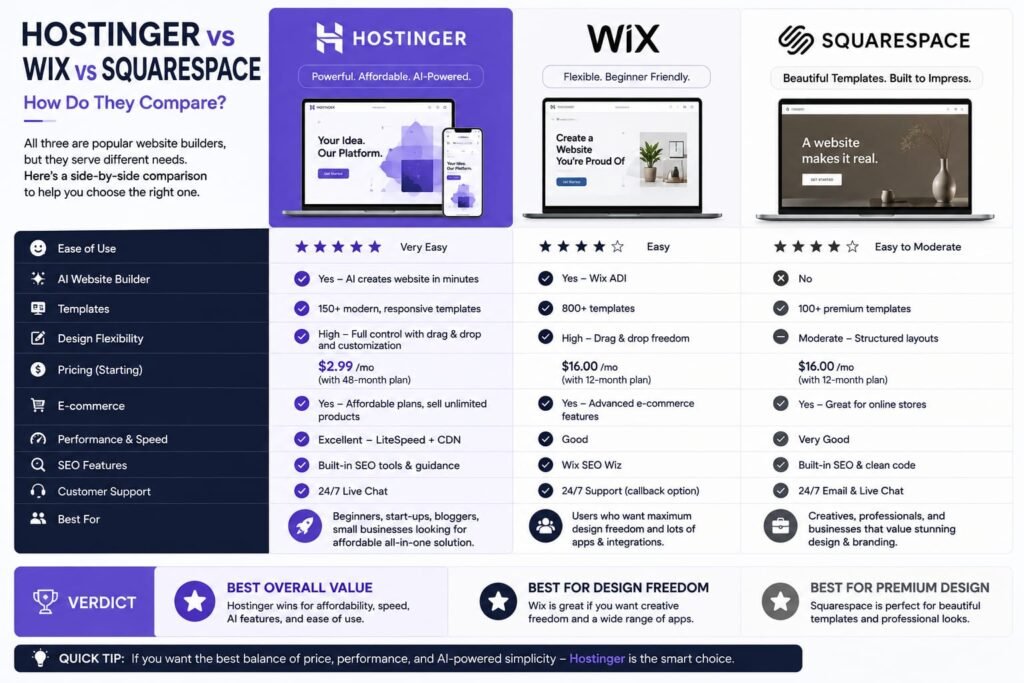
Hostinger significantly undercuts Wix and Squarespace on starting price often around $2.99-$4.99/month compared to Wix’s roughly $14/month and Squarespace’s roughly $17/month — while offering a comparable core AI website-building experience, though with a smaller template library and less design flexibility than either competitor.
Hostinger vs. Wix: Wix offers a larger template library and more design flexibility, along with its own well-developed AI site generation tools, but at a meaningfully higher starting price. Hostinger wins clearly on affordability and hosting performance; Wix wins on design breadth and ecosystem maturity.
Hostinger vs. Squarespace: Squarespace is widely regarded for its polished, design-forward templates, particularly favored by creatives and portfolio sites — but it comes at the highest starting price of the three. Hostinger is the more budget-conscious choice, though Squarespace remains the stronger pick if visual design sophistication is your top priority.
The overall pattern: If price-to-value is your primary concern, Hostinger is difficult to beat. If cutting-edge design flexibility matters more than saving money, Wix or Squarespace are worth the higher cost.
Who Should (and Shouldn’t) Use Hostinger’s AI Website Builder
Hostinger’s AI website builder is a strong fit if you’re a startup, blogger, freelancer, or small business owner who wants a professional-looking website live quickly, without hiring outside help, and without paying a premium for it. It’s particularly well-suited to small eCommerce stores specifically because of the 0% transaction fee policy on the Business plan.
It’s a weaker fit if you need highly custom, design-forward visuals that stand apart from a more templated look, if you’re planning a large-scale or complex website beyond a straightforward small business site, or if responsive customer support (including phone support) is a priority for your workflow.
Frequently Asked Questions
Is Hostinger website builder good for beginners?
Yes. Its AI-first approach generating a full site from a written description rather than starting from a blank template combined with an intuitive drag-and-drop editor makes it one of the more beginner-friendly website builders available, particularly at its price point.
Is Hostinger easy to use compared to other website builders?
Generally, yes. Reviewers consistently note that skipping template selection in favor of AI-generated, ready-to-edit sites reduces the learning curve compared to more traditional builders that require you to choose and heavily customize a template from scratch.
How much does the Hostinger AI website builder cost?
Introductory pricing typically starts around $2.99-$4.99/month for the Premium plan and $3.99-$5.99/month for the Business plan, though renewal prices increase substantially after the initial term commonly landing in the $9.99-$14.99/month range.
Does Hostinger offer a free plan?
No, Hostinger doesn’t offer a free-forever plan for its website builder. It does offer a 14-day free trial that lets you build and preview a site, though you can’t publish it live without upgrading to a paid plan.
Is the Hostinger AI website builder good for eCommerce?
Yes, particularly on the Business plan, which includes inventory management, product pages, multiple payment options, and 0% transaction fees — a genuine cost advantage over platforms that take a percentage of your sales.
How does Hostinger compare to Wix for AI website building?
Hostinger is significantly cheaper and offers strong hosting performance, while Wix offers a larger template library and more design flexibility at a higher price point. The better choice depends on whether affordability or design breadth matters more to you.
Does Hostinger’s website builder support SEO?
Yes, through its built-in AI SEO Assistant and generally fast page load speeds, both of which support basic on-page SEO. It’s a solid starting point for beginners, though not a substitute for a more comprehensive SEO strategy if search visibility is a major priority.
Can I switch from Hostinger’s AI builder to WordPress later?
Yes. Hostinger fully supports WordPress, so you can start with the simpler AI builder and migrate to a full WordPress site if your design or functionality needs eventually outgrow the builder’s capabilities.
What are the biggest downsides of the Hostinger AI website builder?
The most commonly cited drawbacks are steep price increases at renewal, a comparatively limited template library, no free-forever plan, and slower customer support with no phone support option.
Is Hostinger AI website builder good overall, based on reviews?
Yes, generally — independent reviews commonly rate it in the 4+ out of 5 range, praising its affordability, fast AI generation, and solid hosting performance, while consistently flagging renewal pricing and template variety as the platform’s main weaknesses.
My Final Verdict: Is the Hostinger AI Website Builder Worth It?
Based on this Hostinger AI website builder review, the honest answer is: yes, for the right project. If you’re a small business owner, freelancer, or blogger who wants a professional, functional website live quickly and affordably, Hostinger delivers genuine value fast AI-powered site generation, strong hosting performance, and a real cost advantage over big names like Wix and Squarespace, especially if you’re selling online and want to avoid transaction fees.
Where it asks for a tradeoff is design flexibility and long-term pricing the template library is smaller than more design-focused competitors, and the attractive introductory price won’t last through your first renewal. If those tradeoffs are acceptable for your project, Hostinger is one of the strongest value picks in the AI website builder category right now.
The best way to know for sure is to try it yourself: sign up for the 14-day free trial, describe your actual business, and see what the AI generates before you commit to a paid plan. That hands-on test — not another review will tell you definitively whether Hostinger’s AI website builder is the right fit for what you’re building.
Related Reads-
What Is Lovable AI? The Complete Guide to the AI App Builder Everyone’s Talking About
Is Lovable AI Free? Here’s What You Actually Get
Claude Pro vs ChatGPT Plus: The Real Difference Between These $20 AI Plans
How to Fix AI Image Generator Deformities in Fingers, Toes, and Other Anomalies
What Is Meta AI Muse Spark? The Complete 2026 Guide to Meta’s Flagship AI Model
Kimi K3 Explained: Inside Moonshot AI’s Record-Breaking Open Mode
Best AI App Builder in 2026: 10 Top Tools to Build an App Without Coding
Bolt AI App Builder: The Complete Guide to Building Apps in Your Web Browser
Higgsfield AI Pricing in 2026: Every Plan, Credit Cost, and What You Actually Get
Base 44 Pricing in 2026: Every Plan, Credit Cost, and Hidden Fee Explained
Base44 Reviews 2026: What Real Users Actually Think Before You Build
FlutterFlow AI App Builder: The Complete 2026 Guide to Building Real Native Apps
Kimi AI App: The Complete Guide to Download, Features, and How It WorksIs
Kimi AI vs ChatGPT: Which AI Assistant Actually Wins in 2026?
Moonshot AI Kimi K2 Explained: The Open-Source Model Series That Changed AI in 2026
Rocket AI App Builder: The Complete Guide to Solve, Build, and Intelligence
What LLM Does Replit Use? A Complete Guide to Replit’s AI Models, Agents, and Integrations in 2026
Replit vs Lovable: Which AI App Builder Should You Actually Use in 2026?
Replit vs Cursor (2026): The Honest Comparison for Builders, Founders, and Developers